结构化输出
Ollama提供定制的结构化输出API,确保您的模型生成的响应严格符合您提供的JSON模式。除了现有的Spring AI模型无关的结构化输出转换器外,这些API还提供了增强的控制和精确度。
配置
Spring AI 允许您使用 OllamaChatOptions 构建器以编程方式配置响应格式。
使用聊天选项构建器
您可以使用OllamaChatOptions构建器以编程方式设置响应格式,如下所示:
String jsonSchema = """ { "type": "object", "properties": { "steps": { "type": "array", "items": { "type": "object", "properties": { "explanation": { "type": "string" }, "output": { "type": "string" } }, "required": ["explanation", "output"], "additionalProperties": false } }, "final_answer": { "type": "string" } }, "required": ["steps", "final_answer"], "additionalProperties": false } """;Prompt prompt = new Prompt("how can I solve 8x + 7 = -23", OllamaChatOptions.builder() .model(OllamaModel.LLAMA3_2.getName()) .format(new ObjectMapper().readValue(jsonSchema, Map.class)) .build());ChatResponse response = this.ollamaChatModel.call(this.prompt);
与BeanOutputConverter工具集成
您可以利用现有的BeanOutputConverter工具,从您的域对象自动生成JSON模式,并在后续将结构化响应转换为特定域的实例:
record MathReasoning( @JsonProperty(required = true, value = "steps") Steps steps, @JsonProperty(required = true, value = "final_answer") String finalAnswer) { record Steps( @JsonProperty(required = true, value = "items") Items[] items) { record Items( @JsonProperty(required = true, value = "explanation") String explanation, @JsonProperty(required = true, value = "output") String output) { } }}var outputConverter = new BeanOutputConverter<>(MathReasoning.class);Prompt prompt = new Prompt("how can I solve 8x + 7 = -23", OllamaChatOptions.builder() .model(OllamaModel.LLAMA3_2.getName()) .format(outputConverter.getJsonSchemaMap()) .build());ChatResponse response = this.ollamaChatModel.call(this.prompt);String content = this.response.getResult().getOutput().getText();MathReasoning mathReasoning = this.outputConverter.convert(this.content);
确保使用@JsonProperty(required = true,...)注解来生成一个模式,该模式能准确地将字段标记为必填项。虽然这对于JSON模式来说是可选的,但为了结构化响应能正常运行,建议使用。
OpenAI API兼容性
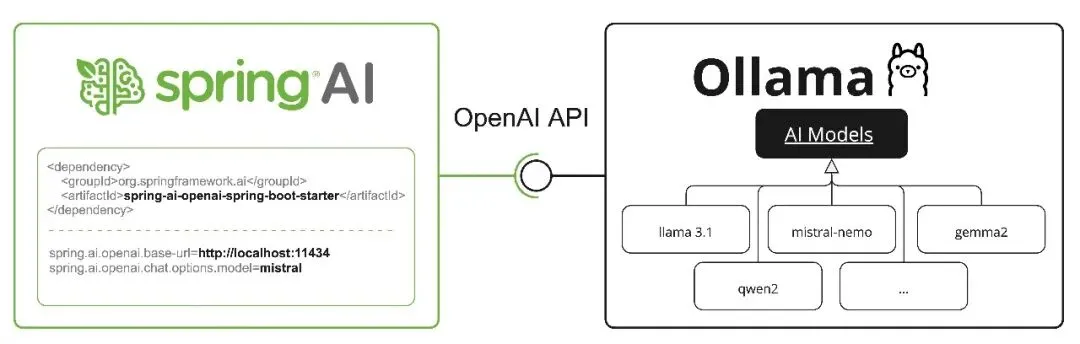
Ollama与OpenAI API兼容,您可以使用Spring AI OpenAI客户端与Ollama交互并使用相关工具。为此,您需要将OpenAI的基URL配置到您的Ollama实例中:spring.ai.openai.chat.base-url=http://localhost:11434,并选择提供的Ollama模型之一:spring.ai.openai.chat.options.model=mistral。
当将OpenAI客户端与Ollama结合使用时,您可以通过extraBody选项传递Ollama特定的参数(如top_k、repeat_penalty、num_predict)。这样,您在使用OpenAI客户端的同时,也能充分利用Ollama的功能。
通过OpenAI兼容性推理内容
Ollama的OpenAI兼容端点支持用于具备思考能力的模型(如qwen3:*-thinking、deepseek-r1、deepseek-v3.1)的reasoning_content字段。当将Spring AI OpenAI客户端与Ollama结合使用时,模型的推理过程将被自动捕获,并通过响应元数据提供。
这是使用Ollama原生思维模式API(如上文“思维模式(推理)”所述)的替代方案。这两种方法都可以与Ollama的思维模型配合使用,但与OpenAI兼容的端点使用的是reasoning_content字段名,而不是thinking。
以下是通过OpenAI客户端访问Ollama推理内容的示例:
// Configure Spring AI OpenAI client to point to Ollama@Configurationclass OllamaConfig { @Bean OpenAiChatModel ollamaChatModel() { var openAiApi = new OpenAiApi("http://localhost:11434", "ollama"); return new OpenAiChatModel(openAiApi, OpenAiChatOptions.builder() .model("deepseek-r1") // or qwen3, deepseek-v3.1, etc. .build()); }}// Use the model with thinking-capable modelsChatResponse response = chatModel.call( new Prompt("How many letter 'r' are in the word 'strawberry'?"));// Access the reasoning process from metadataString reasoning = response.getResult().getMetadata().get("reasoningContent");if (reasoning != null && !reasoning.isEmpty()) { System.out.println("Model's reasoning process:"); System.out.println(reasoning);}// Get the final answerString answer = response.getResult().getOutput().getContent();System.out.println("Answer: " + answer);
在Ollama(0.12+)中,具备思考能力的模型在通过OpenAI兼容端点访问时,会自动启用思考模式。推理内容会自动捕获,无需额外配置。
 10个月宝宝每天需要喝多少奶粉?

