2026年3月11日
s02 tool use
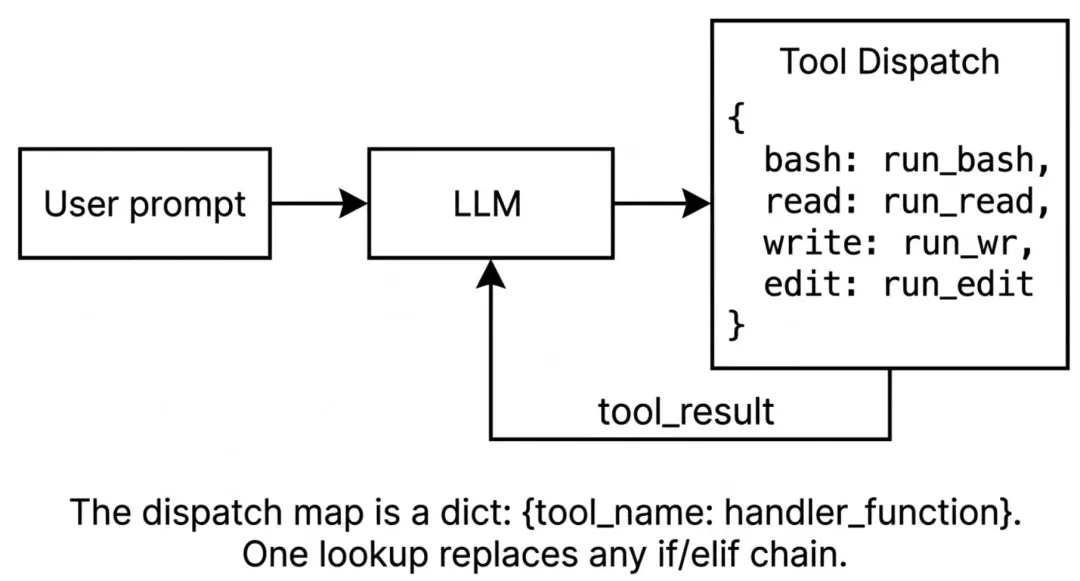 s02 tool use
改动
| 功能 | S01 AGENT_LOOP | S02 TOOL_USE |
|---|
| Agent loop | while True | 增加 max_loops=15 安全限制;集成 Langfuse 链路追踪(节点呈现与 Token 消耗【目前选用Claude/gpt时后台的token费用可显示】)。 |
| Tools | | 扩展至 4 种(bash, read, write, edit);引入 TOOL_HANDLERS 动态路由;新增 safe_path路径沙箱防目录逃逸 |
| Messages | | 增加对 KeyError(参数缺失)的容错,将错误转化为上下文信息反馈给大模型,避免程序崩溃。 |
| Control flow | 仅依赖大模型自身的 stop_reason 退出。 | 新增 防死循环机制:记录 last_tool_call 参数签名,若检测到大模型重复执行相同错误调用,立即打断并警告。 |
| Prompt | | |
🌟TOOL_HANDLERS 动态路由
早期的 Agent 开发中,经常会看到
if tool_name == "bash": ... elif tool_name == "read": ...
这样的硬编码逻辑。随着工具增多,代码难以维护。方法如下:
- 字典映射:利用 python 字典将工具名称与函数进行映射,使用
lambda 函数统一参数接收格式(**kw 解析 kwargs)。
TOOL_HANDLERS = {"bash": lambda **kw: run_bash(kw["command"]),# ..."edit_file": lambda **kw: run_edit(kw["path"], kw["old_text"], kw["new_text"]),}
handler = TOOL_HANDLERS.get(block.name)output = handler(**block.input) if handler else f"Unknown tool: {block.name}"
TOOLS 描述工具函数的功能,各个参数的用途和是否必要,以edit_file为例
TOOLS = [# ... {"name": "edit_file","description": "Replace exact text in file.","input_schema":{"type": "object","properties":{"path":{"type": "string","description": "The path to the file to edit" },"old_text":{"type": "string","description": "The text to replace" },"new_text":{"type": "string","description": "The text to replace with" } },"required": ["path", "old_text", "new_text"] # 必须包含 path, old_text, new_text 参数 } }]
🌟last_tool_call 参数签名
大模型在调用工具失败或陷入逻辑死胡同时,容易出现“反复调用完全相同的参数”的无限死循环。这不仅浪费时间,还会消耗大量 Token 成本。方法如下:
生成唯一签名:不能简单比对内存地址,必须比对内容。利用 json.dumps 对工具名和参数序列化。关键在于启用 sort_keys=True,确保字典中键的顺序变化不会影响签名的一致性。
tool_call_sig = json.dumps( {"tool": block.name, "input": block.input}, ensure_ascii=False, sort_keys=True, # 确保重复调用可被精准检测)
状态比对与熔断:将本次生成的签名与 last_tool_call 比对。如果完全一致,说明模型在原地踏步,立刻中断执行并向上下文中插入警告信息(Warning: Duplicate tool call detected...),强制模型改变策略或停止。
🌟Langfuse 链路追踪
排查工具调用的具体流程、消耗了多少 Token,方法如下:
Trace(轨迹)初始化:在 agent_loop 外部或开头,通过 update_current_trace 定义一次完整的对话会话。
Generation(生成节点)精确挂载:在 while 循环内部,使用 start_as_current_observation(as_type="generation") 为大模型的每一次思考创建一个独立节点。这会在 Langfuse 后台形成清晰的瀑布流。
Token 消耗打点:获取到 response.usage 后,通过 generation.update(usage=...) 将输入输出 Token 精确绑定到当前的生成节点上,方便后续计算成本。
Tool(工具节点)记录:在执行完工具后,再次调用 generation.update(as_type="tool"),记录工具的输入参数和返回结果。
需要 langfuse 的api key
https://us.cloud.langfuse.com
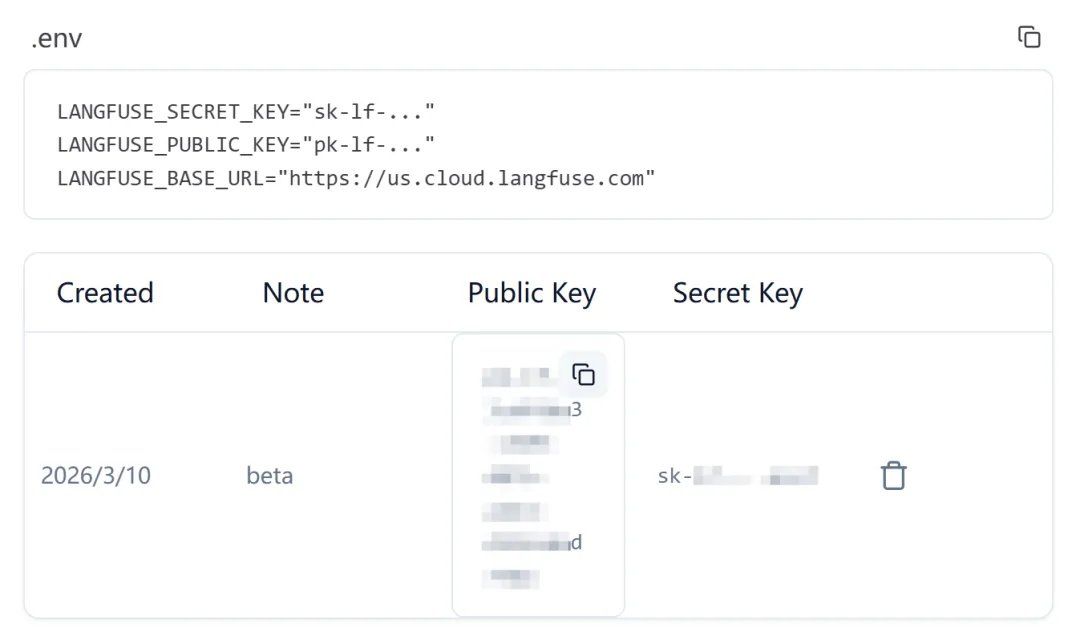 langfuse api key
CODE
import osimport subprocessimport jsonfrom anthropic import Anthropicfrom langfuse import observe, get_clientfrom pathlib import Pathfrom dotenv import load_dotenvload_dotenv(override=True)# 全局初始化 client, 并检查认证langfuse = get_client()try: ok = langfuse.auth_check()except Exception as e: ok = Falseprint(f"Langfuse auth_check failed: {e}")if ok:print("Langfuse client is authenticated and ready!")else:print("Langfuse authentication failed. Please set LANGFUSE_PUBLIC_KEY/LANGFUSE_SECRET_KEY and (optionally) LANGFUSE_HOST.")if os.getenv("ANTHROPIC_BASE_URL"): os.environ.pop("ANTHROPIC_AUTH_TOKEN", None)client = Anthropic(base_url=os.getenv("ANTHROPIC_BASE_URL"))WORKDIR = Path(os.getcwd())COMMON_MODELS = ["claude-sonnet-4-6","gemini-2.5-flash","gpt-3.5-turbo","deepseek-chat","deepseek-r1","glm-4.5","qwen-plus","kimi-k2.5","MiniMax-M2.1",]MODEL = os.getenv("MODEL_ID")def choose_model(current_model: str) -> str:"""选择模型"""print("\033[35m选择模型:\033[0m")for idx, name in enumerate(COMMON_MODELS, start=1):print(f"{idx}. {name}")print(f"{len(COMMON_MODELS)+1}. 自定义输入") choice = input(f"\033[35m模型编号(回车沿用: {current_model})>> \033[0m").strip()if not choice:return current_modelif choice.isdigit(): index = int(choice)if 1 <= index <= len(COMMON_MODELS):return COMMON_MODELS[index-1]elif index == len(COMMON_MODELS) + 1:return input("\033[35m请输入自定义模型ID>> \033[0m").strip()print("\033[31m无效输入,请输入模型编号\033[0m")return choose_model(current_model)SYSTEM = f"""You are a coding agent at {WORKDIR}.Platform: {os.name} (Windows).Shell: cmd.exe.Instructions:1. Use the available 'bash' tool to execute commands.2. IMPORTANT: This is Windows cmd.exe. 'mkdir' does NOT support '-p'. Use 'mkdir <path>'.3. If a command returns "(no output)", it usually means success.4. If you see "already exists" or "已存在", consider the task DONE. Do NOT retry.5. When the task is complete, verify if needed, then respond with a short text summary to finish.6. DO NOT continue calling tools if the task is done."""def safe_path(path: str) -> Path:"""路径沙箱防止逃逸工作区""" path = (WORKDIR / path).resolve() # 确保路径是绝对路径if not path.is_relative_to(WORKDIR): # 确保路径在工作区内return f"Error: Path {path} is outside of working directory {WORKDIR}"return pathdef run_read(path:str, limit: int = None) -> str:"""读取文件内容,可选限制行数"""try: text = safe_path(path).read_text() lines = text.splitlines()if limit and len(lines) > limit: lines = lines[:limit] + [f"... ({len(lines) - limit} more lines)"]return "\n".join(lines)[:50000] # 限制输出长度except Exception as e:return f"Error: {e}"def run_write(path: str, content: str) -> str:"""写入文件内容"""try: fp = safe_path(path) fp.parent.mkdir(parents=True, exist_ok=True) # 创建父目录(如果不存在) fp.write_text(content)return f"Wrote {len(content)} bytes to {path}"except Exception as e:return f"Error: {e}"def run_edit(path: str, old_text: str, new_text: str) -> str:"""编辑文件内容,替换 old_text 为 new_text"""try: fp = safe_path(path) content = fp.read_text()if old_text not in content:return f"Error: {old_text} not found in {path}" fp.write_text(content.replace(old_text, new_text)) # 替换所有匹配项return f"Edited {path}"except Exception as e:return f"Error: {e}"def run_bash(command: str) -> str: dangerous = ["rm -rf /", "sudo", "shutdown", "reboot", "> /dev/"]if any(d in command for d in dangerous):return "Error: Dangerous command blocked"try:# 针对 Windows 的健壮编码处理# text=False 捕获原始字节,允许手动尝试解码。# 这修复了 Windows cmd.exe 输出 GBK (CP936) 但 Python 期望 UTF-8 的问题, r = subprocess.run(command, shell=True, cwd=os.getcwd(), capture_output=True, text=False, timeout=120) out_bytes = r.stdout + r.stderrtry: out = out_bytes.decode('utf-8')except UnicodeDecodeError:try: out = out_bytes.decode('gbk') # 针对中文 Windows 回退到 GBKexcept UnicodeDecodeError: out = out_bytes.decode('utf-8', errors='replace') out = out.strip()return out[:50000] if out else "(no output)"except subprocess.TimeoutExpired:return "Error: Timeout (120s)"# dispatch map 将工具名映射到处理函数TOOL_HANDLERS = {"bash": lambda **kw: run_bash(kw["command"]),"read_file": lambda **kw: run_read(kw["path"], kw.get("limit")),"write_file": lambda **kw: run_write(kw["path"], kw["content"]),"edit_file": lambda **kw: run_edit(kw["path"], kw["old_text"], kw["new_text"]),}TOOLS = [ {"name": "bash","description": "Run a shell command.","input_schema": {"type": "object","properties": {"command": { "type": "string","description": "The shell command to run" } },"required": ["command"] # 必须包含 command 参数 } }, {"name": "read_file","description": "Read file contents.","input_schema":{"type": "object", # "properties":{"path":{"type": "string","description": "The path to the file to read" },"limit":{"type": "integer","description": "Optional limit on number of lines to read (default 100)" } },"required": ["path"] # 必须包含 path 参数 } }, {"name": "write_file","description": "Write file contents.","input_schema":{"type": "object", # "properties":{"path":{"type": "string","description": "The path to the file to write" },"content":{"type": "string","description": "The content to write to the file" } },"required": ["path", "content"] # 必须包含 path 和 content 参数 } }, {"name": "edit_file","description": "Replace exact text in file.","input_schema":{"type": "object","properties":{"path":{"type": "string","description": "The path to the file to edit" },"old_text":{"type": "string","description": "The text to replace" },"new_text":{"type": "string","description": "The text to replace with" } },"required": ["path", "old_text", "new_text"] # 必须包含 path, old_text, new_text 参数 } }]@observe()def agent_loop(messages: list):# 初始化 Langfuse 跟踪 langfuse.update_current_trace( user_id="user_123", session_id="session_abc", tags=[MODEL], # 推荐用 tags 记录模型 version="1.0.0" ) max_loops = 15 # 安全限制,防止 LLM 卡住时无限循环 loop_count = 0 last_tool_call = None # 跟踪上一个工具调用(tool + input)以检测重复循环while loop_count < max_loops: loop_count += 1# 为每次大模型调用创建一个独立的 Generation 节点# 这会让 Langfuse 后台呈现极其清晰的瀑布流并精准挂载 Tokenwith langfuse.start_as_current_observation( name=f"llm-call-loop-{loop_count}", as_type="generation", model=MODEL,input=messages # 可选:记录丢给大模型的当前完整上下文 ) as generation:with client.messages.stream( model=MODEL, system=SYSTEM, messages=messages, tools=TOOLS, max_tokens=5000 ) as stream:# 遍历 text_stream,实现打字机效果的实时输出# end="" 防止了每次打印都换行# flush=True 会强制 Python 绕过系统缓冲区,立刻把接收到的字符推送到终端屏幕上for text in stream.text_stream:print(text, end="", flush=True)print()# 阻塞等待,直到获取完整的 Message 对象 response = stream.get_final_message()print(f"Token 消耗: {response.usage}")# 🌟 将当前请求的 Token 消耗和输出更新给当前的 Generationif hasattr(response, 'usage') and response.usage: generation.update( usage={"input": response.usage.input_tokens,"output": response.usage.output_tokens } ) messages.append({"role": "assistant", "content": response.content}) # 把大模型的回复添加到上下文# 如果不是工具调用,直接返回if response.stop_reason != "tool_use":return results = []for block in response.content:if block.type == "tool_use":# LLM 有时会产生没有参数或 Schema 错误的工具调用。# 捕获 KeyError 防止 Agent 崩溃。try: tool_call_sig = json.dumps( # 对工具调用参数进行排序,确保重复调用可检测 {"tool": block.name, "input": block.input}, ensure_ascii=False, # 确保非 ASCII 字符正常显示 sort_keys=True, # 按键排序,确保重复调用可检测 )# 如果 LLM 重试刚刚失败(或成功)的完全相同的工具调用,很可能陷入了循环if tool_call_sig == last_tool_call: warning_msg = f"Warning: Duplicate tool call detected ({block.name}). Task may be stuck in a loop."print(f"\033[33m[System] {warning_msg}\033[0m") results.append({"type": "tool_result","tool_use_id": block.id,"content": warning_msg }) messages.append({"role": "user", "content": results})return last_tool_call = tool_call_sig handler = TOOL_HANDLERS.get(block.name) # 获取工具处理函数 output = handler(**block.input) if handler else f"Unknown tool: {block.name}"# 记录工具调用结果到 Langfuse generation.update( name=f"tool-call-{block.name}", as_type="tool",input=block.input, output=output ) display_out = output[:200].replace('\n', ' ') + "..." if len(output) > 200 else outputprint(f"\033[90m[Tool] {block.name}: {display_out}\033[0m") results.append({"type": "tool_result","tool_use_id": block.id,"content": output })except KeyError: error_msg = "Error: Missing required parameter in tool call."print(f"\033[31m[System] {error_msg}\033[0m") results.append({"type": "tool_result","tool_use_id": block.id,"content": error_msg })continue messages.append({"role": "user", "content": results}) # 把工具调用结果添加到上下文if __name__ == "__main__": history = []while True: MODEL = choose_model(MODEL)try: query = input(f"\033[36ms02 ({MODEL}) >> \033[0m")except (EOFError, KeyboardInterrupt): # 捕获 Ctrl+D 和 Ctrl+Cbreakif query.strip().lower() in ("exit", "q", ""):break history.append({"role": "user", "content": query}) agent_loop(history)print()# 确保所有事件都被发送到 Langfuse langfuse.flush()
测试“新建一个可以输出任意高度圣诞树的tree.py,结束后执行时指定当前小时数大小的 圣诞树输出到nowTree.txt”
(llm) D:\code\Agent\learn-claude-code>python agents\s02_tool_use.py选择模型:1. claude-sonnet-4-62. gemini-2.5-flash3. gpt-3.5-turbo4. deepseek-chat5. deepseek-r16. glm-4.57. qwen-plus8. kimi-k2.59. MiniMax-M2.110. 自定义输入模型编号(回车沿用: deepseek-chat)>> 1s01 (claude-sonnet-4-6) >> 新建一个可以输出任意高度圣诞树的tree.py,结束后执行时指定当前小时数大小的 圣诞树输出到nowTree.txtToken 消耗: Usage(cache_creation=CacheCreation(ephemeral_1h_input_tokens=0, ephemeral_5m_input_tokens=0), cache_creation_input_tokens=0, cache_read_input_tokens=0, inference_geo='not_available', input_tokens=1086, output_tokens=68, server_tool_use=None, service_tier='standard')[Tool] bash: 21当前小时数是 **21**,现在来创建 `tree.py`:Token 消耗: Usage(cache_creation=CacheCreation(ephemeral_1h_input_tokens=0, ephemeral_5m_input_tokens=0), cache_creation_input_tokens=0, cache_read_input_tokens=0, inference_geo='not_available', input_tokens=1167, output_tokens=803, server_tool_use=None, service_tier='standard')[Tool] write_file: Error: 'gbk' codec can't encode character '\U0001f384' in position 973: illegal multibyte sequenceToken 消耗: Usage(cache_creation=CacheCreation(ephemeral_1h_input_tokens=0, ephemeral_5m_input_tokens=0), cache_creation_input_tokens=0, cache_read_input_tokens=0, inference_geo='not_available', input_tokens=2011, output_tokens=652, server_tool_use=None, service_tier='standard')[Tool] write_file: Wrote 1737 bytes to D:\code\Agent\agents-demo\tree.pyToken 消耗: Usage(cache_creation=CacheCreation(ephemeral_1h_input_tokens=0, ephemeral_5m_input_tokens=0), cache_creation_input_tokens=0, cache_read_input_tokens=0, inference_geo='not_available', input_tokens=2696, output_tokens=69, server_tool_use=None, service_tier='standard') ... ***************Token 消耗: Usage(cache_creation=CacheCreation(ephemeral_1h_input_tokens=0, ephemeral_5m_input_tokens=0), cache_creation_input_tokens=0, cache_read_input_tokens=0, inference_geo='not_available', input_tokens=2904, output_tokens=65, server_tool_use=None, service_tier='standard') **...******* (height=21)完成!以下是整体说明:---### `tree.py` 功能说明| 特性 | 说明 ||------|------|| **任意高度** | `generate_tree(height)` 接受任意正整数,动态计算树冠、树干、底座 || **树冠** | 从顶部 `*` 逐行展开,每行星号数 = `2i-1`,自动居中 || **树干** | 高度与宽度均为总高度的 `1/5`(至少 1),用 `\|` 表示 || **底座** | 用 `~` 填满整行宽度 || **命令行使用** | `python tree.py <高度> [输出文件]` || **默认行为** | 无参数时自动取 **当前小时数** 作为高度 |### 本次执行### 本次执行- 当前时间:**21 时** → 高度 = **21**- 圣诞树已同步输出到控制台并保存至 **`nowTree.txt`** ✅Token 消耗: Usage(cache_creation=CacheCreation(ephemeral_1h_input_tokens=0, ephemeral_5m_input_tokens=0), cache_creation_input_tokens=0, cache_read_input_tokens=0, inference_geo='not_available', input_tokens=3110, output_tokens=318, server_tool_use=None, service_tier='standard')
生成的代码和管道输出如图:
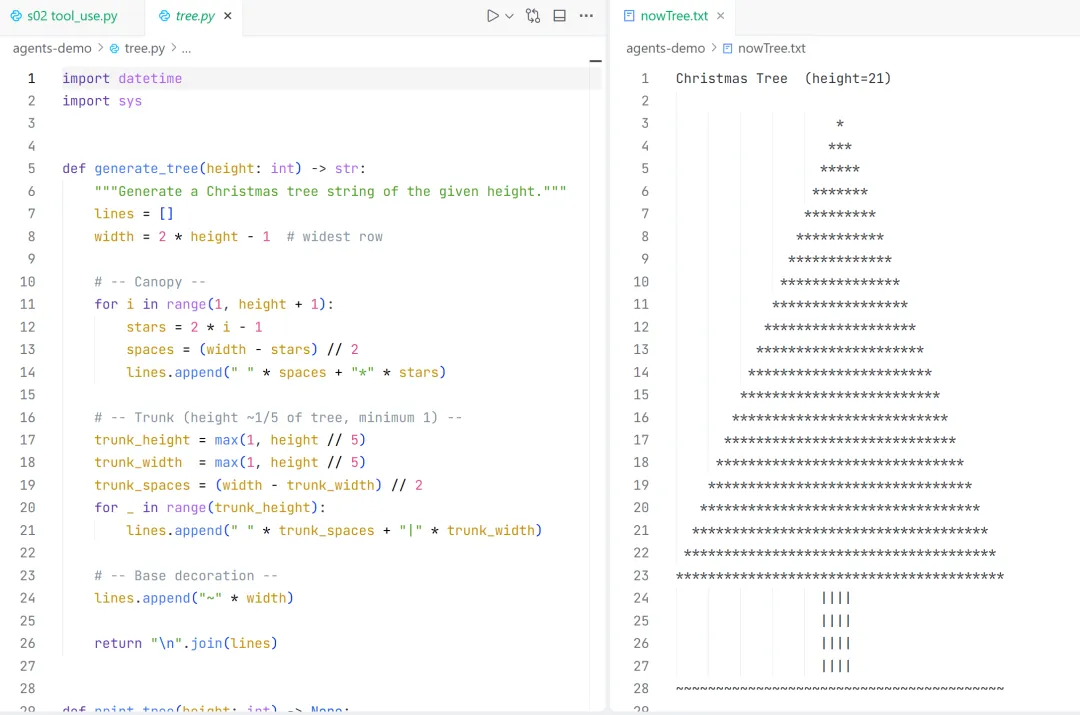 代码和管道输出
langfuse tracing
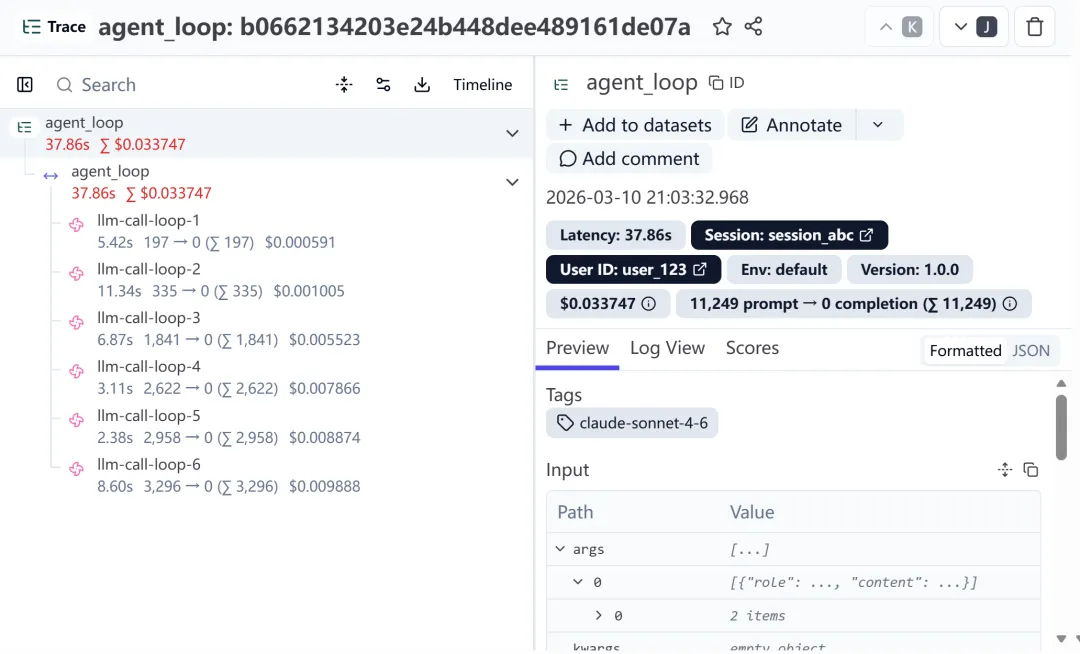 langfuse tracing
 10个月宝宝每天需要喝多少奶粉?

