HuggingFace 模型
Ollama可以即开即用地访问所有GGUF Hugging Face聊天模型。您可以通过名称获取这些模型:ollama pull hf.co/<username>/<model-repository>,或者配置自动获取策略:自动拉取模型:
spring.ai.ollama.chat.options.model=hf.co/bartowski/gemma-2-2b-it-GGUFspring.ai.ollama.init.pull-model-strategy=always
示例控制器
创建一个新的Spring Boot项目,并将spring-ai-starter-model-ollama添加到您的pom(或gradle)依赖项中。
在src/main/resources目录下添加一个application.yaml文件,以启用和配置Ollama聊天模型:
spring: ai: ollama: base-url: http://localhost:11434 chat: options: model: mistral temperature: 0.7
将base-url替换为您的Ollama服务器URL。
这将创建一个OllamaChatModel实现,你可以将其注入到你的类中。以下是一个使用聊天模型进行文本生成的简单@RestController类的示例。
@RestControllerpublic class ChatController { private final OllamaChatModel chatModel; @Autowired public ChatController(OllamaChatModel chatModel) { this.chatModel = chatModel; } @GetMapping("/ai/generate") public Map<String,String> generate(@RequestParam(value = "message", defaultValue = "Tell me a joke") String message) { return Map.of("generation", this.chatModel.call(message)); } @GetMapping("/ai/generateStream") public Flux<ChatResponse> generateStream(@RequestParam(value = "message", defaultValue = "Tell me a joke") String message) { Prompt prompt = new Prompt(new UserMessage(message)); return this.chatModel.stream(prompt); }}
手动配置
如果你不想使用Spring Boot的自动配置功能,你可以在应用程序中手动配置OllamaChatModel。OllamaChatModel实现了ChatModel和StreamingChatModel接口,并使用Low-level OllamaApi客户端连接到Ollama服务。
要使用它,请将spring-ai-ollama依赖项添加到您项目的Maven pom.xml或Gradle build.gradle构建文件中:
Maven
<dependency> <groupId>org.springframework.ai</groupId> <artifactId>spring-ai-ollama</artifactId></dependency>
Gradle
dependencies { implementation 'org.springframework.ai:spring-ai-ollama'}
spring-ai-ollama依赖项还提供了对OllamaEmbeddingModel的访问。
接下来,创建一个OllamaChatModel实例,并使用它发送文本生成请求:
var ollamaApi = OllamaApi.builder().build();var chatModel = OllamaChatModel.builder() .ollamaApi(ollamaApi) .defaultOptions( OllamaChatOptions.builder() .model(OllamaModel.MISTRAL) .temperature(0.9) .build()) .build();ChatResponse response = this.chatModel.call( new Prompt("Generate the names of 5 famous pirates."));// Or with streaming responsesFlux<ChatResponse> response = this.chatModel.stream( new Prompt("Generate the names of 5 famous pirates."));
OllamaChatOptions 为所有聊天请求提供配置信息。
Low-level OllamaApi客户端
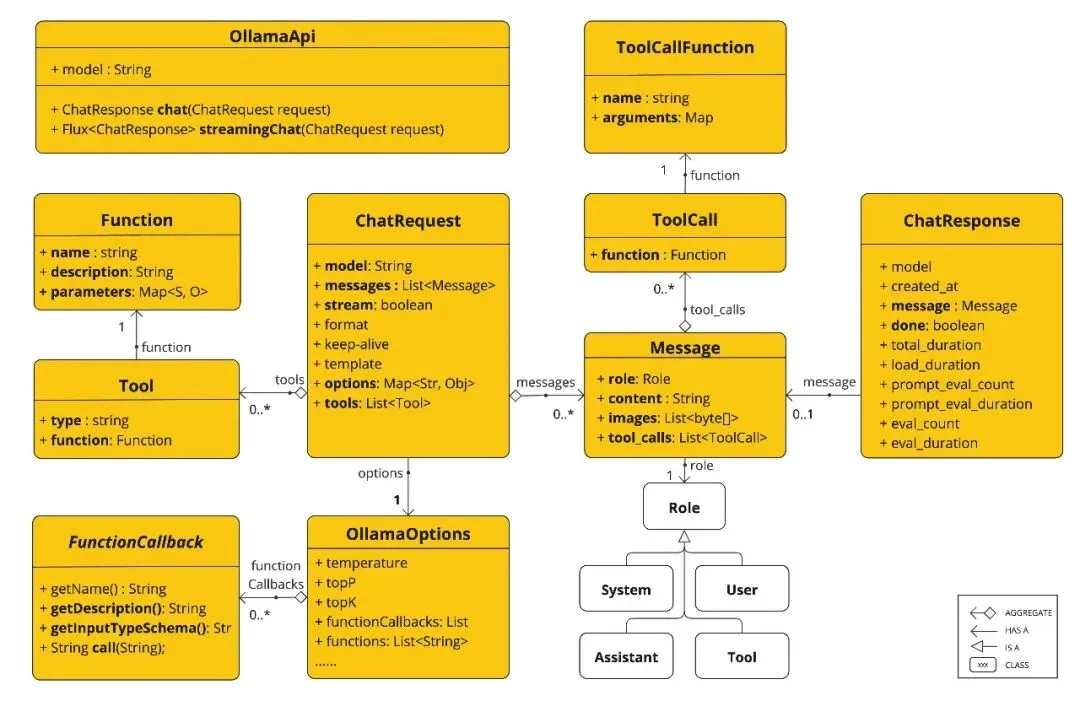
OllamaApi为Ollama聊天补全API提供了一个轻量级的Java客户端。
以下类图展示了OllamaApi聊天接口和构建块:
OllamaApi是一个低级API,不建议直接使用。请改用OllamaChatModel。
以下是一个简单的代码片段,展示了如何以编程方式使用API:
OllamaApi ollamaApi = new OllamaApi("YOUR_HOST:YOUR_PORT");// Sync requestvar request = ChatRequest.builder("orca-mini") .stream(false) // not streaming .messages(List.of( Message.builder(Role.SYSTEM) .content("You are a geography teacher. You are talking to a student.") .build(), Message.builder(Role.USER) .content("What is the capital of Bulgaria and what is the size? " + "What is the national anthem?") .build())) .options(OllamaChatOptions.builder().temperature(0.9).build()) .build();ChatResponse response = this.ollamaApi.chat(this.request);// Streaming requestvar request2 = ChatRequest.builder("orca-mini") .ttream(true) // streaming .messages(List.of(Message.builder(Role.USER) .content("What is the capital of Bulgaria and what is the size? " + "What is the national anthem?") .build())) .options(OllamaChatOptions.builder().temperature(0.9).build().toMap()) .build();Flux<ChatResponse> streamingResponse = this.ollamaApi.streamingChat(this.request2);
 10个月宝宝每天需要喝多少奶粉?

