Netty学习笔记01、—(三大组件、bytebuffer、文件编程)
- 2026-05-06 18:18:12
点击上方蓝字关注我们


一、三大组件
1.1、Channel & Buffer
Channel:数据的传输通道,双向通道,即可输入也可以输出
Buffer:输入数据需要临时存储在内存中,它就是一个内存缓冲区,暂存channel读入的数据,同样写出数据也是需要先写到buffer,应用程序与网络之间的桥梁,用于暂存数据的缓冲区。
Stream:以前的输入输出流也是数据的传输通道。
channel 有一点类似于 stream,它就是读写数据的双向通道,可以从 channel 将数据读入 buffer,也可以将 buffer 的数据写入 channel,而之前的 stream 要么是输入,要么是输出,channel 比 stream 更为底层
常见的 Channel 有
• FileChannel:文件的数据传输通道 • DatagramChannel:UDP网络传输通道 • SocketChannel:TCP数据传输通道,客户端/服务端都OK • ServerSocketChannel:TCP,专用服务端
buffer 则用来缓冲读写数据,常见的 buffer 有
• ByteBuffer(最常用):以字节为单位缓冲数据。下面是实现类 • MappedByteBuffer • DirectByteBuffer • HeapByteBuffer • 不同数据类型: • ShortBuffer • IntBuffer • LongBuffer • FloatBuffer • DoubleBuffer • CharBuffer
1.2、Selector
selector 单从字面意思不好理解,需要结合服务器的设计演化来理解它的用途
多线程版设计
• windows下一个线程就有1MB,若是连接不断增加,内存就会不足,可能产生OOM。
缺点:
• 内存占用高 • 线程上下文切换成本高 • 只适合连接数少的场景
线程多了CPU也要跟的上才行,若是你的电脑是16核,那么在同一时间跑的也只有16个线程,更多的线程只能等待,那么其他线程的状态信息都需要进行临时保存。(如执行函数、存储变量)
线程池版设计
早期的Tomcat就采用了这个线程池版设计
缺点:
• 阻塞模式下,线程仅能处理一个 socket 连接 • 仅适合短连接场景:来了一个连接之后快速处理好业务直接就断开连接,好让线程池中的线程去处理其他事情。一般都是为http请求
selector 版设计
selector 的作用就是配合一个线程来管理多个 channel,获取这些 channel 上发生的事件,这些 channel 工作在非阻塞模式下,不会让线程吊死在一个 channel 上。适合连接数特别多,但流量低的场景(low traffic)
• 解释:在这里thread是服务员,channel是客人,而selector则是能够检测到所有客户需求的工具,对应channel的一举一动都在监视之中,一旦某个channel进行了请求,那么selector就会执行,紧接着selector就会去通知线程thread来对channel进行处理 • 问题(为什么适合流量低的原因,若是流量高呢?):若是某个连接不断的发送请求数据,那么就会造成一个问题就是线程会一直处理该channel的事件,那么其他事件都会一直在等待中。
调用 selector 的 select() 会阻塞直到 channel 发生了读写就绪事件,这些事件发生,select 方法就会返回这些事件交给 thread 来处理
二、ByteBuffer
ByteBuffer初应用
目标:使用channel以及bytebuffer来读取当前项目路径下的文件内容。
技术:channel+bytebuffer API、logback+lombok
<dependency> <groupId>io.netty</groupId> <artifactId>netty-all</artifactId> <version>4.1.32.Final</version></dependency><dependency> <groupId>org.projectlombok</groupId> <artifactId>lombok</artifactId> <version>1.18.20</version></dependency>resources/loback.xml:用于指定日志的输出
<?xml version="1.0" encoding="UTF-8"?><configuration xmlns="http://ch.qos.logback/xml/ns/logback" xmlns:xsi="http://www.w3.org/2001/XMLSchema-instance" xsi:schemaLocation="http://ch.qos.logback/xml/ns/logback logback.xsd"> <!-- 输出控制,格式控制--> <appender name="STDOUT" class="ch.qos.logback.core.ConsoleAppender"> <encoder> <pattern>%date{HH:mm:ss} [%-5level] [%thread] %logger{17} - %m%n </pattern> </encoder> </appender> <!--<appender name="FILE" class="ch.qos.logback.core.rolling.RollingFileAppender"> <!– 日志文件名称 –> <file>logFile.log</file> <rollingPolicy class="ch.qos.logback.core.rolling.TimeBasedRollingPolicy"> <!– 每天产生一个新的日志文件 –> <fileNamePattern>logFile.%d{yyyy-MM-dd}.log</fileNamePattern> <!– 保留 15 天的日志 –> <maxHistory>15</maxHistory> </rollingPolicy> <encoder> <pattern>%date{HH:mm:ss} [%-5level] [%thread] %logger{17} - %m%n </pattern> </encoder> </appender>--> <!-- 用来控制查看那个类的日志内容(对mybatis name 代表命名空间) --> <logger name="com.changlu" level="DEBUG" additivity="false"> <appender-ref ref="STDOUT"/> </logger> <logger name="io.netty.handler.logging.LoggingHandler" level="DEBUG" additivity="false"> <appender-ref ref="STDOUT"/> </logger> <root level="ERROR"> <appender-ref ref="STDOUT"/> </root></configuration>项目目录/data.txt:文件内容
123456uiopqqrrsrc/com/changlu/ByteBufferTest.java:
import lombok.extern.slf4j.Slf4j;import java.io.FileInputStream;import java.io.IOException;import java.nio.ByteBuffer;import java.nio.channels.FileChannel;/** * @ClassName ByteBufferTest * @Author ChangLu * @Date 2021/12/16 18:55 * @Description ByteBuffer基本使用 */@Slf4jpublic class ByteBufferTest { public static void main(String[] args) { //Channel:①输入输出流取得,如FileChannel。②RandomAccessFile try (FileChannel channel = new FileInputStream("data.txt").getChannel()) { //准备缓冲区:开辟一块10字节的堆内存空间 ByteBuffer byteBuffer = ByteBuffer.allocate(10); while (true){ //从channel读取数据,向buffer写入 int len = channel.read(byteBuffer); log.debug("已读取 {} 个字节", len); if (len == -1){ break; } byteBuffer.flip();//切换 buffer 读模式 // 在buffer中是否还有剩余的内容 while (byteBuffer.hasRemaining()) { byte data = byteBuffer.get(); log.debug("当前读取的字节为:{}", (char)data); } byteBuffer.clear();// 切换 buffer 写模式 } } catch (IOException e) { e.printStackTrace(); } }}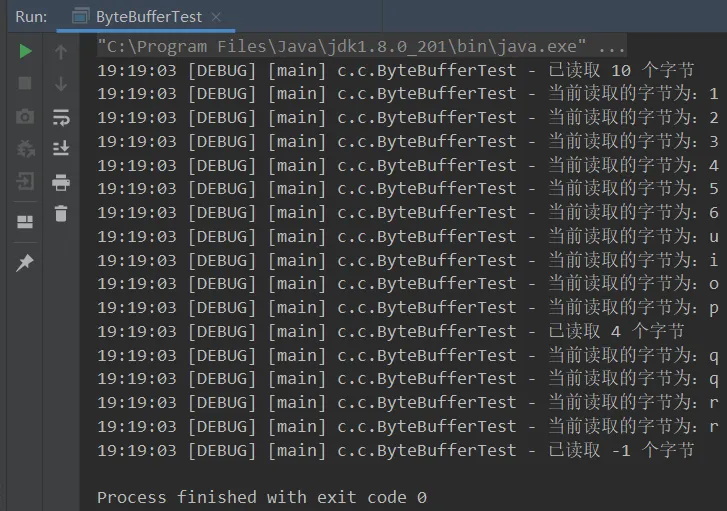
2.1、ByteBuffer正常使用流程(含源码)
正常流程
1. 向 buffer 写入数据,例如调用 channel.read(buffer) 2. 调用 flip() 切换至读模式 3. 从 buffer 读取数据,例如调用 buffer.get() 4. 调用 clear() 或 compact() 切换至写模式 5. 重复 1~4 步骤
读写模式源码
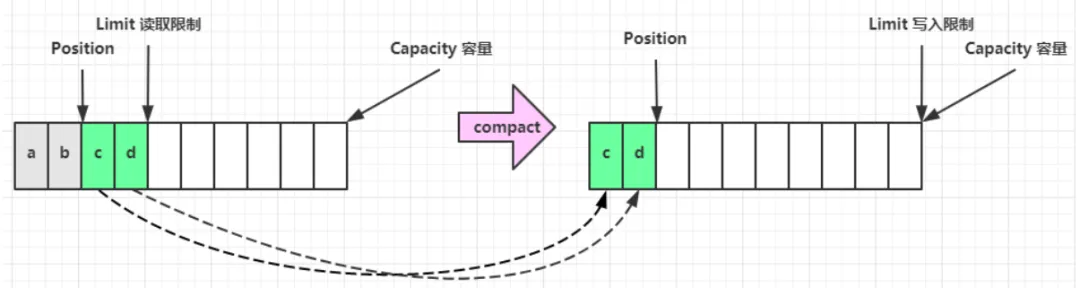
//切换为读模式public final Buffer flip() { limit = position;//保存已写入的位置 position = 0;//待读取指针指向位置0开始 mark = -1; return this;}//切换为写模式(未读的数据会被直接覆盖)public final Buffer clear() { position = 0;//待写入指针指向位置从0开始 limit = capacity;//当前已有数量为原始容量数量(初始化) mark = -1; return this;}//切换为写模式(压缩未读完的空间至前,之后写入数据依次写入在未读的数据后)public ByteBuffer compact() { System.arraycopy(hb, ix(position()), hb, ix(0), remaining()); position(remaining()); limit(capacity()); discardMark(); return this;}2.2、ByteBuffer 结构
ByteBuffer 有以下重要属性
• capacity • position • limit
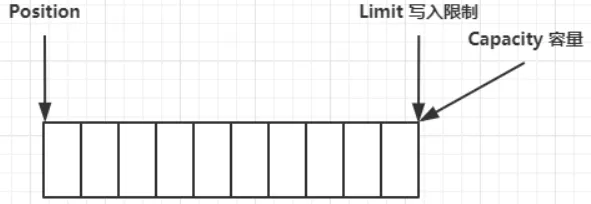
一开始(指初创建ByteBuffer对象后):
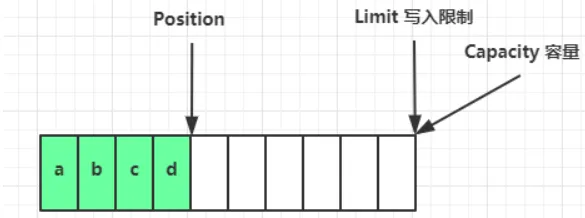
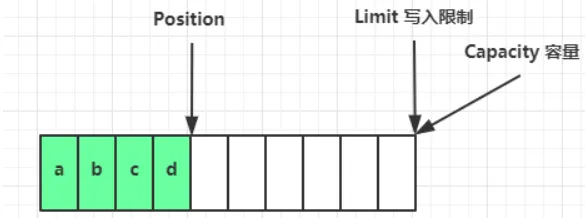
写模式下,position 是写入位置,limit 等于容量,下图表示写入了 4 个字节后的状态:
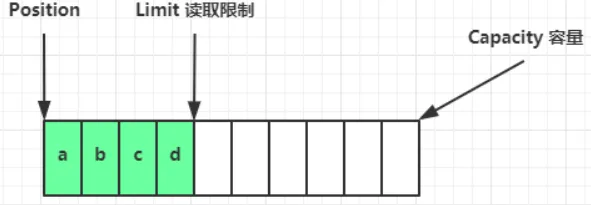
flip()发生后,position 切换为读取位置,limit 切换为读取限制:
读取 4 个字节后,状态:
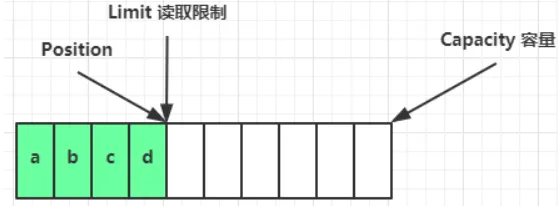
clear()动作发生后,状态:进入写操作
compact()方法,是把未读完的部分向前压缩,然后切换至写模式
2.3、ByteBuffer方法演示
工具类(图形化显示bytebuffer)
使用方式:
ByteBuffer buffer1 = ByteBuffer.allocate(16);//调用debugAll即可ByteBufferUtil.debugAll(buffer1);工具类:其中使用Netty中的库
import io.netty.util.internal.StringUtil;import java.nio.ByteBuffer;import static io.netty.util.internal.MathUtil.isOutOfBounds;import static io.netty.util.internal.StringUtil.NEWLINE;public class ByteBufferUtil { private static final char[] BYTE2CHAR = new char[256]; private static final char[] HEXDUMP_TABLE = new char[256 * 4]; private static final String[] HEXPADDING = new String[16]; private static final String[] HEXDUMP_ROWPREFIXES = new String[65536 >>> 4]; private static final String[] BYTE2HEX = new String[256]; private static final String[] BYTEPADDING = new String[16]; static { final char[] DIGITS = "0123456789abcdef".toCharArray(); for (int i = 0; i < 256; i++) { HEXDUMP_TABLE[i << 1] = DIGITS[i >>> 4 & 0x0F]; HEXDUMP_TABLE[(i << 1) + 1] = DIGITS[i & 0x0F]; } int i; // Generate the lookup table for hex dump paddings for (i = 0; i < HEXPADDING.length; i++) { int padding = HEXPADDING.length - i; StringBuilder buf = new StringBuilder(padding * 3); for (int j = 0; j < padding; j++) { buf.append(" "); } HEXPADDING[i] = buf.toString(); } // Generate the lookup table for the start-offset header in each row (up to 64KiB). for (i = 0; i < HEXDUMP_ROWPREFIXES.length; i++) { StringBuilder buf = new StringBuilder(12); buf.append(NEWLINE); buf.append(Long.toHexString(i << 4 & 0xFFFFFFFFL | 0x100000000L)); buf.setCharAt(buf.length() - 9, '|'); buf.append('|'); HEXDUMP_ROWPREFIXES[i] = buf.toString(); } // Generate the lookup table for byte-to-hex-dump conversion for (i = 0; i < BYTE2HEX.length; i++) { BYTE2HEX[i] = ' ' + StringUtil.byteToHexStringPadded(i); } // Generate the lookup table for byte dump paddings for (i = 0; i < BYTEPADDING.length; i++) { int padding = BYTEPADDING.length - i; StringBuilder buf = new StringBuilder(padding); for (int j = 0; j < padding; j++) { buf.append(' '); } BYTEPADDING[i] = buf.toString(); } // Generate the lookup table for byte-to-char conversion for (i = 0; i < BYTE2CHAR.length; i++) { if (i <= 0x1f || i >= 0x7f) { BYTE2CHAR[i] = '.'; } else { BYTE2CHAR[i] = (char) i; } } } /** * 打印所有内容 * @param buffer */ public static void debugAll(ByteBuffer buffer) { int oldlimit = buffer.limit(); buffer.limit(buffer.capacity()); StringBuilder origin = new StringBuilder(256); appendPrettyHexDump(origin, buffer, 0, buffer.capacity()); System.out.println("+--------+-------------------- all ------------------------+----------------+"); System.out.printf("position: [%d], limit: [%d]\n", buffer.position(), oldlimit); System.out.println(origin); buffer.limit(oldlimit); } /** * 打印可读取内容 * @param buffer */ public static void debugRead(ByteBuffer buffer) { StringBuilder builder = new StringBuilder(256); appendPrettyHexDump(builder, buffer, buffer.position(), buffer.limit() - buffer.position()); System.out.println("+--------+-------------------- read -----------------------+----------------+"); System.out.printf("position: [%d], limit: [%d]\n", buffer.position(), buffer.limit()); System.out.println(builder); } public static void main(String[] args) { ByteBuffer buffer = ByteBuffer.allocate(10); buffer.put(new byte[]{97, 98, 99, 100}); debugAll(buffer); } private static void appendPrettyHexDump(StringBuilder dump, ByteBuffer buf, int offset, int length) { if (isOutOfBounds(offset, length, buf.capacity())) { throw new IndexOutOfBoundsException( "expected: " + "0 <= offset(" + offset + ") <= offset + length(" + length + ") <= " + "buf.capacity(" + buf.capacity() + ')'); } if (length == 0) { return; } dump.append( " +-------------------------------------------------+" + NEWLINE + " | 0 1 2 3 4 5 6 7 8 9 a b c d e f |" + NEWLINE + "+--------+-------------------------------------------------+----------------+"); final int startIndex = offset; final int fullRows = length >>> 4; final int remainder = length & 0xF; // Dump the rows which have 16 bytes. for (int row = 0; row < fullRows; row++) { int rowStartIndex = (row << 4) + startIndex; // Per-row prefix. appendHexDumpRowPrefix(dump, row, rowStartIndex); // Hex dump int rowEndIndex = rowStartIndex + 16; for (int j = rowStartIndex; j < rowEndIndex; j++) { dump.append(BYTE2HEX[getUnsignedByte(buf, j)]); } dump.append(" |"); // ASCII dump for (int j = rowStartIndex; j < rowEndIndex; j++) { dump.append(BYTE2CHAR[getUnsignedByte(buf, j)]); } dump.append('|'); } // Dump the last row which has less than 16 bytes. if (remainder != 0) { int rowStartIndex = (fullRows << 4) + startIndex; appendHexDumpRowPrefix(dump, fullRows, rowStartIndex); // Hex dump int rowEndIndex = rowStartIndex + remainder; for (int j = rowStartIndex; j < rowEndIndex; j++) { dump.append(BYTE2HEX[getUnsignedByte(buf, j)]); } dump.append(HEXPADDING[remainder]); dump.append(" |"); // Ascii dump for (int j = rowStartIndex; j < rowEndIndex; j++) { dump.append(BYTE2CHAR[getUnsignedByte(buf, j)]); } dump.append(BYTEPADDING[remainder]); dump.append('|'); } dump.append(NEWLINE + "+--------+-------------------------------------------------+----------------+"); } private static void appendHexDumpRowPrefix(StringBuilder dump, int row, int rowStartIndex) { if (row < HEXDUMP_ROWPREFIXES.length) { dump.append(HEXDUMP_ROWPREFIXES[row]); } else { dump.append(NEWLINE); dump.append(Long.toHexString(rowStartIndex & 0xFFFFFFFFL | 0x100000000L)); dump.setCharAt(dump.length() - 9, '|'); dump.append('|'); } } public static short getUnsignedByte(ByteBuffer buffer, int index) { return (short) (buffer.get(index) & 0xFF); }}2.3.1、allocate()、allocateDirect()(分配空间)
各个空间开辟问题:
• 开辟在堆内存的问题:会受到GC垃圾回收的影响,一旦进行GC回收,那么堆内存就会被移动,势必就会造成性能影响。 • 直接内存问题:不会受到GC影响,并非使用的是JVM堆中的内存,使用的是操作系统的。分配比较慢,因为其需要调用操作系统接口,若是使用不当就会造成内存泄漏,需要进行合理的释放。
/** * @ClassName TestByteBufferAllocate * @Author ChangLu * @Date 2021/12/16 20:41 * @Description ByteBufferAllocate:开辟空间 */public class TestByteBufferAllocate { public static void main(String[] args) { //开启堆内存 System.out.println(ByteBuffer.allocate(10).getClass()); //开辟直接内存 System.out.println(ByteBuffer.allocateDirect(10).getClass()); /* class java.nio.HeapByteBuffer - java 堆内存,读写效率较低,受到 GC 的影响 class java.nio.DirectByteBuffer - 直接内存,读写效率高(少一次拷贝),不会受 GC 影响,分配的效率低 */ }}2.3.2、put()、flip()、clear()、compact()、get()
import java.nio.ByteBuffer;import static com.changlu.utils.ByteBufferUtil.debugAll;public class TestByteBufferReadWrite { /** * put():写入字节,position+n * flip():进入读模式,limit=position,position=0, * get():读取position开始的字节,position+n * clear():进入写模式,position=0,limit=capacity * compact():压缩内容,将未读取的字节向前移,...,position=limit,limit=capacity * * @param args */ public static void main(String[] args) { ByteBuffer buffer = ByteBuffer.allocate(16); //写入一个字节 buffer.put((byte)0x61); debugAll(buffer); //进入读模式 buffer.flip(); debugAll(buffer); //读取一个字节 System.out.println("读取字符:" + (char)buffer.get()); debugAll(buffer); //测试compact():切换写模式,写入三个字节,切换读模式,读取一个字节,进行压缩(保留未读字节向前移动,position指向未读字节之后) buffer.clear(); buffer.put(new byte[]{0x62,0x63,0x64}); buffer.flip(); System.out.println("读取字符:" + (char)buffer.get()); buffer.compact(); debugAll(buffer); }}效果:
+--------+-------------------- all ------------------------+----------------+position: [1], limit: [16] +-------------------------------------------------+ | 0 1 2 3 4 5 6 7 8 9 a b c d e f |+--------+-------------------------------------------------+----------------+|00000000| 61 00 00 00 00 00 00 00 00 00 00 00 00 00 00 00 |a...............|+--------+-------------------------------------------------+----------------++--------+-------------------- all ------------------------+----------------+position: [0], limit: [1] +-------------------------------------------------+ | 0 1 2 3 4 5 6 7 8 9 a b c d e f |+--------+-------------------------------------------------+----------------+|00000000| 61 00 00 00 00 00 00 00 00 00 00 00 00 00 00 00 |a...............|+--------+-------------------------------------------------+----------------+读取字符:a+--------+-------------------- all ------------------------+----------------+position: [1], limit: [1] +-------------------------------------------------+ | 0 1 2 3 4 5 6 7 8 9 a b c d e f |+--------+-------------------------------------------------+----------------+|00000000| 61 00 00 00 00 00 00 00 00 00 00 00 00 00 00 00 |a...............|+--------+-------------------------------------------------+----------------+读取字符:b+--------+-------------------- all ------------------------+----------------+position: [2], limit: [16] +-------------------------------------------------+ | 0 1 2 3 4 5 6 7 8 9 a b c d e f |+--------+-------------------------------------------------+----------------+|00000000| 63 64 64 00 00 00 00 00 00 00 00 00 00 00 00 00 |cdd.............|+--------+-------------------------------------------------+----------------+2.3.3、get()、put()(读取与写入数据)
读取
同样有两种办法
• 调用 channel 的 write 方法 • 调用 buffer 自己的 get 方法
int writeBytes = channel.write(buf);//从bytebuffer中读取写入到channel中和
byte b = buf.get();//直接从bytebuffer中取到1个字节get 方法会让 position 读指针向后走,如果想重复读取数据
• 可以调用 rewind 方法将 position 重新置为 0 • 或者调用 get(int i) 方法获取索引 i 的内容,它不会移动读指针position!
写入
有两种办法
• 调用 channel 的 read 方法 • 调用 buffer 自己的 put 方法
int readBytes = channel.read(buf);//从channel中读取到数据写入到bytebuffer里和
buf.put((byte)127);//直接向bytebuffer写入一个字节2.3.4、rewind()(重置position=0)
目的:想要重新重头读取一遍数据。
import java.nio.ByteBuffer;import static com.changlu.utils.ByteBufferUtil.debugAll;/** * @ClassName TestByteBufferRewind * @Author ChangLu * @Date 2021/12/16 20:51 * @Description 测试ByteBuffer的Rewind()方法 */public class TestByteBufferRewind { public static void main(String[] args) { ByteBuffer buffer = ByteBuffer.allocate(10); buffer.put(new byte[]{0x61,0x62,0x63}); buffer.flip(); debugAll(buffer); for (int i = 0; i < 3; i++) { if (i == 0) System.out.print("读取三个字节:"); System.out.print((char)buffer.get() + " "); } System.out.println(); debugAll(buffer); //rewind()(重复读取一遍):position = 0 buffer.rewind(); System.out.println("执行rewind后:"); debugAll(buffer); System.out.println("重新读取一遍:"); for (int i = 0; i < 3; i++) { if (i == 0) System.out.print("读取三个字节:"); System.out.print((char)buffer.get() + " "); } }}效果:
+--------+-------------------- all ------------------------+----------------+position: [0], limit: [3] +-------------------------------------------------+ | 0 1 2 3 4 5 6 7 8 9 a b c d e f |+--------+-------------------------------------------------+----------------+|00000000| 61 62 63 00 00 00 00 00 00 00 |abc....... |+--------+-------------------------------------------------+----------------+读取三个字节:a b c +--------+-------------------- all ------------------------+----------------+position: [3], limit: [3] +-------------------------------------------------+ | 0 1 2 3 4 5 6 7 8 9 a b c d e f |+--------+-------------------------------------------------+----------------+|00000000| 61 62 63 00 00 00 00 00 00 00 |abc....... |+--------+-------------------------------------------------+----------------+执行rewind后:+--------+-------------------- all ------------------------+----------------+position: [0], limit: [3] +-------------------------------------------------+ | 0 1 2 3 4 5 6 7 8 9 a b c d e f |+--------+-------------------------------------------------+----------------+|00000000| 61 62 63 00 00 00 00 00 00 00 |abc....... |+--------+-------------------------------------------------+----------------+重新读取一遍:读取三个字节:a b c 2.3.5、remark()与reset()(打标记与重置指针位置)
目的:若是我们想要重复读某个指定位置开始的内容,可使用标记与恢复标记的方式进行。
import java.nio.ByteBuffer;import static com.changlu.utils.ByteBufferUtil.debugAll;/** * @ClassName TestByteBufferMark_Reset * @Author ChangLu * @Date 2021/12/16 21:03 * @Description 测试ByteBuffer的方法:mark()、reset() */public class TestByteBufferMark_Reset { public static void main(String[] args) { ByteBuffer buffer = ByteBuffer.allocate(16); buffer.put(new byte[]{0x62,0x63,0x64}); buffer.flip(); System.out.println((char)buffer.get()); buffer.mark();//mark进行标记该位置:mark=position System.out.println((char)buffer.get()); System.out.println((char)buffer.get()); debugAll(buffer); buffer.reset();//恢复到原标记位置:position=mark debugAll(buffer); //重复读两次 System.out.println("恢复标记后,重新读取:"); System.out.println((char)buffer.get()); System.out.println((char)buffer.get()); }}效果展示:
bcd+--------+-------------------- all ------------------------+----------------+position: [3], limit: [3] +-------------------------------------------------+ | 0 1 2 3 4 5 6 7 8 9 a b c d e f |+--------+-------------------------------------------------+----------------+|00000000| 62 63 64 00 00 00 00 00 00 00 00 00 00 00 00 00 |bcd.............|+--------+-------------------------------------------------+----------------++--------+-------------------- all ------------------------+----------------+position: [1], limit: [3] +-------------------------------------------------+ | 0 1 2 3 4 5 6 7 8 9 a b c d e f |+--------+-------------------------------------------------+----------------+|00000000| 62 63 64 00 00 00 00 00 00 00 00 00 00 00 00 00 |bcd.............|+--------+-------------------------------------------------+----------------+恢复标记后,重新读取:cd2.3.6、String与ByteBuffer互转
其中StandardCharsets.UTF_8.encode进行编码得到的ByteBuffer对象会进行转换读模式(position=0)!
import java.nio.ByteBuffer;import java.nio.charset.StandardCharsets;import static com.changlu.utils.ByteBufferUtil.debugAll;/** * @ClassName TestStringTOByteBuffer * @Author ChangLu * @Date 2021/12/16 21:13 * @Description String与ByteBuffer互转 */public class TestStringTOByteBuffer { public static void main(String[] args) { ByteBuffer buffer = ByteBuffer.allocate(16); //字符串转为bytebuffer //方式一:put()时直接字符串转为byte[]写入 buffer.put("changlu".getBytes()); debugAll(buffer); //方式二:StandardCharsets.UTF_8进行编码创建对象。 //内部过程:按需创建空间,依次填入内容后,执行写模式 ByteBuffer buffer2 = StandardCharsets.UTF_8.encode("changlu"); debugAll(buffer2); //方式三:ByteBuffer.wrap() ByteBuffer buffer3 = ByteBuffer.wrap("changlu".getBytes()); debugAll(buffer3); //ByteBuffer转字符串 //方式一:StandardCharsets.UTF_8.decode,原理就是从position位置开始读取已有的内容 System.out.println(StandardCharsets.UTF_8.decode(buffer2).toString()); //注意:对于上面方式一put()进入由于没有转换为读状态所以需要先进行转换状态,也就是要position=0 buffer.flip(); System.out.println(StandardCharsets.UTF_8.decode(buffer).toString()); }}效果:
+--------+-------------------- all ------------------------+----------------+position: [7], limit: [16] +-------------------------------------------------+ | 0 1 2 3 4 5 6 7 8 9 a b c d e f |+--------+-------------------------------------------------+----------------+|00000000| 63 68 61 6e 67 6c 75 00 00 00 00 00 00 00 00 00 |changlu.........|+--------+-------------------------------------------------+----------------++--------+-------------------- all ------------------------+----------------+position: [0], limit: [7] +-------------------------------------------------+ | 0 1 2 3 4 5 6 7 8 9 a b c d e f |+--------+-------------------------------------------------+----------------+|00000000| 63 68 61 6e 67 6c 75 |changlu |+--------+-------------------------------------------------+----------------++--------+-------------------- all ------------------------+----------------+position: [0], limit: [7] +-------------------------------------------------+ | 0 1 2 3 4 5 6 7 8 9 a b c d e f |+--------+-------------------------------------------------+----------------+|00000000| 63 68 61 6e 67 6c 75 |changlu |+--------+-------------------------------------------------+----------------+changluchanglu快速总结
ByteBuffer方法:
String与ByteBuffer互转方法:
String => ByteBuffer
ByteBuffer => String
2.4、ByteBuffer分散读写
分散集中读、写好处:能够减少ByteBuffer之间的拷贝,减少数据的复制次数,变相的提高了效率。下面是读写的示例:
Scattering Reads(分散读)
import java.io.IOException;import java.io.RandomAccessFile;import java.nio.ByteBuffer;import java.nio.channels.FileChannel;import static com.changlu.utils.ByteBufferUtil.debugAll;/** * @ClassName ScatteringReads * @Author ChangLu * @Date 2021/12/17 17:32 * @Description 分散读取文件内容至ByteBuffer */public class ScatteringReads { public static void main(String[] args) { ByteBuffer b1 = ByteBuffer.allocate(7); ByteBuffer b2 = ByteBuffer.allocate(5); ByteBuffer b3 = ByteBuffer.allocate(3); try (FileChannel channel = new RandomAccessFile("data1.txt", "r").getChannel()) { //直接读取内容到各个ByteBuffer对象中 channel.read(new ByteBuffer[]{b1,b2,b3}); debugAll(b1); debugAll(b2); debugAll(b3); } catch (IOException e) { } }}//data1.txt文件内容changluliner123效果:
+--------+-------------------- all ------------------------+----------------+position: [7], limit: [7] +-------------------------------------------------+ | 0 1 2 3 4 5 6 7 8 9 a b c d e f |+--------+-------------------------------------------------+----------------+|00000000| 63 68 61 6e 67 6c 75 |changlu |+--------+-------------------------------------------------+----------------++--------+-------------------- all ------------------------+----------------+position: [5], limit: [5] +-------------------------------------------------+ | 0 1 2 3 4 5 6 7 8 9 a b c d e f |+--------+-------------------------------------------------+----------------+|00000000| 6c 69 6e 65 72 |liner |+--------+-------------------------------------------------+----------------++--------+-------------------- all ------------------------+----------------+position: [3], limit: [3] +-------------------------------------------------+ | 0 1 2 3 4 5 6 7 8 9 a b c d e f |+--------+-------------------------------------------------+----------------+|00000000| 31 32 33 |123 |+--------+-------------------------------------------------+----------------+分散写
import io.netty.util.CharsetUtil;import java.io.IOException;import java.io.RandomAccessFile;import java.nio.ByteBuffer;import java.nio.channels.FileChannel;/** * @ClassName GatheringWrites * @Author ChangLu * @Date 2021/12/17 17:37 * @Description 分散写:将多个ByteBuffer中内容依次写入到一个文件中 */public class GatheringWrites { public static void main(String[] args) { ByteBuffer b1 = CharsetUtil.UTF_8.encode("changlu"); ByteBuffer b2 = CharsetUtil.UTF_8.encode("hennuli"); try (FileChannel channel = new RandomAccessFile("data3.txt", "rw").getChannel()) { //将多个ByteBuffer中存储的内容依次写入到文件中 channel.write(new ByteBuffer[]{b1,b2}); } catch (IOException e) { } }}效果:
//data3.txtchangluhennuli2.5、网络黏包、半包案例(重要)
案例分析
网络上有多条数据发送给服务端,数据之间使用 \n 进行分隔但由于某种原因这些数据在接收时,被进行了重新组合,例如原始数据有3条为
• Hello,world\n • I'm zhangsan\n • How are you?\n
变成了下面的两个 byteBuffer (黏包,半包)
• Hello,world\nI'm zhangsan\nHo • w are you?\n
若是两个消息和在一起就是粘包,若是消息被截断到下一条消息里就是半包!黏包出现原因:由于效率原因(多个打包比一个一个打包发出去肯定高),其也就会出现黏包的原因。半包出现原因:由于服务器的缓冲大小限制决定的,例如ByteBuffer不可能无限大,那么一次发送过来的内容ByteBuffer只能接收其所能接收的部分,那么剩余的一部分只能下一次接收,此时就产生半包现象。现在要求你编写程序,将错乱的数据恢复成原始的按 \n 分隔的数据
代码编写
现在我们直接向Buffer中输入指定黏包、半包情况,接着对ByteBuffer中的内容进行解析读取:
import java.nio.ByteBuffer;import static com.changlu.utils.ByteBufferUtil.debugAll;/** * @ClassName ByteBufferExam * @Author ChangLu * @Date 2021/12/17 17:58 * @Description 黏包、半包解析(底层实现) */public class ByteBufferExam { public static void main(String[] args) { ByteBuffer buffer = ByteBuffer.allocate(256); //黏包情况: buffer.put("I am changlu!\nhello,xiaoli\nha".getBytes()); handle(buffer); //半包情况: buffer.put(",are you ok?\n".getBytes()); handle(buffer); } /** * 处理黏包、半包情况:每次能够将\n结尾的内容读取到一个ByteBuffer,并测该ByteBuffer对象 * @param buffer */ private static void handle(ByteBuffer buffer) { buffer.flip();//切换到读状态 for (int i = 0; i < buffer.limit(); i++) { if (buffer.get(i) == '\n') { int readLen = i - buffer.position() + 1; ByteBuffer temp = ByteBuffer.allocate(20); for (int j = 0; j < readLen; j++) { temp.put(buffer.get()); } debugAll(temp); } } buffer.compact();//切换写状态(压缩):保留未读取的内容 }}效果展示:可以看到三条信息都被单独读取并处理!
+--------+-------------------- all ------------------------+----------------+position: [14], limit: [20] +-------------------------------------------------+ | 0 1 2 3 4 5 6 7 8 9 a b c d e f |+--------+-------------------------------------------------+----------------+|00000000| 49 20 61 6d 20 63 68 61 6e 67 6c 75 21 0a 00 00 |I am changlu!...||00000010| 00 00 00 00 |.... |+--------+-------------------------------------------------+----------------++--------+-------------------- all ------------------------+----------------+position: [13], limit: [20] +-------------------------------------------------+ | 0 1 2 3 4 5 6 7 8 9 a b c d e f |+--------+-------------------------------------------------+----------------+|00000000| 68 65 6c 6c 6f 2c 78 69 61 6f 6c 69 0a 00 00 00 |hello,xiaoli....||00000010| 00 00 00 00 |.... |+--------+-------------------------------------------------+----------------++--------+-------------------- all ------------------------+----------------+position: [15], limit: [20] +-------------------------------------------------+ | 0 1 2 3 4 5 6 7 8 9 a b c d e f |+--------+-------------------------------------------------+----------------+|00000000| 68 61 2c 61 72 65 20 79 6f 75 20 6f 6b 3f 0a 00 |ha,are you ok?..||00000010| 00 00 00 00 |.... |+--------+-------------------------------------------------+----------------+三、文件编程
3.1、FileChannel
FileChannel:只能工作在阻塞模式下。
获取
不能直接打开 FileChannel,必须通过 FileInputStream、FileOutputStream 或者 RandomAccessFile 来获取 FileChannel,它们都有 getChannel 方法
• 通过 FileInputStream 获取的 channel 只能读 • 通过 FileOutputStream 获取的 channel 只能写 • 通过 RandomAccessFile 是否能读写根据构造 RandomAccessFile 时的读写模式决定
读取
会从 channel 读取数据填充 ByteBuffer,返回值表示读到了多少字节,-1 表示到达了文件的末尾
int readBytes = channel.read(buffer);写入
写入的正确姿势如下, SocketChannel
ByteBuffer buffer = ...;buffer.put(...); // 存入数据buffer.flip(); // 切换读模式while(buffer.hasRemaining()) { channel.write(buffer);}在 while 中调用 channel.write 是因为 write 方法并不能保证一次将 buffer 中的内容全部写入 channel
关闭
channel 必须关闭,不过调用了 FileInputStream、FileOutputStream 或者 RandomAccessFile 的 close 方法会间接地调用 channel 的 close 方法
位置
获取当前位置
long pos = channel.position();设置当前位置
long newPos = ...;channel.position(newPos);设置当前位置时,如果设置为文件的末尾
• 这时读取会返回 -1 • 这时写入,会追加内容,但要注意如果 position 超过了文件末尾,再写入时在新内容和原末尾之间会有空洞(00)
大小
使用 size 方法获取文件的大小
强制写入
操作系统出于性能的考虑,会将数据缓存,不是立刻写入磁盘。可以调用 force(true) 方法将文件内容和元数据(文件的权限等信息)立刻写入磁盘
注意:只有当channel关闭的时候才会同步到磁盘上去,也可以通过编程式直接写入,不过对性能会有影响!
3.2、两个Channel传输数据(transferTo())
目的:进行文件的复制拷贝。
底层:使用操作系统的零拷贝。
方式:使用Channel的transferTo()方法,需要注意的是每次方法调用只能拷贝2GB容量,所以对于大于2G大小的需要多次重复调用。
代码说明:两个demo复制拷贝方法,一个是>2G的,另一个是<=2G。
import java.io.FileInputStream;import java.io.FileOutputStream;import java.io.IOException;import java.nio.channels.FileChannel;/** * @ClassName TestTransferTo * @Author ChangLu * @Date 2021/12/17 19:26 * @Description 测试FileChannel的transferTo方法:底层为零拷贝 */public class TestTransferTo { public static void main(String[] args) { String FILE_FROM = "C:\\Users\\93997\\Desktop\\新建文件夹\\这个杀手不太冷1994.mp4"; String FILE_TO = "C:\\Users\\93997\\Desktop\\新建文件夹\\新建文件夹\\这个杀手不太冷1994.mp4"; final long begin = System.currentTimeMillis(); System.out.println("复制中..."); //传输<=2G// transferTo_2G(FILE_FROM, FILE_TO); //>2G transferTo_t2G(FILE_FROM, FILE_TO); System.out.println("耗时:" + (System.currentTimeMillis() - begin) / 1000 + "s"); } /** * 传输超过<=2G容量大小,默认transferTo传输一次上限为2G容量 */ public static void transferTo_2G(String FILE_FROM, String FILE_TO){ try ( FileChannel from = new FileInputStream(FILE_FROM).getChannel(); FileChannel to = new FileOutputStream(FILE_TO).getChannel(); ) { final long size = from.size(); //注意:传输默认上限最大为2G from.transferTo(0, size, to); } catch (IOException e) { e.printStackTrace(); } } /** * 传输超过2G容量大小 */ public static void transferTo_t2G(String FILE_FROM, String FILE_TO){ try ( FileChannel from = new FileInputStream(FILE_FROM).getChannel(); FileChannel to = new FileOutputStream(FILE_TO).getChannel(); ) { //通过传输容量与原始容量比对来解决一次传输>2G文件的情况 long leftSize = from.size(); while (true) { leftSize -= from.transferTo(from.size() - leftSize, leftSize, to); System.out.println("已拷贝:" + (from.size() - leftSize)/1024.0/1024.0 + "MB,剩余:" + leftSize/1024.0/1024.0 + "MB"); if (leftSize < 2 * 1024 * 1024){ break; } } } catch (IOException e) { e.printStackTrace(); } }}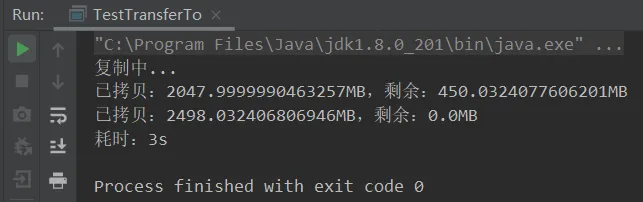
3.3、Path类、Paths工具类
jdk7 引入了 Path 和 Paths 类
• Path 用来表示文件路径 • Paths 是工具类,用来获取 Path 实例
基本的Paths.get()路径设置:
//基本的Path.get()格式public static void test01(){ // 相对路径 使用 user.dir 环境变量来定位 1.txt Path path1 = Paths.get("1.txt"); System.out.println(path1);//1.txt // 绝对路径 代表了 d:\1.txt Path path2 = Paths.get("E:\\资源\\电影资源\\1.txt"); System.out.println(path2);//E:\资源\电影资源\1.txt // 绝对路径 同样代表了 d:\1.txt Path path3 = Paths.get("d:/1.txt"); System.out.println(path3); // 代表了 d:\data\projects Path path4 = Paths.get("d:\\data", "changlu.txt"); System.out.println(path4);}较特殊的路径格式:可转义..
//调用normalize()可对路径进行转义:..表示上级public static void test02(){ Path path = Paths.get("d:\\data\\projects\\a\\..\\b"); System.out.println(path); System.out.println(path.normalize());}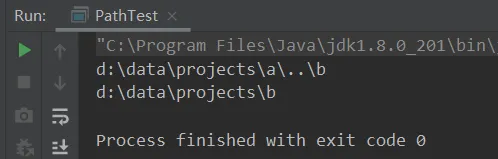
3.4、Files工具类(自带传输方法copy)
3.4.1、基本API使用
检查文件是否存在
Path path = Paths.get("helloword/data.txt");System.out.println(Files.exists(path));创建目录
创建一级目录:
Path path = Paths.get("helloword/d1");Files.createDirectory(path);• 如果目录已存在,会抛异常 FileAlreadyExistsException • 不能一次创建多级目录,否则会抛异常 NoSuchFileException
创建多级目录:
Path path = Paths.get("helloword/d1/d2");Files.createDirectories(path);拷贝文件
Path source = Paths.get("helloword/data.txt");Path target = Paths.get("helloword/target.txt");Files.copy(source, target);//底层使用的操作系统的拷贝,性能也很好!与transferTo相似。• 如果文件已存在,会抛异常 FileAlreadyExistsException
如果希望用 source 覆盖掉 target,需要用 StandardCopyOption 来控制
Files.copy(source, target, StandardCopyOption.REPLACE_EXISTING);移动文件
移动文件
Path source = Paths.get("helloword/data.txt");Path target = Paths.get("helloword/data.txt");Files.move(source, target, StandardCopyOption.ATOMIC_MOVE);• StandardCopyOption.ATOMIC_MOVE 保证文件移动的原子性
删除
删除文件:
Path target = Paths.get("helloword/target.txt");Files.delete(target);• 如果文件不存在,会抛异常 NoSuchFileException
删除目录:
Path target = Paths.get("helloword/d1");Files.delete(target);• 如果目录还有内容,会抛异常 DirectoryNotEmptyException
3.4.2、walk、walkFileTree(递归遍历文件目录工具方法)
方法介绍
//递归遍历文件目录,返回的是一个文件Path Stream流public static Stream<Path> walk(Path start, FileVisitOption... options) throws IOException { return walk(start, Integer.MAX_VALUE, options);}//递归遍历文件目录,访问者模式,重写接口方法public static Path walkFileTree(Path start, FileVisitor<? super Path> visitor) throws IOException{ return walkFileTree(start, EnumSet.noneOf(FileVisitOption.class), Integer.MAX_VALUE, visitor);}//访问接口public interface FileVisitor<T> { //访问文件目录前 FileVisitResult preVisitDirectory(T dir, BasicFileAttributes attrs) throws IOException; //访问文件时 FileVisitResult visitFile(T file, BasicFileAttributes attrs) throws IOException; //访问文件失败 FileVisitResult visitFileFailed(T file, IOException exc) throws IOException; //访问文件目录后 FileVisitResult postVisitDirectory(T dir, IOException exc) throws IOException;}使用场景:
• walk():返回的是stream流,流中包含所有的文件Path对象,可以进行过滤、统计、复制一系列操作。• walkFileTree():在递归过程中,可以通过接口重写的方式在不同的文件或目录访问时刻进行一些操作。
功能1:遍历目录文件
/** * 单独功能点1:遍历目录文件,打印出文件夹数量、文件数。 * 说明:这里将root文件也算入文件夹的数量中,所以内部文件夹数量应该-1 */private static void testViewAllFiles() throws IOException { final Path path = Paths.get("C:\\Program Files\\Java\\jdk1.8.0_201"); //由于匿名实现类中重写方法不能直接对局部变量进行改变值操作所以使用AtomicInteger AtomicInteger dirCount = new AtomicInteger(); AtomicInteger fileCount = new AtomicInteger(); //递归遍历文件夹 Files.walkFileTree(path,new SimpleFileVisitor<Path>() { //进入目录前 @Override public FileVisitResult preVisitDirectory(Path dir, BasicFileAttributes attrs) throws IOException { System.out.println("进入文件目录=》" + dir); dirCount.getAndIncrement(); return super.preVisitDirectory(dir, attrs); } //访问当前文件 @Override public FileVisitResult visitFile(Path file, BasicFileAttributes attrs) throws IOException { System.out.println(" =》" + file); fileCount.getAndIncrement(); return super.visitFile(file, attrs); } }); System.out.println("文件夹数量:" + dirCount); System.out.println("文件数量:" + fileCount);}功能2:统计JDK8目录中jar包的个数
/** * 单独功能点2:统计JDK8目录中jar包的个数 */private static void testJarFileCount() throws IOException { final Path path = Paths.get("C:\\Program Files\\Java\\jdk1.8.0_201"); AtomicInteger jarCount = new AtomicInteger(); //递归遍历文件夹 Files.walkFileTree(path,new SimpleFileVisitor<Path>() { //访问当前文件 @Override public FileVisitResult visitFile(Path file, BasicFileAttributes attrs) throws IOException { //注意:file.getFileName()返回值是Path if (file.toFile().getName().endsWith(".jar")){ System.out.println(file.getFileName()); jarCount.getAndIncrement(); } return super.visitFile(file, attrs); } }); System.out.println("jar包数量:" + jarCount);}功能3:删除多级目录(不走回收站,谨慎删除)
/** * 单独功能点3:删除多级目录(不走回收站,谨慎删除) */private static void testFileMultDirs() throws IOException { final Path path = Paths.get("C:\\Users\\93997\\Desktop\\新建文件夹\\工作室网站"); //注意点:删除多级目录时,首先需要先将某个文件夹中的文件内容删除,之后才可以删除文件目录 Files.walkFileTree(path,new SimpleFileVisitor<Path>() { //1、先删除文件 @Override public FileVisitResult visitFile(Path file, BasicFileAttributes attrs) throws IOException { Files.delete(file); return super.visitFile(file, attrs); } //2、后删除目录(后置文件访问器) @Override public FileVisitResult postVisitDirectory(Path dir, IOException exc) throws IOException { Files.delete(dir); return super.postVisitDirectory(dir, exc); } });}####功能4、拷贝文件夹到指定目录
/** * 单独功能点4、拷贝文件夹到指定目录 */private static void testCopyMultDir() throws IOException { String COPY_ORIGIN = "C:\\Users\\93997\\Desktop\\工作室网站"; //复制到的文件目录为:指定路径\\工作室网站1 String COPY_TARGET = "C:\\Users\\93997\\Desktop\\新建文件夹\\工作室网站1"; //递归返回所有的文件Path集合stream流 Files.walk(Paths.get(COPY_ORIGIN)).forEach(path->{ final String copyFileName = path.toFile().getAbsolutePath().replace(COPY_ORIGIN, COPY_TARGET); System.out.println(copyFileName); //若是文件先创建文件 try { if (Files.isDirectory(path)){ Files.createDirectory(Paths.get(copyFileName)); } else { Files.copy(path, Paths.get(copyFileName)); } } catch (IOException e) { e.printStackTrace(); } });}

END

扫码二维码
获取更多精彩
感谢您的关注