本篇目标:当 Hook "不灵" 的时候,你能系统地排查出原因。前六篇给了你完整的武器库(Java Hook、Native Hook、主动调用、内存操作),但在实战中你会频繁遇到各种问题——类找不到、Hook 了但没输出、App 崩溃、日志被淹没……这些问题不是偶尔碰运气能解决的,你需要一套可重复的诊断方法论。本篇就是这个方法论。
一、为什么需要一篇专门讲排错的文章
前面六篇的代码示例都很顺畅——给定类名、方法名、Hook、拿到结果。但真实的逆向场景常常没这么顺:
- 你从 jadx 复制的类名在 Frida 中报
ClassNotFoundException - Hook 成功了(没有报错),但操作 App 后控制台一条日志都没有
这些不是 Frida 的 bug,而是你对目标 App 的理解和 Frida 的行为之间存在"信息差"。本篇的目标是帮你系统化地缩小这个信息差。
二、日志管理:console.log、send() 与文件写入
在开始讲排错之前,先讲好日志基础设施——因为排错的第一步就是"看日志"。如果日志系统本身就有问题(丢日志、太多、格式乱),排错将寸步难行。
2.1 console.log:最基本的输出
console.log("普通信息"); // 白色文本console.warn("警告信息"); // 黄色文本console.error("错误信息"); // 红色文本
console.log 的输出会通过 Frida 的通信通道从目标进程发送到你的电脑终端上显示。这个过程是异步的——你的 JS 代码不会等 console.log 的内容显示到屏幕上才继续执行。
性能影响:每次 console.log 都涉及一次 IPC(进程间通信)。在高频 Hook 场景(如 Hook Socket.write,每秒可能触发几百次)中,过多的 console.log 会显著拖慢 App,甚至导致 Frida 通信管道拥堵——表现为日志输出严重延迟、App 卡顿、甚至 Frida 连接断开。
2.2 send():结构化消息通道
send() 是 Frida 提供的另一个通信机制。和 console.log(纯文本输出)不同,send() 可以发送结构化的 JSON 数据,并且支持附带二进制数据。
// 发送 JSON 消息send({ type: "encrypt", algorithm: "AES", keyHex: "0123456789abcdef" });// 发送 JSON 消息 + 二进制数据var rawBytes = Memory.readByteArray(addr, 256);send({ type: "dump", address: addr.toString(), size: 256 }, rawBytes);
Python 端接收:
defon_message(message, data):if message['type'] == 'send': payload = message['payload'] print(f"[JS] {payload}")if data:# data 是 bytes 类型,包含 send() 的第二个参数 print(f" 二进制数据: {len(data)} bytes")# 保存到文件with open("dump.bin", "wb") as f: f.write(data)elif message['type'] == 'error': print(f"[ERR] {message['stack']}")script.on('message', on_message)
send() vs console.log 的选择:
| | |
|---|
| console.log | |
| send() | |
| send() | |
| send() | |
| | |
2.3 构建日志分级系统
在复杂的 Hook 脚本中,不同模块产生的日志混在一起很难阅读。建议用一个简单的日志工具:
// logger.js// 日志分级管理工具var LOG_LEVEL = {DEBUG: 0,INFO: 1,WARN: 2,ERROR: 3,NONE: 99};// 全局配置var currentLevel = LOG_LEVEL.INFO; // 默认只显示 INFO 及以上var enabledModules = null; // null = 全部模块, ["crypto", "ssl"] = 只显示这些模块functionlog(level, module, message) {if (level < currentLevel) return;if (enabledModules && enabledModules.indexOf(module) === -1) return;var prefix = "";switch(level) {case LOG_LEVEL.DEBUG: prefix = "[D]"; break;case LOG_LEVEL.INFO: prefix = "[*]"; break;case LOG_LEVEL.WARN: prefix = "[!]"; break;case LOG_LEVEL.ERROR: prefix = "[E]"; break; }var timestamp = newDate().toLocaleTimeString();console.log(timestamp + " " + prefix + "[" + module + "] " + message);}// 便捷方法functionlogD(module, msg) { log(LOG_LEVEL.DEBUG, module, msg); }functionlogI(module, msg) { log(LOG_LEVEL.INFO, module, msg); }functionlogW(module, msg) { log(LOG_LEVEL.WARN, module, msg); }functionlogE(module, msg) { log(LOG_LEVEL.ERROR, module, msg); }// 使用示例logI("crypto", "Cipher.doFinal 被调用, 算法: AES/CBC");logD("crypto", "密钥(hex): 0123456789abcdef"); // DEBUG 级别,默认不显示logW("ssl", "证书校验被绕过");logE("hook", "Hook com.example.Foo 失败: ClassNotFoundException");
2.4 将日志写入文件
当日志量很大时,控制台输出会丢失(Frida 的通信缓冲区有限)。可以通过 Java API 把日志写到 App 目录下的文件中:
// file_logger.js// 将日志写入 App 目录下的文件var FileLogger = {writer: null,init: function(filename) { Java.perform(function() {try {var context = Java.use("android.app.ActivityThread") .currentApplication().getApplicationContext();var filesDir = context.getFilesDir().getAbsolutePath();var logPath = filesDir + "/" + filename;var FileWriter = Java.use("java.io.FileWriter");var BufferedWriter = Java.use("java.io.BufferedWriter"); FileLogger.writer = BufferedWriter.$new(FileWriter.$new(logPath, true));console.log("[FileLogger] 日志文件: " + logPath); } catch(e) {console.error("[FileLogger] 初始化失败: " + e); } }); },write: function(message) {if (!this.writer) return;try { Java.perform(function() {var timestamp = Java.use("java.text.SimpleDateFormat") .$new("HH:mm:ss.SSS") .format(Java.use("java.util.Date").$new()); FileLogger.writer.write(timestamp + " " + message); FileLogger.writer.newLine(); FileLogger.writer.flush(); }); } catch(e) {} },close: function() {if (this.writer) {this.writer.close();this.writer = null; } }};// 使用// FileLogger.init("frida_log.txt");// FileLogger.write("[Cipher] AES encrypt, key=0123456789abcdef");// 日志文件可以通过 adb pull 拉取到电脑上
pull 日志:adb shell run-as com.example.app cat files/frida_log.txt > local_log.txt,或者 adb pull /data/data/com.example.app/files/frida_log.txt(需要 root)。
2.5 控制日志洪水
高频 Hook(如 MessageDigest.update、Socket.write)可能每秒触发几百次。不加控制地打印日志会导致:
控制策略:
// ====== 策略一:采样(只打印每 N 次调用中的 1 次)======var callCount = 0;var SAMPLE_RATE = 10; // 每 10 次打印 1 次SomeClass.hotMethod.implementation = function() { callCount++;if (callCount % SAMPLE_RATE === 0) {console.log("[hotMethod] 第 " + callCount + " 次调用"); }returnthis.hotMethod();};// ====== 策略二:条件过滤(只打印满足条件的调用)======Cipher.doFinal.overload("[B").implementation = function(data) {var result = this.doFinal(data);// 只在加密数据长度 > 0 且不是心跳包(长度 < 8)时打印if (data.length > 8) {console.log("[Cipher] doFinal, input: " + data.length + " bytes"); }return result;};// ====== 策略三:去重(连续相同的调用只打印一次)======var lastLog = "";functionlogOnce(tag, msg) {var key = tag + msg;if (key === lastLog) return; lastLog = key;console.log("[" + tag + "] " + msg);}// ====== 策略四:限速(每秒最多打印 N 条)======var logBudget = 5; // 每秒最多 5 条var lastRefill = Date.now();functionrateLimitedLog(msg) {var now = Date.now();if (now - lastRefill > 1000) { logBudget = 5; lastRefill = now; }if (logBudget > 0) { logBudget--;console.log(msg); }}
三、frida-trace:快速侦察的利器
在写详细的 Hook 脚本之前,frida-trace 可以帮你快速回答"这个方法到底有没有被调用"——10 秒命令就能回答的问题,没必要先写脚本。
3.1 追踪 Java 方法
# 追踪所有包含 "encrypt" 的 Java 方法frida-trace -U -f com.example.app -j '*encrypt*!*'# 追踪特定类的所有方法frida-trace -U -f com.example.app -j 'com.example.app.crypto.AesUtils!*'# 追踪 javax.crypto.Cipher 的所有方法frida-trace -U -f com.example.app -j 'javax.crypto.Cipher!*'# 同时追踪多个类frida-trace -U -f com.example.app \ -j 'javax.crypto.Cipher!*' \ -j 'javax.crypto.spec.SecretKeySpec!*' \ -j 'javax.crypto.Mac!*'
-j 参数的格式是 类名模式!方法名模式。* 是通配符。
运行后,每当 App 调用匹配的方法时,终端会实时显示调用记录(含参数和返回值)。这让你在不写任何脚本的情况下就能观察方法的调用情况。
3.2 追踪 Native 函数
# 追踪 libnative.so 的所有导出函数frida-trace -U -f com.example.app -i 'libnative.so!*'# 追踪特定的 Native 函数frida-trace -U -f com.example.app -i 'open' -i 'close' -i 'read'# 追踪 OpenSSL 的加密函数frida-trace -U -f com.example.app \ -i 'EVP_EncryptInit*' \ -i 'EVP_EncryptUpdate' \ -i 'EVP_EncryptFinal*'# 追踪所有 JNI 相关的函数frida-trace -U -f com.example.app -i 'Java_*'
-i / -x 分别按函数名包含 / 排除;-I / -X 分别按模块名包含 / 排除(-I 是"包含整个模块",不是排除)。
3.3 自定义追踪处理器
frida-trace 首次追踪一个函数时,会在当前目录下生成一个 __handlers__/ 目录,里面包含每个被追踪函数的处理器脚本。你可以编辑这些脚本来自定义行为:
# 运行 frida-trace 后,会生成类似这样的文件:# __handlers__/libc.so/open.jscat __handlers__/libc.so/open.js
// __handlers__/libc.so/open.js// 自动生成的处理器,你可以修改它{ onEnter(log, args, state) {// 读取文件路径参数并打印var path = args[0].readUtf8String(); log("open(\"" + path + "\")"); }, onLeave(log, retval, state) { log("=> fd=" + retval.toInt32()); }}
编辑保存后,下次运行 frida-trace 会自动使用修改后的处理器。
3.4 frida-trace 的适用场景
典型工作流:先用 frida-trace 快速扫描,确认目标方法在哪里、被谁调用、多频繁调用——然后再写针对性的 Hook 脚本做深入分析。
四、Hook 排错系统化流程
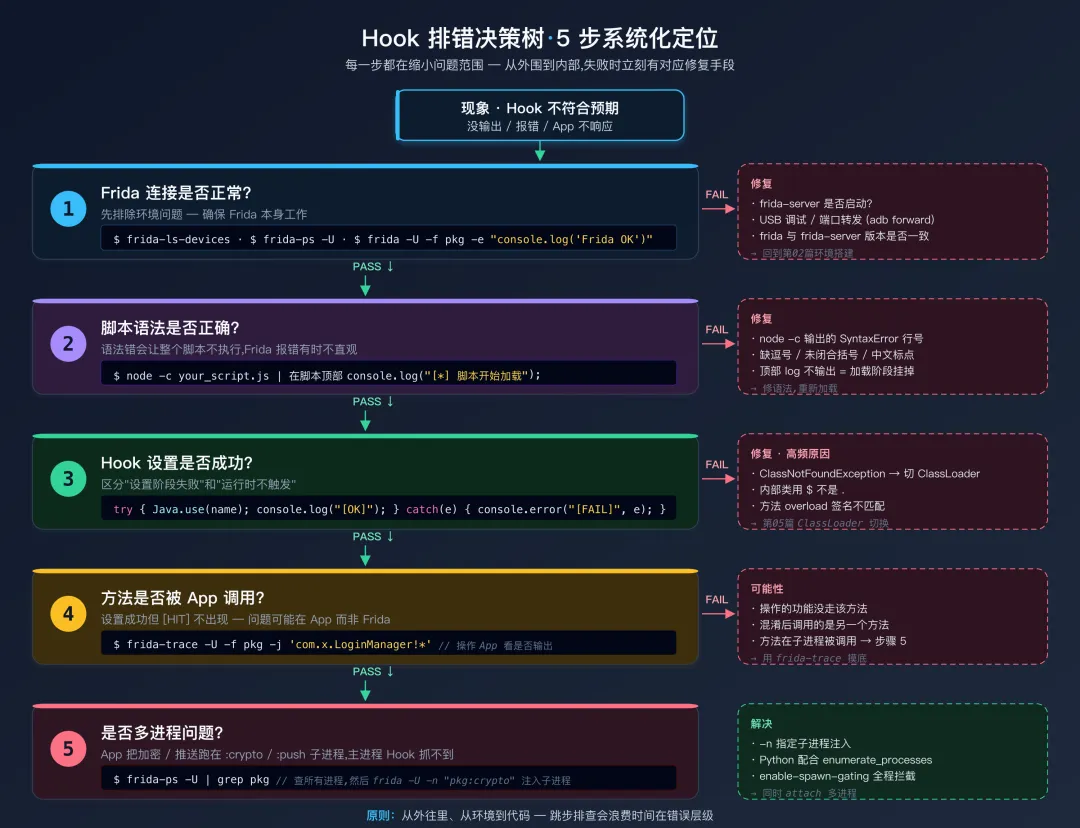
当 Hook 不符合预期时,按以下流程系统化排查。每一步都是在缩小问题范围。
Hook 排错决策树4.1 第一步:确认 Frida 连接正常
在排查 Hook 问题之前,先确保 Frida 本身工作正常:
# 测试一:能否列出设备frida-ls-devices# 测试二:能否列出进程frida-ps -U# 测试三:能否注入最简脚本frida -U -f com.example.app -e "console.log('Frida OK')" --no-pause
如果第三步能看到 Frida OK 输出,说明 Frida 连接正常。如果不能,回到第02篇排查环境问题。
4.2 第二步:确认脚本是否有语法错误
JavaScript 语法错误会导致整个脚本不执行,但 Frida 的错误提示有时不够清晰。
# 方式一:在加载前用 Node.js 检查语法node -c your_script.js# 输出 "your_script.js: SyntaxError: ..." 说明有语法错误# 方式二:在脚本最开头加一行确认执行# 如果这行不输出,说明脚本在加载阶段就失败了
console.log("[*] 脚本开始加载..."); // 加在脚本最顶部Java.perform(function() {console.log("[*] Java.perform 开始执行...");// ... 你的 Hook 代码 ...console.log("[*] 所有 Hook 设置完成");});
如果只看到 脚本开始加载 但没看到 Java.perform 开始执行,说明 Java.perform 之前就出错了。如果两条都没看到,说明脚本压根没被加载(检查文件路径和语法)。
4.3 第三步:Hook 设置是否成功
Hook 代码可能执行了但 Hook 没有实际生效——因为类找不到、方法签名错误等。关键是要**区分"设置阶段的失败"和"运行时的不触发"**。
Java.perform(function() {try {var TargetClass = Java.use("com.example.app.TargetClass");console.log("[OK] Java.use 成功"); TargetClass.targetMethod.implementation = function() {console.log("[HIT] targetMethod 被触发");returnthis.targetMethod(); };console.log("[OK] Hook 设置成功"); } catch(e) {console.error("[FAIL] Hook 设置失败: " + e);console.error("[FAIL] 错误类型: " + e.name);console.error("[FAIL] 错误详情: " + e.message);// 如果是 ClassNotFoundException,打印额外排查信息if (e.message.indexOf("ClassNotFoundException") !== -1) {console.error("[HINT] 尝试以下排查步骤:");console.error(" 1. 检查类名拼写(大小写敏感,内部类用 $)");console.error(" 2. 可能需要切换 ClassLoader(见第05篇)");console.error(" 3. App 可能有加固,类尚未解密加载"); } }});
4.4 第四步:方法是否被 App 调用了
如果 Hook 设置成功(没有报错),但操作 App 后没有看到 [HIT] 日志——问题可能不在 Frida,而在 App。
可能性一:你操作的功能没有触发目标方法。 比如你 Hook 了 LoginManager.login,但在 App 中点击的是"注册"按钮——注册流程调用的是 RegisterManager.register,根本不走 login。
用 frida-trace 确认:
frida-trace -U -f com.example.app -j 'com.example.app.LoginManager!*'# 然后在 App 中操作,看是否有输出
可能性二:App 使用了不同的代码路径。 混淆后的 App 可能有多个看起来相似的方法,jadx 中你看到的 a.b.c.d() 可能不是实际被调用的那个 d()。
可能性三:方法确实被调用了,但在另一个进程中。 很多 App 使用多进程架构(加密操作在 :crypto 进程中,网络操作在 :network 进程中)。见 §4.5 详细讲解。
4.5 第五步:检查是否是多进程问题
Android App 可以在 AndroidManifest.xml 中为不同组件指定不同的进程名(android:process 属性)。例如:
<serviceandroid:name=".crypto.CryptoService"android:process=":crypto" />
当你用 frida -U -f com.example.app 注入时,Frida 只注入主进程。如果目标方法在子进程中运行,你的 Hook 自然不会触发。
诊断方法:
# 查看 App 的所有进程frida-ps -U | grep com.example# 输出可能是:# 12345 com.example.app# 12367 com.example.app:crypto# 12389 com.example.app:push
如果有多个进程,尝试分别注入:
# 注入子进程frida -U -n "com.example.app:crypto" -l your_script.js
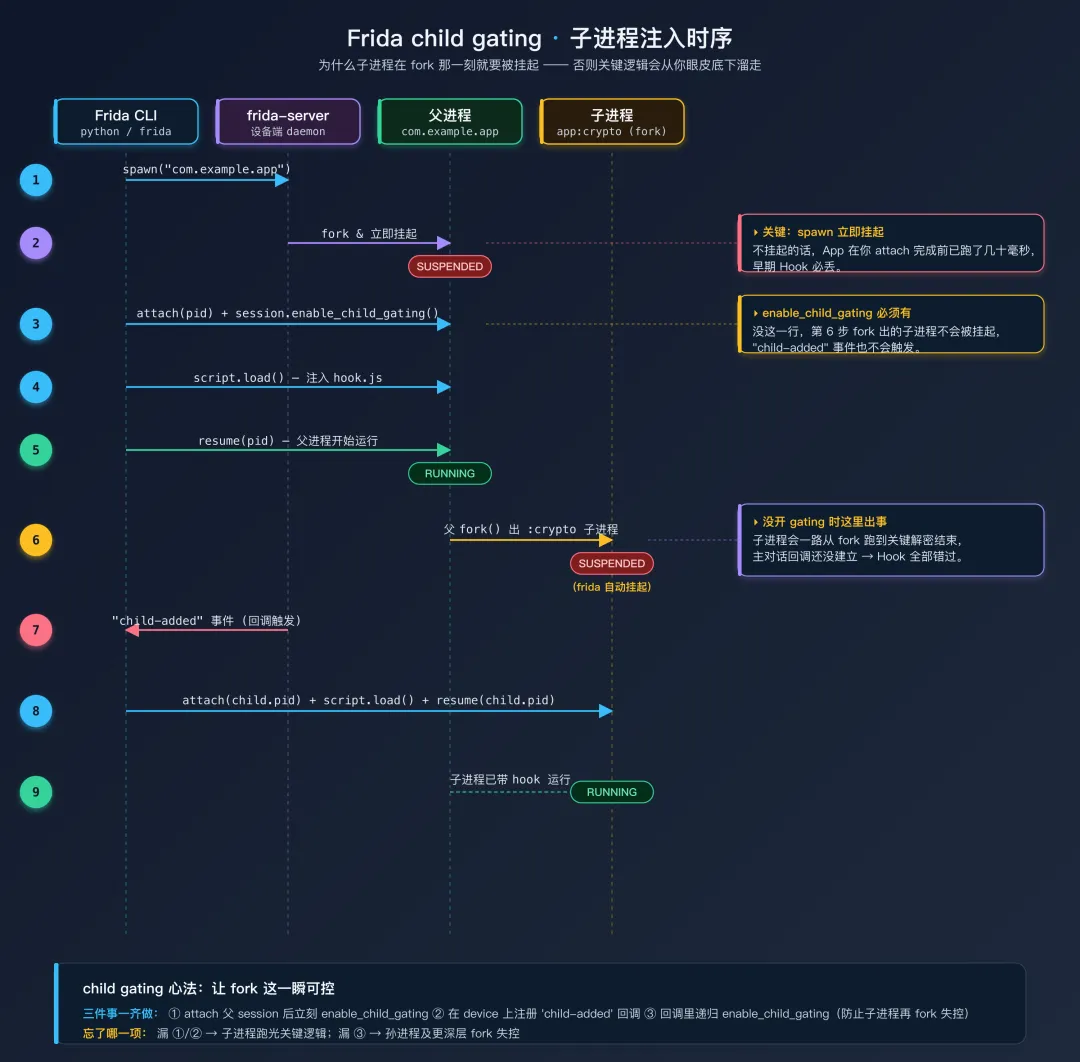
但 -n 只能附加已运行的子进程。如果加密操作在 App 启动早期就执行(典型场景:加固壳在子进程中解密),子进程往往在你来得及附加前就跑完了关键逻辑。这种情况需要 child gating——让 Frida 在 fork 出子进程时立即挂起,待脚本就位再 resume:
import frida, sysdefon_child_added(child): print(f"[+] 新子进程: pid={child.pid} identifier={child.identifier}") child_session = device.attach(child.pid) child_session.enable_child_gating() # 子进程可能再 fork,递归开启 script = child_session.create_script(open("hook.js").read()) script.on('message', lambda m, d: print(m)) script.load() device.resume(child.pid)device = frida.get_usb_device()device.on('child-added', on_child_added)pid = device.spawn(["com.example.app"])session = device.attach(pid)session.enable_child_gating() # 关键:父 session 开启 child gatingscript = session.create_script(open("hook.js").read())script.on('message', lambda m, d: print(m))script.load()device.resume(pid)sys.stdin.read() # 保持脚本运行
child gating 时序图
五、打印调用栈:定位"谁调用了我"
很多排错场景里,问题不在"方法有没有被 Hook 到",而在"这个方法是从哪条代码路径来的"。比如:你 Hook 到了 Cipher.doFinal,但 App 里有 30 个地方调用它,你想知道当前这次调用是登录流程还是消息加密。打印调用栈是回答这类问题最直接的工具。
5.1 Java 层调用栈
Java 层有两种打印调用栈的方式,效果接近,写法不同:
// 方式一:构造 Throwable,借用 Log.getStackTraceString 格式化Java.perform(function() {var Cipher = Java.use("javax.crypto.Cipher");var Throwable = Java.use("java.lang.Throwable");var Log = Java.use("android.util.Log"); Cipher.doFinal.overload("[B").implementation = function(data) {console.log("\n[Cipher.doFinal] input: " + data.length + " bytes");console.log(Log.getStackTraceString(Throwable.$new()));returnthis.doFinal(data); };});// 方式二:手动遍历 StackTraceElement[],可自定义过滤Cipher.doFinal.overload("[B").implementation = function(data) {var Thread = Java.use("java.lang.Thread");var stack = Thread.currentThread().getStackTrace();for (var i = 0; i < stack.length; i++) {console.log(" at " + stack[i].toString()); }returnthis.doFinal(data);};
两种方式都会打印形如 at com.example.app.LoginManager.encryptPassword(LoginManager.java:42) 的调用栈帧。实战中优先用方式一——Log.getStackTraceString 自带格式化、输出更紧凑;需要按帧过滤时再用方式二。
5.2 Native 层调用栈
Native Hook 中用 Thread.backtrace 取栈,配合 DebugSymbol.fromAddress 解析符号:
var openAddr = Module.findExportByName(null, "open");Interceptor.attach(openAddr, {onEnter: function(args) {var path = args[0].readUtf8String();if (path.indexOf("/data/data") === -1) return; // 只看 App 私有目录console.log("\n[open] " + path);console.log(Thread.backtrace(this.context, Backtracer.ACCURATE) .map(DebugSymbol.fromAddress) .join("\n")); }});
输出形如:
[open] /data/data/com.example.app/databases/auth.db0x7f8a1b2c34 libsqlite.so!sqlite3_open0x7f8a1c2d40 libnative.so!AuthDb_init0x7f8a1d3e58 libnative.so!Java_com_example_app_AuthBridge_init0x7f8b2e4f60 libart.so!art_quick_invoke_stub
两种 Backtracer 模式:
| | | |
|---|
Backtracer.ACCURATE | | | |
Backtracer.FUZZY | | | |
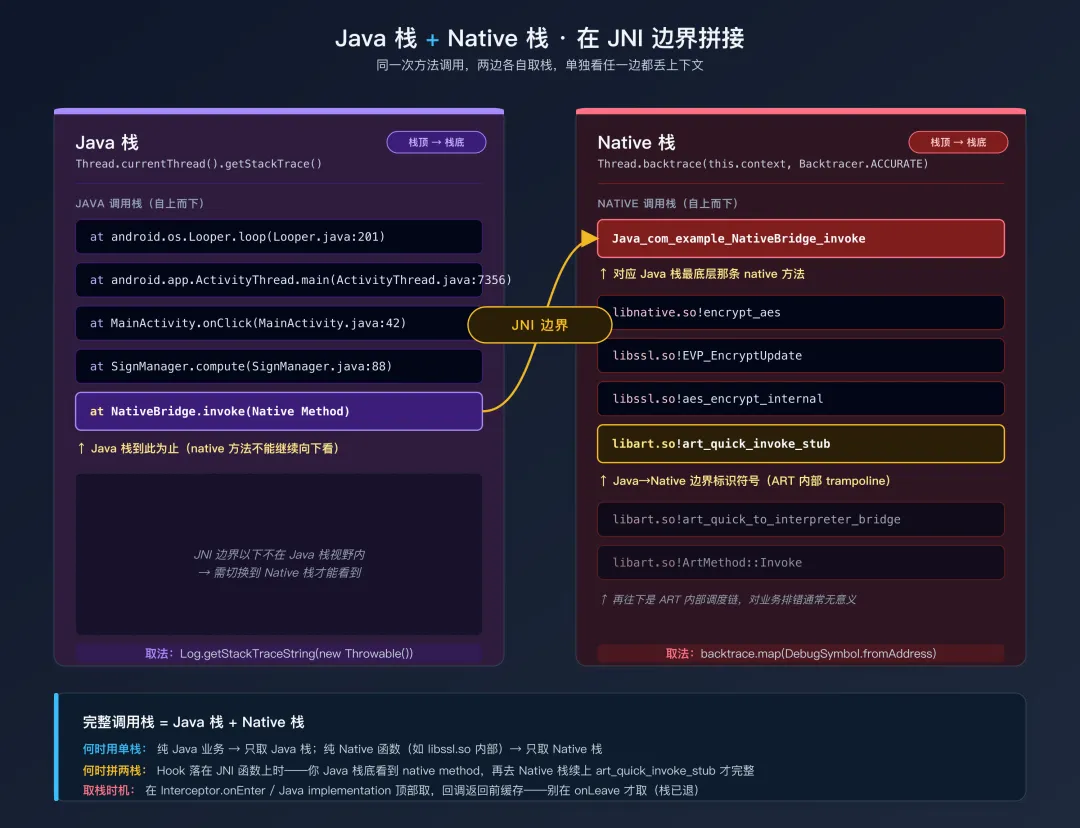
如果调用来自 Java 层(典型情况:JNI 函数),Native 栈底部会出现 art_quick_invoke_stub 这类 ART 内部符号——这是 Java→Native 的边界,再往下要切到 Java 栈才看得清。最完整的做法是 Java 栈 + Native 栈同时打印:在 JNI Hook 里既调 Thread.backtrace 也借 Java API 取一次 Java 栈。
Java 栈与 Native 栈在 JNI 边界拼接// JNI 函数双栈打印var jniAddr = Module.findExportByName("libnative.so", "Java_com_example_Sign_compute");Interceptor.attach(jniAddr, {onEnter: function(args) {console.log("\n=== Native 栈 ===");console.log(Thread.backtrace(this.context, Backtracer.ACCURATE) .map(DebugSymbol.fromAddress).join("\n"));console.log("=== Java 栈 ==="); Java.perform(function() {var Throwable = Java.use("java.lang.Throwable");var Log = Java.use("android.util.Log");console.log(Log.getStackTraceString(Throwable.$new())); }); }});
5.3 调用栈裁剪与过滤
完整调用栈往往几十帧,多数是 Framework 或运行时的"水帧"。过滤掉无信息帧能让输出可读得多:
functiongetCallerStack(maxFrames) {var Thread = Java.use("java.lang.Thread");var stack = Thread.currentThread().getStackTrace();var filtered = [];var skipPrefixes = ["dalvik.system", // 类加载器栈"java.lang.reflect", // 反射调用栈"com.android.internal.os",// 系统启动栈"android.os.Handler", // 主线程消息分发"android.os.Looper" ];for (var i = 0; i < stack.length; i++) {var frame = stack[i].toString();var skip = false;for (var j = 0; j < skipPrefixes.length; j++) {if (frame.indexOf(skipPrefixes[j]) !== -1) { skip = true; break; } }if (skip) continue; filtered.push(frame);if (filtered.length >= (maxFrames || 10)) break; }return filtered.join("\n at ");}// 使用console.log(" at " + getCallerStack(8));
5.4 什么时候打印调用栈
打印调用栈对 IPC 通信和 App 性能有可观开销——一次完整 Java 栈格式化大约几百字节、几毫秒。建议:
- 侦察阶段打:首次找到目标方法被调用时,打一次完整栈,建立"调用路径地图"。
- 复现阶段不打:调用路径明确后,去掉栈打印只留参数日志。
- 条件触发打:用 §2.5 的条件过滤策略——只在特定参数值或第 N 次调用时打印,避免日志洪水。
六、常见错误完整排查手册
6.1 ClassNotFoundException
这是 Frida Java Hook 的头号错误。 第03篇和第05篇都涉及了部分原因,这里给出完整的排查清单。
Error: java.lang.ClassNotFoundException: com.example.app.Foo
排查步骤(按可能性从高到低):
Step 1:检查类名拼写。
// 常见拼写错误Java.use("com.example.app.loginManager"); // 错:首字母应大写Java.use("com.example.app.LoginManager "); // 错:末尾有空格Java.use("com.example.app.Config.Entry"); // 错:内部类应用 $ 而不是 .Java.use("com.example.app.Config$Entry"); // 对// 在 jadx 中正确复制:// 右键类名 → Copy → Copy as frida snippet
Step 2:确认类是否已加载。
// 搜索是否有类似名字的类已加载Java.perform(function() {var keyword = "Foo"; // 你要找的类名关键词 Java.enumerateLoadedClassesSync() .filter(function(c) { return c.indexOf(keyword) !== -1; }) .forEach(function(c) { console.log(" 已加载: " + c); });});
如果搜不到——类可能确实还没被加载(App 还没执行到加载它的代码)。等 App 充分运行后再试。
Step 3:检查是否是 ClassLoader 问题。
// 使用第05篇的 ClassLoader 搜索模板Java.perform(function() { Java.enumerateClassLoaders({onMatch: function(loader) {try { loader.loadClass("com.example.app.Foo");console.log("[FOUND] 通过 " + loader.$className + " 找到"); Java.classFactory.loader = loader;var Foo = Java.use("com.example.app.Foo");console.log("[OK] Java.use 成功"); } catch(e) {} },onComplete: function() {} });});
Step 4:App 是否有加固?
加固 App 的业务类被加密存储在 DEX 中,只有壳解密后才能加载。如果你在 App 启动早期就尝试 Java.use,类确实不存在。
诊断方法:
# 用 jadx 打开 APK,看 Application 类# 以下为 2018-2022 年常见样本特征,加固厂商版本演进会变特征,新版以实测为准:# com.stub.StubApp → 360加固# com.qihoo.util.QHCApplication → 360加固(新版变体)# com.tencent.StubShell.TxAppEntry → 腾讯乐固# com.secneo.apkwrapper.ApplicationWrapper → 梆梆# com.SecShell.SecShell.ApplicationWrapper → 梆梆(变体)# com.baidu.protect.StubApplication → 百度加固(已停止运营,仅老样本可见)# s.h.e.l.l.S → 爱加密老版本# com.shell.NativeApplication → 爱加密新版本
辅助判定:除 Application 类名外,还可看 lib/<abi>/ 下是否有特征 SO(如 libDexHelper.so、libsecexe.so、libBugly_*.so、libshellx.so 等),以及 assets/ 下是否有未知的加密 dex 文件。
对于加固 App,需要等壳解密完成后再 Hook。通常的做法是 Hook Application.onCreate 或 ClassLoader.loadClass,在类被加载时再执行你的 Hook 逻辑:
// 等待加固壳完成解密后再 HookJava.perform(function() {var Application = Java.use("android.app.Application"); Application.onCreate.implementation = function() {this.onCreate();console.log("[*] Application.onCreate 完成,壳应该已解密");// 延迟一小段时间确保所有类都加载完毕 setTimeout(function() { Java.perform(function() {try {var Target = Java.use("com.example.app.RealClass");console.log("[OK] 脱壳后成功找到类");// 在这里设置 Hook } catch(e) {console.error("[!] 仍然找不到: " + e); } }); }, 1000); };});
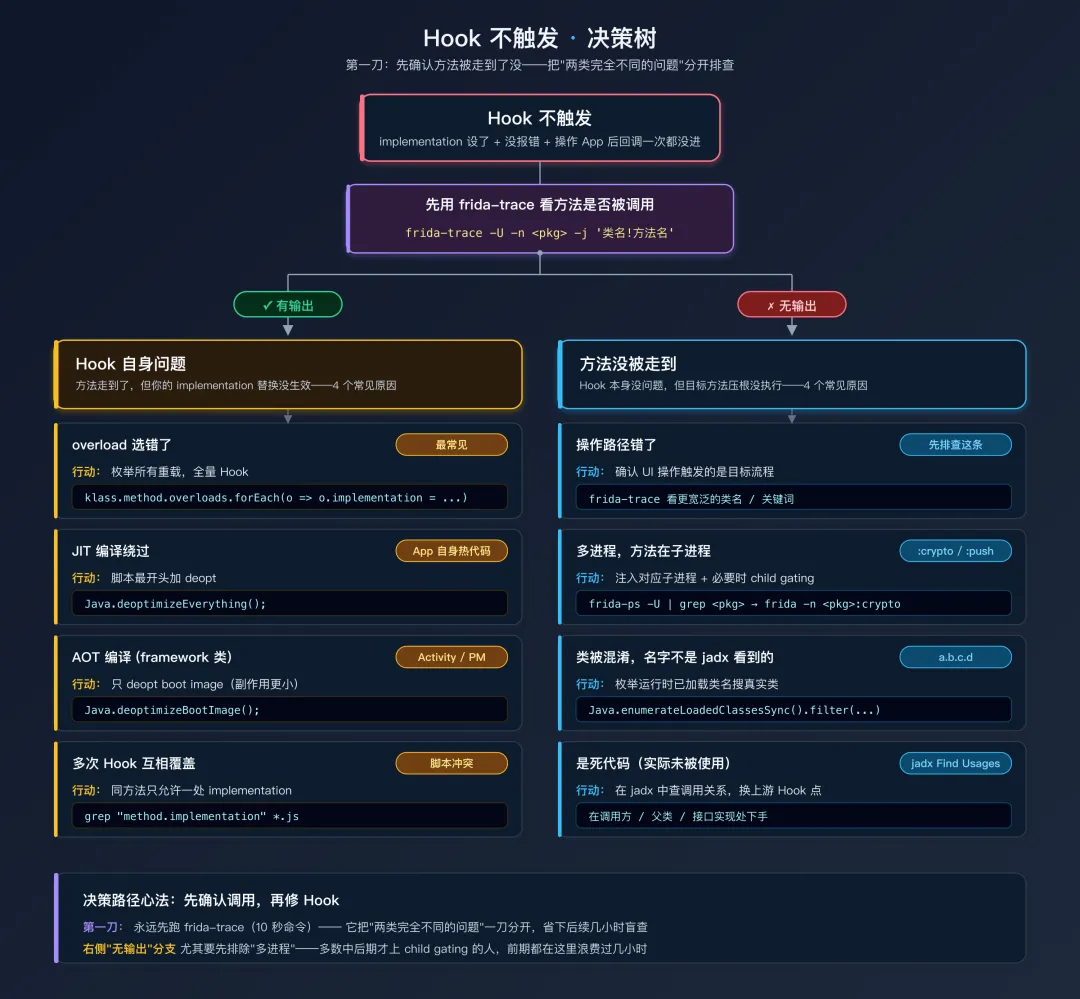
6.2 Hook 设置成功但不触发
这是第二常见的问题——没有报错,但 implementation 回调从未被调用。
Hook 不触发决策树排查清单:
| | |
|---|
| | |
| frida-ps -U | grep 包名 | |
| | |
| | |
| 加 Java.deoptimizeEverything() | |
| | frida -U -f 包名 |
| | |
用 overloads 一次性 Hook 所有重载版本(最强壮的方式):
Java.perform(function() {var TargetClass = Java.use("com.example.app.TargetClass");// 获取 targetMethod 的所有重载版本var overloads = TargetClass.targetMethod.overloads;console.log("[*] targetMethod 有 " + overloads.length + " 个重载版本"); overloads.forEach(function(overload) { overload.implementation = function() {var args = [].slice.call(arguments);// 打印参数类型(帮助识别是哪个重载被调用了)var argTypes = overload.argumentTypes.map(function(t) { return t.className; });console.log("\n[HIT] targetMethod(" + argTypes.join(", ") + ")");// 打印参数值for (var i = 0; i < args.length; i++) {console.log(" arg" + i + " (" + argTypes[i] + "): " + args[i]); }// 调用原始方法var result = this.targetMethod.apply(this, args);console.log(" 返回: " + result);return result; }; });console.log("[*] 所有 " + overloads.length + " 个重载已 Hook");});
6.3 Hook 后 App 崩溃
崩溃类型一:加载脚本的瞬间就崩溃。
通常是 App 检测到了 Frida 并主动退出。诊断:
# 加载空脚本测试frida -U -f com.example.app -e "" --no-pause# 如果空脚本也崩溃 → 反 Frida 检测# 如果空脚本不崩溃但你的脚本崩溃 → 脚本有问题
崩溃类型二:操作 App 触发 Hook 时崩溃。
常见原因:
// 错误一:忘记返回值SomeClass.getConfig.implementation = function() {console.log("[*] getConfig called");// 忘记 return 了!// 如果原方法返回类型不是 void,调用方会收到 undefined/null// 可能导致 NullPointerException};// 正确SomeClass.getConfig.implementation = function() {console.log("[*] getConfig called");returnthis.getConfig(); // 必须返回};// 错误二:返回类型不匹配SomeClass.getCount.implementation = function() {return"123"; // 原方法返回 int,你返回了 String// ART VM 类型检查会失败 → 崩溃};// 正确SomeClass.getCount.implementation = function() {returnthis.getCount(); // 返回原始值// 或者return42; // 返回正确类型的值};// 错误三:没有调用原始方法(中断了正常流程)SomeClass.init.implementation = function(config) {console.log("[*] init: " + config);// 没有调用 this.init(config)// App 后续使用的 this 对象没有被正确初始化 → 各种空指针};// 正确SomeClass.init.implementation = function(config) {console.log("[*] init: " + config);this.init(config); // 必须调用原始方法};
崩溃类型三:Native Hook 后崩溃。
// 错误:onLeave 中修改了返回值类型Interceptor.attach(funcAddr, {onLeave: function(retval) { retval.replace(ptr(0)); // 把返回值改成 NULL// 如果调用方期望一个有效指针并解引用 → SIGSEGV }});// 错误:在 onEnter 中修改了参数但类型不匹配Interceptor.attach(funcAddr, {onEnter: function(args) { args[0] = ptr(0); // 把第一个参数改为 NULL// 如果函数内部解引用这个指针 → SIGSEGV }});
诊断 Native 崩溃:
# 查看 logcat 中的崩溃日志adb logcat -s DEBUG:E AndroidRuntime:E
崩溃日志中的 signal 11 (SIGSEGV) 表示段错误(非法内存访问),signal 6 (SIGABRT) 表示主动退出(通常是检测到异常后 abort()),signal 5 (SIGTRAP) 可能是反调试检测触发的断点。
6.4 Error: expected a pointer(类型错误)
Error: expected a pointer
这个错误通常出现在 Interceptor.attach 的第一个参数不是一个有效的 NativePointer。
// 错误:Module.findExportByName 返回 null(函数不存在)var addr = Module.findExportByName("libnative.so", "nonexistent_func");Interceptor.attach(addr, { ... }); // addr 是 null → "expected a pointer"// 正确:检查返回值var addr = Module.findExportByName("libnative.so", "encrypt_data");if (addr) { Interceptor.attach(addr, { ... });} else {console.log("[!] 函数未找到,可能 SO 未加载或函数名不正确");}
6.5 Unable to find method(方法找不到)
Error: ... .targetMethod(): has no overload that matches
原因一:方法名拼写错误或方法不存在。
// 先枚举类的所有方法,确认方法名var klass = Java.use("com.example.app.TargetClass");var methods = klass.class.getDeclaredMethods();methods.forEach(function(m) {console.log(" " + m.getName() + " | " + m.toGenericString());});
原因二:overload 参数类型写错。
// 常见的类型名错误// 错误 // 正确"String"// "java.lang.String""int[]"// "[I""byte[]"// "[B""Object[]"// "[Ljava.lang.Object;""Map"// "java.util.Map""Context"// "android.content.Context"// 不确定参数类型时,先列出所有重载var overloads = klass.targetMethod.overloads;overloads.forEach(function(o, i) {var types = o.argumentTypes.map(function(t) { return t.className; });console.log(" 重载#" + i + ": (" + types.join(", ") + ")");});
Frida overload 中常见 Java 类型的写法:
| |
|---|
int | "int" |
long | "long" |
boolean | "boolean" |
byte | "byte" |
float | "float" |
double | "double" |
String | "java.lang.String" |
Object | "java.lang.Object" |
Context | "android.content.Context" |
int[] | "[I" |
byte[] | "[B" |
long[] | "[J" |
String[] | "[Ljava.lang.String;" |
Object[] | "[Ljava.lang.Object;" |
List | "java.util.List" |
Map | "java.util.Map" |
数组类型的 JVM 编码规则:[ 表示一维数组,I = int, B = byte, J = long, F = float, D = double, Z = boolean, C = char, S = short。对象数组格式为 [L全限定类名;(注意末尾的分号)。二维数组如 int[][] 是 "[[I"。
七、高级排错技巧
7.1 延迟 Hook:等待类加载
有些类只在 App 运行到特定页面或功能时才加载。你可以用"延迟 Hook"模式——先等待目标类出现,再设置 Hook:
// delayed_hook.js// 轮询等待目标类加载functionwaitForClass(className, callback) {var attempts = 0;var maxAttempts = 30; // 最多等 30 秒functiontryHook() { attempts++;try {var klass = Java.use(className);console.log("[*] 第 " + attempts + " 次尝试找到 " + className); callback(klass); } catch(e) {if (attempts < maxAttempts) { setTimeout(function() { Java.perform(tryHook); }, 1000); } else {console.error("[!] 等待 " + maxAttempts + " 秒后仍找不到 " + className); } } } Java.perform(tryHook);}// 使用waitForClass("com.example.app.payment.PayManager", function(PayManager) { PayManager.pay.implementation = function(amount) {console.log("[pay] amount: " + amount);returnthis.pay(amount); };console.log("[*] PayManager.pay Hook 成功");});
另一种更优雅的方式——监听类加载事件:
// 监听 ClassLoader.loadClass,在目标类被加载时立刻 HookJava.perform(function() {var targetClass = "com.example.app.payment.PayManager";// Hook ClassLoader.loadClassvar ClassLoader = Java.use("java.lang.ClassLoader"); ClassLoader.loadClass.overload("java.lang.String", "boolean") .implementation = function(name, resolve) {var result = this.loadClass(name, resolve);if (name === targetClass) {console.log("[*] " + targetClass + " 刚被加载!");// 立刻设置 Hook setTimeout(function() { Java.perform(function() {try {var PayManager = Java.use(targetClass); PayManager.pay.implementation = function(amount) {console.log("[pay] amount: " + amount);returnthis.pay(amount); };console.log("[*] Hook 成功"); } catch(e) {console.error("[!] Hook 失败: " + e); } }); }, 100); }return result; };console.log("[*] 正在监听 ClassLoader,等待 " + targetClass + " 加载...");});
7.2 多 Hook 冲突排查
当你同时加载多个脚本(或一个脚本中对同一个方法 Hook 了两次),可能出现奇怪的行为——某些 Hook 不触发,或者触发顺序异常。
原则:一个 Java 方法同一时刻只能有一个 implementation 替换。后设置的 Hook 会覆盖先设置的。
// 错误:两次 Hook 同一个方法,第一个被覆盖TargetClass.foo.implementation = function() {console.log("Hook A");returnthis.foo();};TargetClass.foo.implementation = function() {console.log("Hook B"); // 只有 Hook B 生效returnthis.foo();};// 正确:在一个 implementation 中完成所有逻辑TargetClass.foo.implementation = function() {console.log("Hook A");console.log("Hook B");returnthis.foo();};
7.3 logcat 配合 Frida 排错
Android 的 logcat 是与 Frida 互补的信息源。App 自身的日志(Log.d、Log.e)、系统日志、崩溃信息都在 logcat 中。
# 实时查看 App 的日志adb logcat -s "YOUR_APP_TAG:*"# 查看崩溃日志adb logcat -s AndroidRuntime:E DEBUG:E# 只看目标 App 的日志(按 PID 过滤)adb shell pidof com.example.app# 假设 PID 是 12345adb logcat --pid=12345
在 Frida 中也可以 Hook android.util.Log 来捕获 App 的日志输出:
// 捕获 App 的 Log.d / Log.e 输出Java.perform(function() {var Log = Java.use("android.util.Log"); ["d", "e", "i", "w", "v"].forEach(function(level) { Log[level].overload("java.lang.String", "java.lang.String") .implementation = function(tag, msg) {// 过滤只看感兴趣的 tagif (tag.indexOf("Crypto") !== -1 || tag.indexOf("Auth") !== -1) {console.log("[Log." + level + "] [" + tag + "] " + msg); }returnthis[level](tag, msg); }; });});
八、排错速查清单
遇到问题时,按这张清单逐项检查:
□ Frida 环境 □ frida-server 正在运行? (adb shell ps | grep frida) □ 版本匹配? (frida --version vs frida-server --version) □ SELinux 是否阻止? (adb shell getenforce) □ 能否 frida-ps -U 列出进程?□ 脚本加载 □ 没有 JavaScript 语法错误? (node -c script.js) □ 脚本最开头的 console.log 有输出? □ Java.perform 内的代码有执行?□ Java Hook □ 类名正确?(大小写、内部类用 $、完整包名) □ ClassLoader 正确?(加固 App 需要切换) □ 方法名正确?(混淆后的名字 vs 反混淆名) □ overload 参数类型正确?(用 overloads 枚举确认) □ 进程正确?(多进程 App 注入对应进程) □ 时机正确?(方法是否只在启动时调用一次?) □ JIT 干扰?(试试 Java.deoptimizeEverything)□ Native Hook □ SO 已加载?(Process.findModuleByName 不为 null) □ 函数地址有效?(Module.findExportByName 不为 null) □ 偏移正确?(IDA/Ghidra 中的偏移与 SO 版本匹配) □ ARM/Thumb 模式?(32位 SO 的 Thumb 函数地址需要 +1)□ Hook 后崩溃 □ 返回值类型正确? □ 调用了原始方法? □ logcat 中的崩溃信息是什么? □ 是空脚本也崩 → 反 Frida 检测 □ 是 Hook 后才崩 → 脚本逻辑问题
总结
本篇建立了一套系统化的 Frida 排错方法论。核心要点:
日志管理是排错的基础设施。console.log 适合快速调试,send() 适合结构化数据传输和自动化场景。在高频 Hook 中必须控制日志量——采样、条件过滤、限速是三种基本策略。当日志量太大时,写入文件比打印到控制台更可靠。
frida-trace 是快速侦察的利器。在写详细脚本之前,先用 frida-trace -j '类名!方法名' 确认方法是否被调用、什么时候被调用、参数长什么样。它能在 10 秒内回答你可能要花 10 分钟写脚本才能回答的问题。
排错的核心思路是逐步缩小范围:Frida 连接 → 脚本加载 → Hook 设置 → 方法触发 → 输出正常。每一步都有明确的诊断方法,不要跳步猜测。
五个最常见的问题及其快速解法:
ClassNotFoundException → 检查拼写、ClassLoader 切换、等待壳解密- Hook 不触发 → frida-trace 确认、全重载 Hook、检查多进程、JIT 关闭
- Hook 后崩溃 → 检查返回值、确保调用原始方法、检查 logcat
- Native Hook expected a pointer → 检查函数地址是否为 null、SO 是否加载