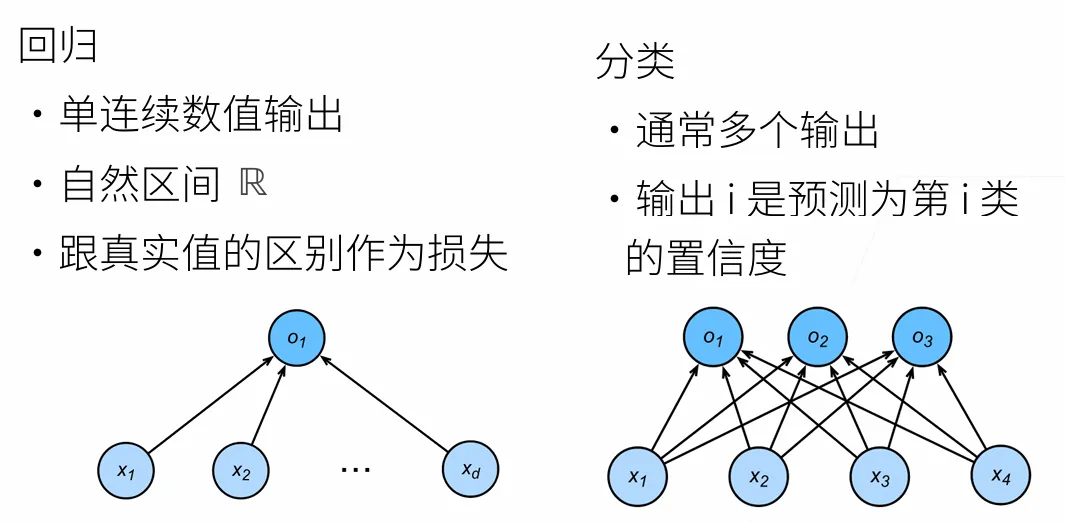
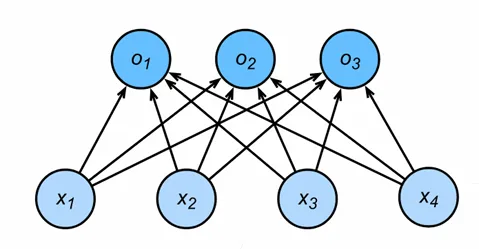
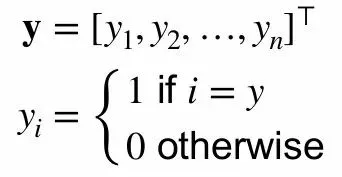
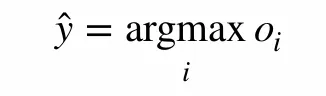
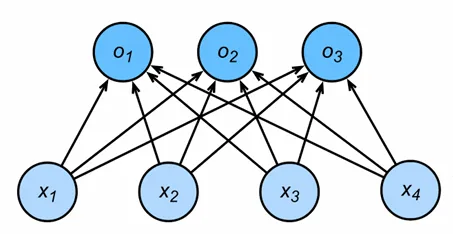
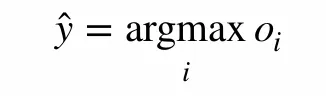
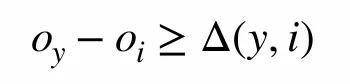
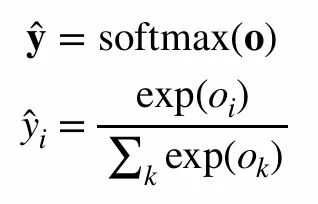
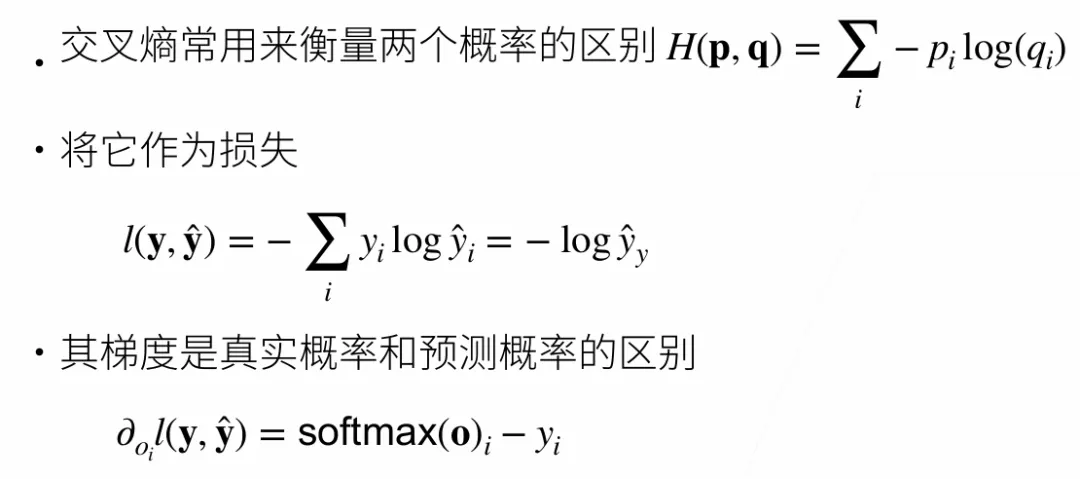
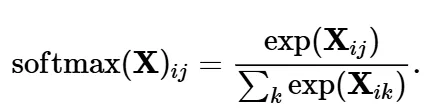
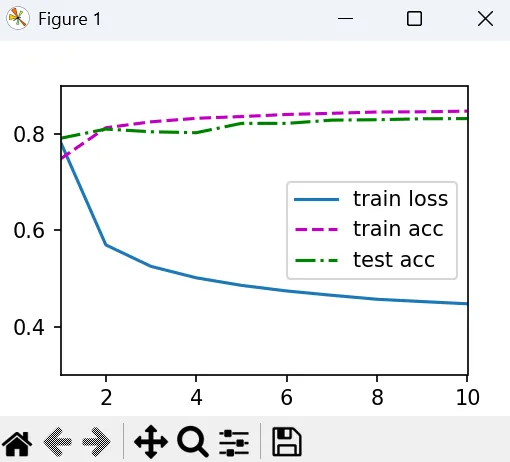
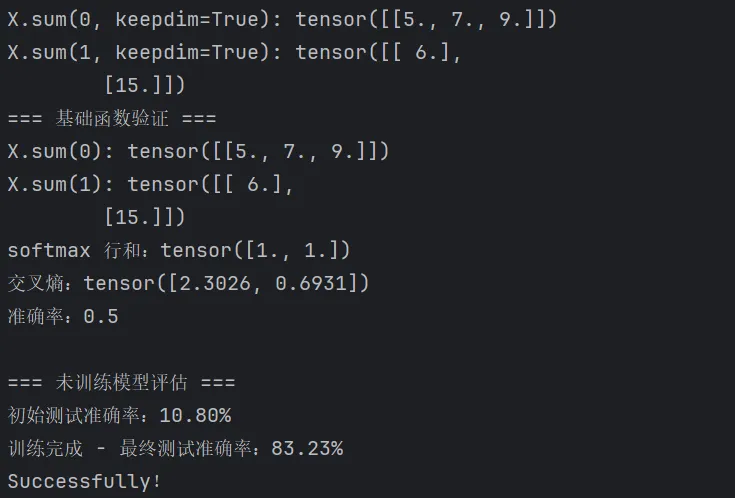
Softmax回归也是机器学习中非常经典且重要的模型。虽然名字叫做回归,但其实是一个分类问题。-分类是预测一个离散类别(如MNIST手写数字识别,10类)1.对类别进行一位有效编码 (假设真实类别是第i个,那么y_i=1,其他元素均为0)3.最大值作为预测(在作预测的时候,选取i使得最大化o_i的置信度的值作为预测)4.输出匹配概率(非负,和为1)综上,Softmax回归是一个多类分类模型,使用Softmax操作子可以得到每个类的预测置信度,使用交叉熵来衡量预测和标号的区别作为损失函数
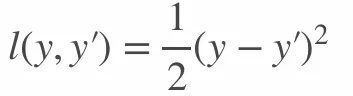
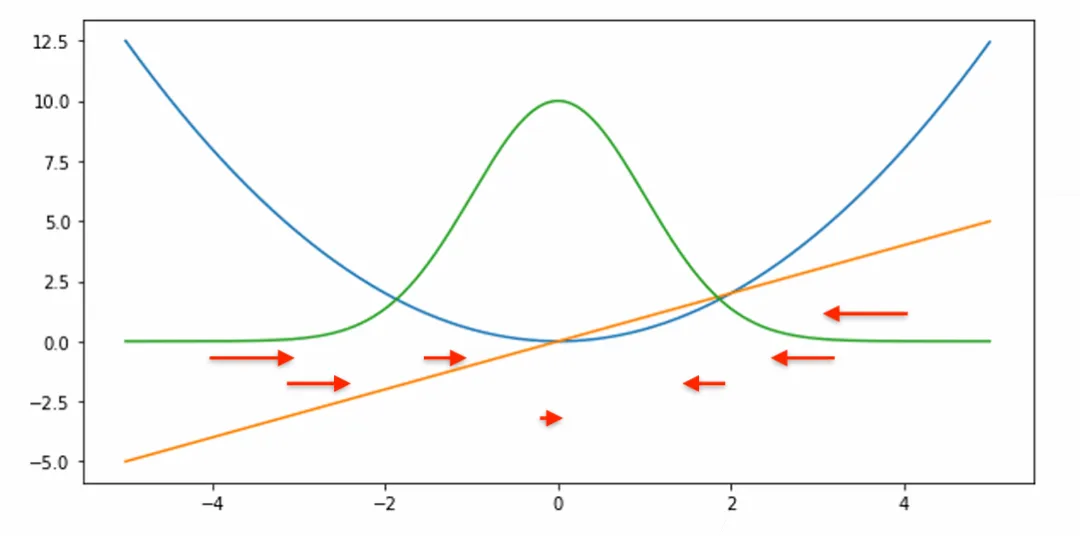
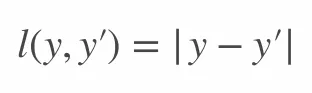
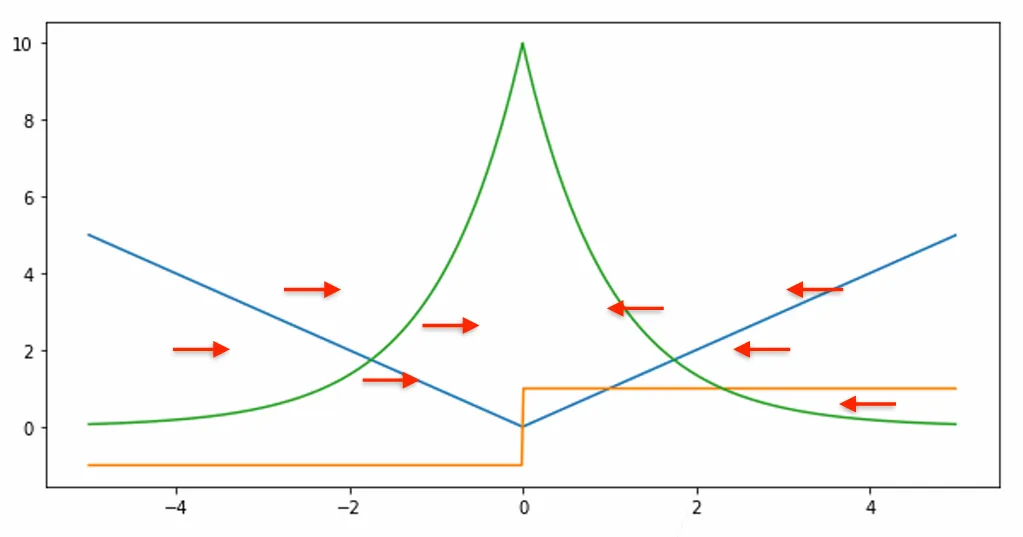
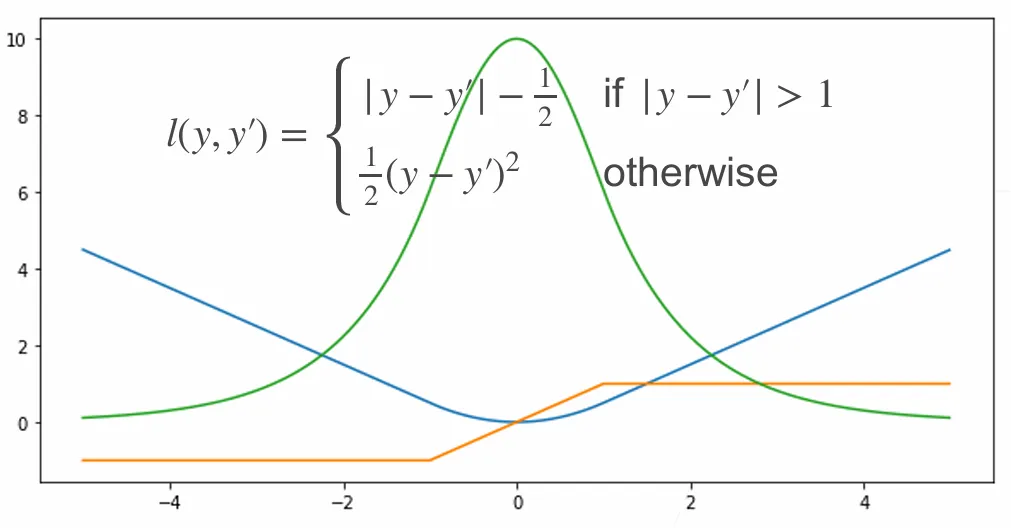
损失函数用来衡量预测值和真实值之间的区别,下面介绍三个常用的损失函数定义:真实值y - 预测值y',再做平方,再除以2.蓝色曲线:当y=0时,变换预测值y'的函数(二次函数)绿色曲线:是l的似然函数(e^(-l)),也是高斯分布当预测值y'与真实值y隔得比较远的时候,那梯度比较大,所以参数更新比较多随着真实值慢慢靠近预测值的时候,靠近远点的时候,梯度会变得越来越小,所以参数更新幅度越来越小但是离原点比较远的时候,不一定想要非常大的梯度来更新参数,所以还有另外一个选择:L1 Loss不管预测值与真实值隔得有多远,梯度始终为常数,权重更新不会特别大,可以带来稳定性上的好处。缺点是零点处不可导,不平滑性导致预测值与真实值靠的比较近的时候可能不稳定。当然,可以提出一个新的函数来结合上面两个函数的好处,并避免劣处,即Huber's Robust Loss当预测值和真实值差的比较大的时候,即绝对值大于1时,为绝对值误差;当预测值和真实值比较近的时候,即绝对值小于1时,为均方误差。
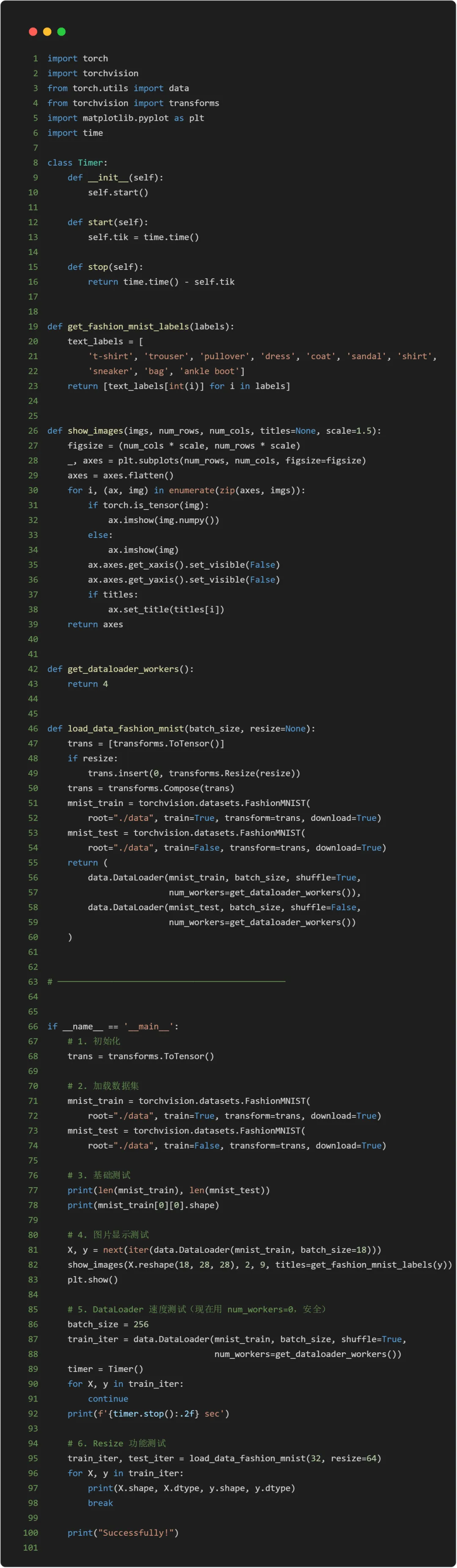
MNIST数据集是图像分类中广泛使用的数据集之一,但作为基准数据集过于简单。所以将使用类似但更复杂的Fashion-MNIST数据集。import torchimport torchvisionfrom torch.utils import datafrom torchvision import transformsimport matplotlib.pyplot as pltimport time# 通过框架中的内置函数将 Fashion-MNIST 数据集下载并读取到内存中# 通过ToSensor实例将图像数据从PIL类型变换成32位浮点数格式# 并除以255使得所有像素的数值均在0到1之间trans = transforms.ToTensor()mnist_train = torchvision.datasets.FashionMNIST(root="./data", train=True, transform=trans, download=True)mnist_test = torchvision.datasets.FashionMNIST(root="./data", train=False, transform=trans, download=True)print(len(mnist_train), len(mnist_test))#(60000, 10000)
# 第一张图片的形状print(mnist_train[0][0].shape)# torch.Size([1, 28, 28])
# 两个可视化数据集的函数def get_fashion_mnist_labels(labels): """返回Fashion-MNIST数据集的文本标签。""" text_labels = [ 't-shirt', 'trouser', 'pullover', 'dress', 'coat', 'sandal', 'shirt', 'sneaker', 'bag', 'ankle boot'] return [text_labels[int(i)] for i in labels]def show_images(imgs, num_rows, num_cols, titles=None, scale=1.5): """Plot a list of images.""" figsize = (num_cols * scale, num_rows * scale) _, axes = plt.subplots(num_rows, num_cols, figsize=figsize) axes = axes.flatten() for i, (ax, img) in enumerate(zip(axes, imgs)): if torch.is_tensor(img): ax.imshow(img.numpy()) else: ax.imshow(img) ax.axes.get_xaxis().set_visible(False) ax.axes.get_yaxis().set_visible(False) if titles: ax.set_title(titles[i]) return axes
# 几个样本的图像及其相应的标签X, y = next(iter(data.DataLoader(mnist_train, batch_size=18)))show_images(X.reshape(18, 28, 28), 2, 9, titles=get_fashion_mnist_labels(y));# 若是在PyCharm中运行,加上 plt.show()
# 定义Timer()class Timer: def __init__(self): self.start() def start(self): self.tik = time.time() def stop(self): """返回耗时(秒)""" return time.time() - self.tik# 读取一小批量数据,大小为batch_size,并输出所需时间batch_size = 256def get_dataloader_workers(): """使用4个进程来读取数据。""" return 4train_iter = data.DataLoader(mnist_train, batch_size, shuffle=True, num_workers=get_dataloader_workers())timer = Timer()for X, y in train_iter: continuef'{timer.stop():.2f} sec'
以上代码若在本地PyCharm运行,需要稍加修改结构:综上,我们可以把以上代码结合起来,封装为load_data_fashion_mnist函数# 定义load_data_fashion_mnist函数def load_data_fashion_mnist(batch_size, resize=None): """下载Fashion-MNIST数据集,然后将其加载到内存中。""" trans = [transforms.ToTensor()] if resize: trans.insert(0, transforms.Resize(resize)) trans = transforms.Compose(trans) mnist_train = torchvision.datasets.FashionMNIST(root="./data", train=True, transform=trans, download=True) mnist_test = torchvision.datasets.FashionMNIST(root="./data", train=False, transform=trans, download=True) return (data.DataLoader(mnist_train, batch_size, shuffle=True, num_workers=get_dataloader_workers()), data.DataLoader(mnist_test, batch_size, shuffle=False, num_workers=get_dataloader_workers()))train_iter, test_iter = load_data_fashion_mnist(32, resize=64)for X, y in train_iter: print(X.shape, X.dtype, y.shape, y.dtype) break


 10个月宝宝每天需要喝多少奶粉?

