本篇目标:越来越多的 App 从传统的 RESTful JSON API 迁移到 gRPC + Protobuf——在 Charles 中 JSON 一目了然,但 Protobuf 编码的数据只是一堆二进制。本篇从 Protobuf 的编码原理与流量识别讲起,覆盖离线解码、.proto 还原、Frida 动态 Hook 三套方案(包括 gRPC 框架层 + Protobuf 序列化层 + Native 层),再到常见对抗手段的绕过,最后给出方案选择速查表与日常逆向 Cheat Sheet。
这是本系列中体量最大的一篇——读完之后,面对任何使用 gRPC / Protobuf 的 Android 应用,你都能完整地完成协议分析。
一、Protobuf 基础概念
1.1 什么是 Protobuf
Protobuf(Protocol Buffers)是 Google 于 2008 年开源的一种语言无关、平台无关的高效二进制序列化协议。它通过预定义的 .proto Schema 文件描述数据结构,再由 protoc 编译器生成目标语言的序列化/反序列化代码。
与 JSON、XML 等文本格式相比,Protobuf 在体积和解析速度上有显著优势:它不在传输数据中携带字段名,而是用整数编号(field number)标识字段,配合变长整数编码(Varint),使得序列化后的数据极其紧凑。这正是它被广泛用于移动端和高性能后端通信的原因。
类比理解:如果把 JSON 比作「带标签的行李箱」——每个物品都贴着一张写满名字的标签,那么 Protobuf 就是「编号储物柜」——只用编号标识,取物时对照目录表即可。省掉了标签的空间,存取也更快。
1.2 为什么 Android 应用喜欢用 Protobuf
| 特性 | JSON | Protobuf |
|---|
| 格式 | 文本,人类可读 | 二进制,不可直接阅读 |
| 体积 | 较大(含字段名、引号、花括号) | 压缩 3~10 倍(仅含编号+值) |
| 解析速度 | 较慢(需词法分析) | 快 20~100 倍(直接内存映射) |
| Schema | 无强制约束 | 强制 .proto 定义,类型安全 |
| 前后兼容 | 需自行处理 | 原生支持字段增删的前后兼容 |
| 逆向难度 | 低(明文可读) | 高(二进制编码,无字段名) |
Google 系应用(YouTube、Maps、Gmail 等)、微信、抖音、快手等大量使用 Protobuf。对于逆向工程师来说,抓包看到的不再是一目了然的 JSON,而是一堆看似无规律的二进制字节——本篇就是要解决这个问题。
1.3 Protobuf 的版本演进
- proto2(2008 年发布):支持
required / optional / extensions 关键字,字段必须显式声明标签。目前仍有大量存量项目使用,但已不再推荐用于新项目。 - proto3(2016 年发布):去掉了
required,所有字段默认 optional(即零值时不序列化),语法更简洁。是目前绝大多数新项目的首选版本。 - Protobuf Editions(2024 年起):Google 推出的新机制,用
edition = "2024" 替代 syntax = "proto2/proto3",通过 feature 标注精细控制字段行为。这一机制将逐步统一 proto2 和 proto3 的差异。对于逆向分析而言,Editions 在 Wire Format 层面与 proto2/proto3 完全兼容,不影响二进制编解码逻辑。
// proto2 风格
syntax = "proto2";
message User {
  required string name = 1;
  optional int32 age = 2;
}

// proto3 风格
syntax = "proto3";
message User {
  string name = 1;
  int32 age = 2;
}

// Editions 风格 (2024+)
edition = "2024";
message User {
  string name = 1 [features.field_presence = EXPLICIT];
  int32 age = 2;
}
逆向视角:无论应用使用 proto2、proto3 还是 Editions,Wire Format 编码格式完全一致。逆向时只需关注编码层面,不必纠结版本差异。
二、Wire Format 编码原理
理解 Wire Format 是逆向 Protobuf 的核心基础。所有 Protobuf 数据——无论用什么语言生成、什么版本的 proto 语法——在二进制层面都遵循相同的编码规则。掌握了 Wire Format,你就能「裸眼」读懂 Protobuf 的二进制数据。
2.1 编码结构
每个字段由 Tag + Value 组成,Tag 本身是一个 Varint,编码了字段编号和类型信息:
Tag = (field_number << 3) | wire_type
其中:
field_number:.proto 中定义的字段编号(1, 2, 3, ...)wire_type:值的编码方式(决定了如何读取后续字节)
关键洞察:Tag 将字段编号和类型信息压缩到一个 Varint 中。低 3 位存储 wire_type(最多 8 种),高位存储 field_number。这意味着字段编号 1~15 的 Tag 只需要 1 个字节(因为 15 << 3 | 7 = 0x7F,刚好 7 位),而编号 16~2047 需要 2 个字节。因此 Protobuf 建议高频字段使用 1~15 的编号以节省空间。
2.2 Wire Type 类型
| Wire Type | 值 | 含义 | 对应 Protobuf 类型 | 读取方式 |
|---|
| Varint | 0 | 变长整数 | int32, int64, uint32, uint64, sint32, sint64, bool, enum | 逐字节读取,MSB=0 时结束 |
| 64-bit | 1 | 固定 8 字节 | fixed64, sfixed64, double | 直接读取 8 字节 |
| Length-delimited | 2 | 长度前缀 | string, bytes, embedded messages, packed repeated | 先读 Varint 长度,再读对应字节 |
| 32-bit | 5 | 固定 4 字节 | fixed32, sfixed32, float | 直接读取 4 字节 |
注意:Wire Type 3(Start Group)和 4(End Group)在 proto2 中用于分组编码(Group),proto3 已完全移除支持。在逆向分析中,如果遇到 wire_type=3 或 4,说明数据使用了极其古老的 proto2 Group 特性,现代应用中几乎不会出现。
2.3 Varint 编码
Protobuf 使用变长整数编码(Variable-Length Integer),核心思想是:每个字节的最高位(MSB, Most Significant Bit)作为延续标志位——1 表示后续还有字节,0 表示这是最后一个字节;低 7 位存储实际数据,采用小端序拼接。
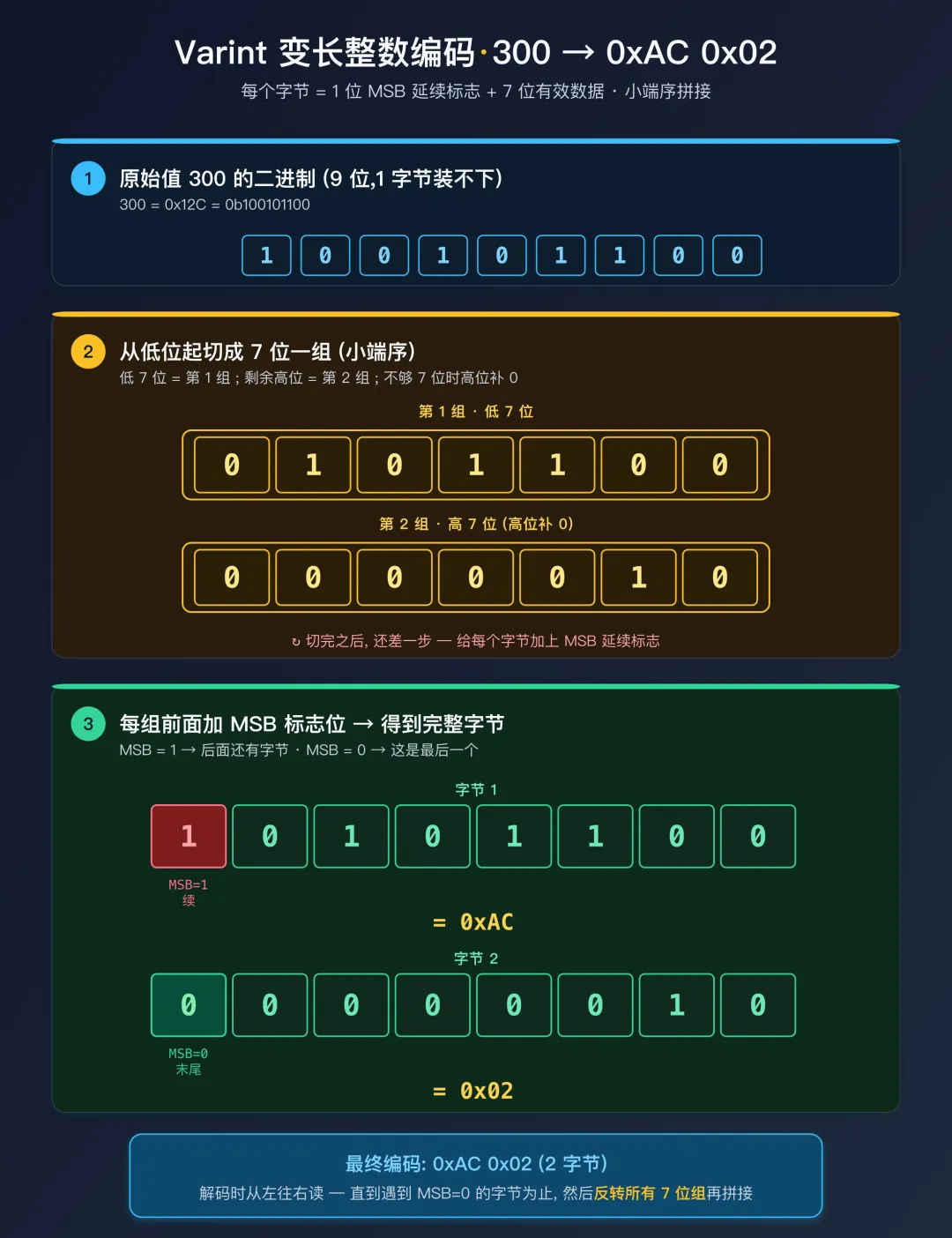 Varint 编码 300
2.4 ZigZag 编码
标准 Varint 编码对负数非常不友好——int32 的 -1 会被当作 0xFFFFFFFF 的无符号值来编码,需要 5 个字节(int64 的负数更是需要 10 个字节)。为解决这个问题,Protobuf 提供了 sint32 / sint64 类型,它们使用 ZigZag 编码先将有符号数映射为无符号数,再用 Varint 编码:
ZigZag 编码公式:
  ZigZag(n) = (n << 1) ^ (n >> 31)   // sint32 (算术右移)
  ZigZag(n) = (n << 1) ^ (n >> 63)   // sint64 (算术右移)

ZigZag 解码公式:
  原始值 = (encoded >>> 1) ^ -(encoded & 1)

映射表:
  原始值    →  ZigZag 编码值  →  Varint 字节数
   0        →  0              →  1 字节
  -1        →  1              →  1 字节
   1        →  2              →  1 字节
  -2        →  3              →  1 字节
   2        →  4              →  1 字节
  -64       →  127            →  1 字节
   64       →  128            →  2 字节
  2147483647 → 4294967294     →  5 字节
 -2147483648 → 4294967295     →  5 字节
逆向提示:当你在裸解码数据中看到一个 Varint 字段值为 1,它可能是真正的整数 1(int32),也可能是 ZigZag 编码的 -1(sint32)。仅从二进制数据无法区分 int32 和 sint32,必须结合业务语义(例如温度、坐标等可能为负的字段更可能是 sint)或反编译 writeTo 方法中的 writeInt32 vs writeSInt32 调用来判断。
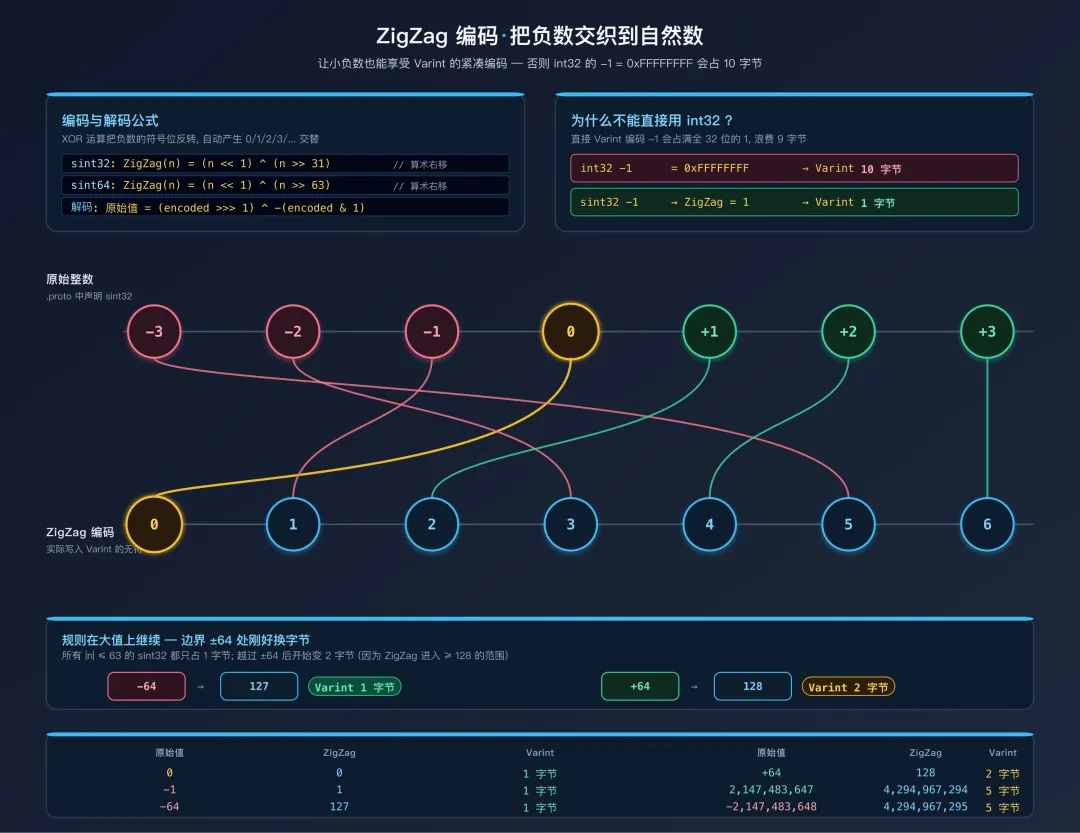 ZigZag 把负数交织到自然数
2.5 手动解码示例
原始十六进制数据:
08 96 01 12 07 74 65 73 74 69 6E 67
逐步解析:
第一个字段:
  Tag 字节: 08 = 0000_1000
    field_number = 0000_1000 >> 3 = 0000_0001 = 1
    wire_type    = 0000_1000 & 0x07 = 0 (Varint)
  Value: 96 01
    0x96 = 1_0010110  (MSB=1, 继续; 有效位: 0010110)
    0x01 = 0_0000001  (MSB=0, 结束; 有效位: 0000001)
    拼接: 0000001 ++ 0010110 = 10010110 = 150
  结果: field 1 = 150 (Varint)

第二个字段:
  Tag 字节: 12 = 0001_0010
    field_number = 0001_0010 >> 3 = 0000_0010 = 2
    wire_type    = 0001_0010 & 0x07 = 2 (Length-delimited)
  Length: 07 = 7 字节
  Value: 74 65 73 74 69 6E 67
    UTF-8 解码: t(74) e(65) s(73) t(74) i(69) n(6E) g(67) = "testing"
  结果: field 2 = "testing" (string)
对应 .proto 定义:
message Example {
  int32 id = 1;     // 值为 150
  string name = 2;  // 值为 "testing"
}
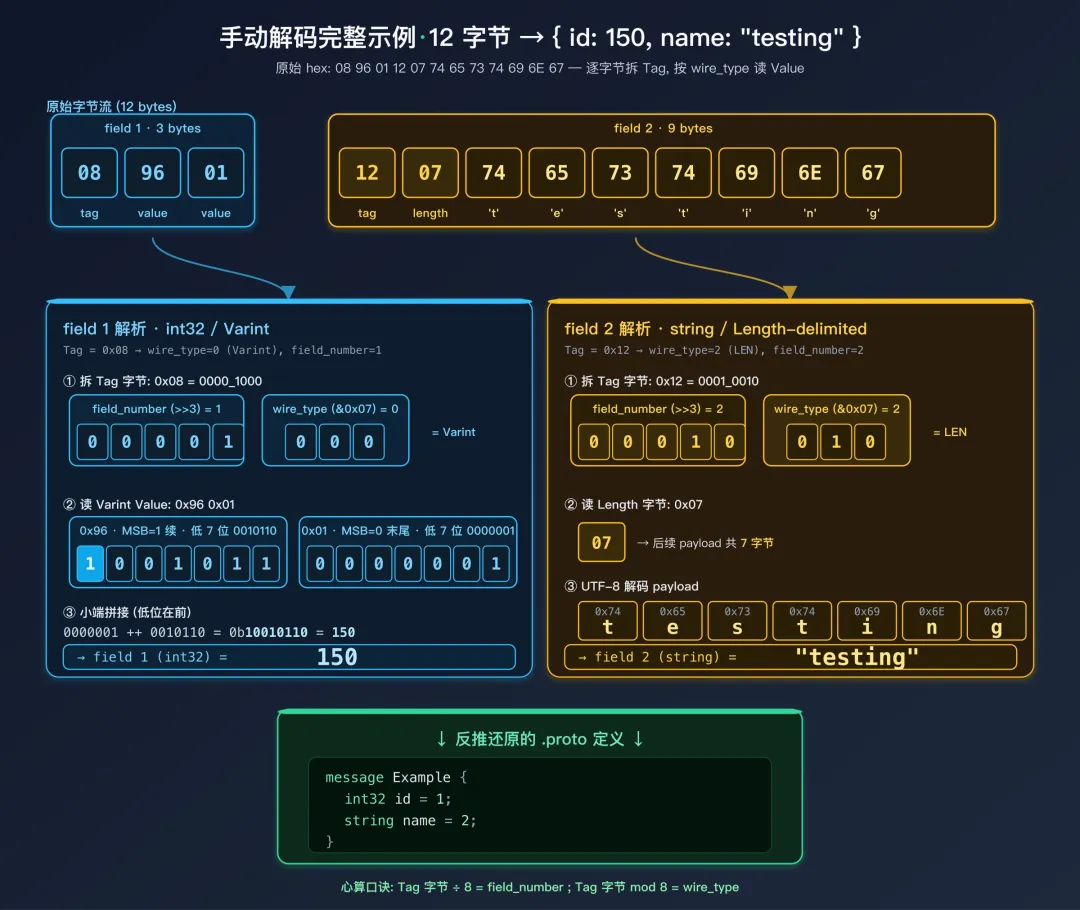 12 字节手动解码全过程
实际操作建议:手动解码看似繁琐,但在遇到解码工具报错或数据被截断时,手动逐字节分析是最可靠的手段。建议至少练习几次,直到能快速心算 Tag 的 field_number 和 wire_type。一个快速心算技巧:Tag 字节除以 8 得到 field_number,对 8 取余得到 wire_type。例如 0x12 = 18,18 / 8 = 2(field_number),18 % 8 = 2(wire_type = Length-delimited)。
三、识别 Protobuf 与 gRPC
在逆向分析中,第一步是判断目标应用是否使用了 Protobuf / gRPC。以下从静态分析和网络流量两个维度提供识别方法。
3.1 APK 中的类名特征
反编译 APK 后搜索以下关键字,命中任何一项即可确认使用了 Protobuf:
com.google.protobuf                 # 标准 protobuf-java 库
com.google.protobuf.nano            # Nano 精简版 (已废弃,但存量应用仍在用)
com.google.protobuf.lite            # Lite 版本,Android 最常见
com.squareup.wire                   # Square 的 Wire 库 (protobuf 的替代实现)
com.squareup.wire.Message           # Wire 库的 Message 基类
GeneratedMessageLite                # protobuf-lite 生成的消息类基类
GeneratedMessageV3                  # protobuf-java 完整版生成的消息类基类
MessageLite                         # Lite 版接口
CodedInputStream                    # Protobuf 的输入流解码器
CodedOutputStream                   # Protobuf 的输出流编码器
io.grpc                             # gRPC 框架
ManagedChannelBuilder               # gRPC Channel 构造器
AbstractStub                        # gRPC Stub 基类
在 smali 代码中,Protobuf 生成的消息类有非常明显的模式:
# protobuf-lite 生成的 message 类通常继承:
.super Lcom/google/protobuf/GeneratedMessageLite;

# 包含以下关键方法 (即使类名被混淆, 方法签名中的 protobuf 类型不会变):
.method public static parseFrom([B)Lcom/example/MyMessage;
    # 从 byte[] 反序列化, 参数签名 [B 表示 byte 数组
.method public writeTo(Lcom/google/protobuf/CodedOutputStream;)V
    # 序列化到 CodedOutputStream, 这是还原 .proto 的关键方法
.method public getSerializedSize()I
    # 返回序列化后的字节数, 用于预分配缓冲区

# 字段编号常量 (即使变量名被混淆, 值不会变):
.field public static final ID_FIELD_NUMBER:I = 0x1
.field public static final NAME_FIELD_NUMBER:I = 0x2
逆向技巧:即使应用经过 ProGuard/R8 混淆,Protobuf 库本身的类名(如 com.google.protobuf.CodedOutputStream)通常不会被混淆(因为它们是外部依赖库)。因此,搜索这些库类名是识别 Protobuf 最可靠的方式。
3.2 SO 层面的特征
如果 Protobuf 编译进了 native 层(C++ 实现),可以在 .so 文件中搜索符号和字符串:
# 在 .so 文件中搜索字符串
strings libnative.so | grep -i "protobuf"
# 搜索 C++ 命名空间下的 protobuf 符号
strings libnative.so | grep "google::protobuf"
# 搜索 .proto 文件路径残留 (有时编译时会嵌入源文件路径)
strings libnative.so | grep "\.proto"
常见的 C++ protobuf 导出符号:
google::protobuf::MessageLite::SerializeToString
google::protobuf::MessageLite::ParseFromString
google::protobuf::internal::WireFormatLite
google::protobuf::io::CodedInputStream
google::protobuf::io::CodedOutputStream
google::protobuf::DescriptorPool
注意:如果 .so 文件被 strip 过(去除符号表),nm 和 readelf 可能找不到符号。此时应改用 strings 搜索字符串——Protobuf 的 C++ 实现中包含大量错误信息字符串(如 "Message type ... has no field named ..."),这些字符串无法被 strip 去除。
3.3 .proto / .desc 文件残留
部分 APK 会直接打包 .proto 源文件(开发者疏忽或使用了动态加载 descriptor 的机制):
# 解压 APK 后搜索 .proto 源文件
find . -name "*.proto"
# 直接列出 APK 包内的 .proto 文件 (无需解压)
unzip -l app.apk | grep ".proto"
# 搜索 .desc / .pb 描述符文件 (编译后的 .proto 二进制格式)
find . -name "*.desc" -o -name "*.pb" -o -name "*.protobin"
# 搜索 assets 目录下的可疑二进制文件
find ./assets -name "*.bin" -o -name "*.dat"
意外收获:如果在 APK 中找到了 .proto 源文件或 .desc 描述符文件,逆向工作量将大幅减少——可以直接获得完整的消息定义,无需手动还原。在实际逆向中,约有 10~20% 的应用会不小心打包这些文件。
3.4 网络流量特征
抓包时,以下 Content-Type 值明确指向 Protobuf:
Content-Type: application/x-protobuf       # 标准 protobuf MIME 类型
Content-Type: application/protobuf          # 简写形式
Content-Type: application/grpc              # gRPC 框架 (底层使用 protobuf)
Content-Type: application/grpc+proto        # gRPC 显式声明使用 protobuf
Content-Type: application/vnd.google.protobuf  # Google 厂商特定 MIME
需要注意的「伪装」情况:
Content-Type: application/octet-stream      # 部分应用用通用二进制类型隐藏
Content-Type: application/x-binary          # 另一种通用二进制类型
Content-Type: application/json              # 极少数情况下, protobuf 被 Base64 编码后放在 JSON 字段中
经验提示:当你看到 application/octet-stream 且响应体不是常见的文件格式(如 ZIP、APK、图片)时,值得尝试用 protoc --decode_raw 解码一下——很多应用为了避免被轻易识别协议格式,会故意使用通用 Content-Type。
当 Content-Type 不明确时,可通过以下二进制数据特征判断:
- 首字节通常是
08:这是 field_number=1, wire_type=0(Varint)的 Tag,是 Protobuf 消息最常见的开头(大多数消息的第一个字段为整数/bool/enum) - 不以
{ 或 < 开头:区别于 JSON({ = 0x7B)和 XML(< = 0x3C) - 不包含大量
00 填充:区别于固定长度二进制协议 - 数据较紧凑:没有字段名、没有分隔符、没有引号
- Tag 字节的低 3 位只能是 0, 1, 2, 5:如果首字节的
byte & 0x07 不在 {0, 1, 2, 5} 中,则一定不是合法的 Protobuf
# 快速判断脚本
import subprocess
from typing import Optional


def looks_like_protobuf(data: bytes) -> bool:
    if not data or len(data) < 2:
        return False
    first_byte = data[0]
    wire_type = first_byte & 0x07
    field_number = first_byte >> 3

    if wire_type not in (0, 1, 2, 5):
        return False
    if field_number == 0:
        return False

    try:
        result = subprocess.run(
            ['protoc', '--decode_raw'],
            input=data,
            capture_output=True,
            timeout=5
        )
        return result.returncode == 0 and len(result.stdout) > 0
    except (FileNotFoundError, subprocess.TimeoutExpired):
        return True


def detect_protobuf_in_response(
    content_type: Optional[str], body: bytes
) -> str:
    if content_type:
        ct = content_type.lower()
        if 'grpc' in ct:
            return 'grpc'
        if 'protobuf' in ct or 'x-protobuf' in ct:
            return 'protobuf'
    if looks_like_protobuf(body):
        return 'protobuf'
    return 'unlikely'
3.5 gRPC 帧结构(重要)
gRPC(Google Remote Procedure Call)是基于 HTTP/2 + Protobuf 的 RPC 框架。它在 Protobuf 数据外层包了一个 5 字节的帧头:
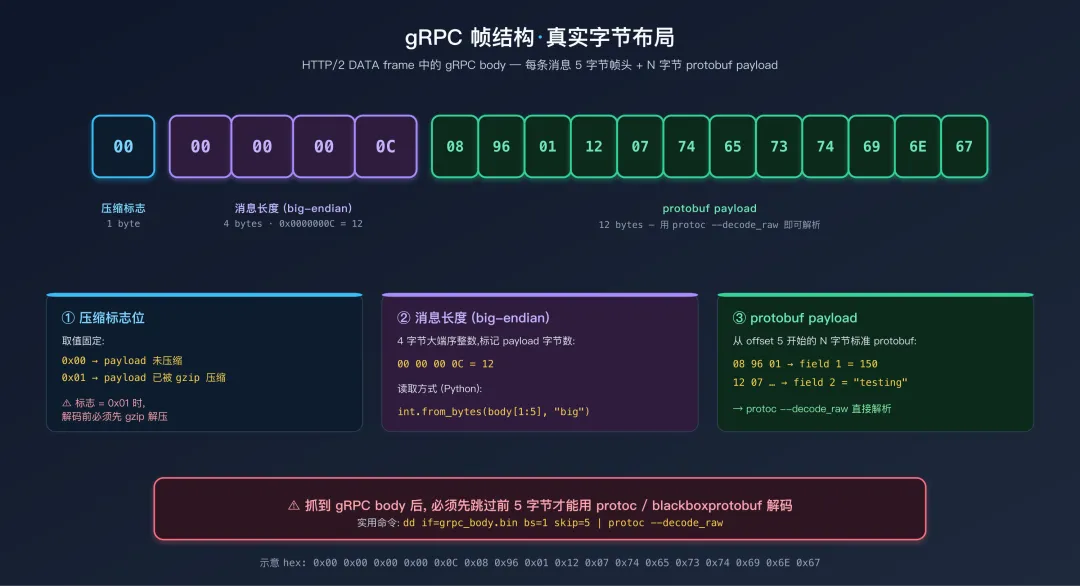 gRPC 帧结构
抓到 gRPC 的 body 后,必须先跳过前 5 字节才能用 protoc --decode_raw 等工具解码。如果压缩标志为 01,还需要先 gzip 解压。
四、gRPC 框架架构与拦截点选择
4.1 gRPC 与裸 Protobuf 的差别
裸 Protobuf 场景下,App 自己把 Message.toByteArray() 的结果通过 OkHttp 发出去——这种情况下 Hook 序列化层就够了(见后文 §七)。
但 gRPC 多了几层框架封装:
- 传输层:HTTP/2 多路复用 +
Content-Type: application/grpc + 5 字节帧头 - 调用层:4 种调用模式(一元 / 服务端流 / 客户端流 / 双向流),各自走不同的
ClientCalls 静态方法 - 元数据层:
Metadata(类似 HTTP Headers)承载认证 Token、签名、追踪 ID - 拦截器层:
ClientInterceptor 把 Metadata 注入到每个调用中
直接 Hook toByteArray 能拿到 Message 二进制,但看不到调用对应的 RPC 方法名,也看不到 Metadata 中的 Token——这正是 gRPC 拦截要额外解决的问题。
4.2 Android 上的五层拦截点
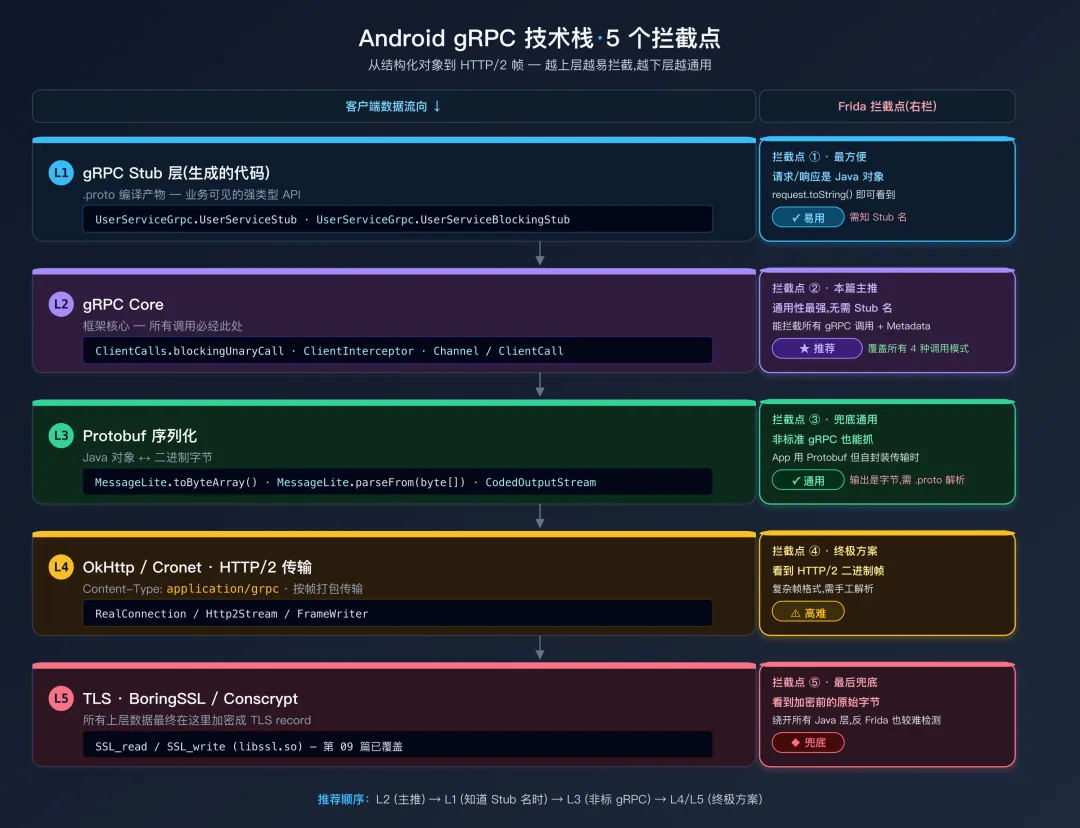 Android gRPC 技术栈与拦截点
| 拦截点 | 拿到什么 | 何时选它 |
|---|
| 1. Stub 层 | 业务 Java 对象,toString() 直接可读 | 知道具体 Stub 类名时最方便 |
| 2. ClientCalls(gRPC 框架层) | 请求/响应 Message + RPC 方法名 | 通用首选,不需知具体 Stub 类名 |
| 3. Protobuf 序列化层 | 仅 byte[] | App 不使用标准 gRPC 框架 |
| 4. OkHttp / Cronet | HTTP/2 frame,含所有 Metadata | 1-3 都失效时的终极方案(见第09篇) |
| 5. SSL_read/write | 加密前明文字节流 | 自定义传输栈时兜底(见第08篇) |
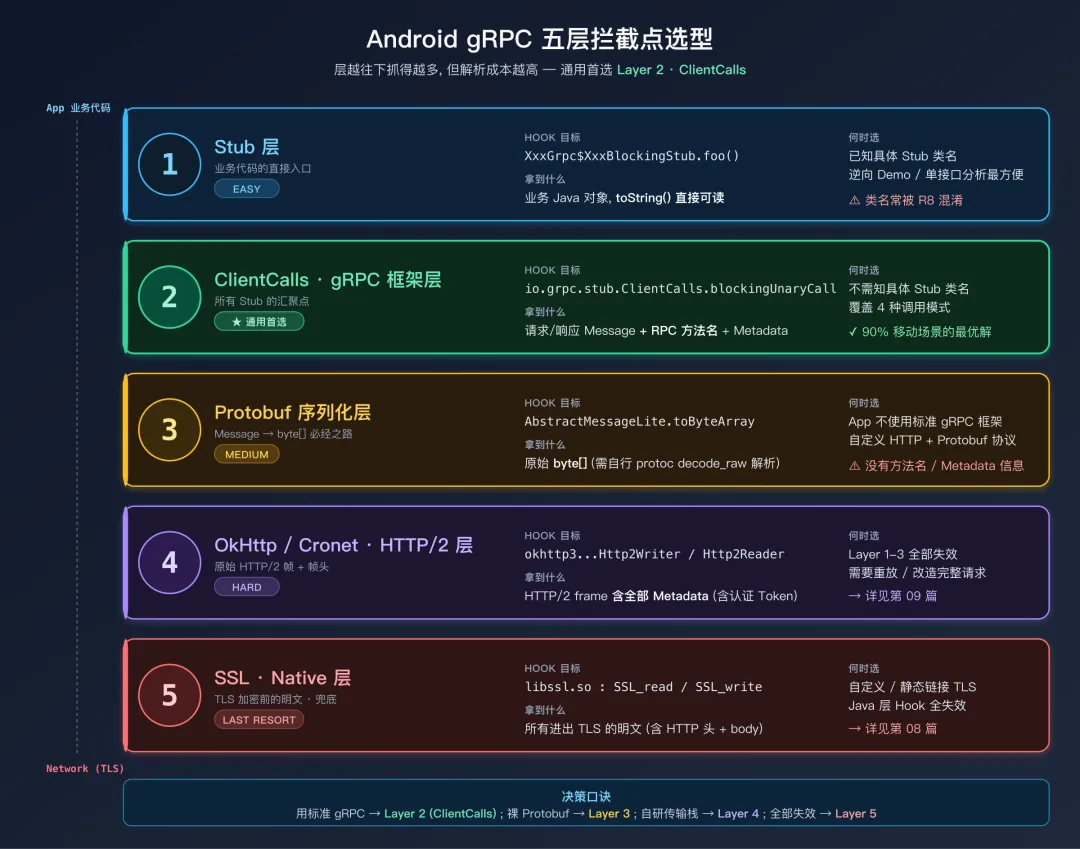 gRPC 各层拦截点对比
4.3 gRPC 的四种调用模式
| 模式 | 描述 | ClientCalls 方法 | 频率 |
|---|
| Unary(一元) | 1 请求 → 1 响应 | blockingUnaryCall / asyncUnaryCall | 最常见 |
| Server Streaming | 1 请求 → N 响应(流) | blockingServerStreamingCall / asyncServerStreamingCall | 推送场景 |
| Client Streaming | N 请求 → 1 响应 | asyncClientStreamingCall | 较少 |
| Bidirectional Streaming | N 请求 ↔ N 响应 | asyncBidiStreamingCall | 实时通信 |
移动 App 中 90% 以上的 gRPC 调用是 Unary 模式;Server Streaming 用于消息推送/增量同步;双向流多见于音视频信令。
五、方案一:Hook ClientCalls(gRPC 框架层)
io.grpc.stub.ClientCalls 是所有生成 Stub 代码最终都会调用的入口——拦截它就能覆盖所有调用模式。
5.1 同步一元调用 blockingUnaryCall
// grpc_capture.js
// 通用 gRPC 拦截脚本——覆盖全部调用模式
Java.perform(function() {

    var separator = "═".repeat(55);

    // ====== Hook Channel 创建:获取服务器地址 ======
    try {
        var Builder = Java.use("io.grpc.ManagedChannelBuilder");
        Builder.forAddress.overload("java.lang.String", "int")
            .implementation = function(host, port) {
            console.log("[gRPC] Channel 目标: " + host + ":" + port);
            return this.forAddress(host, port);
        };
        Builder.forTarget.overload("java.lang.String")
            .implementation = function(target) {
            console.log("[gRPC] Channel 目标: " + target);
            return this.forTarget(target);
        };
    } catch(e) {}

    // ====== 同步一元调用 ======
    try {
        var ClientCalls = Java.use("io.grpc.stub.ClientCalls");

        ClientCalls.blockingUnaryCall.overload(
            "io.grpc.Channel",
            "io.grpc.MethodDescriptor",
            "io.grpc.CallOptions",
            "java.lang.Object"
        ).implementation = function(channel, method, callOptions, request) {

            var fullMethod = method.getFullMethodName();

            console.log("\n" + separator);
            console.log("[gRPC Unary] " + fullMethod);
            console.log("─".repeat(55));
            printProtobufMessage("请求", request);

            var startTime = Date.now();
            var response;
            try {
                response = this.blockingUnaryCall(channel, method, callOptions, request);
            } catch(e) {
                console.log("[!] 调用失败: " + e.getMessage());
                console.log(separator + "\n");
                throw e;
            }

            var elapsed = Date.now() - startTime;
            printProtobufMessage("响应", response);
            console.log("[耗时] " + elapsed + "ms");
            console.log(separator + "\n");

            return response;
        };

        console.log("[OK] blockingUnaryCall");
    } catch(e) {
        console.log("[--] blockingUnaryCall: " + e.message);
    }

    // ... 异步与流式 Hook 见后续小节 ...
});
5.2 异步一元调用 + 代理 Observer 模式
异步调用的难点是:请求在 asyncUnaryCall 出发,响应在 StreamObserver.onNext 回调里到达。要拿到完整的请求-响应对,必须同时 Hook 这两个点——通过 Java.registerClass 创建一个代理 Observer,把回调转交给真正的 Observer 之前先打印日志。
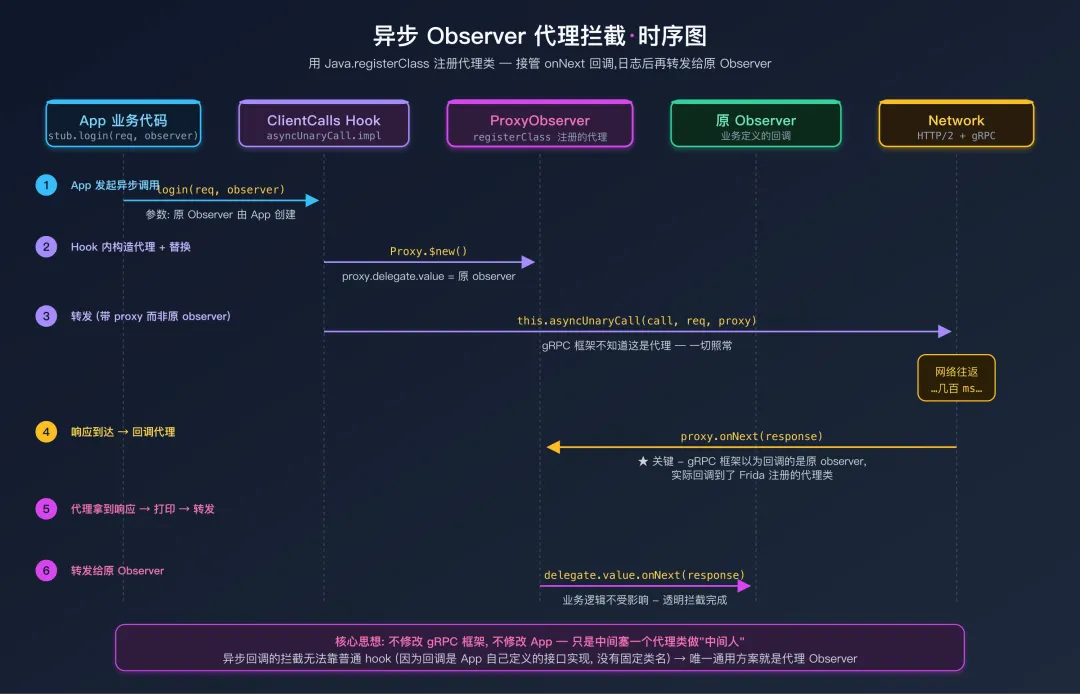 异步 Observer 代理拦截 6 步时序
// ===== 异步一元调用 =====
// 关键点:代理类必须在 Java.perform 顶层"只注册一次"——
// 如果放在 implementation 内部,第二次调用会因为类名重复而崩溃。
var ProxyObserverClass = null;  // 模块级缓存
function getOrCreateProxyObserver() {
    if (ProxyObserverClass !== null) return ProxyObserverClass;
    var StreamObserver = Java.use("io.grpc.stub.StreamObserver");
    ProxyObserverClass = Java.registerClass({
        name: "com.frida.GrpcUnaryProxyObserver",
        implements: [StreamObserver],
        fields: { delegate: "io.grpc.stub.StreamObserver" },
        methods: {
            onNext: function(response) {
                printProtobufMessage("异步响应", response);
                this.delegate.value.onNext(response);
            },
            onError: function(throwable) {
                console.log("[!] gRPC 错误: " + throwable.getMessage());
                this.delegate.value.onError(throwable);
            },
            onCompleted: function() { this.delegate.value.onCompleted(); }
        }
    });
    return ProxyObserverClass;
}

try {
    var ClientCalls = Java.use("io.grpc.stub.ClientCalls");

    ClientCalls.asyncUnaryCall.implementation = function(call, request, responseObserver) {
        console.log("\n[gRPC Async Unary] 请求:");
        printProtobufMessage("请求", request);

        var Proxy = getOrCreateProxyObserver();
        var proxy = Proxy.$new();
        proxy.delegate.value = responseObserver;

        this.asyncUnaryCall(call, request, proxy);
    };
    console.log("[OK] asyncUnaryCall");
} catch(e) {
    console.log("[--] asyncUnaryCall: " + e.message);
}
Java.registerClass 的几个坑:
- 类名全局唯一——同名再注册会抛
Class already defined。所以用模块级变量缓存,只注册一次。 - 传递原 Observer 的两种方式——用
fields 显式声明字段(如上)比闭包捕获更可靠(避免被 GC 提前回收)。 - 每次调用新建实例:注册的是「类」,每次拦截
$new() 一个新实例即可。
5.3 服务端流式调用(同步 & 异步)
同步版返回的是 Iterator<RespT>,每次 next() 取一条流消息。不能直接 hook 实例方法,需要 hook 这个 Iterator 的具体实现类——gRPC-Java 中是 io.grpc.stub.ClientCalls$BlockingResponseStream:
// ===== 同步服务端流式 =====
try {
    var ClientCalls = Java.use("io.grpc.stub.ClientCalls");

    ClientCalls.blockingServerStreamingCall.overload(
        "io.grpc.Channel", "io.grpc.MethodDescriptor",
        "io.grpc.CallOptions", "java.lang.Object"
    ).implementation = function(channel, method, callOptions, request) {
        var fullMethod = method.getFullMethodName();
        console.log("\n[gRPC Server Stream] " + fullMethod);
        printProtobufMessage("请求", request);
        return this.blockingServerStreamingCall(channel, method, callOptions, request);
    };

    // 真正拦截流消息——hook 内部 Iterator 的 next()
    var BlockingResp = Java.use("io.grpc.stub.ClientCalls$BlockingResponseStream");
    BlockingResp.next.implementation = function() {
        var msg = this.next();
        printProtobufMessage("  流消息", msg);
        return msg;
    };
    console.log("[OK] blockingServerStreamingCall");
} catch(e) {
    console.log("[--] blockingServerStreamingCall: " + e.message);
}
版本兼容提醒:BlockingResponseStream 是 gRPC-Java 内部类名,在不同版本中可能微调。如果 hook 失败,先用 Java.enumerateLoadedClassesSync 过滤 io.grpc.stub.ClientCalls$ 前缀确认实际类名。
异步流式调用复用代理 Observer 的思路,把计数器作为实例字段:
// ===== 异步服务端流式 =====
try {
    var ClientCalls = Java.use("io.grpc.stub.ClientCalls");
    var StreamObserver = Java.use("io.grpc.stub.StreamObserver");

    var StreamProxyClass = Java.registerClass({
        name: "com.frida.GrpcStreamProxyObserver",
        implements: [StreamObserver],
        fields: {
            delegate: "io.grpc.stub.StreamObserver",
            count: "int"
        },
        methods: {
            onNext: function(response) {
                this.count.value = this.count.value + 1;
                console.log("[Stream #" + this.count.value + "]");
                printProtobufMessage("  消息", response);
                this.delegate.value.onNext(response);
            },
            onError: function(throwable) {
                console.log("[Stream Error] " + throwable.getMessage());
                this.delegate.value.onError(throwable);
            },
            onCompleted: function() {
                console.log("[Stream 完成] 共 " + this.count.value + " 条");
                this.delegate.value.onCompleted();
            }
        }
    });

    ClientCalls.asyncServerStreamingCall.implementation = function(call, request, observer) {
        console.log("\n[gRPC Async Server Stream]");
        printProtobufMessage("请求", request);

        var proxy = StreamProxyClass.$new();
        proxy.delegate.value = observer;
        proxy.count.value = 0;
        this.asyncServerStreamingCall(call, request, proxy);
    };
    console.log("[OK] asyncServerStreamingCall");
} catch(e) {
    console.log("[--] asyncServerStreamingCall: " + e.message);
}
客户端流 / 双向流的 Hook 思路完全一样:asyncClientStreamingCall(call, observer) 返回值本身就是一个 Observer——你需要代理这个返回的 Observer 来观察客户端发出的每条消息。双向流则是请求和响应都用代理 Observer。考虑到这两种模式在 App 中极少,本篇略过示例代码,思路对照异步流即可。
5.4 辅助函数 printProtobufMessage
function printProtobufMessage(label, message) {
    if (message === null || message === undefined) {
        console.log("[" + label + "] null");
        return;
    }
    console.log("[" + label + "] 类型: " + message.getClass().getName());

    var text = message.toString();
    if (text.length === 0) {
        console.log("  (空消息或 protobuf-lite 未生成 toString)");
        return;
    }

    var maxLen = 2000;
    if (text.length > maxLen) text = text.substring(0, maxLen) + "\n  ...(截断)";
    text.split("\n").forEach(function(line) { console.log("  " + line); });
}
toString() 输出为空? 这是 protobuf-lite 的典型现象——lite 版本为减小体积去掉了 TextFormat 工具类。诊断方法:在反编译代码中搜索 FileDescriptor 或 DescriptorProto,找到了说明是完整版,没找到就是 lite 版本。lite 版本下需要走 §七的字段级 Hook(CodedOutputStream.writeXxx)或者反射访问 getter 方法。
六、方案二:Hook gRPC Metadata(认证 Token、签名)
6.1 什么是 gRPC Metadata
类似 HTTP Headers,键值对形式的附加信息,App 通常在 Metadata 中传递:
authorization: Bearer eyJhbGc...(认证 Token)x-device-id: abc123x-request-sign: hmac-sha256:...(请求签名)x-trace-id: <uuid>
这些信息在 Stub 层看不到——它们由 ClientInterceptor 在调用过程中注入到 Metadata 对象,最终随 HTTP/2 帧发送。
6.2 Hook Metadata.put(请求侧)
// grpc_metadata.js
Java.perform(function() {
    try {
        var Metadata = Java.use("io.grpc.Metadata");
        // Metadata.put 目前只有一个签名: <T> void put(Key<T> key, T value)
        Metadata.put.overload("io.grpc.Metadata$Key", "java.lang.Object")
            .implementation = function(key, value) {
            console.log("[gRPC Metadata] " + key.name() + ": " + value);
            return this.put(key, value);
        };
        console.log("[OK] Metadata.put");
    } catch(e) {
        console.log("[--] Metadata.put: " + e.message);
    }
});
6.3 Hook ClientInterceptor(先找实现类,再 Hook interceptCall)
很多 App 把 Token 注入逻辑封装成专门的 AuthInterceptor。Hook 它有两种思路:
- 首选:jadx 静态搜定位——在反编译代码中搜
interceptCall( 或 authorization / Bearer 关键字,10 秒就能锁定具体的 AuthInterceptor 类名,然后 Java.use(className).interceptCall.implementation = ... 精准 Hook。这是实战首选,**直接跳到本节末的"单点 Hook 模板"**即可。 - 兜底:动态扫描所有实现类——完全不知道类名时使用。注意
Java.choose("io.grpc.ClientInterceptor", ...) 对接口不工作(ART 不维护按接口索引的活实例表,onMatch 一次都不会触发)。正确做法是先用 enumerateLoadedClassesSync + isAssignableFrom 筛出实现类,再对实现类 Hook interceptCall:
// 仅在拦截器已经被构造之后才有效
// 建议:先让 App 跑起来打开任意页面,再 attach 注入此脚本
Java.perform(function() {
    var Interceptor = Java.use("io.grpc.ClientInterceptor");

    // ① 找出所有实现了 ClientInterceptor 的具体类(一次性, 比逐类 try Java.use 快很多)
    var implClasses = [];
    Java.enumerateLoadedClassesSync().forEach(function(name) {
        if (name.indexOf("io.grpc.") === 0) return;        // 排除 gRPC 自带
        if (name.indexOf("$") !== -1) return;              // 排除内部类
        try {
            var Cls = Java.use(name);
            if (Interceptor.class.isAssignableFrom(Cls.class)) {
                implClasses.push(name);
            }
        } catch(e) {}
    });
    console.log("[*] 发现 ClientInterceptor 实现类 " + implClasses.length + " 个");

    // ② 对具体类 Hook interceptCall(hook 接口方法不稳, 必须 hook 实现)
    implClasses.forEach(function(className) {
        try {
            var Cls = Java.use(className);
            Cls.interceptCall.implementation = function(method, callOptions, next) {
                console.log("[Interceptor] " + className +
                            " → " + method.getFullMethodName());
                return this.interceptCall(method, callOptions, next);
            };
            console.log("[OK] Hook " + className);
        } catch(e) {
            console.log("[--] " + className + ": " + e.message);
        }
    });
});
单点 Hook 模板(已知类名时首选):
Java.perform(function() {
    var Cls = Java.use("com.example.app.grpc.AuthTokenInterceptor");
    Cls.interceptCall.implementation = function(method, callOptions, next) {
        console.log("[AuthInterceptor] → " + method.getFullMethodName());
        return this.interceptCall(method, callOptions, next);
    };
});
如果连 Hook 都没触发:说明 Interceptor 还没被实例化(懒加载场景)。让 App 先发起一次 gRPC 调用再 attach;或干脆改用 Java.classFactory 监听类加载事件,在拦截器类被加载后立即 Hook。
6.4 响应 Metadata 拦截
服务端可能在响应头中下发新 Token 或限流信息:
try {
    var Listener = Java.use(
        "io.grpc.ForwardingClientCallListener$SimpleForwardingClientCallListener");
    Listener.onHeaders.implementation = function(headers) {
        console.log("[gRPC 响应头]\n  " + headers.toString());
        return this.onHeaders(headers);
    };
} catch(e) {}
七、方案三:Hook Protobuf 序列化层(通用,兼容非 gRPC)
当 App 不使用标准 gRPC 框架(没有 io.grpc 包),但使用了 Protobuf 编码数据通过自定义 HTTP 客户端发送时,方案一/二无效。这时需要在 Protobuf 的序列化/反序列化层拦截——这套方案不依赖 gRPC,对所有使用 com.google.protobuf.* 库的应用都适用。
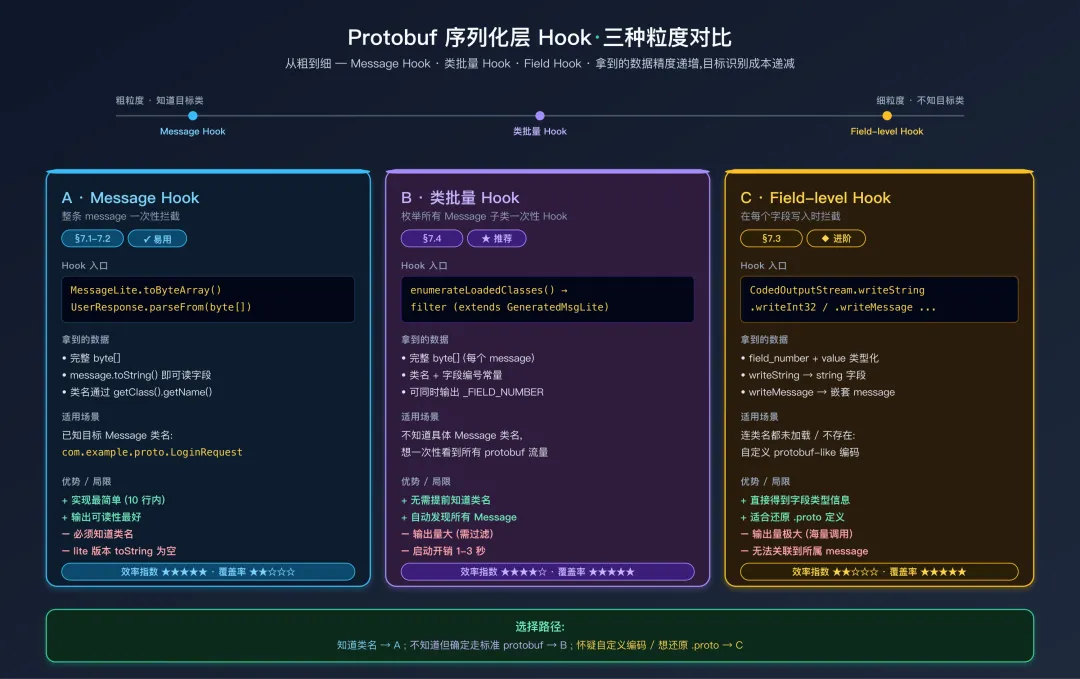 三种 Protobuf 序列化层 Hook 粒度对比
本节按粒度从粗到细介绍三种方法,读者可先看上图选定方案再读对应代码。
7.1 Hook toByteArray(拦截序列化)
// hook_protobuf_writeto.js
// 拦截所有 protobuf message 的序列化, 捕获序列化后的二进制数据
Java.perform(function() {

    // Hook GeneratedMessageLite.toByteArray (protobuf-lite 最常用的序列化方法)
    var MessageLite = Java.use("com.google.protobuf.GeneratedMessageLite");

    MessageLite.toByteArray.implementation = function() {
        var result = this.toByteArray();
        var className = this.getClass().getName();

        // 过滤系统内部调用
        if (className.indexOf("com.google.protobuf") !== -1 ||
            className.indexOf("io.grpc") !== -1) {
            return result;
        }

        console.log("\n[*] Protobuf Serialize: " + className);
        console.log("[*] Size: " + result.length + " bytes");

        // 将 byte[] 转为十六进制字符串 (限制最多打印 512 字节, 避免刷屏)
        var hex = "";
        for (var i = 0; i < result.length && i < 512; i++) {
            hex += ("0" + (result[i] & 0xFF).toString(16)).slice(-2) + " ";
        }
        console.log("[*] Hex: " + hex.trim());

        // 尝试打印 toString (完整版 Message 类会生成可读输出)
        try {
            console.log("[*] Content: " + this.toString());
        } catch(e) {}

        // 将原始二进制数据保存到文件, 方便后续用 protoc 离线分析
        var ts = Date.now();
        var path = "/data/local/tmp/pb_out_" + ts + ".bin";
        var fos = Java.use("java.io.FileOutputStream").$new(path);
        fos.write(result);
        fos.close();
        console.log("[*] Saved to: " + path);

        return result;
    };
});
完整版还是 Lite 版:如果 App 使用完整版 protobuf-java(继承 GeneratedMessageV3),把上面的 GeneratedMessageLite 替换成 GeneratedMessageV3 即可。两者可同时 Hook。
7.2 Hook parseFrom(拦截反序列化)
parseFrom 是每个具体 Message 子类的静态方法,无法在基类上统一 Hook。两种策略:
策略 A:Hook 特定的目标 Message 类
// hook_protobuf_parsefrom.js
Java.perform(function() {

    var TargetMessage = Java.use("com.example.app.proto.UserResponse");

    TargetMessage.parseFrom.overload('[B').implementation = function(data) {
        console.log("\n[*] parseFrom called on: " + this.getClass().getName());

        // 打印原始二进制数据
        var hex = "";
        for (var i = 0; i < data.length && i < 512; i++) {
            hex += ("0" + (data[i] & 0xFF).toString(16)).slice(-2) + " ";
        }
        console.log("[*] Raw data (" + data.length + " bytes): " + hex.trim());

        // 保存原始数据到文件
        var path = "/data/local/tmp/pb_in_" + Date.now() + ".bin";
        var fos = Java.use("java.io.FileOutputStream").$new(path);
        fos.write(data);
        fos.close();

        // 调用原方法
        var result = this.parseFrom(data);
        try {
            console.log("[*] Parsed: " + result.toString());
        } catch(e) {}

        return result;
    };
});
策略 B:通过 enumerateLoadedClasses 找到所有 App Message 类批量 Hook
Java.perform(function() {
    var protoClasses = [];

    Java.enumerateLoadedClassesSync().forEach(function(name) {
        if (name.indexOf("com.google.protobuf") !== -1) return;
        if (name.indexOf("io.grpc") !== -1) return;
        try {
            var klass = Java.use(name);
            var superName = klass.class.getSuperclass().getName();
            if (superName.indexOf("GeneratedMessage") !== -1) {
                protoClasses.push(name);
            }
        } catch(e) {}
    });

    console.log("[*] 发现 " + protoClasses.length + " 个 App Protobuf Message 类");

    protoClasses.forEach(function(className) {
        try {
            var klass = Java.use(className);
            klass.parseFrom.overload("[B").implementation = function(data) {
                var result = this.parseFrom(data);
                console.log("\n[*] parseFrom: " + className.split(".").pop());
                console.log("  输入: " + data.length + " bytes");
                try { console.log("  " + result.toString()); } catch(e) {}
                return result;
            };
        } catch(e) {}
    });
});
parseFrom 有多个重载版本(byte[]、CodedInputStream、InputStream 等)。如果 Hook byte[] 版本没有触发,尝试 Hook 其他重载。可以用 TargetMessage.parseFrom.overloads 查看所有重载签名。
7.3 Hook CodedOutputStream(字段级精细拦截)
上面两节拦截的是整个 Message 级别的序列化/反序列化。如果需要精确到每个字段的写入,可以 Hook CodedOutputStream 的各个 writeXxx 方法:
// hook_coded_output.js
Java.perform(function() {

    var CodedOutputStream = Java.use("com.google.protobuf.CodedOutputStream");

    CodedOutputStream.writeString.implementation = function(fieldNumber, value) {
        console.log("[PB] writeString field=" + fieldNumber + " value=\"" + value + "\"");
        return this.writeString(fieldNumber, value);
    };

    CodedOutputStream.writeInt32.implementation = function(fieldNumber, value) {
        console.log("[PB] writeInt32 field=" + fieldNumber + " value=" + value);
        return this.writeInt32(fieldNumber, value);
    };

    CodedOutputStream.writeInt64.implementation = function(fieldNumber, value) {
        console.log("[PB] writeInt64 field=" + fieldNumber + " value=" + value);
        return this.writeInt64(fieldNumber, value);
    };

    CodedOutputStream.writeBool.implementation = function(fieldNumber, value) {
        console.log("[PB] writeBool field=" + fieldNumber + " value=" + value);
        return this.writeBool(fieldNumber, value);
    };

    CodedOutputStream.writeEnum.implementation = function(fieldNumber, value) {
        console.log("[PB] writeEnum field=" + fieldNumber + " value=" + value);
        return this.writeEnum(fieldNumber, value);
    };

    CodedOutputStream.writeBytes.implementation = function(fieldNumber, value) {
        console.log("[PB] writeBytes field=" + fieldNumber + " len=" + value.size());
        return this.writeBytes(fieldNumber, value);
    };

    CodedOutputStream.writeMessage.implementation = function(fieldNumber, value) {
        console.log("[PB] writeMessage field=" + fieldNumber +
                    " class=" + value.getClass().getName());
        return this.writeMessage(fieldNumber, value);
    };
});
最佳用途:这种字段级 Hook 特别适合在不知道 Message 类名的情况下使用——你不需要知道具体是哪个 Message,只需要知道所有 Protobuf 字段最终都会经过 CodedOutputStream 写出。输出结果可以直接用于还原 .proto 定义(因为 writeXxx 方法名直接映射到 proto 类型,对照表见 §九)。
7.4 批量枚举所有 Protobuf Message 类
在不知道目标 Message 类名的情况下,可以枚举 APK 中所有已加载的 Protobuf Message 类及其字段信息:
// enum_protobuf_classes.js
Java.perform(function() {

    Java.enumerateLoadedClasses({
        onMatch: function(className) {
            try {
                if (className.indexOf("$") !== -1) return;  // 跳过 Builder 等内部类

                var clz = Java.use(className);
                var superClass = clz.class.getSuperclass();

                if (superClass != null) {
                    var superName = superClass.getName();
                    if (superName.indexOf("GeneratedMessageLite") !== -1 ||
                        superName.indexOf("GeneratedMessageV3") !== -1 ||
                        superName.indexOf("GeneratedMessage") !== -1) {

                        console.log("[PROTO] " + className);

                        var fields = clz.class.getDeclaredFields();
                        for (var i = 0; i < fields.length; i++) {
                            var name = fields[i].getName();
                            if (name.endsWith("_FIELD_NUMBER")) {
                                fields[i].setAccessible(true);
                                var val = fields[i].getInt(null);
                                console.log("  " + name + " = " + val);
                            }
                        }
                    }
                }
            } catch(e) {}
        },
        onComplete: function() { console.log("[*] 枚举完成"); }
    });
});
输出示例:
[PROTO] com.example.app.proto.UserInfo
  ID_FIELD_NUMBER = 1
  NAME_FIELD_NUMBER = 2
  EMAIL_FIELD_NUMBER = 3
[PROTO] com.example.app.proto.LoginRequest
  TOKEN_FIELD_NUMBER = 1
  DEVICE_ID_FIELD_NUMBER = 2
这些信息结合 writeTo 的 Hook 输出,足以还原出完整的 .proto 定义(见 §九)。
7.5 篡改请求
通过 Hook Builder 的 build() 方法,可以在请求发出前篡改字段值——测试支付逻辑、权限校验、绕过客户端检查等场景中非常有用:
// tamper_protobuf.js
Java.perform(function() {

    var Builder = Java.use("com.example.app.proto.PurchaseRequest$Builder");

    Builder.build.implementation = function() {
        console.log("[*] Original price: " + this.getPrice());
        console.log("[*] Original item_id: " + this.getItemId());

        // 篡改价格为 0
        this.setPrice(0);
        console.log("[*] Tampered price: " + this.getPrice());

        return this.build();
    };
});
防御视角:这也说明了为什么服务端不能信任客户端提交的价格字段——即使使用了 Protobuf 二进制编码,攻击者仍然可以通过 Frida 轻松篡改任何字段。价格、数量等敏感字段应在服务端重新计算和校验。
7.6 Frida + PC 端 protoc 实时解码联动
设备端把 Protobuf 二进制数据通过 send() 发送到 PC 端,由 Python 脚本接收并实时解码——实现「边操作边解码」的交互式分析:
设备端 Frida 脚本:
// realtime_decode.js
Java.perform(function() {

    var MessageLite = Java.use("com.google.protobuf.GeneratedMessageLite");

    MessageLite.toByteArray.implementation = function() {
        var result = this.toByteArray();
        var className = this.getClass().getName();

        var Base64 = Java.use("android.util.Base64");
        var b64 = Base64.encodeToString(result, 0);  // 0 = NO_WRAP

        send({
            type: "protobuf",
            class: className,
            data: b64
        });

        return result;
    };
});
PC 端 Python 接收脚本:
import frida
import base64
import subprocess
import sys


def on_message(message: dict, data: bytes) -> None:
    if message['type'] == 'send' and message['payload'].get('type') == 'protobuf':
        cls = message['payload']['class']
        raw = base64.b64decode(message['payload']['data'])

        result = subprocess.run(
            ['protoc', '--decode_raw'],
            input=raw,
            capture_output=True,
            text=True,
            timeout=5
        )

        print(f"\n{'=' * 60}")
        print(f"Class: {cls}")
        print(f"Size: {len(raw)} bytes")
        print(f"Decoded:\n{result.stdout}")
    elif message['type'] == 'error':
        print(f"[ERROR] {message['stack']}")


def main() -> None:
    device = frida.get_usb_device()
    session = device.attach("com.example.app")

    with open("realtime_decode.js") as f:
        script = session.create_script(f.read())

    script.on('message', on_message)
    script.load()

    print("[*] Listening for protobuf messages... Press Ctrl+C to quit.")
    try:
        sys.stdin.read()
    except KeyboardInterrupt:
        session.detach()


if __name__ == '__main__':
    main()
进阶优化:可以在 PC 端用 blackboxprotobuf 替代 protoc --decode_raw,并维护一个 typedef 映射表,实现带字段名的实时解码。还可以把解码结果写入 SQLite 或 JSON 文件供后续批量分析。
八、离线解码 Protobuf 数据
拿到了 Protobuf 二进制数据之后(无论来自 Frida 保存的 .bin、抓包工具导出、还是手动复制的 hex),下一步就是把它解码成可读结构。根据手头信息的完整程度(有无 .proto 文件),方法从「裸解码」到「精确解码」有多个层次。
8.1 protoc --decode_raw
最基础的裸解码方式,无需 .proto 文件,只需安装 protoc 即可:
# 从二进制文件直接解码
protoc --decode_raw < message.bin

# 从十六进制字符串解码 (先转二进制再解码)
echo "089601120774657374696e67" | xxd -r -p | protoc --decode_raw

# 输出结果:
# 1: 150
# 2: "testing"

# 从 Base64 编码数据解码
echo "CJYBEgd0ZXN0aW5n" | base64 -d | protoc --decode_raw

# 如果有 .proto 文件, 可以精确解码 (带字段名和类型)
protoc --decode=example.Example -I ./protos/ example.proto < message.bin
# 输出:
# id: 150
# name: "testing"
裸解码的局限性:
- 无法区分
int32 / sint32 / uint32——它们都是 Wire Type 0 - 无法区分
string / bytes / embedded message——它们都是 Wire Type 2 - 不知道字段名,只有 field number(
1: 150 而不是 id: 150) - 无法识别
repeated 字段——相同 field number 的多次出现会被分别显示 - 无法识别
packed repeated 字段——packed 数据会被当作一整段 bytes 显示
实用技巧:当 protoc --decode_raw 输出中某个 Length-delimited 字段显示为乱码(如 2: "\001\002\003..."),通常说明它是一个嵌套 message 或 bytes 字段。你可以将该字段的原始数据单独提取出来,再次用 protoc --decode_raw 解码,如果成功则确认是嵌套 message。
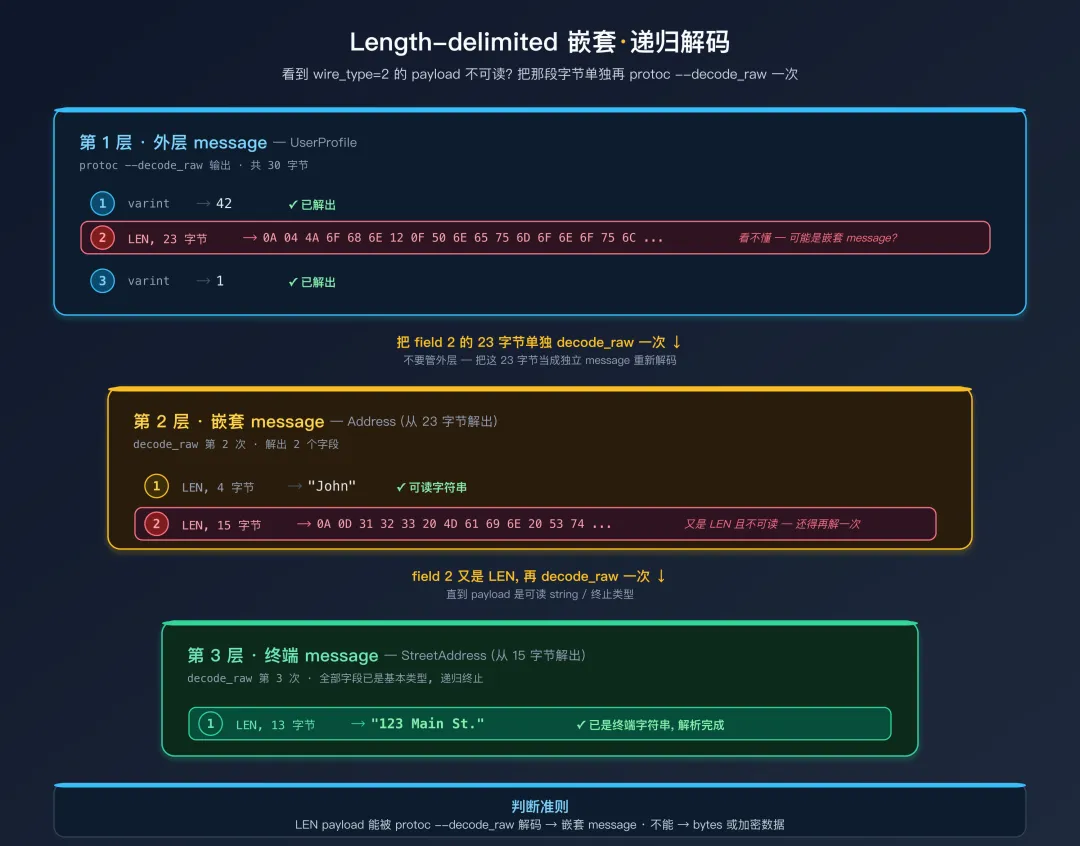 Length-delimited 字段递归解码
8.2 Python 递归裸解码
当需要编程处理大量 Protobuf 数据时,可以用 Python 的 protobuf 库实现递归裸解码:
from google.protobuf.internal.decoder import _DecodeVarint
from google.protobuf.internal.wire_format import (
    WIRETYPE_VARINT,
    WIRETYPE_FIXED64,
    WIRETYPE_LENGTH_DELIMITED,
    WIRETYPE_FIXED32,
)
import struct
from typing import Any


def decode_protobuf_raw(data: bytes, depth: int = 0) -> list[dict[str, Any]]:
    """递归解码 protobuf 二进制数据 (无需 .proto 文件)。"""
    results: list[dict[str, Any]] = []
    pos = 0

    while pos < len(data):
        tag, new_pos = _DecodeVarint(data, pos)
        field_number = tag >> 3
        wire_type = tag & 0x07
        pos = new_pos

        if wire_type == WIRETYPE_VARINT:
            value, pos = _DecodeVarint(data, pos)
            results.append({
                'field': field_number,
                'wire_type': 'varint',
                'value': value,
                'zigzag': (value >> 1) ^ -(value & 1),
                'as_bool': bool(value) if value in (0, 1) else None,
            })

        elif wire_type == WIRETYPE_FIXED64:
            raw = data[pos:pos + 8]
            value = struct.unpack('<q', raw)[0]
            double_value = struct.unpack('<d', raw)[0]
            pos += 8
            results.append({
                'field': field_number,
                'wire_type': 'fixed64',
                'value': value,
                'as_double': double_value,
            })

        elif wire_type == WIRETYPE_LENGTH_DELIMITED:
            length, pos = _DecodeVarint(data, pos)
            value = data[pos:pos + length]
            pos += length

            entry: dict[str, Any] = {
                'field': field_number,
                'wire_type': 'length_delimited',
                'length': length,
                'raw': value.hex(),
            }

            # 尝试解读为 UTF-8 字符串
            try:
                decoded_str = value.decode('utf-8')
                if decoded_str.isprintable() or '\n' in decoded_str:
                    entry['as_string'] = decoded_str
            except UnicodeDecodeError:
                pass

            # 尝试作为嵌套 message 递归解码
            try:
                nested = decode_protobuf_raw(value, depth + 1)
                if nested:
                    entry['as_message'] = nested
            except Exception:
                pass

            results.append(entry)

        elif wire_type == WIRETYPE_FIXED32:
            raw = data[pos:pos + 4]
            value = struct.unpack('<i', raw)[0]
            float_value = struct.unpack('<f', raw)[0]
            pos += 4
            results.append({
                'field': field_number,
                'wire_type': 'fixed32',
                'value': value,
                'as_float': float_value,
            })
        else:
            break

    return results


# 使用示例
if __name__ == '__main__':
    data = bytes.fromhex("089601120774657374696e67")
    for field in decode_protobuf_raw(data):
        print(field)
8.3 Blackboxprotobuf(交互式类型修正)
blackboxprotobuf 是 NCC Group 开发的专为逆向设计的 Python 库,最大亮点是支持交互式类型修正——你可以在裸解码的基础上手动指定每个字段的真实类型,逐步逼近真实的 .proto 定义:
pip install blackboxprotobuf
import blackboxprotobuf

# 第一步: 自动裸解码 (类型由库推断)
data = bytes.fromhex("089601120774657374696e67")
message, typedef = blackboxprotobuf.decode_message(data)

print(message)
# {'1': 150, '2': b'testing'}

print(typedef)
# {'1': {'type': 'int', 'name': ''}, '2': {'type': 'bytes', 'name': ''}}

# 第二步: 手动修正类型定义
typedef['2']['type'] = 'string'
typedef['2']['name'] = 'username'

# 第三步: 用修正后的类型定义重新解码
message, _ = blackboxprotobuf.decode_message(data, typedef)
print(message)
# {'1': 150, 'username': 'testing'}

# 第四步: 构造/篡改请求 (用修正后的 typedef 编码)
new_message = {'1': 999, 'username': 'hacked'}
encoded = blackboxprotobuf.encode_message(new_message, typedef)
print(encoded.hex())
# 输出篡改后的 protobuf 二进制数据
进阶用法:blackboxprotobuf 支持将 typedef 保存为 JSON 文件,方便在多次分析间复用。
8.4 protobuf-inspector(彩色终端输出)
protobuf-inspector 提供彩色的、层级化的终端输出,特别适合快速浏览复杂的嵌套 Protobuf 数据:
pip install protobuf-inspector

# 从标准输入读取二进制数据
protobuf_inspector < message.bin

# 配合 xxd 从十六进制解码
echo "089601120774657374696e67" | xxd -r -p | protobuf_inspector

# 输出 (带颜色和缩进):
# root:
#   1 <varint> = 150
#   2 <chunk> = "testing"
与 protoc 的区别:protobuf-inspector 的输出更适合人类阅读(有颜色和清晰的类型标注),而 protoc --decode_raw 的输出更适合脚本处理。快速分析阶段推荐 protobuf-inspector,自动化流水线推荐 protoc。
8.5 Burp Suite 插件
对于使用 Burp Suite 进行 Web/API 测试的安全研究人员,以下插件可以在抓包界面中直接解码和编辑 Protobuf 数据:
| 插件 | 说明 | 特点 |
|---|
| Protobuf Decoder | 自动解码 protobuf 请求/响应 | 支持裸解码,无需 .proto |
| PBTK (Protobuf Toolkit) | 综合工具包 | 支持从 APK 提取 .proto 后精确解码 |
| protobuf-editor | 在 Burp 中编辑 protobuf | 支持修改字段值后重新编码 |
推荐工作流:先用 PBTK 从 APK 提取 .proto 定义,再将提取的 .proto 文件配置到 Burp 的 Protobuf Decoder 插件中,即可在抓包界面中看到带字段名的精确解码结果,大幅提升分析效率。
8.6 mitmproxy 自动解码 gRPC 流量
如果不想注入 Frida(如真机不便 root、或仅做流量回归分析),可以从 HTTP/2 层抓 gRPC 流量。前置条件是 SSL Pinning 已绕过(见第08篇)。
# decode_grpc.py
# 用法: mitmproxy -s decode_grpc.py -p 8080
# 依赖: pip install blackboxprotobuf mitmproxy
import gzip
import blackboxprotobuf
from mitmproxy import http


def _strip_grpc_frames(body: bytes):
    """gRPC body 可能有多个连续帧,逐帧解析。"""
    offset = 0
    while offset + 5 <= len(body):
        compressed = body[offset]
        length = int.from_bytes(body[offset + 1:offset + 5], "big")
        payload = body[offset + 5:offset + 5 + length]
        if compressed:
            payload = gzip.decompress(payload)
        yield payload
        offset += 5 + length


class GrpcDecoder:
    def response(self, flow: http.HTTPFlow):
        ct = flow.request.headers.get("content-type", "")
        if "grpc" not in ct:
            return
        print(f"\n{'=' * 60}\ngRPC: {flow.request.path}")
        for label, body in [("请求", flow.request.content),
                            ("响应", flow.response.content if flow.response else b"")]:
            if not body:
                continue
            for payload in _strip_grpc_frames(body):
                try:
                    decoded, _ = blackboxprotobuf.decode_message(payload)
                    print(f"\n{label}: {decoded}")
                except Exception as e:
                    print(f"{label} 解码失败: {e}")
        print(f"{'=' * 60}\n")


addons = [GrpcDecoder()]
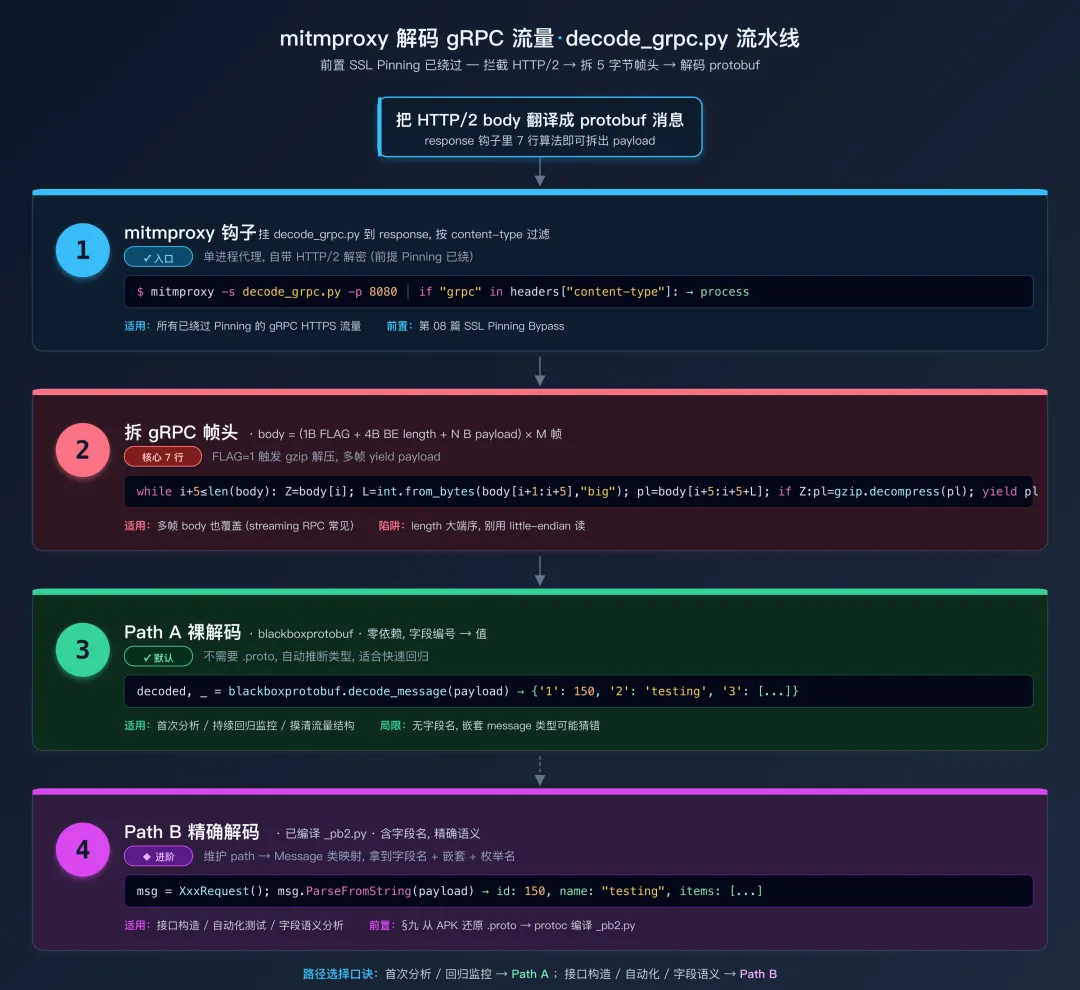 mitmproxy 抓取并解码 gRPC 流量
想要带字段名的精确解码:先用 §九的方法从 APK 还原 .proto,再用 protoc --python_out=. xxx.proto 编译出 _pb2.py,然后在 mitmproxy 插件里维护「路径 → Message 类」的映射,调用 cls().ParseFromString(payload) 即可。
8.7 在线工具
无需安装任何软件,直接在浏览器中解码:
- protobuf-decoder.netlify.app:在线粘贴 hex 或 base64 数据即可裸解码,支持嵌套 message 的递归展开
- protogen.marcgravell.com:在线
.proto 编辑器,支持编码/解码测试
安全提醒:在线工具虽然方便,但你上传的数据可能被服务端记录。如果分析的是敏感应用的通信数据,强烈建议使用本地工具进行离线解码。
九、还原 .proto 与 service 定义
裸解码只能看到 field number 和原始值,无法得知字段名和精确类型。要构造/篡改 Protobuf 请求、或编写自动化测试脚本,必须还原出完整的 .proto 定义。
 还原 .proto 的决策树
沿"省力路径"自上而下检查——下面 6 个小节按这棵决策树展开。
9.1 从 Java 生成类逆向还原(最精确)
这是最可靠的方法。Protobuf 编译器(protoc)生成的 Java 类有固定的代码模式——即使类名被混淆,代码结构也不会变。
9.1.1 识别 Message 类
// protobuf-java (完整版) 生成的类具有以下典型结构
public final class UserInfo extends
    com.google.protobuf.GeneratedMessageV3 {

    // [特征 1] 字段编号常量: 直接暴露 field number, 命名格式固定
    public static final int ID_FIELD_NUMBER = 1;
    public static final int NAME_FIELD_NUMBER = 2;
    public static final int EMAIL_FIELD_NUMBER = 3;
    public static final int AGE_FIELD_NUMBER = 4;
    public static final int ADDRESSES_FIELD_NUMBER = 5;
    public static final int STATUS_FIELD_NUMBER = 6;

    // [特征 2] 字段声明: 类型直接对应 .proto 中的类型
    private int id_;                              // int32
    private volatile String name_;                // string (volatile 是 protobuf 生成代码的特征)
    private volatile String email_;               // string
    private int age_;                             // int32
    private java.util.List<Address> addresses_;   // repeated Address (嵌套 message)
    private int status_;                          // enum (在 Java 中以 int 存储)
}
识别技巧:即使经过混淆,XXX_FIELD_NUMBER 常量的值不会被混淆(混淆器不会修改常量值)。搜索所有值为小正整数且类型为 static final int 的常量,筛选出同一个类中有多个这样常量的,就很可能是 Protobuf 生成的 Message 类。
9.1.2 识别 writeTo 方法(最关键)
writeTo 方法是还原 .proto 的核心线索——它逐字段调用 CodedOutputStream 的类型化写入方法,每一行调用都精确对应一个 .proto 字段定义:
// protobuf-lite 生成的 writeTo 方法
public void writeTo(CodedOutputStream output) throws IOException {
    // field 1: int32 类型, 条件 "!= 0" 是 proto3 默认值优化 (零值不序列化)
    if (id_ != 0) {
        output.writeInt32(1, id_);           // → int32 id = 1;
    }
    if (!name_.isEmpty()) {
        output.writeString(2, name_);         // → string name = 2;
    }
    if (!email_.isEmpty()) {
        output.writeString(3, email_);        // → string email = 3;
    }
    if (age_ != 0) {
        output.writeInt32(4, age_);           // → int32 age = 4;
    }
    // field 5: repeated message 类型 (循环写入 = repeated)
    for (int i = 0; i < addresses_.size(); i++) {
        output.writeMessage(5, addresses_.get(i));  // → repeated Address addresses = 5;
    }
    if (status_ != 0) {
        output.writeEnum(6, status_);         // → Status status = 6;
    }
}
由此精确还原出 .proto 定义:
syntax = "proto3";

message UserInfo {
  int32 id = 1;
  string name = 2;
  string email = 3;
  int32 age = 4;
  repeated Address addresses = 5;
  Status status = 6;
}
9.1.3 writeTo 中的类型映射表
| CodedOutputStream 方法 | Proto 类型 | Wire Type | 说明 |
|---|
writeInt32(n, v) | int32 | 0 (Varint) | 负数会占 10 字节 |
writeInt64(n, v) | int64 | 0 (Varint) | 负数会占 10 字节 |
writeUInt32(n, v) | uint32 | 0 (Varint) | 无符号 |
writeUInt64(n, v) | uint64 | 0 (Varint) | 无符号 |
writeSInt32(n, v) | sint32 | 0 (Varint) | ZigZag 编码 |
writeSInt64(n, v) | sint64 | 0 (Varint) | ZigZag 编码 |
writeFixed32(n, v) | fixed32 | 5 (32-bit) | 固定 4 字节 |
writeFixed64(n, v) | fixed64 | 1 (64-bit) | 固定 8 字节 |
writeSFixed32(n, v) | sfixed32 | 5 (32-bit) | 有符号固定 4 字节 |
writeSFixed64(n, v) | sfixed64 | 1 (64-bit) | 有符号固定 8 字节 |
writeFloat(n, v) | float | 5 (32-bit) | IEEE 754 单精度 |
writeDouble(n, v) | double | 1 (64-bit) | IEEE 754 双精度 |
writeBool(n, v) | bool | 0 (Varint) | 值只有 0 和 1 |
writeString(n, v) | string | 2 (LEN) | UTF-8 编码 |
writeBytes(n, v) | bytes | 2 (LEN) | 原始字节 |
writeMessage(n, v) | 嵌套 message | 2 (LEN) | 递归编码 |
writeEnum(n, v) | enum | 0 (Varint) | 值为枚举的整数值 |
9.1.4 识别 Enum
public enum Status implements com.google.protobuf.ProtocolMessageEnum {
    UNKNOWN(0),      // protobuf enum 的第一个值必须是 0
    ACTIVE(1),
    INACTIVE(2),
    BANNED(3);

    private final int value;
    public final int getNumber() { return value; }
    public static Status forNumber(int value) { ... }
}
还原:
enum Status {
  UNKNOWN = 0;    // proto3 要求第一个值必须是 0
  ACTIVE = 1;
  INACTIVE = 2;
  BANNED = 3;
}
9.1.5 识别 OneOf
// 1. 一个 xxxCase_ int 字段
private int payloadCase_ = 0;
// 2. 一个 Object 字段存储当前活跃分支的值
private Object payload_;

// 3. 一个 Case enum 列出所有分支
public enum PayloadCase {
    TEXT(1),
    IMAGE(2),
    VIDEO(3),
    PAYLOAD_NOT_SET(0);
}
还原:
message ChatMessage {
  oneof payload {
    string text = 1;
    ImageData image = 2;
    VideoData video = 3;
  }
}
9.1.6 识别 Map
private MapField<String, Integer> tags_;

public Map<String, Integer> getTagsMap() { ... }
public int getTagsCount() { ... }
public boolean containsTags(String key) { ... }
还原:
message Foo {
  map<string, int32> tags = 7;
}
Wire Format 层面:map<K, V> field = N 实际上等价于 repeated MapEntry field = N,其中 MapEntry 是一个隐含的嵌套 message { K key = 1; V value = 2; }。
9.2 处理混淆代码
当代码被 ProGuard / R8 混淆后,类名和方法名被替换为无意义的短名(如 a、b、c),但代码结构模式不变:
// 混淆后的 writeTo 方法
public void a(CodedOutputStream var1) throws IOException {
    // writeXxx 方法名属于 protobuf 库, 不会被混淆!
    if (this.a != 0) {
        var1.writeInt32(1, this.a);      // field 1: int32 (确定)
    }
    if (!this.b.isEmpty()) {
        var1.writeString(2, this.b);      // field 2: string (确定)
    }
    if (this.c != null) {
        var1.writeMessage(3, this.c);     // field 3: message
    }
}
混淆代码的还原技巧:
- 搜索
CodedOutputStream 的调用:protobuf 库本身通常不被混淆 - 搜索
writeXxx 方法调用:方法名是 protobuf 库的 API,不会被混淆 - 搜索
FIELD_NUMBER 常量:常量值不会被混淆 - 搜索
parseFrom 方法:签名特征不变 - 利用
getDescriptor():如果是完整版 protobuf-java,descriptor 包含完整的 schema 信息
9.3 从 Descriptor 还原(完整版 protobuf-java)
如果 APK 使用 protobuf-java 完整版,每个生成的 Java 文件中都包含一段序列化的 FileDescriptorProto——这是 .proto 文件的完整二进制表示,包括字段名、类型、注释等全部信息:
static {
    String[] descriptorData = {
        "\n\016user_info.proto\022\007example\032\016address.proto\"" +
        "\213\001\n\010UserInfo\022\n\n\002id\030\001 \001(\005\022\014" + ...
    };
}
提取并解码 descriptor,自动还原 .proto:
from google.protobuf import descriptor_pb2

descriptor_data = open("descriptor.bin", "rb").read()

file_desc = descriptor_pb2.FileDescriptorProto()
file_desc.ParseFromString(descriptor_data)

# 注意:file_desc.syntax 本身就是字符串 "proto2" / "proto3" / "editions",
# 直接拼接即可;为空时按 proto2 兜底(proto2 时 syntax 字段常被省略)。
syntax = file_desc.syntax or "proto2"
print(f'syntax = "{syntax}";')
if file_desc.package:
    print(f'package {file_desc.package};')

for dep in file_desc.dependency:
    print(f'import "{dep}";')

for msg in file_desc.message_type:
    print(f'\nmessage {msg.name}{{')
    for field in msg.field:
        type_name = descriptor_pb2.FieldDescriptorProto.Type.Name(field.type)
        type_str = type_name.lower().replace("type_", "")
        label = descriptor_pb2.FieldDescriptorProto.Label.Name(field.label)
        label_str = label.lower().replace("label_", "")

        if field.type in (11, 14):  # TYPE_MESSAGE=11, TYPE_ENUM=14
            type_str = field.type_name.lstrip('.')

        print(f'{label_str}{type_str}{field.name} = {field.number};')
    print('}')

for enum in file_desc.enum_type:
    print(f'\nenum {enum.name}{{')
    for val in enum.value:
        print(f'{val.name} = {val.number};')
    print('}')
重要提示:protobuf-lite 和 protobuf-nano 不包含 descriptor 信息(为了减小 APK 体积)。判断方法:在反编译代码中搜索 FileDescriptor 或 DescriptorProto,如果找到则说明是完整版。
9.4 PBTK 自动化还原
PBTK (Protobuf Toolkit) 可以自动从 APK 中提取 .proto 文件定义:
git clone https://github.com/marin-m/pbtk.git
cd pbtk && pip install -r requirements.txt

# 从 APK 提取 .proto 文件 (支持完整版和 lite 版)
python extractors/from_apk.py target.apk -o output_protos/

# 也支持从 .jar / .dex 文件中提取
python extractors/jar_extract.py classes.dex -o output_protos/

ls output_protos/
# user_info.proto  address.proto  common.proto  ...
注意:PBTK 的提取效果依赖于应用是否包含 descriptor 信息。对于 protobuf-lite 应用,PBTK 可能只能提取到部分信息或完全失败。此时需要回退到手动分析 writeTo 方法。
9.5 从网络数据盲猜还原
当没有源码、只有二进制网络数据时,可以通过多样本对比分析来推断字段语义:
import blackboxprotobuf

samples = [
    bytes.fromhex("0801120a4a6f686e20446f651803"),
    bytes.fromhex("0802120b4a616e6520536d6974681804"),
    bytes.fromhex("080312084a696d2042726f776e1802"),
]

for i, sample in enumerate(samples):
    msg, typedef = blackboxprotobuf.decode_message(sample)
    print(f"Sample {i+1}: {msg}")
# Sample 1: {'1': 1, '2': b'John Doe',   '3': 3}
# Sample 2: {'1': 2, '2': b'Jane Smith', '3': 4}
# Sample 3: {'1': 3, '2': b'Jim Brown',  '3': 2}

# 根据多样本统计推断字段语义:
# field 1: 值递增 (1, 2, 3) → 很可能是自增 ID
# field 2: 都是可读的人名字符串 → string 类型, 可能是 name
# field 3: 小整数且不递增 → 可能是 enum 或 age

_, typedef = blackboxprotobuf.decode_message(samples[0])
typedef['1']['name'] = 'user_id'
typedef['2']['type'] = 'string'
typedef['2']['name'] = 'name'
typedef['3']['name'] = 'level'
盲猜还原的经验法则:
- 值为 0/1 的 Varint → 大概率是
bool - 值递增的 Varint → 大概率是 ID
- 值范围小且固定的 Varint → 大概率是
enum - 13 位数字的 Varint → 大概率是毫秒级时间戳
- 10 位数字的 Varint → 大概率是秒级时间戳
- Length-delimited 且内容可读 →
string - Length-delimited 且内容能被
protoc --decode_raw 成功解码 → 嵌套 message - Length-delimited 且内容不可读也无法解码 →
bytes(可能是加密数据、图片等)
9.6 从 .desc 描述符文件反编译
如果获取到了 .desc 描述符文件(也叫 FileDescriptorSet),可以直接反编译出 .proto 源文件:
# 使用 protoc 从描述符文件中解码特定消息
protoc --descriptor_set_in=descriptors.desc --decode=package.MessageName

# 利用 descriptor.proto 自描述反编译描述符
protoc --decode=google.protobuf.FileDescriptorSet \
  google/protobuf/descriptor.proto < descriptors.desc
获取 .desc 文件的途径:
- APK assets 目录中可能直接包含
.desc 文件 - gRPC Server Reflection 服务(见 9.8)
- 某些应用在初始化时会从服务端下载 descriptor,可以通过抓包获取
9.7 还原 gRPC service 定义
.proto 包含两类定义:message(数据结构)和 service(RPC 接口)。Message 的还原方法见 9.1-9.6,service 是 gRPC 特有的,需要单独处理。
gRPC 编译器(protoc-gen-grpc-java)会为每个 service 生成一个 XxxGrpc 类。在 jadx 中搜索 extends io.grpc.stub.AbstractStub 或文件名后缀 Grpc.java:
public final class UserServiceGrpc {
    private static final String SERVICE_NAME = "com.example.api.UserService";

    public static final MethodDescriptor<LoginRequest, LoginResponse> getLoginMethod() { ... }
    public static final MethodDescriptor<LogoutRequest, LogoutResponse> getLogoutMethod() { ... }
    public static final MethodDescriptor<ProfileRequest, UserProfile> getGetProfileMethod() { ... }
}
从这段代码可以还原出:
service UserService {
  rpc Login(LoginRequest) returns (LoginResponse);
  rpc Logout(LogoutRequest) returns (LogoutResponse);
  rpc GetProfile(ProfileRequest) returns (UserProfile);
}
每个 MethodDescriptor 的泛型参数直接对应请求和响应的 Message 类型;方法名去掉 get/Method 后缀即 RPC 名。
9.8 grpcurl 探测开启 Reflection 的服务端
部分企业内部环境、测试服或调试残留可能开启了 gRPC Reflection——这是最省力的还原路径:
# 列出所有服务
grpcurl -plaintext api.example.com:443 list

# 列出服务的所有方法
grpcurl -plaintext api.example.com:443 list com.example.api.UserService

# 描述 service 结构
grpcurl -plaintext api.example.com:443 describe com.example.api.UserService

# 描述 message 结构
grpcurl -plaintext api.example.com:443 describe com.example.api.LoginRequest
如果能拉到 service / message 描述,逆向工作量大幅缩减。先试一下没坏处。
十、常见对抗与绕过
在实际逆向中,应用可能采取各种措施来增加 Protobuf 分析的难度。以下是常见的对抗手段及对应的绕过策略。
10.1 自定义序列化
部分应用不使用标准 protobuf 库(com.google.protobuf.*),而是自行实现 Protobuf 的编解码逻辑:
// 自定义的轻量 protobuf 编码 (不依赖 Google protobuf 库)
public byte[] encode() {
    ByteArrayOutputStream bos = new ByteArrayOutputStream();
    // 手动构造 Tag: (field_number << 3) | wire_type
    writeVarint(bos, (1 << 3) | 0);  // field 1, wire_type=0 (Varint)
    writeVarint(bos, this.userId);
    writeVarint(bos, (2 << 3) | 2);  // field 2, wire_type=2 (Length-delimited)
    writeBytes(bos, this.name.getBytes("UTF-8"));
    return bos.toByteArray();
}
绕过策略:
Wire Format 编码规范是公开标准,自定义实现必须遵循同样的编码规则(否则服务端无法解码)。因此:
- 搜索代码中的
writeVarint、<< 3、& 0x07 等特征操作,定位自定义编码逻辑 - 数据层面完全不变,
protoc --decode_raw 仍然能正常解码 - Hook 自定义的
encode() / decode() 方法即可捕获数据
10.2 外层加密 / 压缩
很多应用会在 Protobuf 序列化之后、发送之前,对数据进行压缩和/或加密:
数据流: [原始 protobuf] → [gzip/zstd 压缩] → [AES/ChaCha20 加密] → [网络发送]
解码流: [网络接收] → [解密] → [解压] → [protobuf 反序列化]
绕过策略——关键思路是找到加密前/解密后的节点进行 Hook:
- Hook protobuf 层(最可靠):在
writeTo / toByteArray / parseFrom 层面 Hook——此时数据一定是明文 protobuf,无论外层套了多少层加密压缩 - Hook 压缩层:Hook
GZIPOutputStream.write() / GZIPInputStream.read() 捕获压缩前/解压后的数据 - Hook 加密层:Hook
Cipher.doFinal() 捕获加密前/解密后的数据 - 逐层剥离:如果不确定加密/压缩的具体实现,可以从网络层(OkHttp Interceptor)开始,逐步向内层 Hook,直到拿到可被
protoc --decode_raw 成功解码的数据
10.3 字段名混淆
部分代码混淆工具会对 .proto 中的字段名进行混淆(将有意义的字段名替换为 a、b、c),但 field number 和 wire type 无法被混淆——它们是编码在二进制数据中的,改变它们会导致服务端无法解码:
// 混淆前
message UserInfo {
  string username = 1;
  int32 age = 2;
}

// 混淆后 (字段名被替换, 但 field number 不变)
message a {
  string a = 1;
  int32 b = 2;
}
对逆向的影响:
- Wire Format 编码完全相同,不影响数据解码
- 丢失了有意义的字段名,需要通过业务语义推断
- 可结合多样本对比分析(9.5 节)和 UI 操作关联来还原字段名
10.4 Protobuf Lite / Nano 无 Descriptor
Android 应用最常用的是 protobuf-lite 或已废弃的 protobuf-nano,它们为了减小 APK 体积,不包含 descriptor 信息:
- 无法通过 descriptor 自动还原
.proto(9.3 节方法不适用) - PBTK 等自动化工具可能失效
Message.toString() 输出为空或不可读
绕过策略:只能通过分析 writeTo / mergeFrom 方法手动还原(9.1 节方法)。虽然工作量更大,但还原结果是最精确的。
如何判断是 lite 还是完整版:
- 完整版:包含
com.google.protobuf.Descriptors、FileDescriptor、getDescriptor() 等类和方法 - Lite 版:只有
com.google.protobuf.GeneratedMessageLite,不包含 Descriptor 相关类 - Nano 版:使用
com.google.protobuf.nano.MessageNano 基类(已废弃,但存量应用仍在)
10.5 Native 层 Protobuf
当 Protobuf 逻辑在 .so 文件中实现(C++ protobuf 库)时,Java 层的 Hook 方法不再适用,需要转向 native 层。
静态分析:
# 搜索动态符号表中的 protobuf 相关符号
nm -D libnative.so | grep -i protobuf
readelf -s libnative.so | grep -i protobuf

# 在 IDA Pro / Ghidra 中搜索的关键符号:
# google::protobuf::MessageLite::SerializeToString
# google::protobuf::MessageLite::ParseFromString
# google::protobuf::io::CodedOutputStream::WriteTag
# google::protobuf::io::CodedInputStream::ReadTag
Frida Hook native 层:直接解析 std::string 内部结构很脆弱——libc++ 有 SSO 短串优化(默认布局是 [capacity, size, data*],alternate ABI 又变成 [data*, size, capacity])、libstdc++ 又是完全不同的引用计数式布局,跨版本/跨编译器经常翻车。推荐改 Hook 一个返回裸字节指针的函数,从源头绕开 std::string 的内存布局问题:
// hook_native_protobuf.js
// 推荐方案: Hook MessageLite::SerializeWithCachedSizesToArray(uint8_t* target)
// 该函数直接把序列化后的字节写入调用方提供的缓冲区, 返回写入末尾指针
// 配合 ByteSizeLong() 拿长度, 完全不依赖 std::string 内存布局
var serializeSym =
    "_ZNK6google8protobuf11MessageLite32SerializeWithCachedSizesToArrayEPh";
var byteSizeSym =
    "_ZNK6google8protobuf11MessageLite12ByteSizeLongEv";

var byteSizeFn = new NativeFunction(
    Module.findExportByName("libnative.so", byteSizeSym),
    "size_t", ["pointer"]);

Interceptor.attach(Module.findExportByName("libnative.so", serializeSym), {
    onEnter: function(args) {
        this.thisPtr = args[0];        // MessageLite*
        this.bufStart = args[1];       // uint8_t* target
        this.size = byteSizeFn(this.thisPtr).toNumber();
    },
    onLeave: function(retval) {
        if (this.size <= 0 || this.size > 10 * 1024 * 1024) return;
        var buf = Memory.readByteArray(this.bufStart, this.size);
        console.log("[Native PB] size=" + this.size);
        console.log(hexdump(buf, { length: Math.min(this.size, 256) }));

        var path = "/data/local/tmp/native_pb_" + Date.now() + ".bin";
        var file = new File(path, "wb");
        file.write(buf);
        file.flush();
        file.close();
    }
});
C++ 符号名查找技巧:如果 .so 文件没有被 strip,可以用 nm -D 直接搜索符号。如果被 strip 了,可以在 IDA/Ghidra 中通过字符串交叉引用(如 "SerializeWithCachedSizes" 错误信息)来定位函数。另外,c++filt 工具可以将 mangled name(如 _ZN6google8protobuf...)还原为可读的 C++ 签名。
如果只能 Hook SerializeToString(std::string*):那就必须解析 std::string 内部结构。但这里有三套布局要区分——① libc++ 默认(Android NDK 默认):长串 [capacity, size, data*],capacity 最低位作 long/short 标志位;short 模式数据内联在对象前 23 字节、size 编码在最后一字节的高 7 位;② libc++ alternate(_LIBCPP_ABI_ALTERNATE_STRING_LAYOUT):顺序变成 [data*, size, capacity];③ libstdc++:完全是另一套(COW / SSO 取决于 gcc 版本)。跨版本踩坑很多,能避就避,优先用上面的 SerializeWithCachedSizesToArray 方案。
十一、方案选择速查表与 Cheat Sheet
11.1 方案选择速查表
| 你的情况 | 推荐方案 | 对应章节 |
|---|
App 走标准 gRPC(有 io.grpc 包) | Hook ClientCalls 四模式 | §五 |
| 需要看 Token / 签名 | + Hook Metadata / ClientInterceptor | §六 |
| App 用 Protobuf 但不走 gRPC | Hook toByteArray / parseFrom | §七 |
| 需要精确到字段的 Hook | Hook CodedOutputStream.writeXxx | §7.3 |
| 不知道目标类名 | 批量枚举 + 字段级 Hook | §7.3-7.4 |
| 需要篡改请求 | Hook Builder.build() | §7.5 |
| 不想注入 Frida,纯流量分析 | mitmproxy 插件(跳 5 字节帧头) | §8.6 |
| 只有原始二进制数据 | protoc / blackboxprotobuf / protobuf-inspector | §八 |
拿到 message / .proto 定义 | writeTo / Descriptor / PBTK / 盲猜 | §九 |
| 拿到 service / RPC 定义 | jadx 看 XxxGrpc 类 + grpcurl reflection | §9.7-9.8 |
toString() 输出为空 | 多半是 protobuf-lite | §10.4 |
| 外层有加密/压缩 | Hook 加密前的 protobuf 序列化层 | §10.2 |
| Native 层 protobuf | Hook SerializeToString 等 mangled name | §10.5 |
11.2 实战 Cheat Sheet
以下是日常逆向中最常用的命令和代码片段,建议收藏备用:
# ============================================================
# 1. 快速判断抓包数据是否是 protobuf
# ============================================================
echo -n "YOUR_HEX_DATA" | xxd -r -p | protoc --decode_raw

# ============================================================
# 2. Base64 编码的 protobuf 解码
# ============================================================
echo "BASE64_DATA" | base64 -d | protoc --decode_raw

# ============================================================
# 3. gRPC 数据解码 (跳过前 5 字节的 gRPC 帧头)
# ============================================================
dd if=grpc_body.bin bs=1 skip=5 | protoc --decode_raw

# ============================================================
# 4. 搜索 APK 中的 protobuf 类 (jadx 反编译后)
# ============================================================
jadx -d output/ target.apk
grep -r "GeneratedMessageLite\|GeneratedMessageV3\|FIELD_NUMBER" output/

# ============================================================
# 5. 搜索 APK 中残留的 .proto / descriptor 文件
# ============================================================
unzip -l target.apk | grep -iE "\.proto$|\.desc$|\.pb$"

# ============================================================
# 6. 使用 blackboxprotobuf 快速解码二进制文件
# ============================================================
python3 -c "
import blackboxprotobuf, sys
data = open(sys.argv[1], 'rb').read()
msg, td = blackboxprotobuf.decode_message(data)
print(msg)
" captured.bin

# ============================================================
# 7. Frida 一键 Hook protobuf (附加到目标进程)
# ============================================================
frida -U -l hook_protobuf_writeto.js com.target.app

# ============================================================
# 8. 从 Frida 保存的 .bin 文件批量解码
# ============================================================
for f in /data/local/tmp/pb_*.bin; do
    echo "=== $f ==="
    protoc --decode_raw < "$f"
    echo ""
done

# ============================================================
# 9. 使用 grpcurl 探测 gRPC 服务 (需服务端开启 Reflection)
# ============================================================
grpcurl -plaintext localhost:50051 list
grpcurl -plaintext localhost:50051 list com.example.UserService
grpcurl -plaintext localhost:50051 describe com.example.UserRequest

# ============================================================
# 10. 将 .desc 描述符文件反编译为 .proto
# ============================================================
protoc --descriptor_set_in=descriptors.desc \
  --decode=google.protobuf.FileDescriptorSet \
  google/protobuf/descriptor.proto
11.3 工具速查
解码工具:
| 工具 | 用途 | 安装方式 | 适用场景 |
|---|
protoc --decode_raw | 命令行裸解码 | brew install protobuf | 快速验证数据是否为 protobuf |
blackboxprotobuf | Python 交互式解码 | pip install blackboxprotobuf | 逐步还原字段类型 |
protobuf-inspector | 彩色层级化输出 | pip install protobuf-inspector | 快速浏览嵌套结构 |
PBTK | APK 自动提取 .proto | git clone from GitHub | 完整版 protobuf-java |
动态分析工具:
| 工具 | 用途 | 说明 |
|---|
| Frida | Hook Java/Native protobuf 调用 | 最灵活,实时捕获和篡改 |
| mitmproxy | 抓包 + 自定义 protobuf 解码脚本 | Python 脚本扩展 |
| Charles / Burp Suite | 配合插件解码 protobuf 流量 | GUI 友好 |
| Wireshark | 分析 gRPC/protobuf 网络层细节 | 支持 protobuf dissector |
小结
Protobuf 逆向的核心在于理解 Wire Format 编码——无论应用如何混淆和加密,Protobuf 数据最终都必须遵循 Tag(field_number + wire_type) + Value 的编码格式。掌握了这一点,剩下的工作就是选择合适的拦截点和工具。
本篇覆盖的完整方法论:
- 认知层(§一-§二):理解 Protobuf 为何高效、Wire Format 的
Tag+Value 编码结构、Varint 和 ZigZag 编码——这是一切后续操作的理论依据。 - 识别层(§三):从 APK 类名到 HTTP 流量特征,多维度快速判断目标应用是否使用 Protobuf / gRPC,特别注意 gRPC 的 5 字节帧头。
- gRPC 框架层 Hook(§四-§六):Hook
io.grpc.stub.ClientCalls 覆盖四种调用模式;用 Java.registerClass 创建代理 Observer 处理异步回调;用 Java.choose 而非全量遍历找 ClientInterceptor。 - Protobuf 序列化层 Hook(§七):当 App 不走标准 gRPC 时的通用方案——
toByteArray 拦截序列化、parseFrom 拦截反序列化、CodedOutputStream.writeXxx 字段级精细拦截,配合 Frida + PC 端实时解码联动。 - 解码层(§八):从
protoc --decode_raw 到 blackboxprotobuf 交互式类型修正,从 protobuf-inspector 可视化输出到 mitmproxy 插件,根据场景选用合适工具。 - 还原层(§九):六种方法按可靠性排序——
writeTo 反推(最精确)、处理混淆代码、提取 Descriptor、PBTK 自动化、多样本盲猜、.desc 反编译;gRPC 还有 service 还原和 grpcurl 探测。 - 对抗层(§十):自定义序列化、外层加密、字段混淆、无 Descriptor、Native 层实现——每种对抗手段都有对应的绕过思路。


