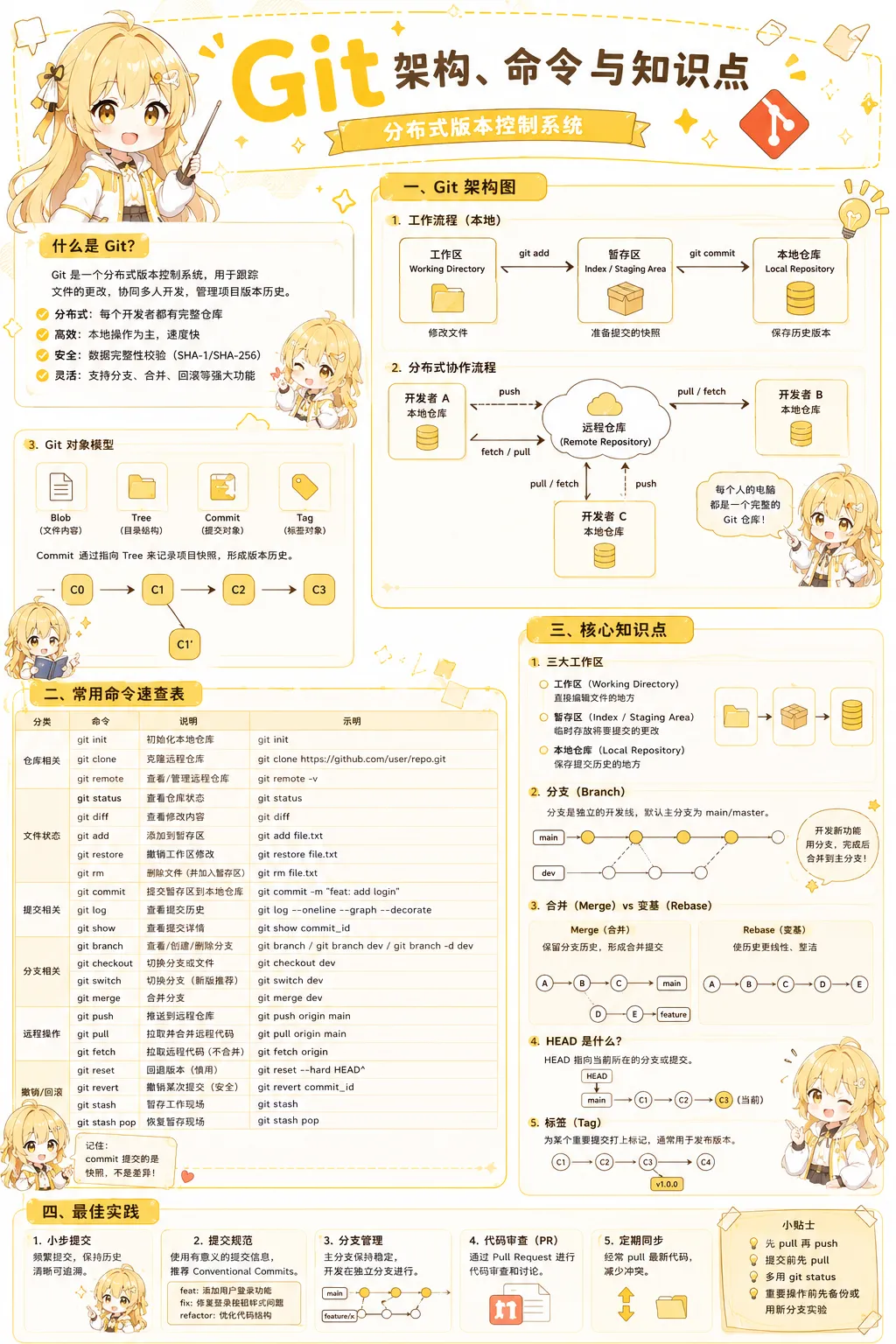
git是一个分布式的“快照流”版本控制系统,用于跟踪文件的更改
PS:可以理解为"文件时光机",随时可以回溯
git核心区域
- 工作区 Working Directory 工作区是编写代码的区域
- 暂存区 Staging Area(也叫 Index) 暂存区是暂时存储代码提交的区域,用
- 本地仓库 Local Repository 本地仓库是藏在
.git 文件夹里的完整数据库,是存储所有代码提交的区域 - 远程仓库 Remote Repository 放在 GitHub、GitLab 等服务器上的“副本”,用来多人协作与备份
git核心操作
| | | | |
|---|
| | | | |
| | | | |
| | | | |
| | | 指向某次提交的“可移动指针”,支持并行开发多条时间线 | |
| | | 把两条分支历史拼接在一起,形成新的合并提交(可能冲突) | |
| | | 将一系列提交“剪切”到新基底,历史更线性,会改写哈希 | |
| | | | |
| | | 给某次提交起人类可读的固定别名(如 v1.0.0),常用于发布 | |
| | | 把本地仓库的分支提交上传到远程仓库,实现共享与备份 | |
git 命令
git命令帮助中英对照表
usage: git [-v | --version] [-h | --help] [-C <path>] [-c <name>=<value>] [--exec-path[=<path>]] [--html-path] [--man-path] [--info-path] [-p|--paginate|-P|--no-pager][--no-replace-objects] [--no-lazy-fetch] [--no-optional-locks] [--no-advice] [--bare] [--git-dir=<path>] [--work-tree=<path>] [--namespace=<name>] [--config-env=<name>=<envvar>] <command> [<args>]用法: git [-v | --version]显示版本 [-h | --help]显示帮助 [-C <路径>]指定运行目录 [-c <键>=<值>]临时配置 [--exec-path[=<路径>]] [--html-path] [--man-path] [--info-path] [-p|--paginate|-P|--no-pager][--no-replace-objects] [--no-lazy-fetch] [--no-optional-locks] [--no-advice] [--bare] [--git-dir=<路径>]指定仓库目录 [--work-tree=<路径>]指定工作区 [--namespace=<名称>] [--config-env=<键>=<环境变量>] <命令> [<参数>]These are common Git commands used in various situations: (常用 Git 命令按场景分组)start a working area (see also: git help tutorial) (开始工作区)cloneClonearepositoryintoanewdirectory (克隆仓库到新目录) initCreateanemptyGitrepositoryorreinitializeanexistingone (创建空仓库或重新初始化已有仓库)work on the current change (see also: git help everyday) (处理当前改动) addAddfilecontentstotheindex (把文件内容加入暂存区)mvMoveorrenameafile,adirectory,orasymlink (移动或重命名文件/目录/符号链接) restore Restore working tree files (还原工作区文件)rmRemovefilesfromtheworkingtreeandfromtheindex (从工作区和暂存区删除文件)examine the history and state (see also: git help revisions) (查看历史与状态) bisectUsebinarysearchtofindthecommitthatintroducedabug (用二分查找定位引入问题的提交) diffShowchangesbetweencommits,commitandworkingtree,etc (显示提交之间或提交与工作区的差异) grep Print lines matching a pattern (按模式搜索并打印匹配行)log Show commit logs (显示提交日志) showShowvarioustypesofobjects(展示任意Git 对象) status Show the working tree status (显示工作区状态)grow, mark and tweak your common history (维护/标记/修整共同历史) backfill Download missing objects in a partial clone (为部分克隆下载缺失对象) branch List, create, or delete branches (列出、创建或删除分支) commit Record changes to the repository (把暂存区改动记录为一次提交) mergeJointwoormoredevelopmenthistoriestogether (合并多个开发历史) rebaseReapplycommitsontopofanotherbasetip (把提交移到新的基底之上) resetResetcurrentHEADtothespecifiedstate (把当前分支头指针重置到指定状态) switch Switch branches (切换分支) tagCreate,list,deleteorverifyatagobjectsignedwithGPG (创建、列出、删除或校验标签)collaborate (see also: git help workflows) (协同工作) fetchDownloadobjectsandrefsfromanotherrepository (从远程仓库下载对象和引用) pullFetchfromandintegratewithanotherrepositoryoralocalbranch (拉取并合并远程或本地分支的改动) pushUpdateremoterefsalongwithassociatedobjects (把本地提交更新到远程引用)'git help -a' and 'git help -g' list available subcommands and some concept guides.(git help -a 列出所有子命令,git help -g 列出概念向导)See 'git help <command>' or 'git help <concept>' to read about a specific subcommand or concept.(查看具体子命令或概念:git help <命令> 或 git help <概念>)See 'git help git'for an overview of the system.(查看 Git 系统总览:git help git)
git 常用命令
仓库初始化与克隆
git init # 初始化仓库 git init -b main # 初始化并指定默认分支 git clone https://github.com/user/repo.git # 克隆仓库 git clone -b dev https://github.com/user/repo.git # 克隆指定分支 git -c http.proxy=http://127.0.0.1 https://github.com/user/repo.git # 通过代理进行克隆分支git clone --depth=1 https://github.com/user/repo.git # 浅克隆(CI/CD 常用)
查看仓库状态与日志
git status # 查看当前状态 git status -s # 简洁模式查看状态 git log# 查看完整日志 git log --oneline # 单行显示日志 git log --oneline --graph --all # 图形化查看分支 git log -5 # 查看最近5次提交 git log --author="admin"# 查看指定作者提交 git log -- xxx.py # 查看文件历史 git diff # 查看工作区差异 git diff --cached # 查看暂存区差异 git diff HEAD~1 HEAD # 比较两个提交 git diff main.py # 查看指定文件差异
文件提交操作
git add main.py # 添加单个文件 git add . # 添加当前目录全部文件 git add -A # 添加所有变化 git commit -m "feat: 新增用户模块"# 提交代码 git commit -am "fix: 修复bug"# 跳过 add 提交 git commit --amend # 修改最近一次提交 git commit -m "feat: 新增支付功能"git commit -m "fix: 修复订单异常"git commit -m "docs: 更新README"git commit -m "refactor: 重构用户模块"git commit -m "test: 添加单元测试"
分支管理
git branch # 查看本地分支 git branch -r # 查看远程分支 git branch -a # 查看所有分支 git branch dev # 创建分支 git checkout dev # 切换分支 git checkout -b feature/login # 创建并切换分支 git switch dev # 新版切换分支 git switch -c feature/pay # 新版创建并切换 git branch -d feature/test # 删除本地分支 git branch -D feature/test # 强制删除本地分支 git push origin --delete test# 删除远程分支
远程仓库操作
git remote -v # 查看远程仓库地址 git remote add origin https://github.com/user/repo.git # 添加远程仓库 git pull # 拉取并合并 git pull origin main # 拉取指定分支 git fetch # 仅拉取不合并 git fetch --all # 拉取所有远程分支 git push # 推送当前分支 git push -u origin main # 首次推送 git push -f # 强制推送(危险) git push --force-with-lease # 安全强制推送
分支合并与变基
git merge dev # 合并 dev 分支到当前分支 git rebase main # 变基到 main git rebase -i HEAD~5 # 交互式 rebase git status # 查看冲突文件 git add . # 冲突解决后添加文件 git commit # 完成 merge git rebase --continue# 完成 rebase
撤销与恢复
git checkout -- main.py # 撤销文件修改(旧版) git restore main.py # 撤销文件修改(新版) git reset HEAD main.py # 取消 add git restore --staged main.py # 新版取消 add git reset --soft HEAD~1 # 回退提交,保留暂存区 git reset --mixed HEAD~1 # 回退提交,保留工作区 git reset --hard HEAD~1 # 强制回退(危险) git revert commit_id # 生成反向提交
临时保存代码
git stash # 临时保存修改 git stash list # 查看 stash 列表 git stash pop # 恢复最近 stash git stash apply stash@{1} # 恢复指定 stash
标签管理
git tag v1.0 # 创建轻量标签 git tag -a v1.0 -m "release v1.0"# 创建附注标签 git push origin v1.0 # 推送指定标签 git push origin --tags # 推送全部标签 git tag -d v1.0 # 删除本地标签 git push origin :refs/tags/v1.0 # 删除远程标签
代码审计与追踪
git blame main.go # 查看谁修改了代码 git log --follow app.py # 查看文件历史 git show commit_id # 查看提交详情
CI/CD 常用命令
git rev-parse HEAD # 获取当前 commit id git rev-parse --short HEAD # 获取短 commit id git branch --show-current # 获取当前分支 git diff --quiet # 检查是否存在修改
Git 配置
git config --global user.name "admin"git config --global user.email "admin@test.com"git config --list # 查看配置 git config --global color.ui true# 开启颜色显示
Git Alias(推荐)
git config --global alias.st status git config --global alias.cm commit git config --global alias.tree "log --oneline --graph --all"git config --global alias.last "log -1 HEAD"git st git cm git tree git last
企业多人协作流程
git pull origin main # 拉取最新代码 git checkout -b feature/login # 创建功能分支 git add . # 添加修改 git commit -m "feat: 新增登录功能"# 提交代码 git push origin feature/login # 推送功能分支
企业开发危险命令(慎用)
git push -f # 强制推送 git push --force-with-lease # 安全强推 git reset --hard HEAD~1 # 强制回退 git push origin --delete test# 删除远程分支
git 工作流
命令checklist
| | | | |
|---|
| | | | |
| | git config --global user.name "Your Name" | | |
| | git config --global user.email "you@example.com" | | |
| | git init | | |
| | git clone <repo_url> | | git clone https://github.com/user/repo.git |
| | git status | | |
| | git add <file> | | git add README.md |
| | git add . | | |
| | git commit -m "message" | | |
| | git commit -am "message" | | |
| | git log | | |
| | git branch | | |
| | git branch <branch> | | git branch feature/login |
| | git checkout <branch> | | git checkout develop |
| | git checkout -b <branch> | | |
| | git merge <branch> | | |
| | git branch -d <branch> | | |
| | git remote -v | | |
| | git remote add <name> <url> | | git remote add origin https://... |
| | git pull | | |
| | git push | | git push origin main |
| | git push -u origin <branch> | | |
| | .gitignore | | |
| | git diff | | |
| | git diff --cached | | |
| | git checkout -- <file> | | |
| | git reset --soft HEAD~1 | | |
| | git reset --hard HEAD~1 | | 谨慎操作 |
| | git tag | | |
| | git tag <tagname> | | v1.0 |
| | git push origin <tagname> | | |
git 提交规范
commit message格式
<type>(<scope>): <subject>
PS: git commit -m "feat(ymlj):添加新的功能点"
commit type类型
feat:新功能。对应次版本号变更(如 1.2.0 → 1.3.0)。
fix:修 Bug。对应修订号变更(如 1.2.0 → 1.2.1)。
style:代码风格调整(空格、缩进等),不影响逻辑。
refactor:重构,既非新功能也非修 Bug。
彩蛋
清理Git已合并分支:源自CIA泄露的开发文档的一行命令
git branch --merged | grep -v "*|master" | xargs -n 1 git branch -d
命令原理解析
git branch --merged
列出所有已合并到当前分支的本地分支
grep -v "\*\|master"
过滤掉带*标记的当前活跃分支,以及master主分支,从根源避免核心分支被误删
xargs -n 1 git branch -d
将过滤后的分支名单逐行传入,逐个执行删除操作;该操作具备安全机制,小写的-d参数不会对未完成合并的分支执行删除
如今行业内绝大多数项目都已使用main替代了传统的master作为主分支名称,开发者可基于原始命令进行更新,同时额外排除项目中其他长期使用的常驻分支:
git branch --merged origin/main | grep -vE "^\s*(*|main|develop)" | xargs -n 1 git branch -d