Netty学习笔记03、Netty组件学习
- 2026-05-09 06:48:06
点击上方蓝字关注我们


一、认识Netty
1.1 Netty 是什么?
Netty is an asynchronous event-driven network application frameworkfor rapid development of maintainable high performance protocol servers & clients.Netty 是一个异步的、基于事件驱动的网络应用框架,用于快速开发可维护、高性能的网络服务器和客户端。
• 异步是一种独特的网络模型,在这里的指的是调用时的异步与异步IO不同(netty使用多线程来完成方法的调用和处理结果相分离),是指的方法调用和处理结果交由多个线程来进行处理的方式(调用方法的线程可以腾出手来做其他的事情),依旧是基于多路复用。 • 事件驱动指的是底层采用的是多路复用技术,也就是selector,当发生响应请求时才会被处理!
1.2 Netty 的作者
他还是另一个著名网络应用框架 Mina 的重要贡献者
1.3 Netty 的地位
Netty 在 Java 网络应用框架中的地位就好比:Spring 框架在 JavaEE 开发中的地位
以下的框架都使用了 Netty,因为它们有网络通信需求!
• Cassandra - nosql 数据库 • Spark - 大数据分布式计算框架 • Hadoop - 大数据分布式存储框架 • RocketMQ - ali 开源的消息队列 • ElasticSearch - 搜索引擎 • gRPC - rpc 框架 • Dubbo - rpc 框架 • Spring 5.x - flux api 完全抛弃了 tomcat ,使用 netty 作为服务器端 • Zookeeper - 分布式协调框架
1.4 Netty 的优势
netty的底层就是NIO;linux的多路复用epoll,NIO的作者在处理epoll时有bug,会导致select方法在某些情况下阻塞不了,一般来说只有事件发生了select才会不阻塞,而出的bug就是没有事件也不在阻塞,导致CPU100%。netty通过一些方式解决了这个bug!!!与NIO、其他框架对比:
• Netty vs NIO,工作量大,bug 多 • 需要自己构建协议 • 解决 TCP 传输问题,如粘包、半包 • epoll 空轮询导致 CPU 100% • 对 API 进行增强,使之更易用,如 FastThreadLocal => ThreadLocal,ByteBuf => ByteBuffer,都进行了一定的增强! • Netty vs 其它网络应用框架 • Mina 由 apache 维护,将来 3.x 版本可能会有较大重构,破坏 API 向下兼容性,Netty 的开发迭代更迅速,API 更简洁、文档更优秀 • 久经考验,16年,Netty 版本 • 2.x 2004 • 3.x 2008 • 4.x 2013 • 5.x 已废弃(没有明显的性能提升,维护成本高)
二、netty入门程序HelloWorld!
2.1、netty入门:客户端->服务端 helloworld
前提准备:引入netty依赖
<dependency> <groupId>io.netty</groupId> <artifactId>netty-all</artifactId> <version>4.1.32.Final</version></dependency>案例目的:客户端向服务端发送一个"helloworld",服务器进行接收打印!
2.1.1、服务端
import io.netty.bootstrap.ServerBootstrap;import io.netty.channel.*;import io.netty.channel.nio.NioEventLoopGroup;import io.netty.channel.socket.nio.NioServerSocketChannel;import io.netty.channel.socket.nio.NioSocketChannel;import io.netty.handler.codec.string.StringDecoder;/** * @ClassName NettyServer * @Author ChangLu * @Date 2021/12/28 22:26 * @Description 基于Netty的服务器 */public class NettyServer { public static void main(String[] args) { //1、服务器端的启动器,负责组装netty组件,启动服务器 new ServerBootstrap() // 2、BossEventLoop,WorkerEventLoop(selector+thread=>eventLoop,两个组成处理循环事件) // Group:组的意思,包含了线程和选择器 .group(new NioEventLoopGroup()) // 3、设置服务器channel实现(包含OIO、BIO);这里NioServerSocketChannel是对原生的ServerSocketChannel进行了封装 // 在netty中提供了多个ServerSocketChannel的实现 .channel(NioServerSocketChannel.class) // 4、处理分工 boss负责处理连接 worker(child)处理读写。在这里决定了之后worker要干哪一些事情(具体某个事情抽象成处理器,也就是handler) .childHandler( // 5、代表和客户端进行数据读写的通道 Initializer 初始化 负责添加别的handler new ChannelInitializer<NioSocketChannel>() { @Override protected void initChannel(NioSocketChannel ch) throws Exception { //6、添加具体handler。 // StringDecoder:目的就是将ByteBuf数据类型转换为String字符串 ch.pipeline().addLast(new StringDecoder()); // ChannelInboundHandlerAdapter:自定义handler ch.pipeline().addLast(new ChannelInboundHandlerAdapter(){ //channelRead:表示要处理读事件。这里的msg对象就是转换之后的字符串 @Override public void channelRead(ChannelHandlerContext ctx, Object msg) throws Exception { System.out.println(msg);//将转换后的字符串打印出来! } }); } }) // 7、指定了NioServerSocketChannel启动后绑定的监听端口 .bind(8080); }}2.1.2、客户端
import io.netty.bootstrap.Bootstrap;import io.netty.channel.ChannelInitializer;import io.netty.channel.nio.NioEventLoopGroup;import io.netty.channel.socket.nio.NioSocketChannel;import io.netty.handler.codec.string.StringEncoder;import java.net.InetSocketAddress;/** * @ClassName NettyClient * @Author ChangLu * @Date 2021/12/28 22:26 * @Description 基于netty的客户端。注意:调试时要回车一下才能够发送出数据! */public class NettyClient { public static void main(String[] args) throws Exception{ // 1、启动类 new Bootstrap() //也可以使用之前NIO、BIO的连接客户端进行连接,只不过这里是netty的demo也就使用EventLoop来演示 // 2、添加EventLoop .group(new NioEventLoopGroup()) // 3、选择客户端channel实现 .channel(NioSocketChannel.class) // 4、添加处理器 .handler(new ChannelInitializer<NioSocketChannel>() { // 连接建立后就会执行这个初始化方法 @Override protected void initChannel(NioSocketChannel ch) throws Exception { // 同时也添加一个编码器。把String=>ByteBuf 发送出去 ch.pipeline().addLast(new StringEncoder()); } }) // 5、连接到服务器 .connect(new InetSocketAddress("localhost",8080)) .sync() .channel() // 6、向服务器发送数据 .writeAndFlush("hello,world!"); }}运行效果流程:首先启动服务器,接着运行客户端client程序进行连接与发送数据

2.2、流程梳理
完整流程回顾step1:服务端server启动:1、首先会创建group组(通过看源码,可以看到初始会创建16个eventloop)2、接着指定channel实现类(这里是serversocketchannel,其中会处理accept()事件),并且来添加一些handler处理器。这里的添加的是初始化handler,该handler会在客户端发起连接时执行初始化操作也就是方法内内容。3、监听端口。step2:客户端client启动1、同样创建group组。2、指定连接的channel。同样也添加了一个初始化处理器,该处理器同样也在连接建立之后会被执行init方法。3、执行connect(),发起连接(下面经过debug测试) 首先触发自己客户端的initChannel()事件执行初始化,这里添加了一个编码器(用于将发送的字符串=>ByteBuf传输出去) 接着触发server的initchannel来为pipeline(流水线)添加一些必要工序操作,这里添加了一个字符串解码器(用于接收客户端数据后将ByteBuf=>String);还有一个是InBound适配器,可进行一系列事件的自定义重写,这里的话重写了read()事件,之后客户端发送数据就会执行我们自定义的内容。4、紧接着连接完毕之后sync()取到连接对象也就是之前定义的NioSocketChannel,取到之后向服务器发送一个字符串 发送过程中会先走StringEncoder中的编码方法,将String=>ByteBuf之后发送出去 接着服务端的read()事件接收好之后,同样也会走StringDecoder中的解码方法,将ByteBuf=>String,接着会执行channelRead()方法,其中的msg就是转换之后的字符串,我们这里仅仅只是打印即可!两个端的代码执行大致流程顺序如下:直接从黑马那贴过来的
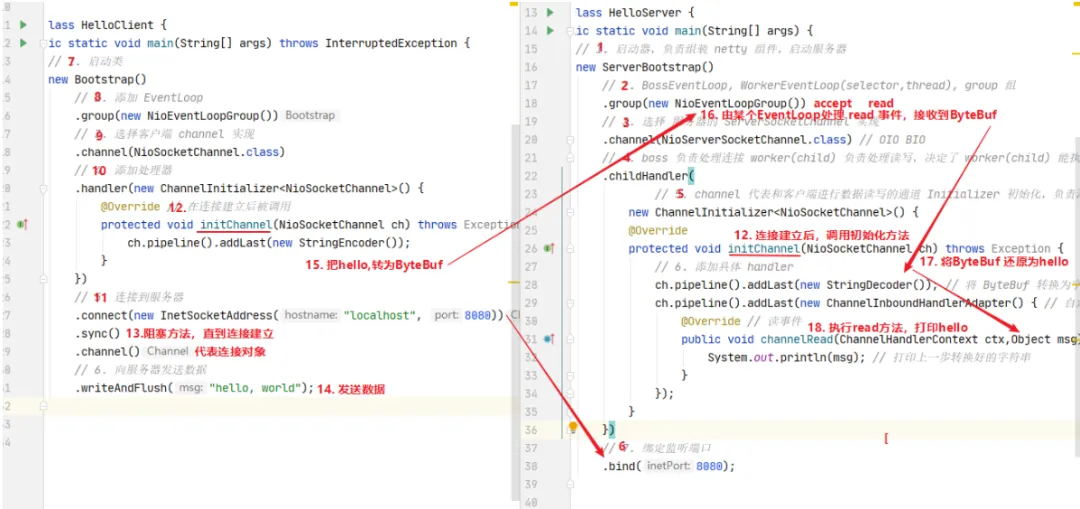
2.3、netty-helloworld的各个组件通俗介绍
将各个使用到的组件进行抽象比喻:
• 把 channel 理解为数据的通道 • 把 msg 理解为流动的数据,最开始输入是 ByteBuf,但经过 pipeline 的加工,会变成其它类型对象,最后输出又变成 ByteBuf • 把 handler 理解为数据的处理工序 • 工序有多道,合在一起就是 pipeline,pipeline 负责发布事件(读、读取完成...)传播给每个 handler, handler 对自己感兴趣的事件进行处理(重写了相应事件处理方法) • handler 分 Inbound 和 Outbound 两类:分别对应接收与输入两类情况! • 把 eventLoop 理解为处理数据的工人(底层使用了一个线程池,是个单线程池) • 工人可以管理多个 channel 的 io 操作,并且一旦工人负责了某个 channel,就要负责到底(绑定) • 工人既可以执行 io 操作,也可以进行任务处理,每位工人有任务队列,队列里可以堆放多个 channel 的待处理任务,任务分为普通任务、定时任务 • 工人按照 pipeline 顺序,依次按照 handler 的规划(代码)处理数据,可以为每道工序指定不同的工人
三、组件
3.1、EventLoop
3.1.1、认识EventLoop和EventLoopGroup
EventLoop
Eventloop:具体干活的工人,事件循环对象。
EventLoop 本质是一个单线程执行器(同时维护了一个 Selector),里面有 run 方法处理 Channel 上源源不断的 io 事件。如下是EventLoop接口的继承关系图:
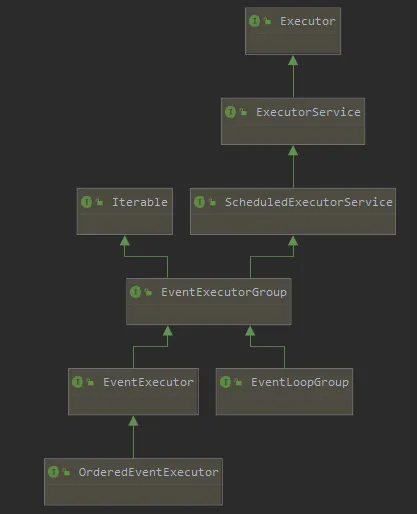
它的继承关系比较复杂
• 一条线是继承自 JUC的ScheduledExecutorService 因此包含了线程池中所有的方法 • 另一条线是继承自 netty 自己的 OrderedEventExecutor, • 提供了 boolean inEventLoop(Thread thread) 方法判断一个线程是否属于此 EventLoop • 提供了 parent 方法来看看自己属于哪个 EventLoopGroup
EventLoopGroup:事件循环组
EventLoopGroup 是一组 EventLoop,Channel 一般会调用 EventLoopGroup 的 register 方法来绑定其中一个 EventLoop,后续这个 Channel 上的 io 事件都由此 EventLoop 来处理(保证了 io 事件处理时的线程安全)
• 继承自 netty 自己的 EventExecutorGroup • 实现了 Iterable 接口提供遍历 EventLoop 的能力 • 另有 next 方法获取集合中下一个 EventLoop
3.1.2、执行普通、定时任务
目的:通过NioEventLoopGroup事件循环组来去执行普通和定时任务。
import io.netty.channel.nio.NioEventLoopGroup;import lombok.extern.slf4j.Slf4j;import java.util.concurrent.TimeUnit;/** * @ClassName TestEventLoop * @Author ChangLu * @Date 2022/1/2 21:41 * @Description 测试EventLoop */@Slf4jpublic class TestEventLoop { public static void main(String[] args) { //1、创建事件循环组。(若是不传默认值,就会根据当前电脑的核心数创建线程数量) NioEventLoopGroup group = new NioEventLoopGroup(2);// io事件,普通任务,定时任务// DefaultEventLoopGroup group1 = new DefaultEventLoopGroup();// 普通任务,定时任务// System.out.println(NettyRuntime.availableProcessors());//打印本机的CPU核心数量,8核 //2、获取下一个事件循环对象(可不断循环获取) System.out.println(group.next()); System.out.println(group.next()); System.out.println(group.next()); System.out.println(group.next()); //3、执行普通任务// group.next().submit(()->{ //或者使用execute()方法提交都是可以的// try {// Thread.sleep(1000);// } catch (InterruptedException e) {// e.printStackTrace();// }// log.debug("ok!");// }); //或3、执行定时任务 group.next().scheduleAtFixedRate(()->{ log.debug("test"); }, 0 , 1, TimeUnit.SECONDS); log.debug("main!"); }}• NioEventLoop处理好了IO事件之后,就可以使用defaultEventLoopGroup来执行一些相关的任务,主要做异步,定时处理的!做事件分发可以使用这种提交事务的方法! • AIO中是守护线程。
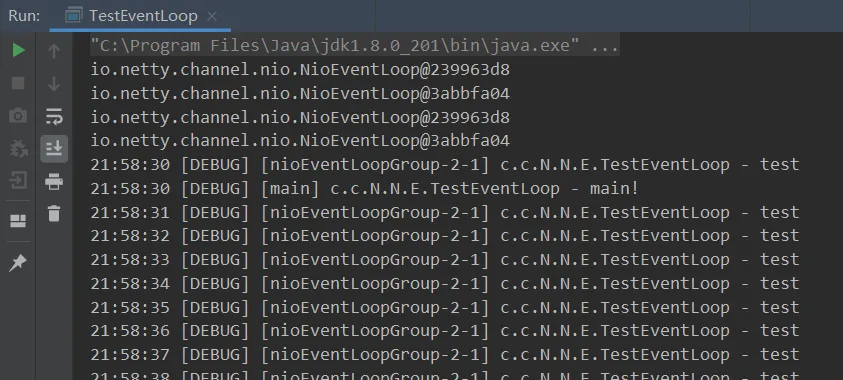
对于demo中主线程结束了还能运行的原因是,线程中开辟的用户线程依旧在运行中。
• 分析:ThreadPoolExecutor中的runWorker方法里有一个getTask()方法,该方法不断从队列中拿任务执行,没有就阻塞,这也就是为什么主线程结束了,程序依旧在运行中的原因。
3.1.3、执行IO任务(含2点细化)
执行IO任务
一旦建立连接,那么channel就会跟某个EventLoop绑定,后序的请求由同一个EventLoop来进行处理。
服务端:
import io.netty.bootstrap.ServerBootstrap;import io.netty.buffer.ByteBuf;import io.netty.channel.ChannelHandlerContext;import io.netty.channel.ChannelInboundHandlerAdapter;import io.netty.channel.ChannelInitializer;import io.netty.channel.nio.NioEventLoopGroup;import io.netty.channel.socket.nio.NioServerSocketChannel;import io.netty.channel.socket.nio.NioSocketChannel;import lombok.extern.slf4j.Slf4j;import java.nio.charset.Charset;/** * @ClassName EventLoopServer * @Author ChangLu * @Date 2022/1/2 22:19 * @Description 服务端 */@Slf4jpublic class O2EventLoopServer { public static void main(String[] args) { new ServerBootstrap() .group(new NioEventLoopGroup()) .channel(NioServerSocketChannel.class) .childHandler(new ChannelInitializer<NioSocketChannel>() { @Override protected void initChannel(NioSocketChannel ch) throws Exception { ch.pipeline().addLast(new ChannelInboundHandlerAdapter() { //由于没有使用String解码器,这里接收到的msg对象就是ByteBuf对象 @Override public void channelRead(ChannelHandlerContext ctx, Object msg) throws Exception { ByteBuf buf = (ByteBuf) msg; log.debug(buf.toString(Charset.defaultCharset()));//实际自己编写服务器时不要使用默认,应当进行指定 } }); } }) .bind(8080); }}客户端:使用3.1.2中的client即可
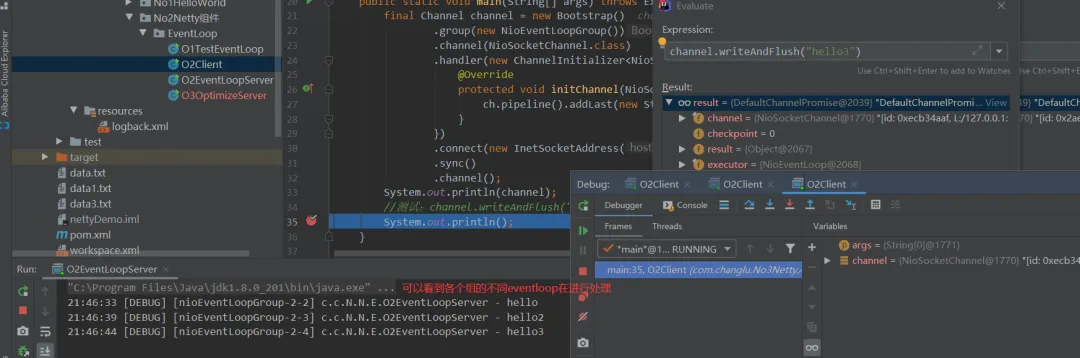
流程:每当来临一个连接,此时就会将该channel去绑定到指定的一个EventLoop中的selector中,每个NioEventLoop都是一个线程,之后该channel的其他事件都有这个EventLoop来去处理执行,这就与我们之前手写多线程NIO多路复用的思路完全一致:
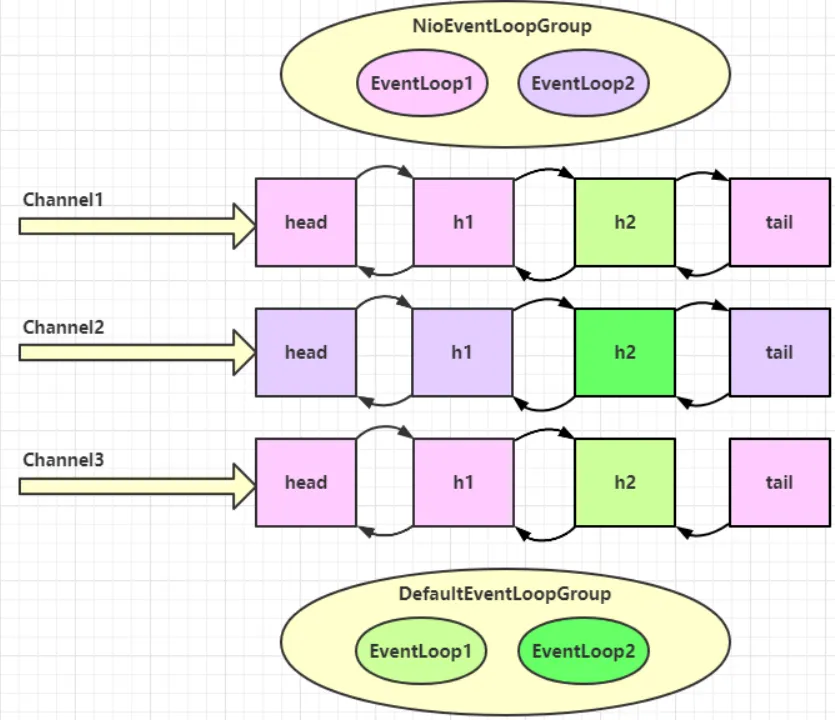
分工细化(2点)
第一点:Boos、worker各指定一个组,Boos只负责serversocketchannel的accept监听,worker负责建立连接后得到的channel均衡绑定到各个eventloop的selector上。
第二点:若是执行handler中间有一些较耗时的操作,那么可以添加一个新的handler并交由一个处理普通事件的eventloop来进行异步处理!
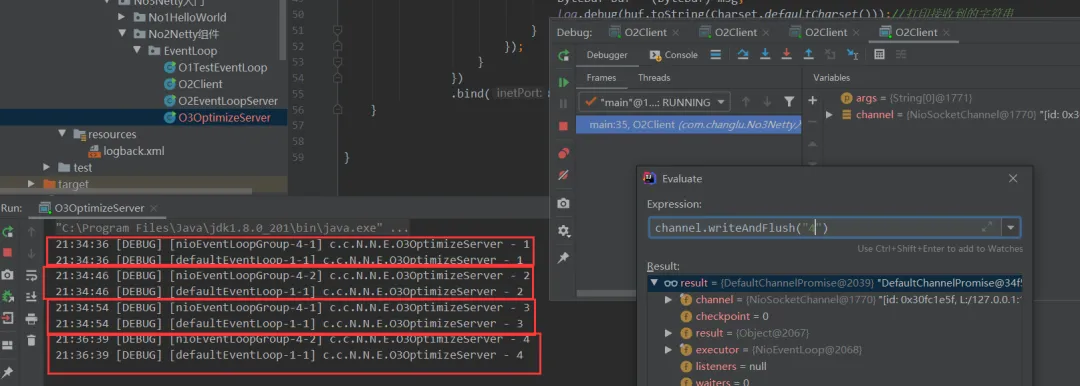
import io.netty.bootstrap.ServerBootstrap;import io.netty.buffer.ByteBuf;import io.netty.channel.ChannelHandlerContext;import io.netty.channel.ChannelInboundHandlerAdapter;import io.netty.channel.ChannelInitializer;import io.netty.channel.DefaultEventLoop;import io.netty.channel.nio.NioEventLoopGroup;import io.netty.channel.socket.nio.NioServerSocketChannel;import io.netty.channel.socket.nio.NioSocketChannel;import lombok.extern.slf4j.Slf4j;import java.nio.charset.Charset;/** * @ClassName O3OptimizeServer * @Author ChangLu * @Date 2022/1/3 21:21 * @Description 对02EventLoopServer进行分工细化,两个部分:①细化工作组。②耗时较长的任务交给指定组进行异步执行! */@Slf4jpublic class O3OptimizeServer { public static void main(String[] args) { //分工细化2:若是执行事件的过程中某个事件耗时较长,那么可以将其提交给其他事件组来进行异步执行 //这里handler2进行处理的操作会提交给该组来进行执行 DefaultEventLoop group = new DefaultEventLoop(); new ServerBootstrap() //分工细化1:Boss对应一个组(不用传递参数也没事),负责NioServerSocketChannel的accept监听; // worker对应一个组,之后来临连接的channel都会绑定其某个EventLoop .group(new NioEventLoopGroup(),new NioEventLoopGroup(2)) .channel(NioServerSocketChannel.class) .childHandler(new ChannelInitializer<NioSocketChannel>() { @Override protected void initChannel(NioSocketChannel ch) throws Exception { ch.pipeline().addLast("handler1",new ChannelInboundHandlerAdapter() { @Override public void channelRead(ChannelHandlerContext ctx, Object msg) throws Exception { ByteBuf buf = (ByteBuf) msg; log.debug(buf.toString(Charset.defaultCharset()));//打印接收到的字符串 //传递给下一个handler执行,若是不调用无法传递 ctx.fireChannelRead(msg); } })//分工细化2:指定group组来进行异步执行 .addLast(group, "handler2", new ChannelInboundHandlerAdapter(){ @Override public void channelRead(ChannelHandlerContext ctx, Object msg) throws Exception { ByteBuf buf = (ByteBuf) msg; log.debug(buf.toString(Charset.defaultCharset()));//打印接收到的字符串 } }); } }) .bind(8080); }}效果:可以看到debug建立了四个客户端连接,每个客户端发送数据时先由各自eventloop执行各个绑定的handler1,接着使用指定的一个事件循环组来执行handler2
3.1.3、源码分析(不同eventLoop,线程如何切换)
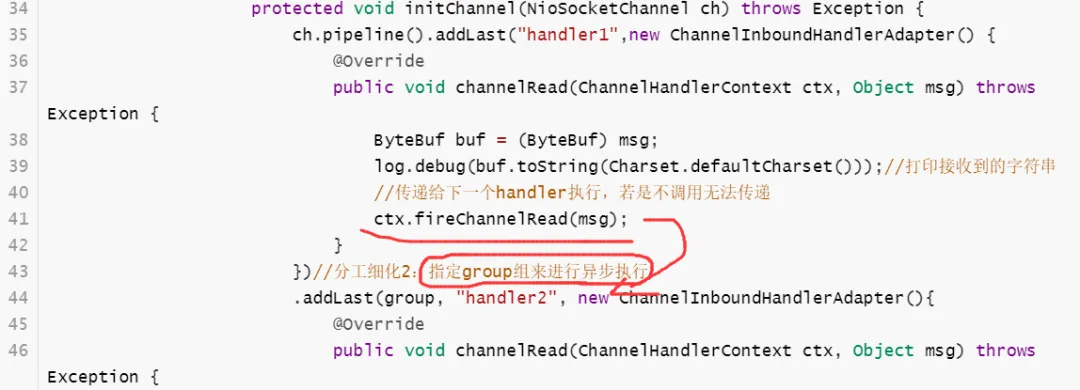
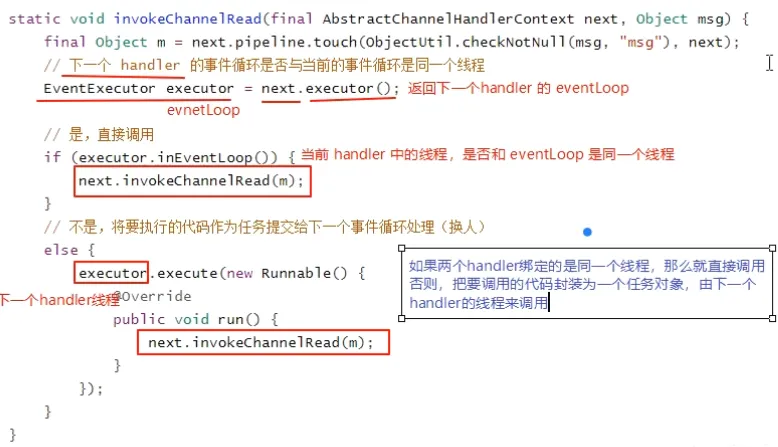
问题:不同的eventloop,线程如何切换?
关键代码 io.netty.channel.AbstractChannelHandlerContext#invokeChannelRead(),可以看到切换的操作是通过临时开辟一个新的线程去执行的!
通过调用链一步步向下调,executor默认就是handler所在的Reactor线程,如果在addLast为handler添加了普通线程池,那么executor就是普通线程池,就会直接向线程池进行提交给任务,也就是去执行!
3.2、channel
3.2.1、介绍Channel、ChannelFuture
channel 的主要作用
• close() 可以用来关闭 channel • closeFuture() 用来处理 channel 的关闭 • sync 方法作用是同步等待 channel 关闭 • 而 addListener 方法是异步等待 channel 关闭 • pipeline() 方法添加处理器:添加handler。 • write() 方法将数据写入。(在netty中并不会直接将写入的内容直接发出,会有一个缓冲机制;仅仅只是将内容写入到客户端的缓冲区中,具体什么时间发要根据一定条件,例如执行 flush()方法会立即发出去或者达到缓冲区一定大小就也会发出去)• writeAndFlush() 方法将数据写入并刷出(写入并直接刷出!)
3.2.2、连接问题
思考:原始connect()方法之后调用sync()方法原因?
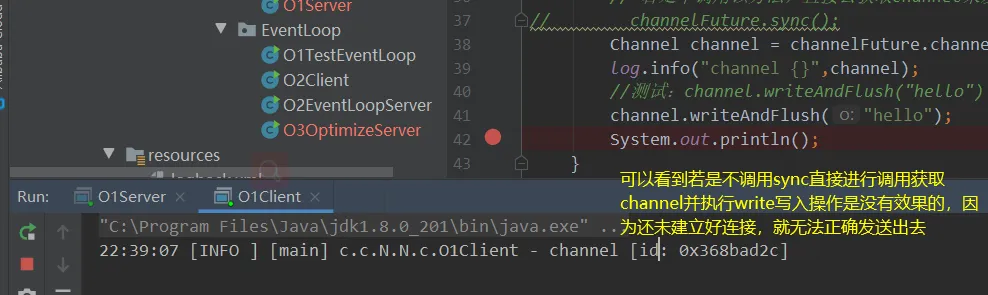
package com.changlu.No3Netty入门.No2Netty组件.channel;import io.netty.bootstrap.Bootstrap;import io.netty.channel.Channel;import io.netty.channel.ChannelFuture;import io.netty.channel.ChannelInitializer;import io.netty.channel.nio.NioEventLoopGroup;import io.netty.channel.socket.nio.NioSocketChannel;import io.netty.handler.codec.string.StringEncoder;import lombok.extern.slf4j.Slf4j;import java.net.InetSocketAddress;/** * @ClassName NettyClient * @Author ChangLu * @Date 2021/12/28 22:26 * @Description 测试connect的连接问题 */@Slf4jpublic class O1Client { public static void main(String[] args) throws Exception{ ChannelFuture channelFuture = new Bootstrap() .group(new NioEventLoopGroup()) .channel(NioSocketChannel.class) .handler(new ChannelInitializer<NioSocketChannel>() { @Override protected void initChannel(NioSocketChannel ch) throws Exception { ch.pipeline().addLast(new StringEncoder()); } }) //connect是一个异步非阻塞方法,返回的是一个ChannelFuture,专门用于记录异步方法状态的。 .connect(new InetSocketAddress("localhost", 8080)); //阻塞方法,直到连接建立之后再会停止阻塞继续向下执行。 // 若是不调用该方法,直接去获取channel来发送数据,很有可能因为没有建立好连接导致发送失败 channelFuture.sync(); Channel channel = channelFuture.channel(); log.info("channel {}",channel); //测试:channel.writeAndFlush("hello") channel.writeAndFlush("hello"); System.out.println(); }}首先,connect是一个异步非阻塞方法,一旦发起调用就会指派另一个线程来去执行,可以直接拿到返回结果ChannelFuture并进行向下运行。真正执行connect的是nio线程。
添加sync()的原因是由于connect是异步调用,如果不加一个同步让代码阻塞在这里,那么调用write方法就可能会出错(执行的时候可能还未连接)。
ChannelFuture作用:专门用于记录异步方法状态的返回结果。
• 小提示:之后只要看到返回值是Future的,那么该方法基本就是异步非阻塞方法!
注释掉sync()测试效果:
不注释效果:
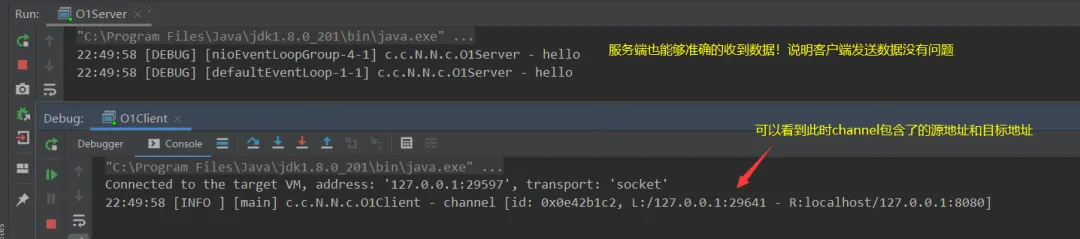
3.2.3、ChannelFuture的实际应用
3.2.3.1、处理连接操作(两种方式:同步、异步)
问题:针对于连接成功之后来进行相应的操作有两种方案:
ChannelFuture channelFuture = new Bootstrap() ... .connect(new InetSocketAddress("localhost", 8080));//异步非阻塞连接方法①同步方式处理结果。
//方式一:同步阻塞等待连接//阻塞方法,直到连接建立之后再会停止阻塞继续向下执行。// 若是不调用该方法,直接去获取channel来发送数据,很有可能因为没有建立好连接导致发送失败channelFuture.sync();//底层源码保护性暂停,主线程await(),另一个线程创建成功之后唤醒Channel channel = channelFuture.channel();log.info("channel {}",channel);//测试:channel.writeAndFlush("hello")②异步调用处理结果。异步的交给nio线程来调用
//方式二:添加一个监听器,来异步处理结果channelFuture.addListener(new ChannelFutureListener() { //当连接完成就会执行该回调方法:执行完成事件,其中channelFuture就是本身对象 @Override public void operationComplete(ChannelFuture channelFuture) throws Exception { Channel channel = channelFuture.channel(); log.info("channel {}",channel); channel.writeAndFlush("hello!"); }});优劣说明:若是使用同步的话,主线程就会进入阻塞状态从而导致不能做更多的一些事情;而使用回调方法呢,主线程不用等待连接成功后才能执行之后的操作,连接成功后要处理的结果直接放在异步下进行即可!

3.2.3.2、处理关闭channel连接操作与eventloop(两种方式:同步、异步)
说明
核心:channel的关闭、eventloop关闭都是异步的,调用方法返回的都是一个ChannelFuture,与处理连接相同都包含同步与异步方法!
• 对于eventloop事件循环组关闭博有优雅关闭操作:首先会拒绝接收新的任务,等一段时间将现有的任务能运行完的先运行完才停止线程!
注意:netty中有许多方法都是异步的,需要使用正确的方法来处理对应的方法结果!不能直接按照方法顺序来进行一些结果操作!
关闭连接案例
案例描述:启动一个server端,接着启动一个客户端,输入q则取消连接,输入其他直接发送给服务端。重点放在server服务端上。
server:
import io.netty.bootstrap.ServerBootstrap;import io.netty.channel.ChannelHandlerContext;import io.netty.channel.ChannelInboundHandlerAdapter;import io.netty.channel.ChannelInitializer;import io.netty.channel.nio.NioEventLoopGroup;import io.netty.channel.socket.nio.NioServerSocketChannel;import io.netty.channel.socket.nio.NioSocketChannel;import io.netty.handler.codec.string.StringDecoder;import lombok.extern.slf4j.Slf4j;/** * @ClassName O3Server * @Author ChangLu * @Date 2022/1/5 16:43 * @Description 用于接收03client案例发起的连接 */@Slf4jpublic class O3Server { public static void main(String[] args) { new ServerBootstrap() .group(new NioEventLoopGroup(),new NioEventLoopGroup(2)) .channel(NioServerSocketChannel.class) .childHandler(new ChannelInitializer<NioSocketChannel>() { @Override protected void initChannel(NioSocketChannel sc) throws Exception { sc.pipeline().addLast(new StringDecoder()); sc.pipeline().addLast(new ChannelInboundHandlerAdapter(){ @Override public void channelRegistered(ChannelHandlerContext ctx) throws Exception { log.debug("成功建立连接,channel {}",ctx.channel()); } @Override public void channelRead(ChannelHandlerContext ctx, Object msg) throws Exception { log.debug("收到消息,来自 channel {},数据为 {}",ctx.channel(), msg); } }); } }) .bind(8080); }}client:包含同步与异步处理关闭连接
import io.netty.bootstrap.Bootstrap;import io.netty.channel.Channel;import io.netty.channel.ChannelFuture;import io.netty.channel.ChannelFutureListener;import io.netty.channel.ChannelInitializer;import io.netty.channel.nio.NioEventLoopGroup;import io.netty.channel.socket.nio.NioSocketChannel;import io.netty.handler.codec.string.StringEncoder;import lombok.extern.slf4j.Slf4j;import java.net.InetSocketAddress;import java.util.Scanner;/** * @ClassName O3handleCloseClient * @Author ChangLu * @Date 2022/1/5 16:31 * @Description 处理关闭channel连接(异步):同样是同步、异步方法解决 */@Slf4jpublic class O3handleCloseClient { public static void main(String[] args) throws InterruptedException { final NioEventLoopGroup group = new NioEventLoopGroup(); final ChannelFuture future = new Bootstrap() .group(group) .channel(NioSocketChannel.class) .handler(new ChannelInitializer<NioSocketChannel>() { @Override protected void initChannel(NioSocketChannel channel) throws Exception { channel.pipeline().addLast(new StringEncoder()); } }) .connect(new InetSocketAddress("localhost", 8080)); final Channel channel = future.sync().channel(); log.debug("channel连接已建立 {}", channel); //创建一个线程来处理用户操作 new Thread(()->{ final Scanner scanner = new Scanner(System.in); while(true){ final String line = scanner.nextLine(); if ("q".equals(line)) { //关闭连接 final ChannelFuture closeFuture = channel.close();// //方式一:同步关闭(阻塞等待)// try {// closeFuture.sync();// } catch (InterruptedException e) {// e.printStackTrace();// }// //阻塞结束则表示成功关闭// log.debug("连接已关闭!");// //整个程序此时并没有关闭,仅仅只是断开了该channel连接,若要是想让程序直接结束,需要将事件循环组进行关闭!// group.shutdownGracefully(); break; } channel.writeAndFlush(line); } }).start(); //方式2:异步处理关闭结果 final ChannelFuture closeFuture = channel.closeFuture(); //添加监听器 closeFuture.addListener(new ChannelFutureListener() { @Override public void operationComplete(ChannelFuture channelFuture) throws Exception { //阻塞结束则表示成功关闭 log.debug("连接已关闭!"); group.shutdownGracefully();//关闭事件循环组,结束程序 } }); }}效果:


3.2.3.3、同步与异步解决方案区别
思考记录一下
同步:主线程会阻塞,与此同时主线程可以取到该响应结果。
异步:主线程不会阻塞,结果出来了会使用另一个线程来调用回调函数并进行处理,主线程拿不到该结果,也就是说另一个线程会拿到结果!
为什么netty要用异步?异步提升了什么?
结论说明
疑问:为什么不在一个线程中去执行建立连接、去执行关闭 channel,那样不是也可以吗?非要用这么复杂的异步方式:比如一个线程发起建立连接,另一个线程去真正建立连接还有同学会笼统地回答,因为 netty 异步方式用了多线程、多线程就效率高。其实这些认识都比较片面,多线程和异步所提升的效率并不是所认为的先说结论:对每个操作步骤进行合理的拆解并且通过多线程+异步执行,在一定时间内能够提升吞吐量,但是对于总体响应时间不减反增。(这里吞吐量实际上我们可以看成来建立连接处理的个数!)
• 最最核心:吞吐量提升了,用响应速率来换取吞吐量,响应时间没有变化反倒会增加,但是这种处理方式是响应时间换取吞吐量。 • tips:错误回答是netty用了多线程效率变高。
举例分析
思考下面的场景:4 个医生给人看病,每个病人花费 20 分钟,而且医生看病的过程中是以病人为单位的,一个病人看完了,才能看下一个病人。假设病人源源不断地来,可以计算一下 4 个医生一天工作 8 小时,处理的病人总数是:4 * 8 * 3 = 96
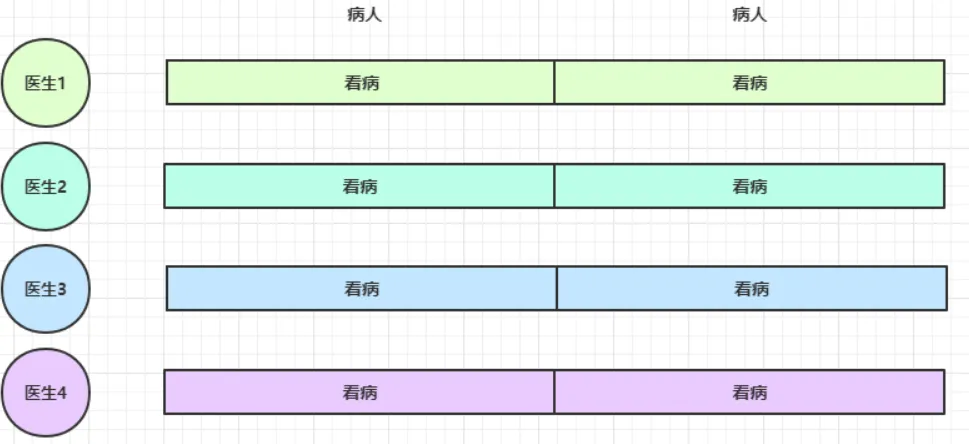
经研究发现,看病可以细分为四个步骤,经拆分后每个步骤需要 5 分钟,如下:
因此可以做如下优化,只有一开始,医生 2、3、4 分别要等待 5、10、15 分钟才能执行工作,但只要后续病人源源不断地来,他们就能够满负荷工作,并且处理病人的能力提高到了 4 * 8 * 12 效率几乎是原来的四倍。
• 思考疑惑:这里我觉得不应该是处理病人的能力提高了原来的四倍,而是在一定时间范围内接待病人的能力提升了四倍。对于客户端访问服务器,很大一个核心问题就是并发访问量急剧增多,通过这种方式能够在一定时间内提升吞吐量!
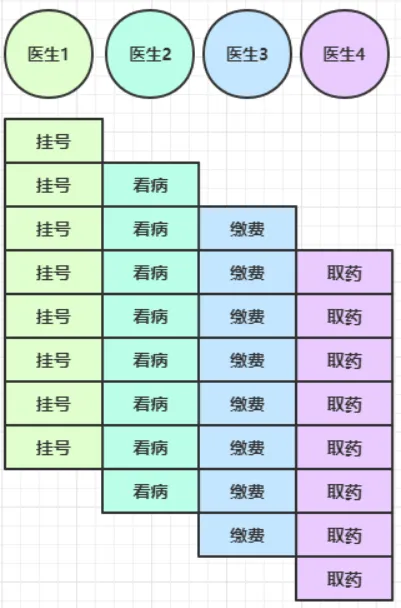
总结:医生是线程,病人是channel,步骤是handler;异步解耦;在一定时间内,吞吐量变高了。吞吐量提升了,用响应速率来换取吞吐量,响应时间没有变化反倒会增加,但是这种处理方式是响应时间换取吞吐量。
3.3、Future & Promise
netty的future继承了JDK的future;netty的promise继承了netty的future。
3.3.1、介绍Future与Promise
使用场景:在异步处理时,经常使用该两个接口。
首先要说明 netty 中的 Future 与 jdk 中的 Future 同名,但是是两个接口,netty 的 Future 继承自 jdk 的 Future,而 Promise 又对 netty Future 进行了扩展。
• jdk Future 只能同步等待任务结束(或成功、或失败)才能得到结果 • netty Future 可以同步等待任务结束得到结果,也可以异步方式得到结果,但都是要等任务结束 • netty Promise 不仅有 netty Future 的功能,而且脱离了任务独立存在,只作为两个线程间传递结果的容器
本质都是等待唤醒机制,这个机制一个应用就是保护性暂停,另一个就是生产者消费者,都是线程通信。
额外:
1、对于promise,netty比es6出来早2、jdk中的future不能够区分任务是成功还是失败!3、future就是在线程间传递一个结果或者传递一个数据的容器。4、该future中的数据是由执行任务的线程来进行填充进去的,我们自己没有机会去填,之后我们可以使用promise来去自己填充进去! 3.3.2、JDK的Future示例(线程间取值)
案例目的:主线程中获取线程池中某个线程处理任务的结果!
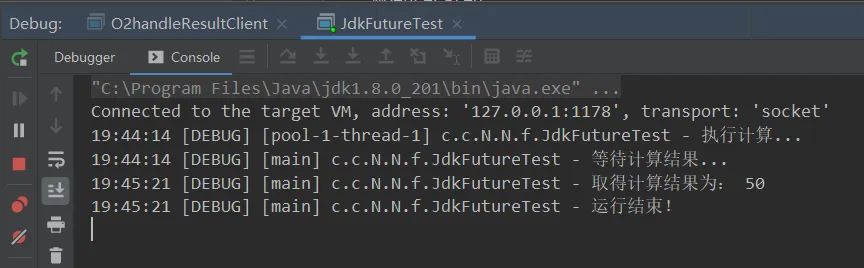
import lombok.extern.slf4j.Slf4j;import java.util.concurrent.*;/** * @ClassName JdkFutureTest * @Author ChangLu * @Date 2022/1/5 19:28 * @Description JDK的Future测试:目的是线程间取值,其中get()方法是阻塞的。 */@Slf4jpublic class JdkFutureTest { public static void main(String[] args) throws ExecutionException, InterruptedException { final ExecutorService service = Executors.newFixedThreadPool(2); final Future<Integer> future = service.submit(new Callable<Integer>() { @Override public Integer call() throws Exception { log.debug("执行计算..."); Thread.sleep(1000); return 50; } }); log.debug("等待计算结果..."); //JDK的Future的get()是阻塞方法 log.debug("取得计算结果为: {}", future.get()); log.debug("运行结束!"); }}效果:可以看到"运行结果!"是在get()阻塞结束取到值之后进行打印的,那么就可以说这个get()是阻塞方法
3.3.3、netty的Future示例(同步、异步)
案例目的:同样与3.3.2一样进行线程间取值。
import io.netty.channel.nio.NioEventLoopGroup;import io.netty.util.concurrent.Future;import io.netty.util.concurrent.GenericFutureListener;import lombok.extern.slf4j.Slf4j;import java.util.concurrent.Callable;import java.util.concurrent.ExecutionException;/** * @ClassName NettyFutureTest * @Author ChangLu * @Date 2022/1/5 19:55 * @Description TODO */@Slf4jpublic class NettyFutureTest { public static void main(String[] args) throws ExecutionException, InterruptedException { final NioEventLoopGroup group = new NioEventLoopGroup(); //注意这个Future是netty中的Future final Future<Integer> future = group.submit(new Callable<Integer>() { @Override public Integer call() throws Exception { log.debug("执行任务..."); Thread.sleep(1000); return 666; } }); log.debug("等待结果..."); //方式一:同步取得结果(主线程阻塞获取)// log.debug("取值结果为:{}", future.get());// log.debug("取值结束!"); //方式二:异步取得结果(执行任务线程来调用的回调方法) future.addListener(new GenericFutureListener<Future<? super Integer>>() { @Override public void operationComplete(Future<? super Integer> future) throws Exception { log.debug("取值结果为:{}", future.getNow()); } }); System.out.println("test..."); }}效果:
同步方法执行

异步方法执行

结论:同步方法在main线程中取到值,在取到值之前main线程阻塞;异步方法是在执行任务线程中取到的值,在取到值之前main线程不阻塞!
3.3.4、netty的promise示例
描述:
1、前面的future不能主动来装数据
2、使用promise可以准确的知道数据是处理正常还是异常!
3、开发网络框架,例如RPC,Promise的重要性比较大
4、setSuccess()表示结果正确,setFailure(e)表示结果不正确会抛出异常!
案例目的:通过使用promise来去表示执行某个任务的结果是成功还是失败!主线程可以来进行接收。(线程间数据传递)
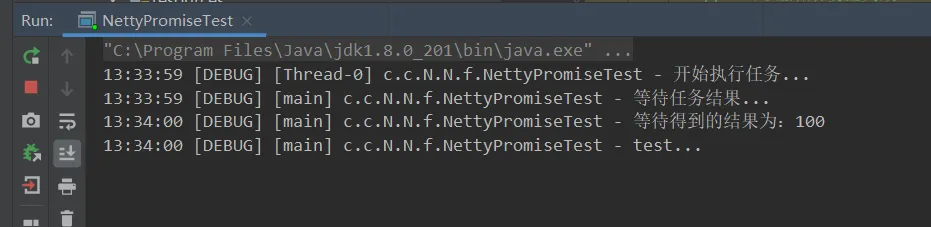
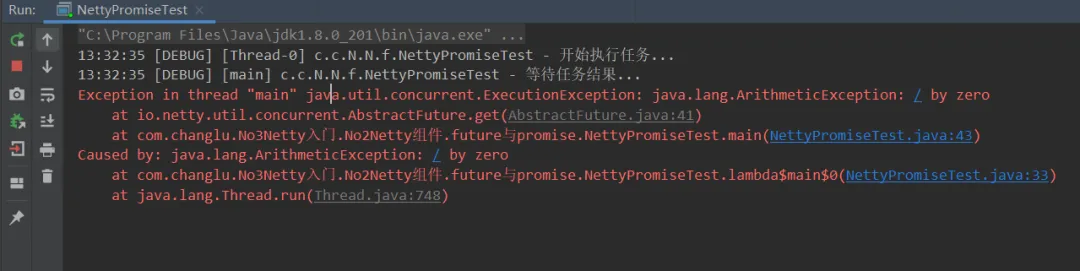
import io.netty.channel.EventLoop;import io.netty.channel.nio.NioEventLoopGroup;import io.netty.util.concurrent.DefaultPromise;import lombok.extern.slf4j.Slf4j;import java.util.concurrent.ExecutionException;/** * @ClassName NettyPromiseTest * @Author ChangLu * @Date 2022/1/6 13:25 * @Description Netty中的Promise使用:对某个业务处理结果设置成功或失败 */@Slf4jpublic class NettyPromiseTest { public static void main(String[] args) throws ExecutionException, InterruptedException { final EventLoop eventLoop = new NioEventLoopGroup().next(); final DefaultPromise<Integer> promise = new DefaultPromise<>(eventLoop); new Thread(()->{ log.debug("开始执行任务..."); try { Thread.sleep(1000); } catch (InterruptedException e) { e.printStackTrace(); } //1、处理结果设置成功!// promise.setSuccess(100); //2、处理结果设置失败! try { int i = 10/0; }catch (Exception e){// e.printStackTrace(); //在异常中设置失败结果 promise.setFailure(e); } }).start(); log.debug("等待任务结果..."); //get()方法是一个阻塞方法。若是任务成功会直接返回值;若是任务失败会抛出异常 log.debug("等待得到的结果为:{}",promise.get()); log.debug("test..."); }}效果:
设置成功正常阻塞并接受到值
设置失败则会抛出异常
3.4、handler & pipeline
pipeline:类似于流水线,handler则是一道道工序,流动的内容就是要处理的数据。
handler:handler是最为重要的,之后编写一些业务我们都直接在handler中进行,并且在netty中包含了许多内置的handler给我们简化工作(例如netty提供的StringEncoder是OutBoundHandler,StringDecode是InBoundHandler,日志new LoggingHandler()若是使用了logback需要进行额外配置)。
3.4.1、入站、出站handler执行顺序
addlast添加handler的位置实际上在head、tail handler中间
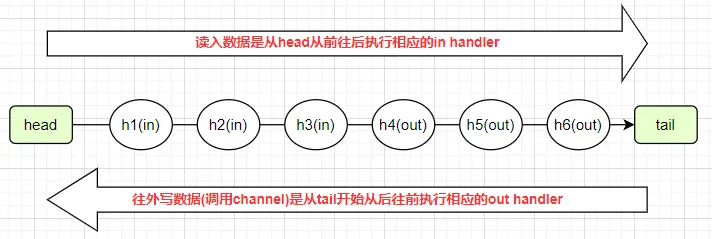
案例目的:对于in、outbound handler在进行addLast()添加后最终实际的执行顺序。
server:
import io.netty.bootstrap.ServerBootstrap;import io.netty.channel.*;import io.netty.channel.nio.NioEventLoopGroup;import io.netty.channel.socket.nio.NioServerSocketChannel;import io.netty.channel.socket.nio.NioSocketChannel;import io.netty.handler.codec.string.StringDecoder;import io.netty.handler.codec.string.StringEncoder;import lombok.extern.slf4j.Slf4j;/** * @ClassName PipelineTest * @Author ChangLu * @Date 2022/1/6 13:59 * @Description Pipeline添加入站、出站handler:入站、出站时handler的执行顺序 */@Slf4jpublic class O1PipelineTestServer { public static void main(String[] args) throws InterruptedException { new ServerBootstrap() .group(new NioEventLoopGroup(),new NioEventLoopGroup(2)) .channel(NioServerSocketChannel.class) .childHandler(new ChannelInitializer<NioSocketChannel>() { @Override protected void initChannel(NioSocketChannel ch) throws Exception { ch.pipeline().addLast(new StringDecoder()); ch.pipeline().addLast(new StringEncoder()); //添加入站事件 ch.pipeline().addLast("h1", new ChannelInboundHandlerAdapter(){ @Override public void channelRead(ChannelHandlerContext ctx, Object msg) throws Exception { log.debug("1(in)"); super.channelRead(ctx, msg);//调用下一条执行链:底层执行了ctx.fireChannelRead(msg); } }); ch.pipeline().addLast("h2", new ChannelInboundHandlerAdapter(){ @Override public void channelRead(ChannelHandlerContext ctx, Object msg) throws Exception { log.debug("2(in)"); super.channelRead(ctx, msg);//调用下一条执行链:底层执行了ctx.fireChannelRead(msg); } }); ch.pipeline().addLast("h3", new ChannelInboundHandlerAdapter(){ @Override public void channelRead(ChannelHandlerContext ctx, Object msg) throws Exception { log.debug("3(in)"); super.channelRead(ctx, msg);//调用下一条执行链:底层执行了ctx.fireChannelRead(msg); //接收到数据之后来进行写数据(紧接着会触发出站handler) ch.writeAndFlush("hello,client!");// ch.writeAndFlush(ctx.alloc().buffer().writeBytes("hello,client".getBytes()));//或者直接自己将String转换为ByteBuf发送出去 } }); //出站自定义的三道工序 ch.pipeline().addLast("h4", new ChannelOutboundHandlerAdapter(){ @Override public void write(ChannelHandlerContext ctx, Object msg, ChannelPromise promise) throws Exception { log.debug("4(out)"); super.write(ctx, msg, promise); } }); ch.pipeline().addLast("h5", new ChannelOutboundHandlerAdapter(){ @Override public void write(ChannelHandlerContext ctx, Object msg, ChannelPromise promise) throws Exception { log.debug("5(out)"); super.write(ctx, msg, promise); } }); ch.pipeline().addLast("h6", new ChannelOutboundHandlerAdapter(){ @Override public void write(ChannelHandlerContext ctx, Object msg, ChannelPromise promise) throws Exception { log.debug("6(out)"); super.write(ctx, msg, promise); } }); } }) .bind(8080) .sync(); log.debug("服务器启动成功!"); }}client:
import io.netty.bootstrap.Bootstrap;import io.netty.channel.*;import io.netty.channel.nio.NioEventLoopGroup;import io.netty.channel.socket.nio.NioSocketChannel;import io.netty.handler.codec.string.StringDecoder;import io.netty.handler.codec.string.StringEncoder;import lombok.extern.slf4j.Slf4j;import java.net.InetSocketAddress;import java.util.Scanner;/** * @ClassName O1Client * @Author ChangLu * @Date 2022/1/6 14:04 * @Description client:用于向服务端发起请求,可以自由输入信息发送出去,q表示退出当前连接 */@Slf4jpublic class O1Client { public static void main(String[] args) throws InterruptedException { final ChannelFuture future = new Bootstrap() .group(new NioEventLoopGroup()) .channel(NioSocketChannel.class) .handler(new ChannelInitializer<NioSocketChannel>() { @Override protected void initChannel(NioSocketChannel channel) throws Exception { channel.pipeline().addLast(new StringDecoder()); channel.pipeline().addLast(new StringEncoder()); channel.pipeline().addLast(new ChannelInboundHandlerAdapter() { @Override public void channelRead(ChannelHandlerContext ctx, Object msg) throws Exception { log.debug("接收到来自 {} 数据:{}", ctx.channel(), msg); } }); } }) .connect(new InetSocketAddress("localhost", 8080)); //等待连接 future.sync(); final Channel channel = future.channel(); log.debug("成功连接:{}", channel); log.debug("请输入消息或者q退出成功:"); new Thread(()->{ final Scanner scanner = new Scanner(System.in); while (true) { final String msg = scanner.nextLine(); if ("q".equals(msg)){ channel.close(); break; } channel.writeAndFlush(msg); } }).start(); }}效果:

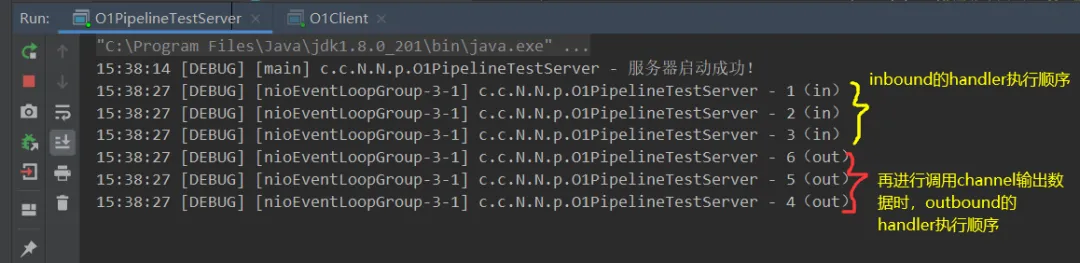
3.4.2、InBoundHandler案例(加工数据)
核心点:
1、若是想要InBoundHandler依次执行,那么需要调用一个super.channelRead(ctx, data);或ctx.fireChannelRead(data);来进行调用下一个handler,前者源码实际就是调用的后者!2、handler之间可以传递数据,那么可以来使用多个handler可以进行对数据加工处理!3、最后一个InBoundHandler不需要去调用super.channelRead了,因为已经是最后一个执行结果了!案例目的:通过三个自定义InBoundHandler,来对Bytebuf 进行如Bytebuf -> String -> Result自定义对象进行加工处理。
server:
import io.netty.bootstrap.ServerBootstrap;import io.netty.buffer.ByteBuf;import io.netty.channel.*;import io.netty.channel.nio.NioEventLoopGroup;import io.netty.channel.socket.nio.NioServerSocketChannel;import io.netty.channel.socket.nio.NioSocketChannel;import lombok.AllArgsConstructor;import lombok.Data;import lombok.extern.slf4j.Slf4j;/** * @ClassName O2InboundHandlerTest * @Author ChangLu * @Date 2022/1/6 14:56 * @Description InboundHandler测试:handler之间传递规则,各个handler进行数据处理分工 */@Slf4jpublic class O2InboundHandlerTest { public static void main(String[] args) throws InterruptedException { new ServerBootstrap() .group(new NioEventLoopGroup(),new NioEventLoopGroup(2)) .channel(NioServerSocketChannel.class) .childHandler(new ChannelInitializer<NioSocketChannel>() { @Override protected void initChannel(NioSocketChannel ch) throws Exception { //添加入站事件 //第一个handler:将ByteBuf => String ch.pipeline().addLast("h1", new ChannelInboundHandlerAdapter(){ @Override public void channelRead(ChannelHandlerContext ctx, Object msg) throws Exception { log.debug("1(in)"); ByteBuf buf = (ByteBuf)msg; final String data = buf.toString(Charsets.UTF_8); super.channelRead(ctx, data);//方式一:执行下一个handler } }); //第二个handler:将String封装到Result对象中 ch.pipeline().addLast("h2", new ChannelInboundHandlerAdapter(){ @Override public void channelRead(ChannelHandlerContext ctx, Object msg) throws Exception { log.debug("2(in)"); final Result result = new Result("小明", (String) msg); ctx.fireChannelRead(result);//方式二:同样执行下一个handler } }); //第三个handler:接受到Result对象输出 ch.pipeline().addLast("h3", new ChannelInboundHandlerAdapter(){ @Override public void channelRead(ChannelHandlerContext ctx, Object msg) throws Exception { log.debug("3(in)"); log.debug("解析得到的数据为:{}", msg); } }); } }) .bind(8080) .sync(); log.debug("服务器启动成功!"); } @Data @AllArgsConstructor static class Result{ private String name; private String msg; }}效果:客户端依旧使用的是3.4.1案例中的client
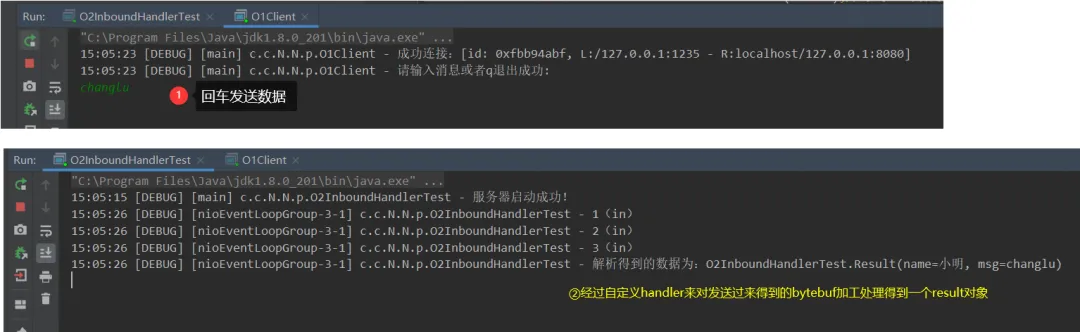
3.4.3、OutBoundHandler案例(不同对象发出数据效果不一致)
核心点:
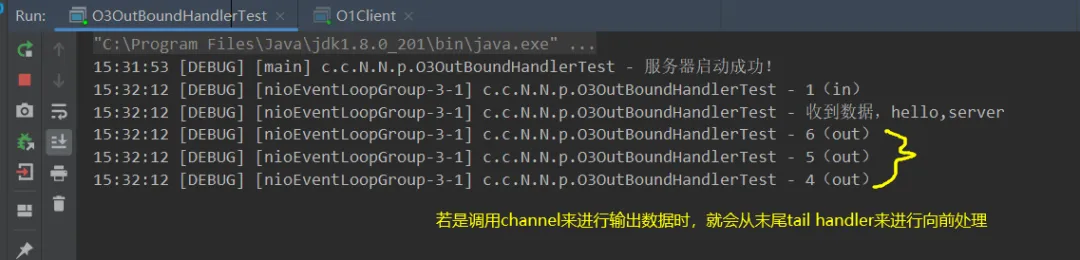
1、执行OutBoundHandler的顺序是从后往前依次执行的,对于使用channel来写或者ChannelHandlerContext来写handler的处理也有区别。2、通过ChannelHandlerContext来发送数据效果,实际会从当前的handler向前开始依次执行handler来进行数据的额外处理,若是原本在该handler之后的boundhandler就不会被执行到!3、通过channel来写数据,一定会从tail(最后一个handler)开始向前依次执行OutBoundHandler。4、发送数据一定要发出去bytebuf,若是直接writeAndFlush("字符串"),服务端不会接收到,除非再添加一个handler处理器也就是StringEncoder(),会将String转为ByteBuf。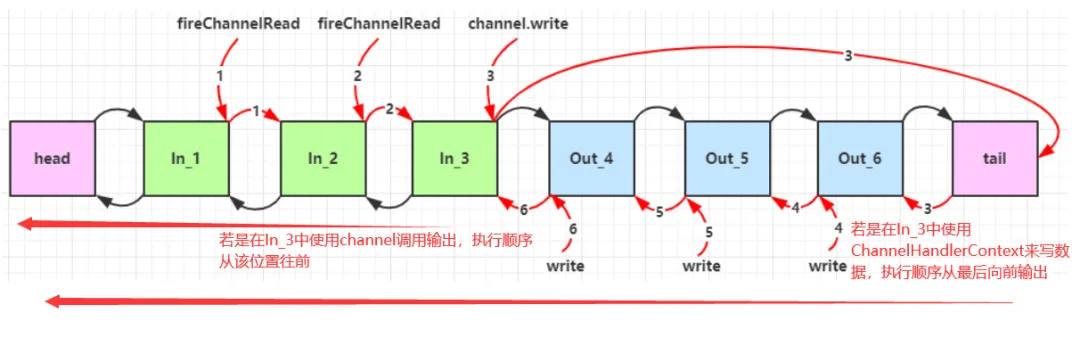
案例目的:通过两种进行写数据的方法调用来看出对应其执行顺序!
import io.netty.bootstrap.ServerBootstrap;import io.netty.channel.*;import io.netty.channel.nio.NioEventLoopGroup;import io.netty.channel.socket.nio.NioServerSocketChannel;import io.netty.channel.socket.nio.NioSocketChannel;import io.netty.handler.codec.string.StringDecoder;import io.netty.handler.codec.string.StringEncoder;import lombok.extern.slf4j.Slf4j;/** * @ClassName O3OutBoundHandlerTest * @Author ChangLu * @Date 2022/1/6 15:19 * @Description 出站处理器:ctx调用时outhandler执行顺序,普通channel输出数据时outhandler执行顺序 */@Slf4jpublic class O3OutBoundHandlerTest { public static void main(String[] args) throws InterruptedException { new ServerBootstrap() .group(new NioEventLoopGroup(),new NioEventLoopGroup(2)) .channel(NioServerSocketChannel.class) .childHandler(new ChannelInitializer<NioSocketChannel>() { @Override protected void initChannel(NioSocketChannel ch) throws Exception { ch.pipeline().addLast(new StringDecoder()); ch.pipeline().addLast(new StringEncoder()); //添加入站事件 ch.pipeline().addLast("h1", new ChannelInboundHandlerAdapter(){ @Override public void channelRead(ChannelHandlerContext ctx, Object msg) throws Exception { log.debug("1(in)"); log.debug("收到数据,{}", msg); super.channelRead(ctx, msg); //向客户端写数据 //方式一:调用NioSocketChannel来进行发送数据。(从tail末尾向前依次执行outhandler)// ch.writeAndFlush("hello,client!"); //方式二:调用ctx来进行发送数据。(从当前handler向前依次执行outhandler) ctx.writeAndFlush("hello,client"); } }); //出站自定义的三道工序 ch.pipeline().addLast("h4", new ChannelOutboundHandlerAdapter(){ @Override public void write(ChannelHandlerContext ctx, Object msg, ChannelPromise promise) throws Exception { log.debug("4(out)"); super.write(ctx, msg, promise); } }); ch.pipeline().addLast("h5", new ChannelOutboundHandlerAdapter(){ @Override public void write(ChannelHandlerContext ctx, Object msg, ChannelPromise promise) throws Exception { log.debug("5(out)"); super.write(ctx, msg, promise); } }); ch.pipeline().addLast("h6", new ChannelOutboundHandlerAdapter(){ @Override public void write(ChannelHandlerContext ctx, Object msg, ChannelPromise promise) throws Exception { log.debug("6(out)"); super.write(ctx, msg, promise); } }); } }) .bind(8080) .sync(); log.debug("服务器启动成功!"); }}效果:

通过channel来发送数据效果
通过ctx,也就是ChannelHandlerContext发送数据效果:

3.5、EmbeddedChannel(快速测试入站、出站handler业务)
用途:为了能够快速进行测试业务代码,可以通过使用EmbeddedChannel来进行快速调用写入、输出!
案例目的:使用EmbeddedChannel来进行测试一下入站、出站handler的执行顺序。
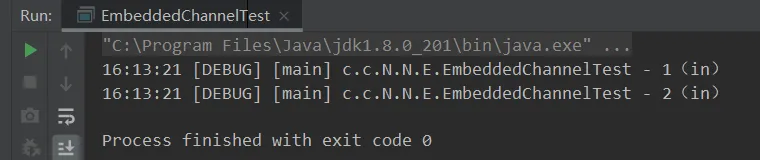
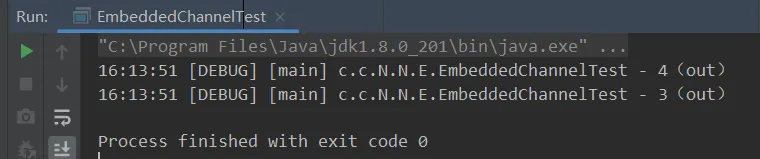
import io.netty.buffer.ByteBufAllocator;import io.netty.channel.ChannelHandlerContext;import io.netty.channel.ChannelInboundHandlerAdapter;import io.netty.channel.ChannelOutboundHandlerAdapter;import io.netty.channel.ChannelPromise;import io.netty.channel.embedded.EmbeddedChannel;import lombok.extern.slf4j.Slf4j;/** * @ClassName EmbeddedChannelTest * @Author ChangLu * @Date 2022/1/6 16:04 * @Description EmbeddedChannel:工具类,能够快速测试我们所写的一些入站、出站handler执行顺序及过程 */@Slf4jpublic class EmbeddedChannelTest { public static void main(String[] args) { final ChannelInboundHandlerAdapter h1 = new ChannelInboundHandlerAdapter(){ @Override public void channelRead(ChannelHandlerContext ctx, Object msg) throws Exception { log.debug("1(in)"); super.channelRead(ctx, msg); } }; final ChannelInboundHandlerAdapter h2 = new ChannelInboundHandlerAdapter(){ @Override public void channelRead(ChannelHandlerContext ctx, Object msg) throws Exception { log.debug("2(in)"); super.channelRead(ctx, msg); } }; final ChannelOutboundHandlerAdapter h3 = new ChannelOutboundHandlerAdapter() { @Override public void write(ChannelHandlerContext ctx, Object msg, ChannelPromise promise) throws Exception { log.debug("3(out)"); super.write(ctx, msg, promise); } }; final ChannelOutboundHandlerAdapter h4 = new ChannelOutboundHandlerAdapter() { @Override public void write(ChannelHandlerContext ctx, Object msg, ChannelPromise promise) throws Exception { log.debug("4(out)"); super.write(ctx, msg, promise); } }; //初始化EmbeddedChannel final EmbeddedChannel channel = new EmbeddedChannel(h1, h2, h3, h4); //模拟入站操作// channel.writeInbound(ByteBufAllocator.DEFAULT.buffer().writeBytes("hello,server".getBytes())); //模拟出站操作 channel.writeOutbound(ByteBufAllocator.DEFAULT.buffer().writeBytes("hello,client".getBytes())); }}效果:
模拟入站输出:
模拟出站输出:
3.6、ByteBuf
netty中的ByteBuf的容量可以动态扩容,相比较于在NIO中的ByteBuffer一旦指定初始容量之后就无法更改了!若是写入超过容量的数据则会出现覆盖的情况!
3.6.1、创建
创建与写入API:
//创建一个20字节容量的ByteBuffinal ByteBuf bytebuf = ByteBufAllocator.DEFAULT.buffer(20);//进行写数据,具备自动扩容的功能!bytebuf.writeBytes(builder.toString().getBytes());案例描述:向一个20字节容量的ByteBuf插入50个字节,测试是否会动态扩容
import io.netty.buffer.ByteBuf;import io.netty.buffer.ByteBufAllocator;import static io.netty.buffer.ByteBufUtil.appendPrettyHexDump;import static io.netty.util.internal.StringUtil.NEWLINE;/** * @ClassName ByteBufTest * @Author ChangLu * @Date 2022/1/6 16:28 * @Description ByteBuf案例:创建 */public class ByteBufTest { public static void main(String[] args) { createByteBufDemo(); } /** * ByteBuf创建:可进行自动扩容 */ public static void createByteBufDemo(){ final ByteBuf bytebuf = ByteBufAllocator.DEFAULT.buffer(20);// System.out.println(bytebuf);//toString()的一些内容展示有限:PooledUnsafeDirectByteBuf(ridx: 0, widx: 0, cap: 20) log(bytebuf); final StringBuilder builder = new StringBuilder(); for (int i = 0; i < 50; i++) { builder.append("a"); } //向ByteBuffer中写入数据 bytebuf.writeBytes(builder.toString().getBytes());// System.out.println(bytebuf); log(bytebuf); } /** * 工具类:用于方便查看ByteBuf中的具体数据信息 * @param buffer */ private static void log(ByteBuf buffer) { int length = buffer.readableBytes(); int rows = length / 16 + (length % 15 == 0 ? 0 : 1) + 4; StringBuilder buf = new StringBuilder(rows * 80 * 2) .append("read index:").append(buffer.readerIndex()) .append(" write index:").append(buffer.writerIndex()) .append(" capacity:").append(buffer.capacity()) .append(NEWLINE); appendPrettyHexDump(buf, buffer); System.out.println(buf.toString()); }}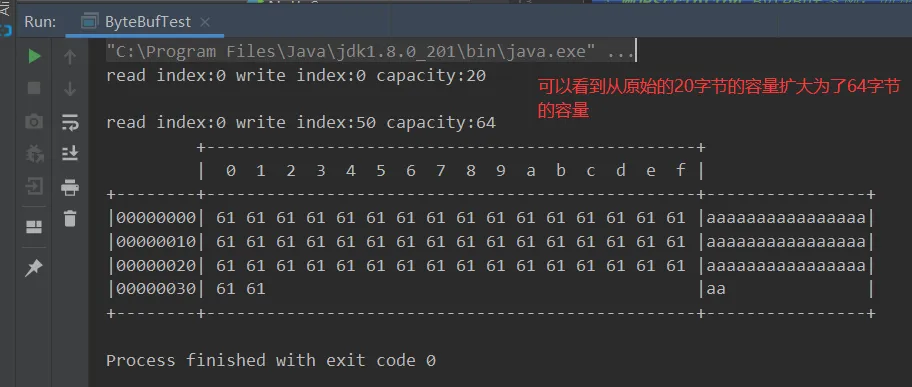
3.6.2、直接内存 vs 堆内存
netty的默认情况下都会使用直接内存来作为ByteBuf的内存
堆内存与直接内存区别
堆内存的分配效率比较高,但是读写内存的效率比较低
直接内存分配效率比较低,但是读写效率高。直接内存使用的是系统内存
• 直接内存使用的是系统内存,若是从磁盘中读取文件时会将数据直接读入到系统内存,那么系统内存呢就会用直接内存的方式映射到java内存中,java里面访问的和操作系统访问的是同一块内存,那么就可以减少一次内存的复制,所以读取效率会高于堆内存。 • 堆内存会受到垃圾回收的影响,那么必然会对对象进行搬迁、复制等操作则会影响效率。
3.6.3、池化 vs 非池化
池化的最大意义在于可以重用 ByteBuf,优点有
• 没有池化,则每次都得创建新的 ByteBuf 实例,这个操作对直接内存代价昂贵,就算是堆内存,也会增加 GC 压力 • 有了池化,则可以重用池中 ByteBuf 实例,并且采用了与 jemalloc 类似的内存分配算法提升分配效率 • 高并发时,池化功能更节约内存,减少内存溢出的可能
在netty中的bytebuf支持池化管理,对于一些创建比较慢这样可以使用池的思想进行优化。
• 例如数据库连接十分耗时,可以使用数据库连接池来进行优化,用完后归还池则实现对象的重用了。
是否池化说明
4.1 之前,池化功能还不成熟,默认是非池化实现4.1 以后,非 Android 平台默认启用池化实现,Android 平台启用非池化实现;windows平台默认是开辟的池化管理测试一下:版本是4.1.3,也就是4.1以后,默认是开启池化的
/** * 查看ByteBuf是否池化、采用的是直接内存或堆内存 */public static void seeByteBufClassDemo(){ //buffer():默认是直接内存 System.out.println(ByteBufAllocator.DEFAULT.buffer().getClass()); //directBuffer():直接内存 System.out.println(ByteBufAllocator.DEFAULT.directBuffer().getClass()); //heapBuffer():堆内存 System.out.println(ByteBufAllocator.DEFAULT.heapBuffer().getClass());}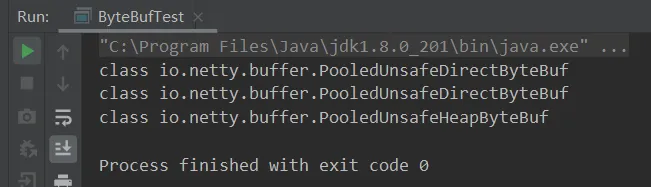
若是在4.1之后想使用非池化需要指定系统环境变量才程序运行时:
//-Dio.netty.allocator.type={unpooled|pooled} 设置非池化-Dio.netty.allocator.type=unpooled
若是不想要通过配置参数,也可以调用指定的类Unpooled来生成非池化的字节缓冲区:
//class io.netty.buffer.UnpooledByteBufAllocator$InstrumentedUnpooledUnsafeHeapByteBufSystem.out.println(Unpooled.buffer().getClass());3.6.4、ByteBuf组成
ByteBuf是netty基于nio中的ByteBuffer的封装改进。
特点:
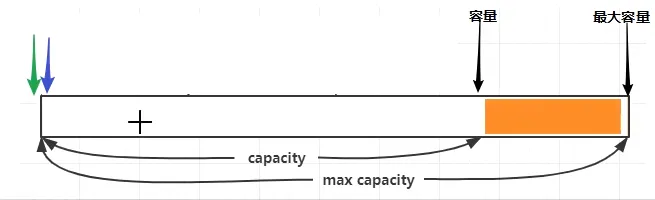
1、读写指针最开始都在 0 位置(图中两个颜色指针)。
2、规定了容量与最大容量:为了将来在容量不够时才去申请更多的内存,实现按需所取。
3、包含两个指针(读写指针):当进行写入数据的时候写指针向后移动,此时读指针与写指针这部分数据表示是可读部分。若是读取数据,读指针也会向后移动。那么也就是说写指针与读指针之间是未读取的数据。已经读过的部分则是废弃部分。
4、对于ByteBuf由四个部分组成:废弃部分(已读)、可读部分(未读)、可写字节(未写)、可扩容部分(等待容量满进行分配)
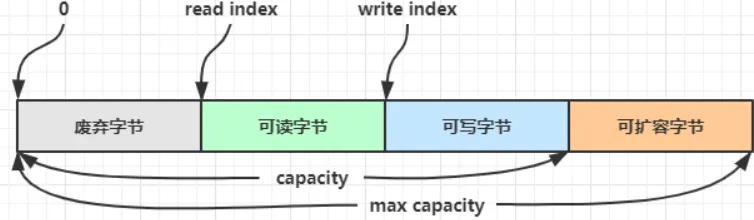
与ByteBuffer比较:相对于bytebuf只有一个指针,若是想要进行读需要切换到读模式,想要写要切换到写模式。用起来不方便。
两个方便进行了改进:①读和写使用了两个指针。②可以动态扩容。
3.6.5、写入
常用的方法:
• 带有LE的就是大端写入,不带的则是小端写入。网络编程中的两个名词,代表的是先写高位字节,还是先写低位字节;一般采用大端写入! • 大端写入:低位靠后,先写高位的0。 • 小端写入:低位先写,与大端相反。 • 对于ByteBuf提供了写入ByteBuf以及stringbuilder、stringbuffer、string的API。
注意点:①这些方法的未指明返回值的,其返回值都是 ByteBuf,意味着可以链式调用。②网络传输,默认习惯是 Big Endian。
demo
案例目的:测试是否能够正常写入字符串、字节等。
/** * 03、测试ByteBuf的写入与扩容 */public static void writeToByteBufDemo(){ final ByteBuf buffer = ByteBufAllocator.DEFAULT.buffer(20); buffer.writeBytes("c".getBytes());//写入字节 final StringBuilder builder = new StringBuilder("hang"); buffer.writeCharSequence(builder, Charset.defaultCharset());//写入stringbuilder buffer.writeCharSequence("lu", Charset.defaultCharset());//写入字符串 log(buffer); //测试扩容 buffer.writeCharSequence(",helloworld", Charset.defaultCharset()); log(buffer);}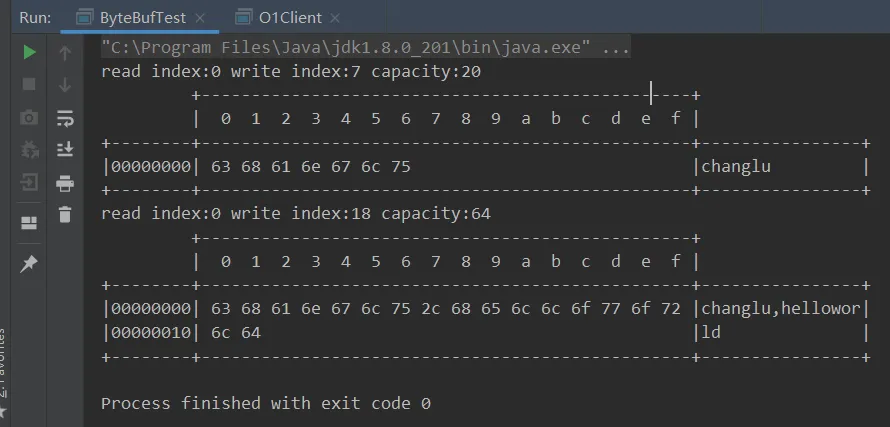
3.6.5、扩容
默认若是不指定的话则最大容量是整数的最大值。
扩容规则是
• 如何写入后数据大小未超过 512,则选择下一个 16 的整数倍,例如写入后大小为 12 ,则扩容后 capacity 是 16 • 如果写入后数据大小超过 512,则选择下一个 2^n,例如写入后大小为 513,则扩容后 capacity 是 2^10=1024(2^9=512 已经不够了) • 扩容不能超过 max capacity 会报错
3.6.7、读取
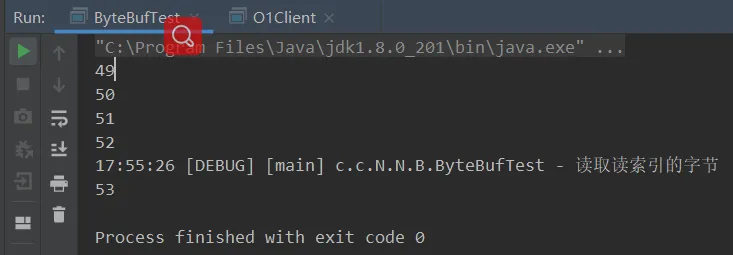
案例目的:读取字节以及标记重复读取
/** * 04、测试ByteBuf的读取:包含重复读取某个字节 */public static void readByteBufDemo(){ final ByteBuf buffer = ByteBufAllocator.DEFAULT.buffer(20); buffer.writeBytes("123456789".getBytes());//写入字节 System.out.println(buffer.readByte());//读取一个字节 System.out.println(buffer.readByte()); System.out.println(buffer.readByte()); System.out.println(buffer.readByte()); buffer.markReaderIndex();//可标记读索引以及写索引 buffer.readBytes(4); buffer.resetReaderIndex();//重置读索引 log.debug("读取读索引的字节"); System.out.println(buffer.readByte());}1、读取内容使用read开头的API,这类API会移动读指针。
2、若是使用get开头API,不会移动读指针。
3、若是想要回读或重读可以设置mark标记,同样也可以设置读或写标记!
3.6.8、retain & release (释放ByteBuf)
3.6.8.1、释放分析
由于 Netty 中有堆外内存(指的是直接内存)的 ByteBuf 实现,堆外内存最好是手动来释放,而不是等 GC 垃圾回收。
• UnpooledHeapByteBuf 使用的是 JVM 内存,只需等 GC 回收内存即可。 • UnpooledDirectByteBuf 使用的就是直接内存了,需要特殊的方法来回收内存。 • PooledByteBuf 和它的子类使用了池化机制,需要更复杂的规则来回收内存。
扩展:可达性分析是通过一系列的GC ROOTS对象来连接有用的对象,走过的路径会形成一条链,当有对象到GC ROOTS没有一条引用链的时候就要被回收了。
核心:在实际业务场景中,入站、出站操作中都会使用到ByteBuf,针对于池化的Bytebuf则会将用完之后的ByteBuf还回内存池,来达到内存重用!在入站、出站过程中经历多个handler,其中head、tail handler是netty默认定义好的,两者都能够进行收尾工作(指的是若是最终传递得到的Object msg的对象ByteBuf就会进行自动回收,若是其他类型则不处理)。:
误解:不要觉得头和尾都可以释放我们中途就可以不管bytebuf的释放了,因为其释放时机需要把bytebuf对象一直传到头或尾handler才会释放。若是在中途已经将bytebuf转换成字符串了接着进行下面的传递,此时到tail拿到的仅仅是那个字符串了就不是bytebuf了,既然如此就不会做释放处理。
最合适的释放时机:谁最后拿到bytebuf(传递已对bytebuf进行解析并将解析后的内容向后传递的handler)就要对ByteBuf进行释放。若是从头置尾handler直接都是传递的ByteBuf中间也可以不手动释放,最后也会给我们进行释放,不过最好就是哪里用完了ByteBuf(解析完)就进行释放!
3.6.8.2、源码分析(head、tail)
基本规则是,谁是最后使用者,谁负责 release,详细分析如下
• 起点,对于 NIO 实现来讲,在 io.netty.channel.nio.AbstractNioByteChannel.NioByteUnsafe#read 方法中首次创建 ByteBuf 放入 pipeline(line 163 pipeline.fireChannelRead(byteBuf)) • 入站 ByteBuf 处理原则 • 对原始 ByteBuf 不做处理,调用 ctx.fireChannelRead(msg) 向后传递,这时无须 release • 将原始 ByteBuf 转换为其它类型的 Java 对象,这时 ByteBuf 就没用了,必须 release • 如果不调用 ctx.fireChannelRead(msg) 向后传递,那么也必须 release • 注意各种异常,如果 ByteBuf 没有成功传递到下一个 ChannelHandler,必须 release • 假设消息一直向后传,那么 TailContext 会负责释放未处理消息(原始的 ByteBuf) • 出站 ByteBuf 处理原则 • 出站消息最终都会转为 ByteBuf 输出,一直向前传,由 HeadContext flush 后 release • 异常处理原则 • 有时候不清楚 ByteBuf 被引用了多少次,但又必须彻底释放,可以循环调用 release 直到返回 true
tail handler:入站最后执行的处理器
//可以看到实现了ChannelInboundHandler接口final class TailContext extends AbstractChannelHandlerContext implements ChannelInboundHandler { //关注其中的read方法 public void channelRead(ChannelHandlerContext ctx, Object msg) throws Exception { DefaultChannelPipeline.this.onUnhandledInboundMessage(msg); }}protected void onUnhandledInboundMessage(Object msg) { try { logger.debug("Discarded inbound message {} that reached at the tail of the pipeline. Please check your pipeline configuration.", msg); } finally { //使用了一个工具类来进行尝试释放 ReferenceCountUtil.release(msg); }}public static boolean release(Object msg) { //可以看到会使用instanceOf来判断是否是ByteBuf,因为ByteBuf实现了引用计数的接口,若是是的话就会进行释放 //public abstract class ByteBuf implements ReferenceCounted, Comparable<ByteBuf> { return msg instanceof ReferenceCounted ? ((ReferenceCounted)msg).release() : false;}head handler:出站的最后一个handler执行器
//可以注意到其实现了ChannelOutboundHandler、ChannelInboundHandler,则表示又是入站执行器,也是出站执行器。final class HeadContext extends AbstractChannelHandlerContext implements ChannelOutboundHandler, ChannelInboundHandler { //对于出站就要关注其write方法 public void write(ChannelHandlerContext ctx, Object msg, ChannelPromise promise) throws Exception { this.unsafe.write(msg, promise); }}//AbstractChannel.classpublic final void write(Object msg, ChannelPromise promise) { this.assertEventLoop(); ChannelOutboundBuffer outboundBuffer = this.outboundBuffer; //这里做了一次是否为出栈BUffer判定。若是的话则表示当前方法是在出站时进行调用的。 if (outboundBuffer == null) { this.safeSetFailure(promise, AbstractChannel.WRITE_CLOSED_CHANNEL_EXCEPTION); //可以看到这里也进行了释放操作,内部源码实际上就是对msg类型进行判断,若是ByteBuf就释放。 ReferenceCountUtil.release(msg); } else { ... } }3.6.8、零拷贝
netty的零拷贝体现在网络数据传输、文件传输以及数据操作的优化,下面就主要介绍数据操作的零拷贝优化。
• netty中的零拷贝主要也是指减少数据复制,提升性能。
通过wrap(),可将byte[]数组、ByteBuf、ByteBuffer等包装成一个Netty ByteBuf对象,避免了复制拷贝操作。
通过duplicate(),可将整个ByteBuf进行零拷贝。
通过slice(),可将ByteBuf分解为多个共享同一个存储区域的ByteBuf, 避免内存的拷贝。
通过CompositeByteBuf,可将多个ByteBuf进行合并。
3.6.8.1、slice:切割
slice是数据零拷贝的体现之一
①实际应用
案例目的:对某个Bytebuf进行数据分割放置到两个ByteBuf中。
/** * 实际应用:零拷贝获取head、body */public static void practicalUse(){ final ByteBuf buffer = ByteBufAllocator.DEFAULT.buffer(20); buffer.writeCharSequence("head,body", Charset.defaultCharset()); //若是要对某一个ByteBuf进行切割操作,第一部分要的是前5个,第二部分要的是后5个 //应用场景:对请求body、head进行切割。分割得到的两个部分实际上使用的是原先Buffer的共享内存 final ByteBuf front = buffer.slice(0, 4);//第一个参数是切割的位置,第二个参数是切割的数量 log(front); final ByteBuf end = buffer.slice(5, 4); log(end);}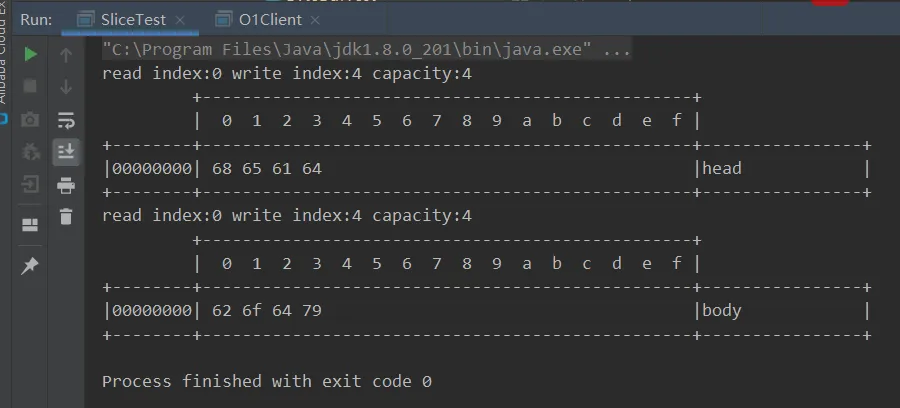
②修改切割得到的某个ByteBuf位置内容也会影响源ByteBuf;切割得到的ByteBuf无法写入
/** * Slice切片得到的ByteBuf进行测试 */public static void sliceTest(){ ByteBuf buffer = ByteBufAllocator.DEFAULT.buffer(20); buffer.writeBytes(new byte[]{1,2,3,4}); final ByteBuf sliceBuf = buffer.slice(0, 4); //1、修改切片得到的ByteBuf也会影响原始的ByteBuf,因为使用的是同一块内存 sliceBuf.setByte(0,6); log(buffer); //2、无法对切片进行write操作,会抛出异常IndexOutOfBoundsException sliceBuf.writeByte(10);}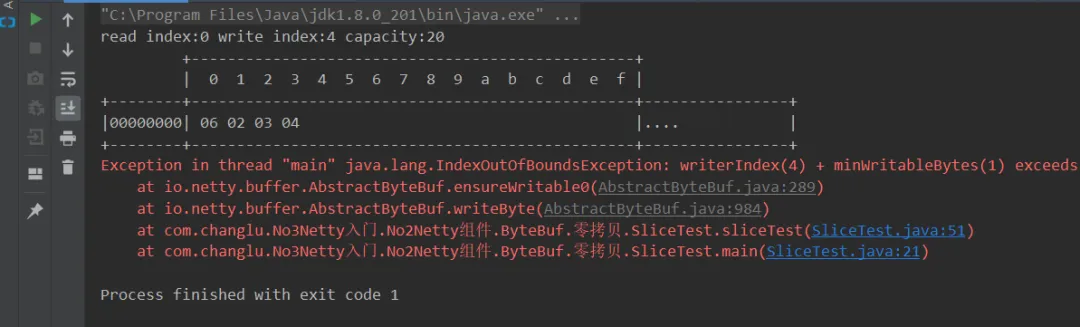
③release()与retain()应用场景
release()与retain()可对使用相同内存的ByteBuf同时进行引用计数!
/** * release()与retain()使用 */public static void sliceTest2(){ ByteBuf buffer = ByteBufAllocator.DEFAULT.buffer(20); buffer.writeBytes(new byte[]{1,2,3,4}); final ByteBuf sliceBuf = buffer.slice(0, 4); //这里引用计数+1,对于原ByteBuf以及切割得到的ByteBuf都有影响,因为是占用的同一块内存 sliceBuf.retain();//引用计数+1 buffer.release(); //若是直接对原ByteBuf进行清理,然后使用切片得到的ByteBuf会抛出异常IllegalReferenceCountException: refCnt: 0 //若是在release()之后也想正常使用,可以在此之前使用retain()进行引用+1,release()相对于会引用-1,此时就不会真正释放内存,自然也就能欧使用 log(sliceBuf);}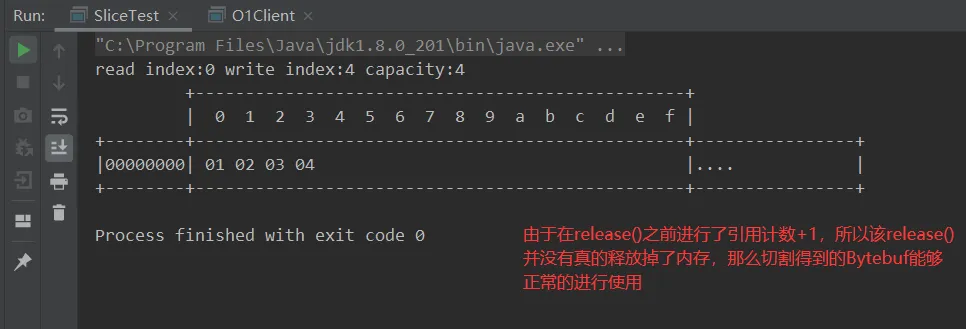
3.6.8.2、duplicate:整块
效果:好比截取了原始 ByteBuf 所有内容,并且没有 max capacity 的限制,也是与原始 ByteBuf 使用同一块底层内存,只是读写指针是独立的。
import io.netty.buffer.ByteBuf;import io.netty.buffer.ByteBufAllocator;import java.nio.charset.Charset;import static com.changlu.No3Netty入门.No2Netty组件.ByteBuf.ByteBufTest.log;/** * @ClassName DuplicateTest * @Author ChangLu * @Date 2022/1/7 23:32 * @Description Duplicate:整块零拷贝 */public class DuplicateTest { public static void main(String[] args) { final ByteBuf buffer = ByteBufAllocator.DEFAULT.buffer(20); buffer.writeCharSequence("changlu", Charset.defaultCharset()); final ByteBuf dupBuf = buffer.duplicate(); //对整块进行零拷贝的进行修改 dupBuf.setByte(0,1); log(buffer);//测试源ByteBuf受到影响 }}效果:
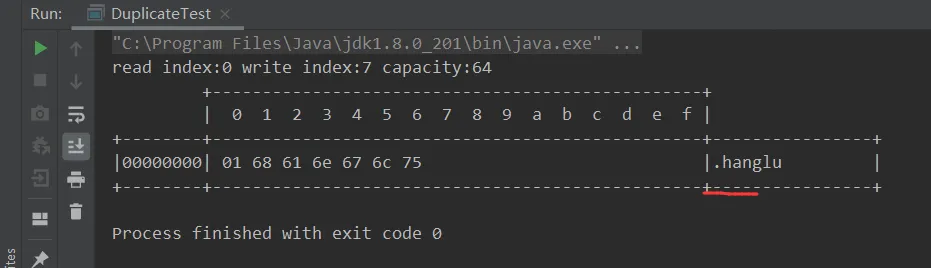
3.6.8.3、copy:深拷贝(非零拷贝)
copy:就是对整个ByteBuf进行深拷贝,拷贝过后的能够进行写入,并且修改的位置内容不会影响源位置。
import io.netty.buffer.ByteBuf;import io.netty.buffer.ByteBufAllocator;import java.nio.charset.Charset;import static com.changlu.No3Netty入门.No2Netty组件.ByteBuf.ByteBufTest.log;/** * @ClassName CopyTest * @Author ChangLu * @Date 2022/1/7 23:37 * @Description Copy:整个ByteBuf进行深拷贝 */public class CopyTest { public static void main(String[] args) { final ByteBuf buffer = ByteBufAllocator.DEFAULT.buffer(20); buffer.writeCharSequence("changlu", Charset.defaultCharset()); //进行深拷贝 final ByteBuf copyBuf = buffer.copy(); copyBuf.setByte(0,1); copyBuf.writeByte(6); //测试源buffer log(buffer); //测试深拷贝得到buffer log(copyBuf); }}效果:
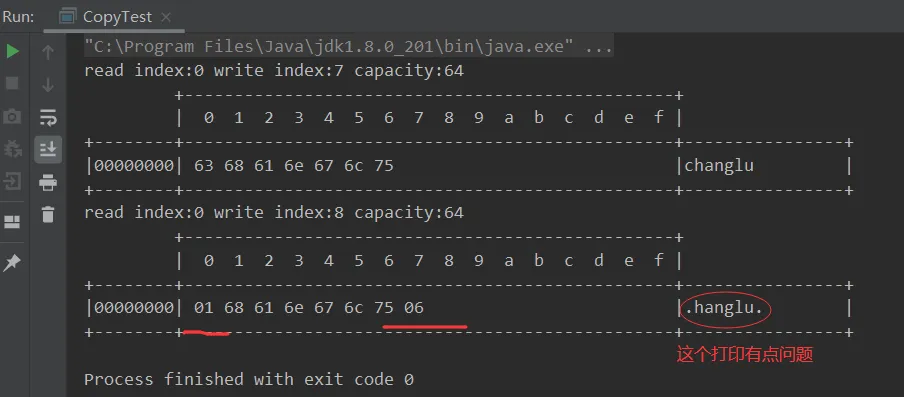
3.6.8.4、CompositeBuffer:组装ByteBuf
CompositeByteBuf 是一个组合的 ByteBuf,它内部维护了一个 Component 数组,每个 Component 管理一个 ByteBuf,记录了这个 ByteBuf 相对于整体偏移量等信息,代表着整体中某一段的数据。
• 优点,对外是一个虚拟视图,组合这些 ByteBuf 不会产生内存复制 • 缺点,复杂了很多,多次操作会带来性能的损耗
功能:可以将多个 ByteBuf 合并为一个逻辑上的 ByteBuf,避免拷贝。注意要设置true来让其调整读,写指针。
案例:包含两个测试
import io.netty.buffer.ByteBuf;import io.netty.buffer.ByteBufAllocator;import io.netty.buffer.CompositeByteBuf;import java.nio.charset.Charset;import static com.changlu.No3Netty入门.No2Netty组件.ByteBuf.ByteBufTest.log;/** * @ClassName CompositeBufferTest * @Author ChangLu * @Date 2022/1/7 23:48 * @Description CompositeBuffer:零拷贝之一,合并ByteBuf */public class CompositeBufferTest { public static void main(String[] args) { final ByteBuf buffer = ByteBufAllocator.DEFAULT.buffer(20); buffer.writeCharSequence("changlu", Charset.defaultCharset()); final ByteBuf buffer1 = ByteBufAllocator.DEFAULT.buffer(20); buffer1.writeCharSequence("liner", Charset.defaultCharset()); //效率较低方案:直接通过writeBytes()写入字节方式写入// log(ByteBufAllocator.DEFAULT.buffer(20).writeBytes(buffer).writeBytes(buffer1)); //零拷贝:合并两个Buffer到一个Buffer中,使用的共享内存 final CompositeByteBuf comBuf = ByteBufAllocator.DEFAULT.compositeBuffer(); //测试一:不设置true// comBuf.addComponents(buffer, buffer1);//若是不设置true,则不会自动调整读、写指针位置造成数据不会加进来 //测试二:设置true comBuf.addComponents(true, buffer, buffer1); log(comBuf); }}效果:
测试一:
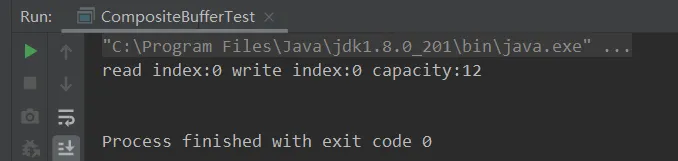
测试二:
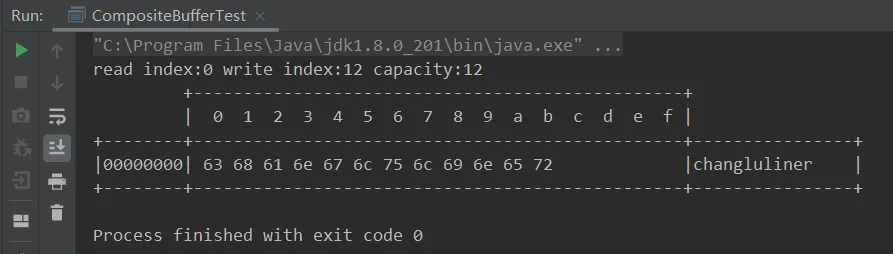
3.6.8.5、工具类Unpooled(提供了非池化的 ByteBuf 创建、组合、复制等操作)
Unpooled 是一个工具类,类如其名,提供了非池化的 ByteBuf 创建、组合、复制等操作。
这里仅介绍其跟【零拷贝】相关的 wrappedBuffer 方法,可以用来包装 ByteBuf。
案例目的:测试组合方法wrappedBuffer
import io.netty.buffer.ByteBuf;import io.netty.buffer.ByteBufAllocator;import io.netty.buffer.Unpooled;import static com.changlu.No3Netty入门.No2Netty组件.ByteBuf.ByteBufTest.log;/** * @ClassName UnpooledTest * @Author ChangLu * @Date 2022/1/7 23:59 * @Description Unpooled:非池化ByteBuf进行零拷贝的工具类 */public class UnpooledTest { public static void main(String[] args) { ByteBuf buf1 = ByteBufAllocator.DEFAULT.buffer(5); buf1.writeBytes(new byte[]{1, 2, 3, 4, 5}); ByteBuf buf2 = ByteBufAllocator.DEFAULT.buffer(5); buf2.writeBytes(new byte[]{6, 7, 8, 9, 10}); // 当包装 ByteBuf 个数超过一个时, 底层使用了 CompositeByteBuf ByteBuf buf3 = Unpooled.wrappedBuffer(buf1, buf2); buf3.setByte(0,6); log(buf1); }}效果:
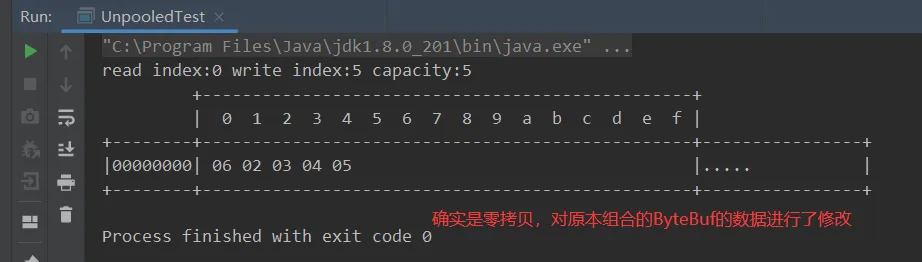
3.6.9、ByteBuf优势汇总
1、池化 - 可以重用池中 ByteBuf 实例,更节约内存,减少内存溢出的可能。
2、读写指针分离,不需要像 ByteBuffer 一样切换读写模式。
3、实现自动扩容。
4、支持链式调用,使用更流畅。
5、很多地方体现零拷贝,例如 wrap、slice、duplicate、CompositeByteBuf。
案例、回显服务器(双向通信)
描述+code(netty)
前提描述
实现功能:客户端向服务器发什么,服务端就返回什么。
出现的问题:bytebuf的释放问题,下面是问题和解答(个人见解)。
• 服务器接收到客户端发来的数据,是否要手动释放? • 若是不手动调用ctx.fireChannelRead(),就不会走到tail handler!(debug测试测出来)一般两种情况,①若是在该handler中使用完了ByteBuf,那么就直接手动释放;②若是没有进行解析之类的操作,那么可以直接传递到后面handler,也就是tail handler也会帮你进行释放操作,ctx.fireChannelRead()。 • 回显业务必然会创建一个ByteBuf对象,是否需要手动释放? • 对于自己创建的ByteBuf,则需要进行手动释放,在这里回显业务是调用了 writeAndFlush这是一个异步操作,那么添加一个监听器当写入完毕之后就进行手动释放!
code
服务器:
import io.netty.bootstrap.ServerBootstrap;import io.netty.buffer.ByteBuf;import io.netty.channel.ChannelHandlerContext;import io.netty.channel.ChannelInboundHandlerAdapter;import io.netty.channel.ChannelInitializer;import io.netty.channel.nio.NioEventLoopGroup;import io.netty.channel.socket.nio.NioServerSocketChannel;import io.netty.channel.socket.nio.NioSocketChannel;import io.netty.util.ReferenceCountUtil;import lombok.extern.slf4j.Slf4j;import java.nio.charset.Charset;/** * @ClassName Server * @Author ChangLu * @Date 2022/1/8 9:42 * @Description echoserver:提供回显服务的服务器,就是收到什么,然后就发送什么的程序。 */@Slf4jpublic class Server { public static void main(String[] args) throws InterruptedException { new ServerBootstrap() .group(new NioEventLoopGroup(), new NioEventLoopGroup(2)) .channel(NioServerSocketChannel.class) .childHandler(new ChannelInitializer<NioSocketChannel>() { @Override protected void initChannel(NioSocketChannel ch) throws Exception { ch.pipeline().addLast(new ChannelInboundHandlerAdapter(){ @Override public void channelRead(ChannelHandlerContext ctx, Object msg) throws Exception { ByteBuf buf = (ByteBuf)msg; log.debug("收到客户端发送数据:{}", buf.toString(Charset.defaultCharset())); final ByteBuf response = ctx.alloc().buffer(); response.writeBytes(buf); //向客户端回发数据:需要手动释放 ctx.writeAndFlush(response).addListener((future)->{ //释放ByteBuf ReferenceCountUtil.release(response); }); //向后传递让Tail handler来进行释放msg super.channelRead(ctx, msg); } }); } }) .bind(8080).sync(); System.out.println("服务器启动成功!"); }}客户端:
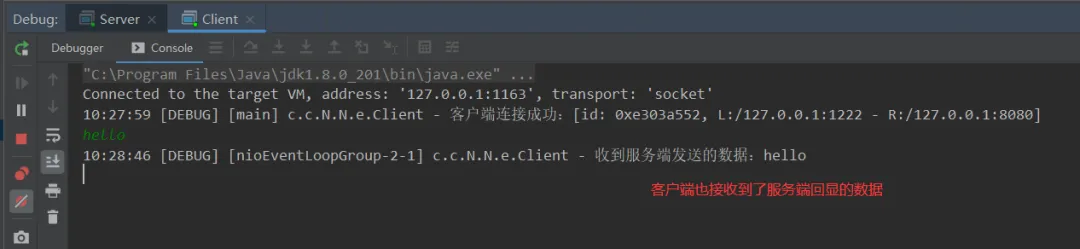
import io.netty.bootstrap.Bootstrap;import io.netty.buffer.ByteBuf;import io.netty.channel.*;import io.netty.channel.nio.NioEventLoopGroup;import io.netty.channel.socket.nio.NioSocketChannel;import io.netty.handler.codec.string.StringEncoder;import lombok.extern.slf4j.Slf4j;import java.nio.charset.Charset;import java.util.Scanner;/** * @ClassName Client * @Author ChangLu * @Date 2022/1/8 9:49 * @Description Client:客户端连接 */@Slf4jpublic class Client { public static void main(String[] args) throws InterruptedException { NioEventLoopGroup group = new NioEventLoopGroup(); Channel channel = new Bootstrap() .group(group) .channel(NioSocketChannel.class) .handler(new ChannelInitializer<NioSocketChannel>() { @Override protected void initChannel(NioSocketChannel ch) throws Exception { ch.pipeline().addLast(new StringEncoder());//String=>ByteBuf ch.pipeline().addLast(new ChannelInboundHandlerAdapter() { @Override public void channelRead(ChannelHandlerContext ctx, Object msg) throws Exception { ByteBuf buffer = (ByteBuf) msg; log.debug("收到服务端发送的数据:{}", buffer.toString(Charset.defaultCharset())); //同理这里也需要进行向后传递进行释放ByteBuf super.channelRead(ctx, msg); } }); } }).connect("127.0.0.1", 8080).sync().channel(); log.debug("客户端连接成功:{}", channel); channel.closeFuture().addListener(future -> { group.shutdownGracefully(); }); new Thread(() -> { Scanner scanner = new Scanner(System.in); while (true) { String line = scanner.nextLine(); if ("q".equals(line)) { channel.close(); break; } channel.writeAndFlush(line); } }).start(); }}效果:
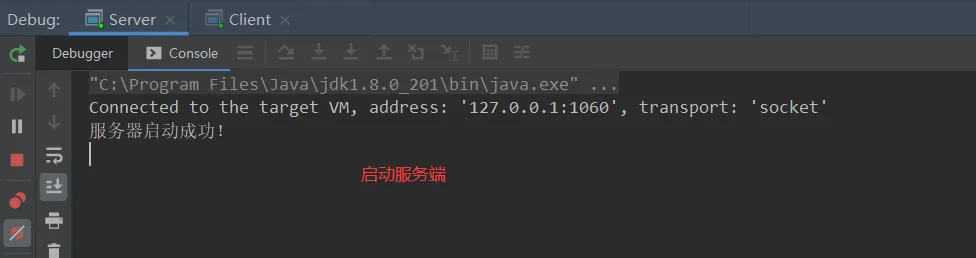
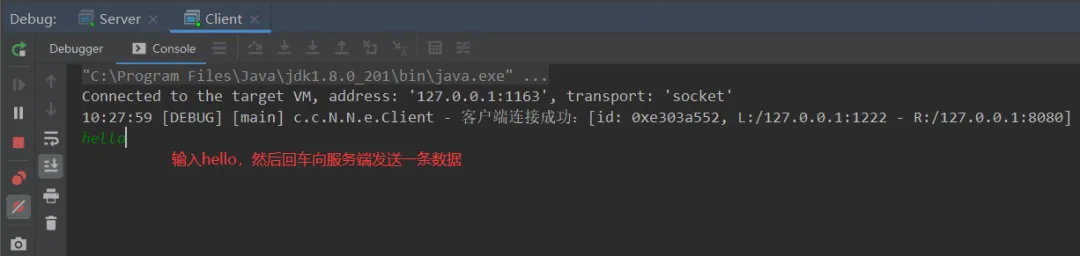
回显效果:
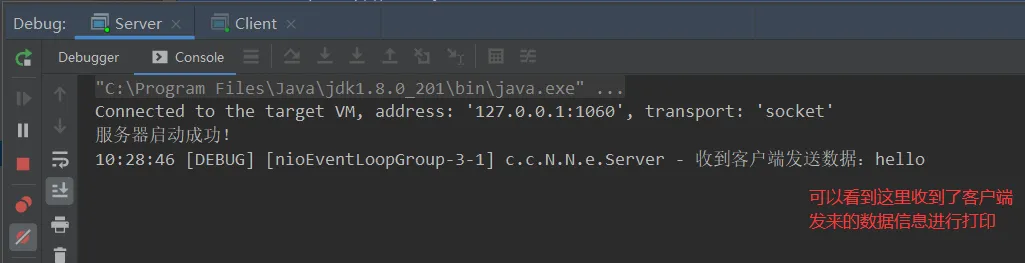
扩展:读写误解解答(含socket实现)
只有在 netty,nio 这样的多路复用 IO 模型时,读写才不会相互阻塞,才可以实现高效的双向通信,这是不正确的。
实际上,Java Socket 是全双工的:在任意时刻,线路上存在A 到 B 和 B 到 A 的双向信号传输。即使是阻塞 IO,读和写是可以同时进行的,只要分别采用读线程和写线程即可,读不会阻塞写、写也不会阻塞读。
案例demo
案例目的:测试同一个Socket的读、写操作是否是双向信号通信,也就是全双工!(通过给写线程打上断点,之后看读线程是否能够正常运行)
Server:
import java.io.*;import java.net.ServerSocket;import java.net.Socket;/** * @ClassName Server * @Author ChangLu * @Date 2022/1/8 10:35 * @Description 服务端:接收到连接之后,启动读写线程 */public class Server { public static void main(String[] args) throws IOException { ServerSocket ss = new ServerSocket(8888); Socket s = ss.accept(); new Thread(() -> { try { BufferedReader reader = new BufferedReader(new InputStreamReader(s.getInputStream())); while (true) { System.out.println(reader.readLine()); } } catch (IOException e) { e.printStackTrace(); } }).start(); new Thread(() -> { try { BufferedWriter writer = new BufferedWriter(new OutputStreamWriter(s.getOutputStream())); // 例如在这个位置加入 thread 级别断点,可以发现即使不写入数据,也不妨碍前面线程读取客户端数据 for (int i = 0; i < 100; i++) { writer.write(String.valueOf(i)); writer.newLine(); writer.flush(); } } catch (IOException e) { e.printStackTrace(); } }).start(); }}client:
import java.io.*;import java.net.Socket;/** * @ClassName Client * @Author ChangLu * @Date 2022/1/8 10:35 * @Description 客户端:同样有读写线程,建立连接之后写线程向服务端发送数据,读线程监听服务端发来的数据 */public class Client { public static void main(String[] args) throws IOException { Socket s = new Socket("localhost", 8888); new Thread(() -> { try { BufferedReader reader = new BufferedReader(new InputStreamReader(s.getInputStream())); while (true) { System.out.println(reader.readLine()); } } catch (IOException e) { e.printStackTrace(); } }).start(); new Thread(() -> { try { BufferedWriter writer = new BufferedWriter(new OutputStreamWriter(s.getOutputStream())); for (int i = 0; i < 100; i++) { writer.write(String.valueOf(i)); writer.newLine(); writer.flush(); } } catch (IOException e) { e.printStackTrace(); } }).start(); }}参考文章
[1]. 线程池问题——主线程跑完,线程池是否会继续运行
[2]. main线程终止,其他线程还会运行吗?
[3]. 零拷贝:netty深入理解系列-Netty零拷贝的实现原理 、彻底搞懂Netty高性能之零拷贝


END

扫码二维码
获取更多精彩
感谢您的关注