【学习笔记】Harness | 三千分影诀,SubAgents for Crisp Tasks —— -Claude-Code实战(5/13)
上一节课学习了让 Agent 做一个 【todo 清单】,从而让它能够更专注地干活。
但是当 Agent 连续干很多事的时候,messages 会越来越长。
一些对后续过程无价值的信息会一直夹在这中间,让后面的问题越来越难回答。
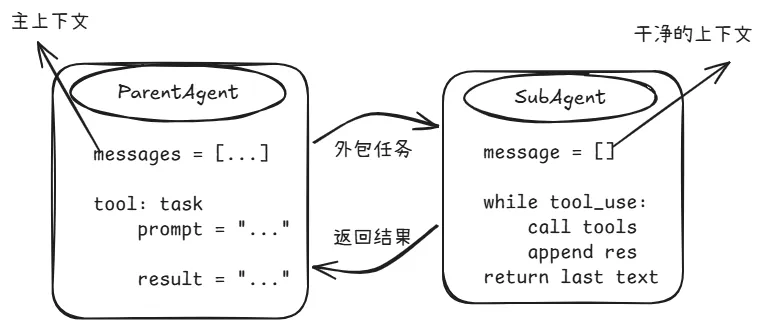
这节课就要解决这个问题,通过【SubAgents】把局部任务放进独立上下文里做,做完只把必要结果拉回到【ParentAgent】就行。
一句话:SubAgents for Crisp Tasks。
1. ParentAgent
当前正在和用户对话,有主 messages 的这个 Agent
2. SubAgent
由 ParentAgent 临时派生出来,专门处理某个子任务的 Agent
3. 上下文隔离
- ParentAgent 有自己的 messages
- SubAgent 也有自己的 messages
- SubAgent 的中间过程不会自动写回 ParentAgent
简单总结几个关键点:
1. ParentAgent 会将一些辅助任务交给一个初始状态为空的SubAgent,消息列表为[ ]。
2. SubAgent会执行所有繁琐的操作,然后只有最终的文本总结会返回给ParentAgent。
3. SubAgent的完整历史记录会被丢弃。
💡SubAgent 的核心,不是多一个角色,而是多一个干净上下文。
1. 给 ParentAgent 一个 task 工具。
有了这个工具,ParentAgent 就可以把一些任务扔给 SubAgent,以一个独立上下文去干活。
{ "name": "task", "description": "Run a subtask in a clean context and return a summary.", "input_schema": { "type": "object", "properties": { "prompt": {"type": "string"} }, "required": ["prompt"] }}
2. SubAgent使用自己独立的消息列表
💡这是隔离的关键,SubAgent从新的消息列表开始,不共享ParentAgent的
def run_subagent(prompt: str) -> str: sub_messages = [{"role": "user", "content": prompt}] ...
3. SubAgent只使用必要的工具
通常情况下,SubAgent不需要具备和ParentAgent完全一样的能力。
例如:只给它读文件、搜索、bash之类的基础工具;不给它继续派生SubAgent的能力,防止它无限递归。
CHILD_TOOLS = [ {"name": "bash", "description": "Run a shell command.", ...}, {"name": "read_file", "description": "Read file contents.", ...}, {"name": "write_file", "description": "Write content to file.", ...}, {"name": "edit_file", "description": "Replace exact text in file.", ...},]
4. SubAgent只将结果返回给ParentAgent
不关心SubAgent的全部历史信息,只需要它干完活后返回一段总结就行
return { "type": "tool_result", "tool_use_id": block.id, "content": summary_text,}
总的来说,就是两个步骤。
- Step1:给ParentAgent 配置一个 task 工具,不给 SubAgent配置
PARENT_TOOLS = CHILD_TOOLS + [ {"name": "task", "description": "Spawn a subagent with fresh context.", "input_schema": { "type": "object", "properties": {"prompt": {"type": "string"}}, "required": ["prompt"], }},]
- Step2:SubAgent以messages=[ ]开始跑自己的循环,最后仅返回文本总结tool_result。
def run_subagent(prompt: str) -> str: sub_messages = [{"role": "user", "content": prompt}] for _ in range(30): # safety limit response = client.messages.create( model=MODEL, system=SUBAGENT_SYSTEM, messages=sub_messages, tools=CHILD_TOOLS, max_tokens=8000, ) sub_messages.append({"role": "assistant", "content": response.content}) if response.stop_reason != "tool_use": break results = [] for block in response.content: if block.type == "tool_use": handler = TOOL_HANDLERS.get(block.name) output = handler(**block.input) results.append({"type": "tool_result", "tool_use_id": block.id, "content": str(output)[:50000]}) sub_messages.append({"role": "user", "content": results}) # Extract only the final text -- everything else is thrown away return "".join( b.text for b in response.content if hasattr(b, "text") ) or "(no summary)"
s04_subagent.py 展示了上下文隔离与SubAgent。
允许主Agent派生出一个拥有独立、干净对话历史的子Agent去处理具体任务,从而避免主对话上下文因冗长的工具调用记录而变得混乱。
从 Markdown 文档中解析 Agent 的配置class AgentTemplate: """从 Markdown 文件的 Frontmatter(元数据)中解析智能体配置""" def __init__(self, path): self.path = Path(path) self.config = {} self.system_prompt = "" self._parse() def _parse(self): # 使用正则表达式拆分 YAML 配置部分和系统提示词正文 text = self.path.read_text() match = re.match(r"^---\s*\n(.*?)\n---\s*\n(.*)", text, re.DOTALL) if match: # 解析配置项(如 name: coder) for line in match.group(1).splitlines(): if ":" in line: k, _, v = line.partition(":") self.config[k.strip()] = v.strip() self.system_prompt = match.group(2).strip()
为 Agent 定制工具集。注意不给SubAgent 派生任务的能力# 子智能体可用的基础工具(Bash、读、写、改)CHILD_TOOLS = [ {"name": "bash", "description": "Run a shell command.", ...}, {"name": "read_file", "description": "Read file contents.", ...}, {"name": "write_file", "description": "Write content to file.", ...}, {"name": "edit_file", "description": "Replace exact text in file.", ...},]# 父智能体在子工具基础上增加一个 "task" 工具,用于指派任务PARENT_TOOLS = CHILD_TOOLS + [ { "name": "task", "description": "启动一个拥有独立上下文的子智能体。它共享文件系统,但不共享对话历史。", "input_schema": { "type": "object", "properties": { "prompt": {"type": "string"}, "description": {"type": "string"} }, "required": ["prompt"] } },]
SubAgent 运行逻辑。完全独立的对话列表,任务完成后返回最终总结def run_subagent(prompt: str) -> str: """ 子智能体核心逻辑: 1. 开启全新的 sub_messages 列表,实现上下文隔离。 2. 在子循环中完成所有工具调用。 3. 只返回结果总结,不返回执行细节。 """ sub_messages = [{"role": "user", "content": prompt}] for _ in range(30): # 设置最大思考步数防止死循环 response = client.messages.create( model=MODEL, system=SUBAGENT_SYSTEM, messages=sub_messages, tools=CHILD_TOOLS, max_tokens=8000, ) sub_messages.append({"role": "assistant", "content": response.content}) if response.stop_reason != "tool_use": break # 任务完成,退出子循环 # 执行子工具并反馈(过程记录在 sub_messages 中) results = [] for block in response.content: if block.type == "tool_use": handler = TOOL_HANDLERS.get(block.name) output = handler(**block.input) results.append({"type": "tool_result", "tool_use_id": block.id, "content": str(output)}) sub_messages.append({"role": "user", "content": results}) # 丢弃子对话详情,仅返回最终的文本描述 return "".join(b.text for b in response.content if hasattr(b, "text"))
def agent_loop(messages: list): while True: response = client.messages.create( model=MODEL, system=SYSTEM, messages=messages, tools=PARENT_TOOLS, max_tokens=8000, ) messages.append({"role": "assistant", "content": response.content}) if response.stop_reason != "tool_use": return results = [] for block in response.content: if block.type == "tool_use": # 检查是否为分派任务请求 if block.name == "task": desc = block.input.get("description", "subtask") prompt = block.input.get("prompt", "") print(f"> task ({desc}): {prompt[:80]}") # 调用子智能体并获取“汇报” output = run_subagent(prompt) else: # 调用普通工具(如 bash) handler = TOOL_HANDLERS.get(block.name) output = handler(**block.input) print(f" {str(output)[:200]}") results.append({"type": "tool_result", "tool_use_id": block.id, "content": str(output)}) messages.append({"role": "user", "content": results})
def safe_path(p: str) -> Path: """路径安全卫士:防止子智能体通过 ../../ 访问敏感系统文件""" path = (WORKDIR / p).resolve() if not path.is_relative_to(WORKDIR): raise ValueError(f"Path escapes workspace: {p}") return pathif __name__ == "__main__": history = [] while True: # 启动主 CLI,用户在此处输入最高指令 try: query = input("\033[36ms04 >> \033[0m") except (EOFError, KeyboardInterrupt): break if query.strip().lower() in ("q", "exit", ""): break history.append({"role": "user", "content": query}) agent_loop(history) # 进入父循环,父循环可能进一步调用 run_subagent # 打印父智能体给出的最终答案 response_content = history[-1]["content"] for block in response_content: if isinstance(response_content, list): for block in response_content: if hasattr(block, "text"): print(block.text) print()
我们测试一下
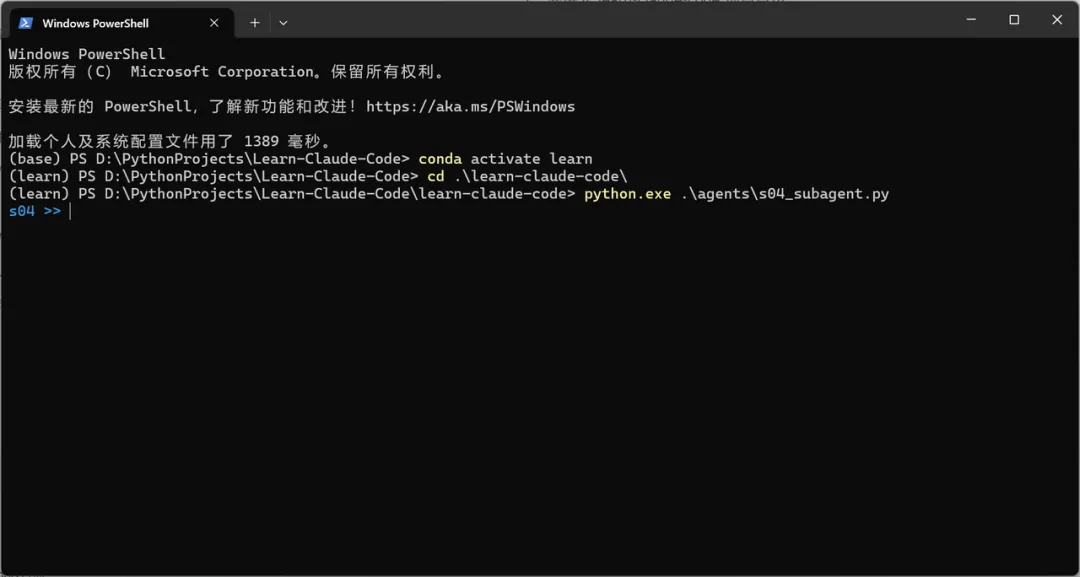
1. 先进入 learn-claude-code 项目目录
python agents/s04_subagent.py
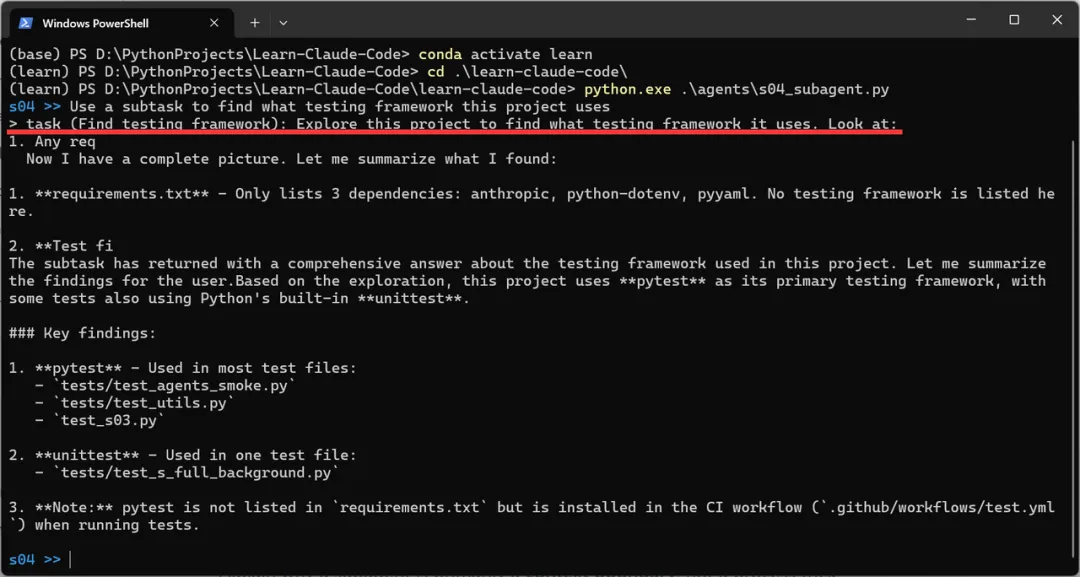
3. 测试一下,让它【使用子任务的方式去查找该项目用的什么测试框架】这里红线标注的地方可以清楚地看到,调用了【task 工具】分配任务。
结合 agent_loop() 中的代码打印逻辑,也证明确实是调用了 task 工具,测试很成功。
if block.name == "task": desc = block.input.get("description", "subtask") prompt = block.input.get("prompt", "") print(f"> task ({desc}): {prompt[:80]}") # 调用子智能体并获取“汇报” output = run_subagent(prompt)
在这一节课中,我们学习了如何派生一个带有全新 messages=[ ] 的一次性子Agent,干完活后仅向父Agent返回摘要,丢弃中间过程。
总结一下,我们学会了👇
通过隔离次要任务来保持上下文的整洁
SubAgents for Crisp Tasks
现在请思考一个问题:Agent 本身携带的知识该如何处理?我们不可能把模型永远都用不到的知识也加进来塞满提示词吧,我们只需要给模型加载要用的知识就够了。
怎么按需加载知识呢?
这个问题我们将在下一节【s05 - Skills】进行探讨,学习如何按需加载知识 Skill。