当你使用 LangGraph 构建 Agent 时,你首先需要将其拆分为多个步骤,这个步骤称为节点(nodes)。然后你要描述
每个节点之间的决策和过渡。最终链接每个节点的是一个共享的 state,每个节点可以往这里写和读。
这篇文章中,我将带你使用 langgraph 过一遍构建客户支持 email agent 的思路过程。
想要从你自动化的流程开始
想像一下你需要构建一个处理客户支持邮件的 AI Agent。你的产品团队有以下要求。
The agent should:- Read incoming customer emails- Classify them by urgency and topic- Search relevant documentation to answer questions- Draft appropriate responses- Escalate complex issues to human agents- Schedule follow-ups when neededExample scenarios to handle:1. Simple product question: "How do I reset my password?"2. Bug report: "The export feature crashes when I select PDF format"3. Urgent billing issue: "I was charged twice for my subscription!"4. Feature request: "Can you add dark mode to the mobile app?"5. Complex technical issue: "Our API integration fails intermittently with 504 errors"
第一步:将你的工作流分为不同的步骤
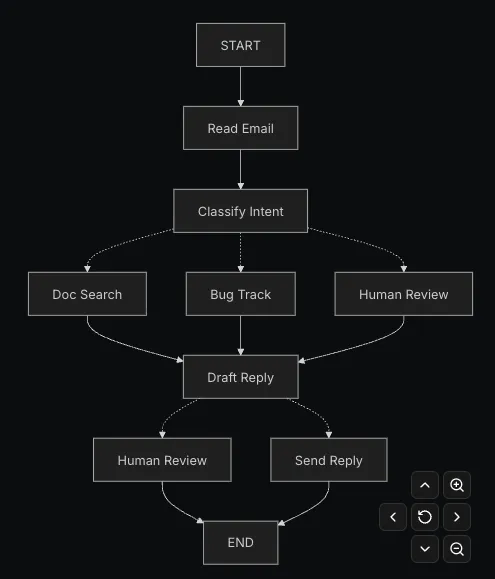
每个步骤都是一个 node(或者是做一个具体工作的函数)。然后将它们之间的关系联系起来。这里可以理解为流程图。
第二步:识别出每一步都需要做什么
对于图中的每个节点,确定它代表什么类型的操作以及它需要什么上下文才能正常工作。
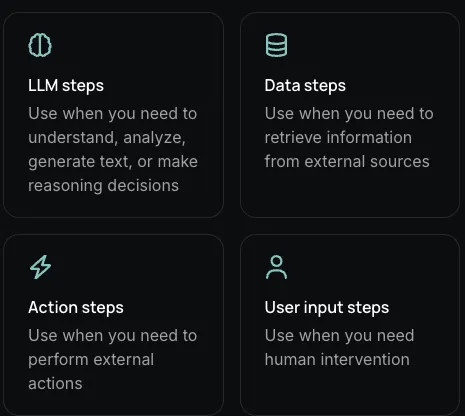
一共有四种,LLM 步、Data 步、Action 步、用户输入步。
LLM steps
当一个步骤中需要理解、分析、生成文本、做决策时:
- 静态上下文 prompt:分类类别,紧迫性定义,回复格式
Data Steps
当一个步骤中需要获取外部信息:
Action Steps
当一个步骤中需要执行外部动作时:
User Input steps
当一个步骤中需要人类介入时,
第三步:设计你的状态
State 是可以被你的 agent 所有 node 访问的共享内存。可以把它看做成你的智能体在处理流程的时候用来记录它所学到的一切以及所做决定的笔记本。
什么应该在 state 中?
应该存:如果它需要在各个 steps 中保持不变就将其放到 state 中
不该存:临时要用的
对于我们的邮件 agent 来说,我们需要存的有:
保持原始数据,按需格式化 promtps
关键原则:你的 state 应该保存原始数据,不是格式化后的文本。在你需要的时候再格式化 prompts
这里的意思是:
- 不同的节点可以根据自身需求对相同的数据进行不同的格式化处理
- 调试更加清晰——你能确切地看到每个节点收到了哪些数据
我们来定义我们的 state:
from typing import TypedDict, Literal# Define the structure for email classificationclassEmailClassification(TypedDict): intent: Literal["question", "bug", "billing", "feature", "complex"] urgency: Literal["low", "medium", "high", "critical"] topic: str summary: strclassEmailAgentState(TypedDict):# Raw email data email_content: str sender_email: str email_id: str# Classification result classification: EmailClassification | None# Raw search/API results search_results: list[str] | None# List of raw document chunks customer_history: dict | None# Raw customer data from CRM# Generated content draft_response: str | None messages: list[str] | None
第四步:构建你的节点
现在我们来实现每个步骤。在 Langgraph 中每个 node 仅仅是一个 python 函数,这个函数输入是当前的 state 输出是更新 state
适当地处理错误
不同错误有不同的处理策略。
瞬时错误
添加一个重试策略自动重试网路问题
from langgraph.types import RetryPolicyworkflow.add_node("search_documentation", search_documentation, retry_policy=RetryPolicy(max_attempts=3, initial_interval=1.0))
LLM 可恢复错误
存储发生的错误并让 LLM 可见再次尝试,这里比较有意思的是,Command 作用可以同时完成状态更新以及控制流流转。
from langgraph.types import Commanddefexecute_tool(state: State) -> Command[Literal["agent", "execute_tool"]]:try: result = run_tool(state['tool_call'])return Command(update={"tool_result": result}, goto="agent")except ToolError as e:# Let the LLM see what went wrong and try againreturn Command( update={"tool_result": f"Tool error: {str(e)}"}, goto="agent" )
用户可修复错误
缺少信息、指令不清晰等。
from langgraph.types import Commanddeflookup_customer_history(state: State) -> Command[Literal["draft_response"]]:ifnot state.get('customer_id'): user_input = interrupt({"message": "Customer ID needed","request": "Please provide the customer's account ID to look up their subscription history" })return Command( update={"customer_id": user_input['customer_id']}, goto="lookup_customer_history" )# Now proceed with the lookup customer_data = fetch_customer_history(state['customer_id'])return Command(update={"customer_history": customer_data}, goto="draft_response")
意外错误
defsend_reply(state: EmailAgentState):try: email_service.send(state["draft_response"])except Exception:raise# Surface unexpected errors
实现我们邮件 Agent Nodes
读取和分类节点
- LangGraph 封装的 ChatOpenAI 拥有结构化输出方法,可以直接取用结构化的结果
from typing import Literalfrom langgraph.graph import StateGraph, START, ENDfrom langgraph.types import interrupt, Command, RetryPolicyfrom langchain_openai import ChatOpenAIfrom langchain.messages import HumanMessagellm = ChatOpenAI(model="gpt-5-nano")defread_email(state: EmailAgentState) -> dict:"""Extract and parse email content"""# In production, this would connect to your email servicereturn {"messages": [HumanMessage(content=f"Processing email: {state['email_content']}")] }defclassify_intent(state: EmailAgentState) -> Command[Literal["search_documentation", "human_review", "draft_response", "bug_tracking"]]:"""Use LLM to classify email intent and urgency, then route accordingly"""# Create structured LLM that returns EmailClassification dict structured_llm = llm.with_structured_output(EmailClassification)# Format the prompt on-demand, not stored in state classification_prompt = f""" Analyze this customer email and classify it: Email: {state['email_content']} From: {state['sender_email']} Provide classification including intent, urgency, topic, and summary. """# Get structured response directly as dict classification = structured_llm.invoke(classification_prompt)# Determine next node based on classificationif classification['intent'] == 'billing'or classification['urgency'] == 'critical': goto = "human_review"elif classification['intent'] in ['question', 'feature']: goto = "search_documentation"elif classification['intent'] == 'bug': goto = "bug_tracking"else: goto = "draft_response"# Store classification as a single dict in statereturn Command( update={"classification": classification}, goto=goto )
搜索和跟踪节点
defsearch_documentation(state: EmailAgentState) -> Command[Literal["draft_response"]]:"""Search knowledge base for relevant information"""# Build search query from classification classification = state.get('classification', {}) query = f"{classification.get('intent', '')}{classification.get('topic', '')}"try:# Implement your search logic here# Store raw search results, not formatted text search_results = ["Reset password via Settings > Security > Change Password","Password must be at least 12 characters","Include uppercase, lowercase, numbers, and symbols" ]except SearchAPIError as e:# For recoverable search errors, store error and continue search_results = [f"Search temporarily unavailable: {str(e)}"]return Command( update={"search_results": search_results}, # Store raw results or error goto="draft_response" )defbug_tracking(state: EmailAgentState) -> Command[Literal["draft_response"]]:"""Create or update bug tracking ticket"""# Create ticket in your bug tracking system ticket_id = "BUG-12345"# Would be created via APIreturn Command( update={"search_results": [f"Bug ticket {ticket_id} created"],"current_step": "bug_tracked" }, goto="draft_response" )
回复节点
- 如果遇到中断了,那么仅执行中断函数,其余之前的节点不再执行,这个需要和 memory 做配合,这个会将状态保存下来以等待人类审批之后在执行。
defdraft_response(state: EmailAgentState) -> Command[Literal["human_review", "send_reply"]]:"""Generate response using context and route based on quality""" classification = state.get('classification', {})# Format context from raw state data on-demand context_sections = []if state.get('search_results'):# Format search results for the prompt formatted_docs = "\n".join([f"- {doc}"for doc in state['search_results']]) context_sections.append(f"Relevant documentation:\n{formatted_docs}")if state.get('customer_history'):# Format customer data for the prompt context_sections.append(f"Customer tier: {state['customer_history'].get('tier', 'standard')}")# Build the prompt with formatted context draft_prompt = f""" Draft a response to this customer email:{state['email_content']} Email intent: {classification.get('intent', 'unknown')} Urgency level: {classification.get('urgency', 'medium')}{chr(10).join(context_sections)} Guidelines: - Be professional and helpful - Address their specific concern - Use the provided documentation when relevant """ response = llm.invoke(draft_prompt)# Determine if human review needed based on urgency and intent needs_review = ( classification.get('urgency') in ['high', 'critical'] or classification.get('intent') == 'complex' )# Route to appropriate next node goto = "human_review"if needs_review else"send_reply"return Command( update={"draft_response": response.content}, # Store only the raw response goto=goto )defhuman_review(state: EmailAgentState) -> Command[Literal["send_reply", END]]:"""Pause for human review using interrupt and route based on decision""" classification = state.get('classification', {})# interrupt() must come first - any code before it will re-run on resume human_decision = interrupt({"email_id": state.get('email_id',''),"original_email": state.get('email_content',''),"draft_response": state.get('draft_response',''),"urgency": classification.get('urgency'),"intent": classification.get('intent'),"action": "Please review and approve/edit this response" })# Now process the human's decisionif human_decision.get("approved"):return Command( update={"draft_response": human_decision.get("edited_response", state.get('draft_response',''))}, goto="send_reply" )else:# Rejection means human will handle directlyreturn Command(update={}, goto=END)defsend_reply(state: EmailAgentState) -> dict:"""Send the email response"""# Integrate with email service print(f"Sending reply: {state['draft_response'][:100]}...")return {}
第五步:串联他们到一起
现在我们将节点连接成一个可运行的图。由于我们的节点会自行处理路由决策,因此我们只需要几条必要的边。
from langgraph.checkpoint.memory import MemorySaverfrom langgraph.types import RetryPolicy# Create the graphworkflow = StateGraph(EmailAgentState)# Add nodes with appropriate error handlingworkflow.add_node("read_email", read_email)workflow.add_node("classify_intent", classify_intent)# Add retry policy for nodes that might have transient failuresworkflow.add_node("search_documentation", search_documentation, retry_policy=RetryPolicy(max_attempts=3))workflow.add_node("bug_tracking", bug_tracking)workflow.add_node("draft_response", draft_response)workflow.add_node("human_review", human_review)workflow.add_node("send_reply", send_reply)# Add only the essential edgesworkflow.add_edge(START, "read_email")workflow.add_edge("read_email", "classify_intent")workflow.add_edge("send_reply", END)# Compile with checkpointer for persistence, in case run graph with Local_Server --> Please compile without checkpointermemory = MemorySaver()app = workflow.compile(checkpointer=memory)
测试
这个样例会走到人工,会调用 interrupt()方法,然后保存所有上下文到 checkpointer,等到人工审批后,根据 thread_id 来恢复流程。代码不会从头开始执行,会继续从端点处执行,会将输入的数据注入到断点返回值中供后续流程使用。
# Test with an urgent billing issueinitial_state = {"email_content": "I was charged twice for my subscription! This is urgent!","sender_email": "customer@example.com","email_id": "email_123","messages": []}# Run with a thread_id for persistenceconfig = {"configurable": {"thread_id": "customer_123"}}result = app.invoke(initial_state, config)# The graph will pause at human_reviewprint(f"human review interrupt:{result['__interrupt__']}")# When ready, provide human input to resumefrom langgraph.types import Commandhuman_response = Command( resume={"approved": True,"edited_response": "We sincerely apologize for the double charge. I've initiated an immediate refund..." })# Resume executionfinal_result = app.invoke(human_response, config)print(f"Email sent successfully!")
 10个月宝宝每天需要喝多少奶粉?

