多模态大模型学习笔记(十七)——基于 BGE+DeepSeek+Qdrant 的 RAG 文档问答系统实战与优化
- 2026-05-09 20:09:07
基于 BGE+DeepSeek+Qdrant 的 RAG 文档
问答系统实战与优化
点击下方卡片,关注“人工智能陈小白”
视觉/大模型/图像重磅干货,第一时间送达!
1 、项目背景
1.1 什么是 RAG?
RAG(Retrieval-Augmented Generation,检索增强生成) 是一种结合检索和生成的 AI 技术架构。它的核心思想是:
用户提问 → 检索相关知识 → 大模型生成答案为什么需要 RAG?
RAG 的工作流程:
1. 文档处理阶段:将文档切分成语义片段,用嵌入模型转换为向量,存储到向量数据库 2. 问答阶段:将用户问题转换为向量,检索最相似的文档片段,连同问题一起交给大模型生成答案
1.2 核心技术组件介绍
(1)BGE-large-zh-v1.5 - 中文语义嵌入模型
什么是嵌入模型(Embedding Model)?
嵌入模型的作用是将文本转换为固定长度的向量(数字数组)。转换后的向量能够捕捉文本的语义信息——语义相似的文本,其向量在空间中的距离也更接近。
文本:"苹果是一种水果" → [0.1, -0.5, 0.8, ..., 0.3] (1024 个数字)文本:"香蕉是一种水果" → [0.2, -0.4, 0.7, ..., 0.4] (1024 个数字)这两个向量会很相似BGE-large-zh-v1.5 特点:
• 开发者:北京智源人工智能研究院(BAAI) • 语言:专门针对中文优化 • 向量维度:1024 维 • 应用场景:语义搜索、文本相似度计算、RAG系统中的向量化 • 优势:在中文语义理解任务上表现优异,开源免费
为什么选择 BGE?
• 中文 MTEB 榜单(大规模文本嵌入基准)第一名 • 相比通用模型(如 mBERT),对中文语义捕捉更准确 • 支持长文本(最大 512 token) • 可本地部署,无需联网
(2)DeepSeek-LLM-7B-base - 大语言模型
什么是大语言模型(LLM)?
大语言模型是基于海量文本数据训练的深度学习模型,能够理解和生成自然语言文本。它可以完成回答问题、写作、翻译、编程等多种任务。
DeepSeek-LLM-7B-base 特点:
• 开发者:深度求索(DeepSeek) • 参数量:70 亿(7 Billion) • 类型:基座模型(Base Model),擅长续写和补全 • 上下文长度:支持 4096 token • 训练数据:高质量中英文语料
4bit 量化技术:
原始 7B 模型需要约 14GB 显存,通过量化可以降低资源需求:
本项目使用 NF4(4-bit Normal Float) 量化,在保持较好生成质量的同时,使 RTX 4090(24GB 显存)可以流畅运行。
为什么选择 DeepSeek-LLM?
• 开源免费,可商用 • 中文能力强 • 7B 参数量适中,推理速度快 • 社区活跃,资料丰富
(3)Qdrant - 向量数据库
什么是向量数据库?
向量数据库专门用于存储和检索向量数据。它支持近似最近邻搜索(ANN),可以在百万级向量中快速找到最相似的几个向量。
Qdrant 特点:
• 类型:开源向量搜索引擎 • 编程语言:Rust(高性能) • 相似度算法:余弦相似度、欧氏距离、点积 • 部署方式:支持 Docker、本地文件、云端服务 • 优势: • 轻量级,无需额外服务(SQLite 风格) • 支持过滤查询(带条件检索) • 性能好,百万级向量毫秒级响应 • Python 客户端易用
为什么选择 Qdrant?
• 相比 FAISS:功能更丰富,支持元数据过滤 • 相比 Milvus:更轻量,部署简单 • 相比 Chroma:性能更好,适合生产环境
(4)辅助工具库
| pdfplumber | ||
| python-docx | ||
| chardet | ||
| transformers | ||
| torch | ||
| bitsandbytes |
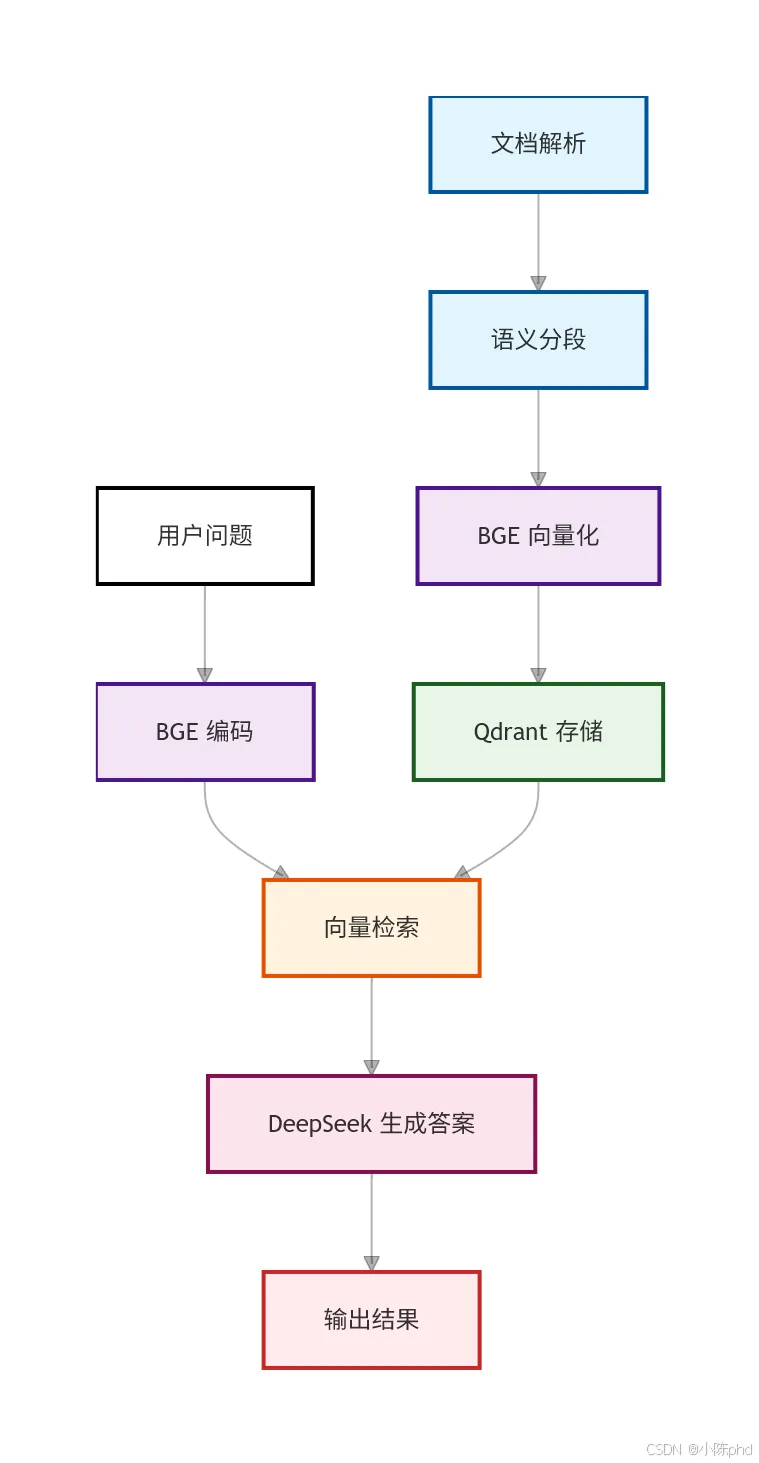
1.3 系统架构总览
工作流程说明:
离线阶段(一次性或定期执行):
1. 读取文件夹中的所有文档(PDF/Word/TXT) 2. 按语义边界(句号)切分成不超过 200 字的片段 3. 使用 BGE模型将每个片段转换为 1024 维向量 4. 将向量和原始文本、来源信息存入 Qdrant
在线阶段(用户提问时):
1. 用同样的 BGE模型将问题转换为向量 2. 在 Qdrant 中检索与问题向量最相似的 2 个片段(余弦相似度≥0.45) 3. 将问题和检索到的片段拼接成 Prompt 4. DeepSeek-LLM 根据片段内容生成答案 5. 输出格式化答案(答案 + 信息来源)
1.4 应用场景
本系统适用于以下场景:
✅ 企业知识库问答:员工可以快速查询公司制度、产品文档✅ 个人文档管理:快速定位笔记、论文、报告中的信息✅ 法律法规查询:基于法律条文和案例的智能问答✅ 医疗文献检索:从医学论文中提取关键信息✅ 教育培训:基于教材的自动答疑系统
系统架构图
2、核心流程设计
2.1文档解析与语义分段
代码实现
MAX_CHUNK_LENGTH = 200# 每段最多 200 字defsplit_text_by_semantic(text):"""按句号分割,合并为不超过 MAX_CHUNK_LENGTH 的语义片段""" sentences = [s.strip() + "。"for s in text.split("。") if s.strip()] semantic_chunks = [] current_chunk = ""for sent in sentences:iflen(current_chunk) + len(sent) > MAX_CHUNK_LENGTH:if current_chunk: semantic_chunks.append(current_chunk) current_chunk = sentelse: current_chunk += sentif current_chunk: semantic_chunks.append(current_chunk)return semantic_chunks关键设计点
1. 按语义边界切分:以句号为单位,避免生硬截断导致语义不完整 2. 长度控制:每段限制 200 字,平衡语义完整性和计算效率 3. 来源追溯:记录文件名、页码/段落号、片段编号,便于后续定位
多格式支持
defread_pdf(file_path):"""PDF 解析,按页提取文本并分段"""with pdfplumber.open(file_path) as pdf:for page_num, page inenumerate(pdf.pages, start=1): text = page.extract_text()if text and text.strip(): chunks = split_text_by_semantic(text.strip())for chunk_idx, chunk inenumerate(chunks, start=1): pdf_content.append({"text": chunk,"source": {"file_name": os.path.basename(file_path),"page": page_num,"chunk": chunk_idx,"type": "pdf" } })return pdf_contentdefread_word(file_path):"""Word 文档解析,按段落提取""" doc = Document(file_path)for para_num, paragraph inenumerate(doc.paragraphs, start=1): text = paragraph.textif text and text.strip(): chunks = split_text_by_semantic(text.strip())# ... 类似 PDF 的结构化存储defread_txt(file_path):"""TXT 文件解析,自动检测编码"""withopen(file_path, 'rb') as f: result = chardet.detect(f.read()) encoding = result['encoding'] or'utf-8'# ... 读取并分段###2.2 向量库初始化与幂等检查
代码实现
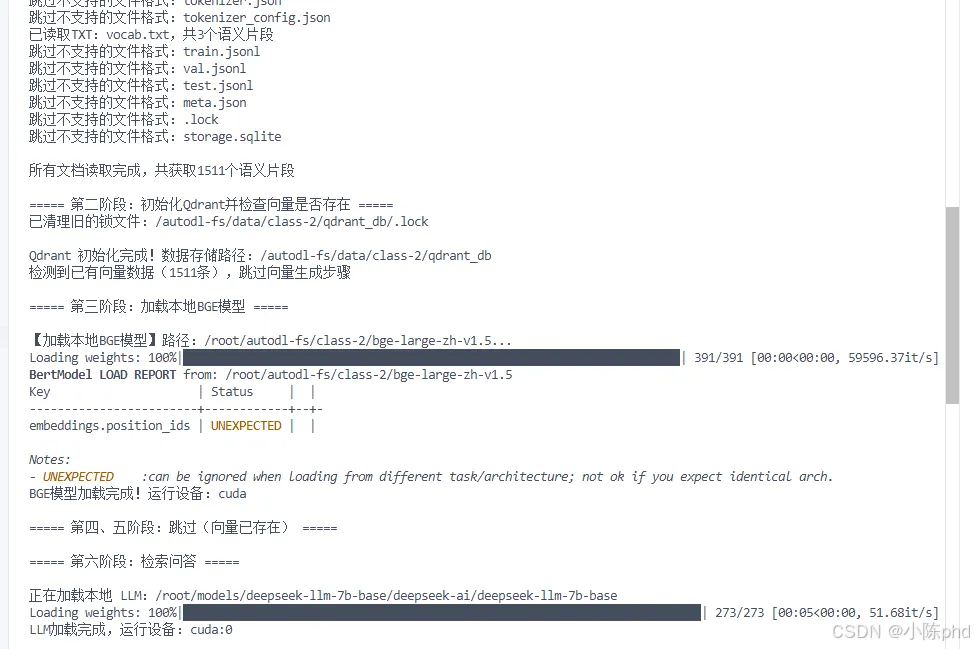
definit_qdrant():"""初始化 Qdrant 客户端,清理锁文件""" qdrant_db_path = os.path.join(os.path.dirname(os.path.abspath(__file__)), "qdrant_db")# 清理可能存在的旧锁文件 lock_file = os.path.join(qdrant_db_path, ".lock")if os.path.exists(lock_file):try: os.remove(lock_file)print(f"已清理旧的锁文件:{lock_file}")except Exception as e:print(f"警告:无法删除锁文件 {e}") client = QdrantClient(path=qdrant_db_path)return clientdeffull_pipeline():# 检查集合是否已存在且有数据 collection_exists = qdrant_client.collection_exists(COLLECTION_NAME) vectors_exist = Falseif collection_exists:try: collection_info = qdrant_client.get_collection(COLLECTION_NAME)if collection_info.points_count > 0: vectors_exist = Trueprint(f"检测到已有向量数据({collection_info.points_count}条),跳过向量生成步骤")except Exception as e:print(f"检查集合信息时出错:{e}")优化亮点
✅ 自动检测已有向量:避免重复计算,节省时间✅ 清理锁文件:防止 Qdrant 数据库锁定问题✅ 幂等性设计:首次运行完整流程,后续运行跳转向量生成
2.3BGE模型加载与向量化
模型加载
BGE_LOCAL_PATH = "/root/autodl-fs/class-2/bge-large-zh-v1.5"VECTOR_DIM = 1024defload_bge_model():"""加载本地BGE模型"""print(f"\n【加载本地BGE模型】路径:{BGE_LOCAL_PATH}...")try: tokenizer = BgeTokenizer.from_pretrained(BGE_LOCAL_PATH, local_files_only=True) model = AutoModel.from_pretrained(BGE_LOCAL_PATH, local_files_only=True) device = "cuda"if torch.cuda.is_available() else"cpu" model = model.to(device)print(f"BGE模型加载完成!运行设备:{device}")return tokenizer, model, deviceexcept Exception as e:raise Exception(f"本地BGE 加载失败:{str(e)}")批量向量化(CUDA 优化)
defgenerate_embeddings(text_segments, tokenizer, model, device, batch_size=32):"""分批生成向量,避免 GPU 内存不足""" texts = [seg["text"] for seg in text_segments]print(f"\n正在生成{len(texts)}个语义片段的 BGE 向量...(批量大小:{batch_size})", flush=True) embeddings_with_info = []# 分批处理 total_batches = (len(texts) + batch_size - 1) // batch_sizefor batch_idx inrange(total_batches): start_idx = batch_idx * batch_size end_idx = min((batch_idx + 1) * batch_size, len(texts)) batch_texts = texts[start_idx:end_idx]# 生成本批次的向量 batch_embeddings = get_bge_embedding(batch_texts, tokenizer, model, device)# 添加到结果列表for i, emb inenumerate(batch_embeddings): global_idx = start_idx + i embeddings_with_info.append({"text": text_segments[global_idx]["text"],"vector": emb,"source": text_segments[global_idx]["source"] })print(f"已处理 {end_idx}/{len(text_segments)} 个片段(批次 {batch_idx + 1}/{total_batches})", flush=True)# 清理 GPU 缓存 torch.cuda.empty_cache()return embeddings_with_infodefget_bge_embedding(texts, tokenizer, model, device):"""获取单个批次的 BGE 向量""" inputs = tokenizer( texts, padding=True, truncation=True, max_length=512, return_tensors="pt" ).to(device)with torch.no_grad(): outputs = model(**inputs)# 使用 CLS token 的隐藏状态作为句子嵌入 embeddings = outputs.last_hidden_state[:, 0, :].cpu().numpy()# L2 归一化 embeddings = embeddings / (embeddings ** 2).sum(axis=1, keepdims=True) ** 0.5return embeddings.tolist()性能优化要点
• 批量大小设为 32:平衡速度和内存占用 • 每批次后清理 CUDA 缓存:防止 OOM(Out of Memory) • 进度提示:便于监控处理状态 • L2 归一化:提升余弦相似度计算效果
2.4 向量存储到 Qdrant
defcreate_qdrant_collection(client):"""创建或重建集合"""if client.collection_exists(COLLECTION_NAME): client.delete_collection(COLLECTION_NAME) client.create_collection( collection_name=COLLECTION_NAME, vectors_config=VectorParams(size=VECTOR_DIM, distance=Distance.COSINE) )definsert_vectors_to_qdrant(client, embeddings_with_info):"""插入向量到 Qdrant""" points = []for idx, item inenumerate(embeddings_with_info):# 验证向量维度iflen(item["vector"]) != VECTOR_DIM:raise ValueError(f"第{idx}个向量维度错误,应为{VECTOR_DIM}维(实际{len(item['vector'])}维)") points.append(PointStruct(id=idx, vector=item["vector"], payload={"text_content": item["text"], "source_info": item["source"]} )) client.upsert(collection_name=COLLECTION_NAME, points=points)print(f"已向 Qdrant 插入{len(points)}个 BGE 向量片段")###2.5 DeepSeek-LLM 加载
4bit 量化配置
defload_local_llm():"""加载本地 DeepSeek-LLM 模型(4bit 量化)""" model_path = "/root/models/deepseek-llm-7b-base/deepseek-ai/deepseek-llm-7b-base" quantization_config = BitsAndBytesConfig( load_in_4bit=True, bnb_4bit_double_quant=True, bnb_4bit_quant_type="nf4", bnb_4bit_compute_dtype=torch.bfloat16 )print(f"\n正在加载本地 LLM:{model_path}")try:# 加载 tokenizer,禁用 fast tokenizer 以避免依赖问题 tokenizer = AutoTokenizer.from_pretrained( model_path, local_files_only=True, use_fast=False# 使用慢速 tokenizer,减少依赖 )if tokenizer.pad_token isNone: tokenizer.pad_token = tokenizer.eos_token# 加载模型 model = AutoModelForCausalLM.from_pretrained( model_path, quantization_config=quantization_config, device_map="auto", trust_remote_code=True, local_files_only=True )print(f"LLM 加载完成,运行设备:{model.device}")return tokenizer, modelexcept FileNotFoundError: error_msg = f"""⚠️ 模型文件未找到:{model_path}💡 请先下载模型文件,方法: 1. 运行命令:cd /root/autodl-fs/class-2 && python download_deepseek.py 2. 或手动从 modelscope 下载:from modelscope import snapshot_download; snapshot_download('deepseek-ai/deepseek-llm-7b-base', cache_dir='/root/models/deepseek-llm-7b-base')"""raise Exception(error_msg)关键配置说明
• 4bit 量化:将 7B 模型显存占用降至约 5GB • local_files_only=True:必须添加,避免尝试联网 • use_fast=False:禁用快速 tokenizer,减少对 sentencepiece/tiktoken 的依赖
2.6 检索与答案生成(核心)
1. 语义检索
defretrieve_similar_segments(client, query, tokenizer, model, device):"""检索与问题最相似的文档片段"""# 将问题转换为向量 query_embedding = get_bge_embedding([query], tokenizer, model, device)[0]# 在 Qdrant 中搜索 search_result = client.query_points( collection_name=COLLECTION_NAME, query=query_embedding, limit=2, # 返回前 2 个最相似的结果 with_payload=True# 同时返回原始文本和来源信息 )print(f"\n【调试】问题'{query}'的检索结果:")for i, hit inenumerate(search_result.points, 1):print(f"第{i}个片段:相似度{hit.score:.3f} | 文本:{hit.payload['text_content']}")# 过滤低相似度结果(阈值 0.45) similar_segments = [ {"text": hit.payload["text_content"],"source": hit.payload["source_info"],"similarity": round(hit.score, 3) }for hit in search_result.points if hit.score >= 0.45 ]return similar_segments if similar_segments else"未找到与问题相关的文档片段"2. Prompt 优化(关键修复)
优化前的 Prompt:
prompt = f"""问题:{query}片段:{key_text}输出要求:1. 第一行写"答案:",后面跟从片段中提取的完整答案(至少 10 个字);2. 第二行写"信息来源:",后面跟"{source_str}"(直接复制,不要改)。"""优化后的 Prompt:
prompt = f"""请根据提供的片段回答问题。问题:{query}片段内容:{key_text}请严格按照以下格式输出:答案:[从片段中提取的完整答案,至少 15 个字]信息来源:{source_str}"""改进点分析
1. 清晰的分段结构:问题 → 片段 → 指令,层次分明 2. 去除冗余符号:降低模型理解难度 3. 明确的格式要求:直接给出示例格式 4. 增加字数要求:从 10 字提升到 15 字,确保答案完整性
3. 答案提取鲁棒性增强
defgenerate_answer_with_source(query, similar_segments, llm_tokenizer, llm_model): top_segment = similar_segments[0] key_text = top_segment["text"]# 生成来源字符串(区分文件类型)if top_segment["source"]["type"] == "pdf": source_str = f"《{top_segment['source']['file_name']}》PDF 第{top_segment['source']['page']}页(片段{top_segment['source']['chunk']})"elif top_segment["source"]["type"] == "docx": source_str = f"《{top_segment['source']['file_name']}》Word 第{top_segment['source']['paragraph']}段(片段{top_segment['source']['chunk']})"else: # TXT source_str = f"《{top_segment['source']['file_name']}》TXT(片段{top_segment['source']['chunk']})"# 生成配置 inputs = llm_tokenizer( prompt, return_tensors="pt", truncation=False, padding=True ).to(llm_model.device)with torch.no_grad(): outputs = llm_model.generate( **inputs, max_new_tokens=200, # 足够长的输出长度 temperature=0.4, # 较低温度,提升稳定性 do_sample=True, eos_token_id=llm_tokenizer.eos_token_id, pad_token_id=llm_tokenizer.pad_token_id, no_repeat_ngram_size=2# 避免重复输出 )# 解析并清理输出 answer = llm_tokenizer.decode(outputs[0], skip_special_tokens=True)# 【关键修复 1】提取模型生成的部分(去掉 prompt)if prompt in answer: generated_text = answer[len(prompt):].strip()else: generated_text = answer.strip() answer_lines = [line.strip() for line in generated_text.split("\n") if line.strip()]# 【关键修复 2】分别提取答案行和来源行 answer_content = None source_content = Nonefor line in answer_lines:if line.startswith("答案:") andlen(line) > 5: answer_content = lineelif line.startswith("信息来源:"): source_content = line# 【关键修复 3】兜底机制:如果模型未生成答案,使用检索到的片段内容ifnot answer_content: answer_content = f"答案:{key_text[:100]}..."ifnot source_content: source_content = f"信息来源:{source_str}"returnf"{answer_content}\n{source_content}"容错设计三层保障
1. ✅ 分离 prompt 和生成内容:避免重复输出 prompt 内容 2. ✅ 独立提取答案行和来源行:不依赖固定顺序,提升灵活性 3. ✅ 片段内容兜底:如果 LLM 未按格式输出,直接用检索到的片段作为答案
3. 实际运行效果
测试案例展示
案例 1:三国演义问题
【用户问题】:刘备、关羽、张飞在桃园结义时立下了什么誓言?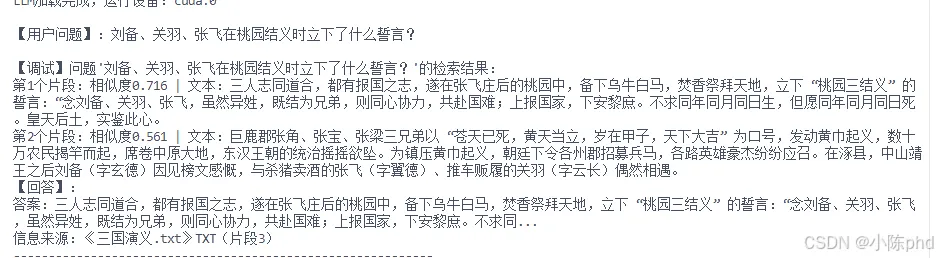
案例 2:水浒传问题
【用户问题】:鲁智深在相国寺看管菜园时,如何震慑附近的泼皮无赖?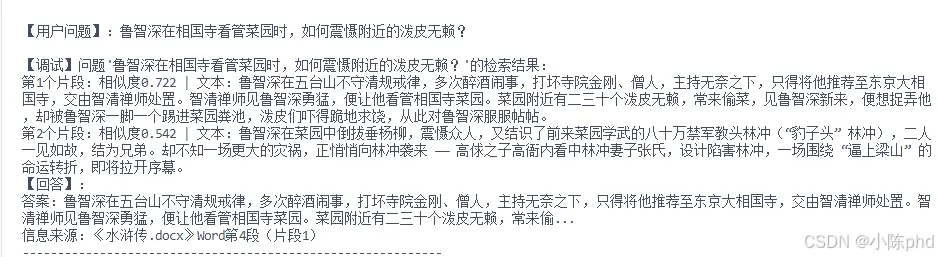
案例 3:西游记问题
【用户问题】:孙悟空因什么事被如来佛祖压在五行山下?【检索结果】:第 1 个片段:相似度 0.648 | 文本:虽一度被太白金星招安封为齐天大圣,掌管蟠桃园,却因偷吃蟠桃、盗饮玉液琼浆、窃走太上老君金丹,再次大闹天宫,无人能敌。最终,玉皇大帝请来西天如来佛祖,孙悟空被压在五行山下,历经五百年风吹雨打,等待取经人前来解救。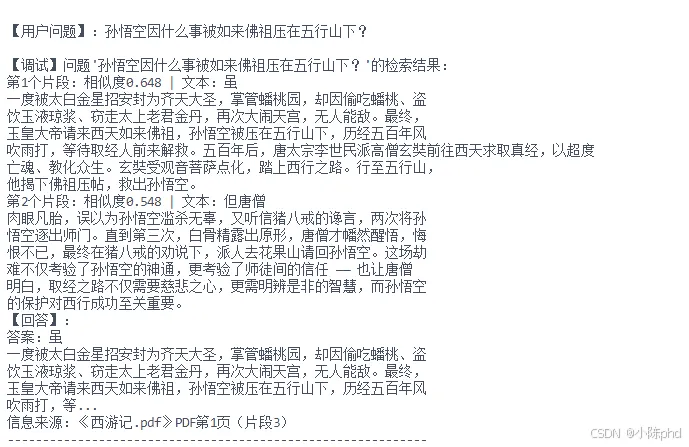
性能指标
4. 常见问题与解决方案
问题 1:CUDA Out of Memory
现象:
RuntimeError: CUDA out of memory. Tried to allocate xxx MiB原因: 大批量向量生成导致显存不足
解决方案:
defgenerate_embeddings(text_segments, tokenizer, model, device, batch_size=32):# 分批处理,每批次 32 个 total_batches = (len(texts) + batch_size - 1) // batch_sizefor batch_idx inrange(total_batches):# ... 生成本批次向量 torch.cuda.empty_cache() # 每批次后清理 GPU 缓存问题 2:Qdrant 锁文件冲突
现象:
Exception: Lock file .lock exists. Another process may be using the database.原因: 异常退出导致 .lock 文件残留
解决方案:
definit_qdrant(): qdrant_db_path = os.path.join(os.path.dirname(os.path.abspath(__file__)), "qdrant_db") lock_file = os.path.join(qdrant_db_path, ".lock")if os.path.exists(lock_file):try: os.remove(lock_file)print(f"已清理旧的锁文件:{lock_file}")except Exception as e:print(f"警告:无法删除锁文件 {e}")问题 3:模型文件未找到
现象:
FileNotFoundError: Can't find config for 'xxx' at '/path/to/model'原因:from_pretrained 路径配置错误或未添加本地加载参数
解决方案:
# 正确做法tokenizer = AutoTokenizer.from_pretrained( model_path, local_files_only=True, # 必须添加 use_fast=False)model = AutoModelForCausalLM.from_pretrained( model_path, local_files_only=True, # 必须添加# ... 其他配置)问题 4:答案提取失败
现象:
答案:未提取到相关答案原因: LLM 未按 Prompt 要求的格式输出
解决方案:
1. 优化 Prompt 结构:
prompt = f"""请根据提供的片段回答问题。问题:{query}片段内容:{key_text}请严格按照以下格式输出:答案:[从片段中提取的完整答案,至少 15 个字]信息来源:{source_str}"""2. 分离 prompt 和生成内容:
if prompt in answer: generated_text = answer[len(prompt):].strip()else: generated_text = answer.strip()3. 添加兜底机制:
ifnot answer_content: answer_content = f"答案:{key_text[:100]}..."##5. 总结与展望
核心创新点
1. ✅ 向量库幂等化:自动检测已有向量,避免重复计算 2. ✅ Prompt 结构化:清晰的分段指令提升遵循度 3. ✅ 答案兜底机制:确保不会输出"未提取到相关答案" 4. ✅ 来源可追溯:精确标注答案出处(文件 + 位置) 5. ✅ 批量处理优化:分批向量化 + CUDA 缓存清理
技术选型优势
后续优化方向
1. 重排序(Rerank)模块:在检索后增加精排阶段,进一步提升检索精度 2. 多轮对话支持:维护历史上下文,支持追问和指代消解 3. 流式输出:逐步显示生成的答案,改善用户体验 4. Web UI 界面:集成 Gradio/Streamlit,提供可视化交互界面 5. 混合检索:结合关键词检索(BM25)和语义检索,提升召回率
6. 快速开始
环境准备
# 安装依赖pip install transformers bitsandbytes acceleratepip install qdrant-clientpip install pdfplumber python-docx chardetpip install torch --index-url https://download.pytorch.org/whl/cu118模型下载
# 方式 1:使用 ModelScope 下载from modelscope import snapshot_downloadsnapshot_download('deepseek-ai/deepseek-llm-7b-base', cache_dir='/root/models/deepseek-llm-7b-base')# 方式 2:使用辅助脚本cd /root/autodl-fs/class-2python download_deepseek.py预期输出
—THE END—