本篇目标:构建一个「加密操作全自动监控系统」。第12-13篇分别讲了 Cipher、MessageDigest、Mac、Signature 的 Hook 方法——但在实际逆向中,你面对一个陌生 App 时不知道它用了哪些加密、在什么时机调用、密钥从哪来。一个个试效率太低。本篇的方案是:加载一个脚本,操作 App,所有加密操作自动"吐"出来——算法名称、密钥、IV、输入、输出、调用栈,一目了然。这就是安卓逆向圈子里说的「算法自吐」。
配套脚本:本篇产出的 crypto_monitor.js(700+ 行,6 个模块,单文件复制即用)已整理好打包。 关注本公众号后私信回复关键词「脚本」 即可获取,本系列与后续 Unidbg / SO 逆向 / ARM 汇编 等系列脚本会统一在此发放并持续更新。
一、什么是「算法自吐」
1.1 概念
「算法自吐」不是一个 Frida API 的名字,而是一种逆向工作模式:
- 加载一个预先编写好的、覆盖所有标准加密 API 的 Hook 脚本
- 正常操作 App(登录、下单、搜索……)
- 从控制台输出中直接读出 App 使用的加密方案
你不需要提前知道 App 用了什么算法、不需要在 jadx 中搜索加密代码、不需要处理代码混淆——因为不管 App 的业务代码怎么写、怎么混淆,它最终都要调用 javax.crypto.Cipher、java.security.MessageDigest 等标准 API。Hook 标准 API 就能把整个加密链路看清楚。
1.2 与第12-13篇的区别
| 第 12-13 篇 | 本篇(算法自吐) |
|---|
| 定位 | 理解每个 API 的原理和 Hook 方法 | 一键使用 |
| 脚本结构 | 每个 API 单独的脚本 | 全部整合为一个脚本 |
| 输出格式 | 基础 console.log | 彩色彩条事件头、字段对齐、调用栈过滤 |
| Cipher 实例关联 | 无(getInstance/init/doFinal 分散输出) | 自动关联同一 Cipher 实例的三步操作 |
| 输出范围 | 单 API 字段 | 完整自吐参数(算法+密钥+IV+输入+输出+栈) |
| 性能控制 | 无 | 模块开关、栈帧包名过滤、限速 |
| 落地姿势 | 需要按目标 API 改 | 复制脚本、改 CONFIG 即用 |
1.3 工作流
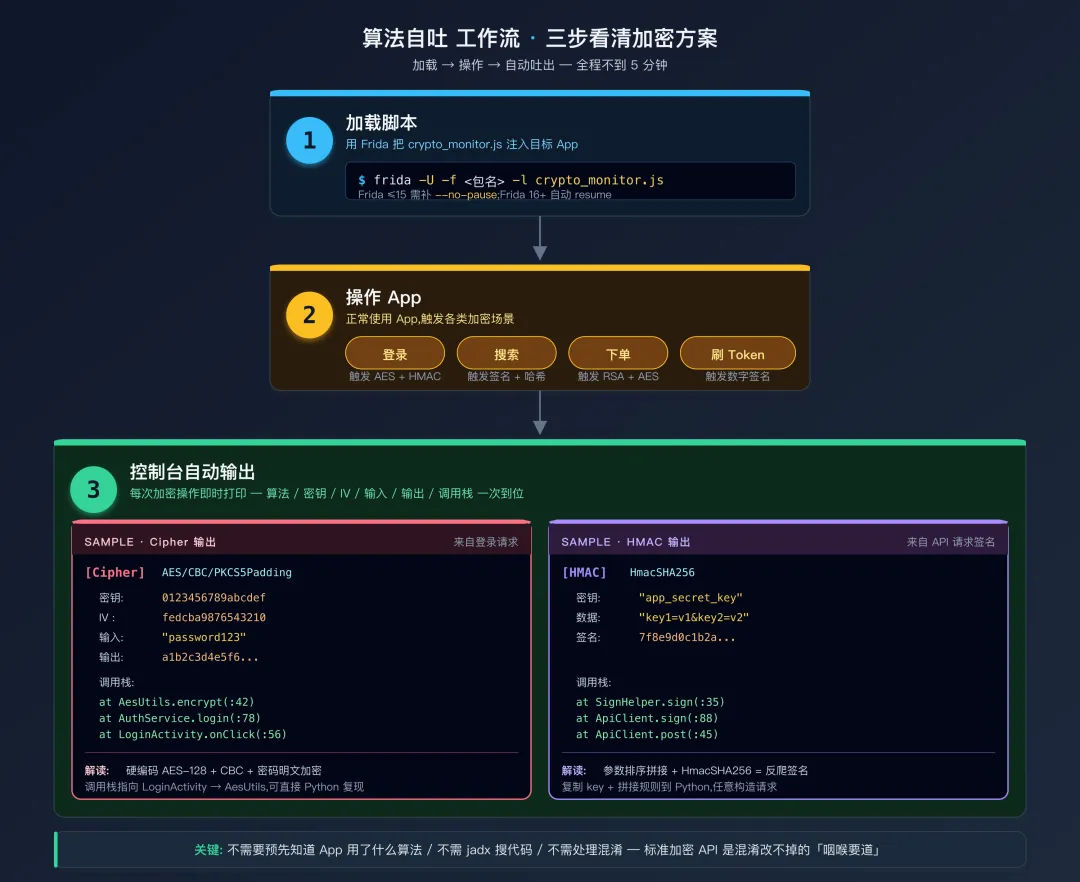 算法自吐工作流
二、核心挑战:Cipher 实例关联
2.1 问题
Cipher 的三步操作(getInstance → init → doFinal)是在同一个 Cipher 实例上依次调用的:
Cipher cipher = Cipher.getInstance("AES/CBC/PKCS5Padding");  // 步骤1
cipher.init(Cipher.ENCRYPT_MODE, keySpec, ivSpec);            // 步骤2
byte[] result = cipher.doFinal(plaintext);                    // 步骤3
如果你分别 Hook 这三个方法,它们的回调是独立触发的——你在 getInstance 回调中看到了 AES/CBC,在 init 回调中看到了密钥,在 doFinal 回调中看到了明文和密文。但问题是:这三次回调之间没有天然的关联。如果 App 在多线程中同时进行多次加密(比如同时加密密码和签名),三步操作的回调会交错出现,你无法区分哪个密钥对应哪次加密。
2.2 解决方案:用 Cipher 实例的 hashCode 作为关联 ID
为什么选 hashCode?Frida JS 端没有标准 WeakRef 引 Java 对象的能力,自增 ID 又无法在 doFinal 时拿回 getInstance 时分配的值。hashCode 是 Java 对象自带、跨方法可复读的身份标识——最适合做"查 ctx"的 key。
在三步操作中,this(Java 对象引用)是同一个 Cipher 实例,所以 this.hashCode() 在三处取到的值相同,可以将信息聚合到一起:
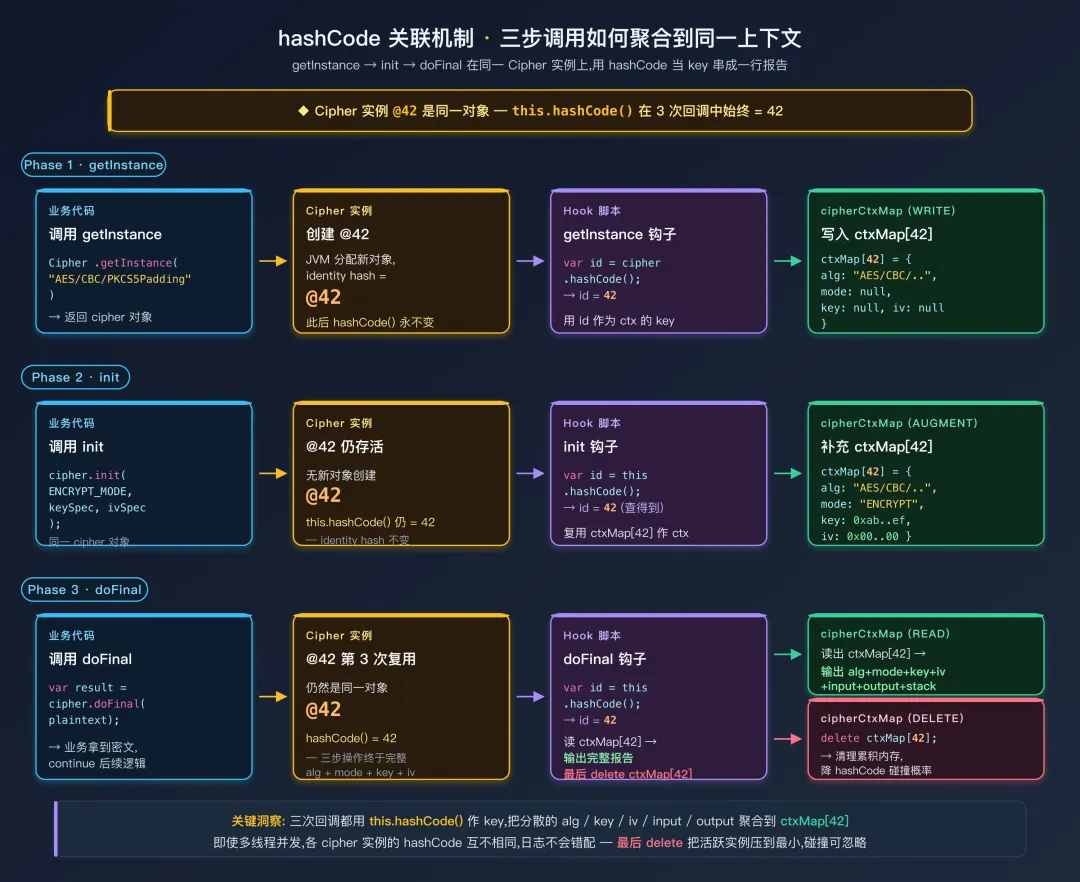 hashCode 关联机制
// 用 Map 保存每个 Cipher 实例的信息
var cipherContextMap = {};

// 在 getInstance 中记录
function onGetInstance(cipherId, transformation) {
    cipherContextMap[cipherId] = {
        algorithm: transformation,
        mode: null,
        key: null,
        iv: null
    };
}

// 在 init 中补充
function onInit(cipherId, mode, key, iv) {
    if (cipherContextMap[cipherId]) {
        cipherContextMap[cipherId].mode = mode;
        cipherContextMap[cipherId].key = key;
        cipherContextMap[cipherId].iv = iv;
    }
}

// 在 doFinal 中输出完整信息
function onDoFinal(cipherId, input, output) {
    var ctx = cipherContextMap[cipherId];
    if (ctx) {
        // 现在你有了完整的上下文:算法 + 模式 + 密钥 + IV + 输入 + 输出
        printCipherReport(ctx, input, output);
    }
}
这个关联机制是本篇脚本与第12/13篇分散 Hook 脚本的核心区别。
风险注脚:Java Object.hashCode() 默认是 identity hash(System.identityHashCode),32-bit 整数——理论上两个不同对象可碰撞。本脚本的应对措施是在 doFinal 输出报告后立刻 delete cipherCtxMap[id]:既避免长会话内存累积,也将"同一时刻活跃实例数"压到最小,让碰撞概率降到可忽略。代价是同一 Cipher 重复 doFinal(连续多块加密)时第二次会丢上下文——绝大多数业务"一次性 doFinal" 不受影响。
三、完整的 crypto_monitor.js
本篇的核心产出。所有代码包在一个 IIFE 中——把下方第 3.1 ~ 3.7 节七段代码顺序拼接进同一个 .js 文件即可使用。
各模块之间的关系:
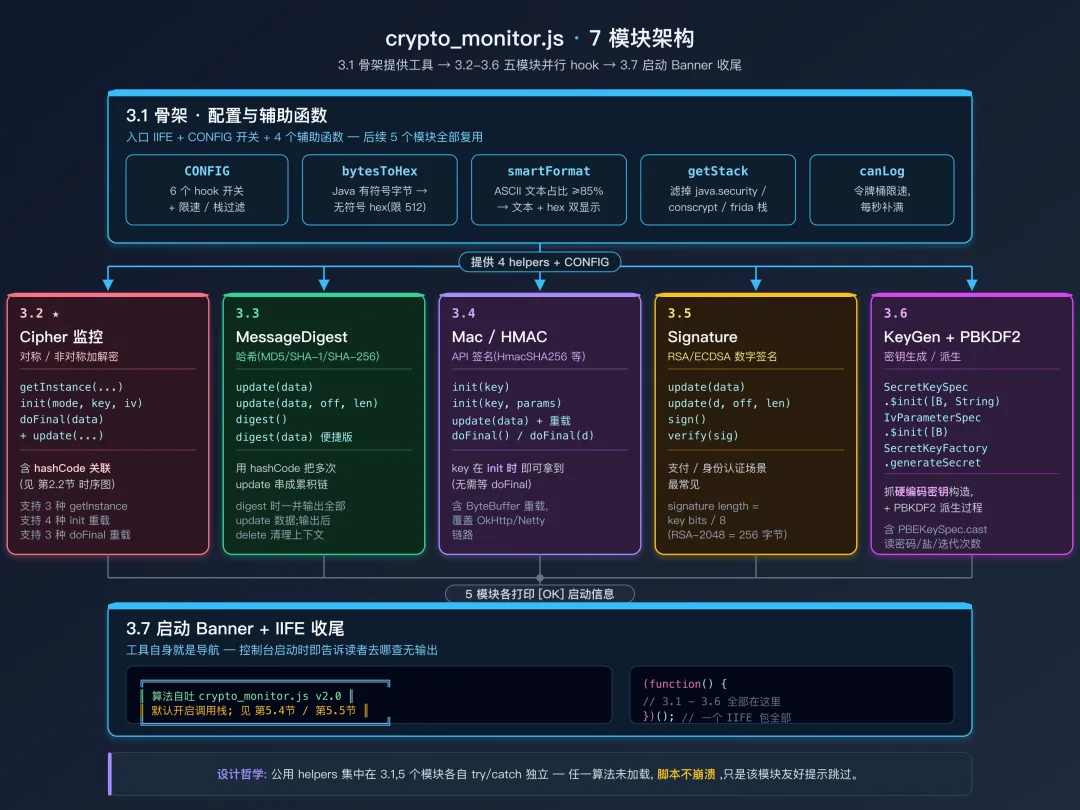 crypto_monitor.js 7 模块架构
3.1 骨架:配置与辅助函数
入口、CONFIG 开关、智能格式化、调用栈过滤、限速器——后续每个模块都会复用。
阅读地图(这段代码长,扫读时按顺序找这 4 处):
CONFIG(功能开关 + 输出控制 + 性能 + 外观)—— 改这里就能定制脚本行为C 调色板 + tint() —— 256 色背景标签 + ANSI 着色封装bytesToHex / smartFormat —— 字节到展示字符串的两个核心格式器printHeader / printField / printMultiInput / printStack —— 4 个输出原语,全部带 buf 参数支持原子事件
// crypto_monitor.js
// ============================================================
// 算法自吐:一个脚本监控全部加密操作
// 用法: frida -U -f <包名> -l crypto_monitor.js
//      (Frida 16+ 已自动 resume; 旧版本需补 --no-pause)
// Frida 17 注意:create_script 默认不带 Java bridge,
//   建议走 frida-tools 17.x 的 CLI,或用 frida-compile 打包 bridge
// ============================================================

(function() {
    "use strict";

    // ==================== 配置 ====================
    var CONFIG = {
        // 功能开关
        hookCipher: true,           // Cipher(AES/DES/RSA)
        hookMessageDigest: true,    // MessageDigest(MD5/SHA)
        hookMac: true,              // Mac(HMAC)
        hookSignature: true,        // Signature(RSA/ECDSA 签名)
        hookKeyGeneration: true,    // SecretKeySpec / KeyGenerator
        hookPBKDF2: true,           // PBKDF2 密钥派生

        // 输出控制
        showStack: true,            // 默认开启;若性能受影响可关闭
        stackMaxLines: 4,           // 调用栈最多显示几层
        maxDataLength: 256,         // 数据最多显示多少字节(hex)
        filterPackage: null,        // 设为 "com.example.app" 后只显示该包栈帧

        // 性能控制
        rateLimitPerSecond: 20,     // 每秒最多输出多少条(0=不限速)

        // 外观
        useColor: true              // 终端 ANSI 着色;不支持彩色的终端设为 false
    };

    // ==================== 辅助函数 ====================

    // —— ANSI 颜色 —— 可通过 CONFIG.useColor 关闭
    // 头部用 256 色背景标签(不靠终端主题的 16 色 palette,色块鲜明)
    // 字段值用标准前景色 => 柔和不喧宾
    var C = {
        reset:    "\x1b[0m",
        bold:     "\x1b[1m",
        dim:      "\x1b[2m",
        // 字段值前景色
        green:    "\x1b[32m",
        yellow:   "\x1b[33m",
        gray:     "\x1b[90m",
        // 事件头标签:SGR 1=bold; 38;5;N=fg 256色; 48;5;N=bg 256色
        // 颜色码参见 https://www.ditig.com/256-colors-cheat-sheet
        hCipher:    "\x1b[1;38;5;16;48;5;51m",   // 黑字 / 51-aqua    青蓝(对称密钥)
        hHash:      "\x1b[1;38;5;15;48;5;27m",   // 白字 / 27-blue    深蓝(摘要)
        hHmac:      "\x1b[1;38;5;16;48;5;201m",  // 黑字 / 201-pink   亮品红(消息认证)
        hSignature: "\x1b[1;38;5;16;48;5;220m",  // 黑字 / 220-gold   金黄(签名)
        hKeyGen:    "\x1b[1;38;5;16;48;5;46m"    // 黑字 / 46-lime    亮绿(密钥/派生)
    };
    function tint(color, text) {
        return CONFIG.useColor ? (color + text + C.reset) : text;
    }
    // 视觉宽度:CJK 字符 2 列, ASCII 1 列;用于把标签 pad 到等宽
    function visualLen(s) {
        var w = 0;
        for (var i = 0; i < s.length; i++) w += (s.charCodeAt(i) > 0x7f) ? 2 : 1;
        return w;
    }

    function bytesToHex(bytes) {
        if (bytes === null || bytes === undefined) return "null";
        if (bytes.length === undefined) return String(bytes);
        var hex = [];
        var maxLen = Math.min(bytes.length, CONFIG.maxDataLength);
        for (var i = 0; i < maxLen; i++) {
            var b = ((bytes[i] || 0) & 0xff).toString(16);
            hex.push(b.length === 1 ? "0" + b : b);
        }
        if (bytes.length > CONFIG.maxDataLength) {
            hex.push("...(" + bytes.length + " bytes)");
        }
        return hex.join("");
    }

    // 返回字符串数组:可打印文本 → ["\"text\"", "hex"](两行);否则 ["hex"](一行)
    // 由 printField 负责换行展示
    function smartFormat(bytes) {
        if (bytes === null || bytes === undefined) return ["null"];
        if (bytes.length === undefined) return [String(bytes)];
        if (bytes.length === 0) return ["(空)"];

        // 判断是否为 ASCII 文本为主(0x20-0x7E + 常见换行/制表符)
        // 注意:中文等 UTF-8 多字节字符不会被识别为"可打印",会走 hex 显示
        var printableCount = 0;
        var checkLen = Math.min(bytes.length, 64);
        for (var i = 0; i < checkLen; i++) {
            var b = bytes[i] & 0xff;
            if ((b >= 0x20 && b <= 0x7e) || b === 0x09 || b === 0x0a || b === 0x0d) {
                printableCount++;
            }
        }

        var hex = bytesToHex(bytes);
        if (printableCount / checkLen > 0.85) {
            try {
                var text = Java.use("java.lang.String").$new(bytes, "UTF-8").toString();
                if (text.length > 200) text = text.substring(0, 200) + "...";
                return ['"' + text + '"', hex];
            } catch(e) {}
        }
        return [hex];
    }

    // —— 统一输出原语 ——

    // —— 输出策略 ——
    // 每个事件用 buf 数组收集所有行,结尾由 hook 调一次 console.log(buf.join("\n"))。
    // 这样多线程并发触发时,frida 消息流最多事件级穿插,绝不会字段级混入(避免之前的"半个事件混半个事件")。
    // 所有 print* 函数都接受可选 buf 参数:传 buf 就追加,不传就立即 console.log(向后兼容)。

    // 事件头:[ TYPE ] 标签(彩色块) + 算法副标题(加粗白字)
    // - 标签固定 9 列宽,左右各 2 空格,色块面积大、辨识高
    // - 副标题不带背景,加粗即可,与字段对齐
    function printHeader(type, subtitle, color, buf) {
        var label = type.toUpperCase();
        while (label.length < 9) label += " ";  // pad to 9
        var tag = tint(color, "  " + label + "  ");
        var sub = CONFIG.useColor ? (C.bold + subtitle + C.reset) : subtitle;
        var line = tag + "  " + sub;
        if (buf) {
            buf.push("");        // 空行作事件分隔
            buf.push(line);
        } else {
            console.log("");
            console.log(line);
        }
    }

    // 多段输入的统一输出:一个标签 +(可选)环号区分每段
    // inputsArrayOfArrays 是 [[text, hex], [hex], [text, hex], ...] 这种形状
    // 每个子数组代表一次 update() 的内容(可能 1 行 hex 或 2 行 text+hex)
    function printMultiInput(label, inputsArrayOfArrays, buf) {
        var circled = ["①","②","③","④","⑤","⑥","⑦","⑧","⑨","⑩",
                       "⑪","⑫","⑬","⑭","⑮","⑯","⑰","⑱","⑲","⑳"];
        if (inputsArrayOfArrays.length === 0) return;
        if (inputsArrayOfArrays.length === 1) {
            // 只有一段:不加号,保持简洁
            printField(label, inputsArrayOfArrays[0], null, buf);
            return;
        }
        // 多段:每段首行带环号,续行缩进 2 列对齐
        var flat = [];
        inputsArrayOfArrays.forEach(function(inpLines, idx) {
            var marker = circled[idx] || ("(" + (idx + 1) + ")");
            inpLines.forEach(function(line, j) {
                flat.push(j === 0 ? (marker + " " + line) : ("  " + line));
            });
        });
        printField(label, flat, null, buf);
    }

    // 字段输出:标签 │ 值;value 为字符串或字符串数组(多行)
    // 标签自动 pad 到视觉 4 列,续行用等宽空白对齐
    function printField(label, value, valueColor, buf) {
        if (value === null || value === undefined) return;
        var lines = (typeof value === "object" && value.length !== undefined) ? value : [value];
        if (lines.length === 0) return;

        var pad = "";
        while (visualLen(label) + pad.length < 4) pad += " ";
        var labelPart = tint(C.dim, "    " + label + pad + " │ ");
        var contPart  = tint(C.dim, "         │ ");
        var paint = valueColor
            ? function(v) { return tint(valueColor, v); }
            : function(v) { return v; };

        var out = [labelPart + paint(lines[0])];
        for (var i = 1; i < lines.length; i++) {
            out.push(contPart + paint(lines[i]));
        }
        if (buf) {
            for (var k = 0; k < out.length; k++) buf.push(out[k]);
        } else {
            for (var m = 0; m < out.length; m++) console.log(out[m]);
        }
    }

    // 取调用栈数组,过滤掉 Frida / JCE 内部帧
    function getStackLines() {
        if (!CONFIG.showStack) return [];
        try {
            var stack = Java.use("android.util.Log").getStackTraceString(
                Java.use("java.lang.Exception").$new());
            var lines = stack.split("\n").filter(function(l) {
                var t = l.trim();
                return t.startsWith("at ") &&
                    t.indexOf("frida") === -1 &&
                    t.indexOf("java.lang.reflect") === -1 &&
                    t.indexOf("javax.crypto") === -1 &&
                    t.indexOf("java.security") === -1 &&
                    t.indexOf("com.android.org.conscrypt") === -1;
            });

            if (CONFIG.filterPackage) {
                var filtered = lines.filter(function(l) {
                    return l.indexOf(CONFIG.filterPackage) !== -1;
                });
                if (filtered.length > 0) lines = filtered;
            }

            return lines.slice(0, CONFIG.stackMaxLines)
                .map(function(l) { return l.trim(); });
        } catch(e) { return []; }
    }

    function printStack(buf) {
        var lines = getStackLines();
        if (lines.length === 0) return;
        // 栈本身用默认色;标签和分隔条已经是 dim,无需再压暗,深色背景才看得清
        printField("栈", lines, null, buf);
    }

    // 限速器:令牌桶,每秒补满
    var logBudget = CONFIG.rateLimitPerSecond || 999;
    var lastRefill = Date.now();

    function canLog() {
        if (CONFIG.rateLimitPerSecond <= 0) return true;
        var now = Date.now();
        if (now - lastRefill > 1000) {
            logBudget = CONFIG.rateLimitPerSecond;
            lastRefill = now;
        }
        if (logBudget > 0) {
            logBudget--;
            return true;
        }
        return false;
    }

    // —— 各模块见下方 第3.2节-第3.6节 ——
3.2 Cipher 监控
第二章介绍的 hashCode 关联机制在这里实现。getInstance 创建上下文 → init 补充 mode/key/iv → doFinal 输出完整报告并清理上下文(避免长会话累积内存)。
阅读地图:
Cipher.getInstance 三个重载(String / String,String / String,Provider)—— 都建 cipherCtxMap[id]handleInit(...) 抽取共享逻辑 —— 再被五个 Cipher.init 重载复用reportCipher(...) —— 用 buf 累积事件,结尾一次 console.log(buf.join("\n")) 原子吐出Cipher.doFinal 三个重载分别接 null / byte[] / byte[],offset,len,全部调 reportCipher
    if (CONFIG.hookCipher) {
        Java.perform(function() {
            var Cipher = Java.use("javax.crypto.Cipher");
            var cipherCtxMap = {};

            // --- getInstance ---
            // 注意:Cipher.getInstance 是 static 方法,Frida 中 `this` 绑到类对象,
            // `this.getInstance(...)` 等价于 `Cipher.getInstance(...)`
            Cipher.getInstance.overload("java.lang.String").implementation = function(transformation) {
                var cipher = this.getInstance(transformation);
                var id = cipher.hashCode();
                cipherCtxMap[id] = { alg: transformation, mode: null, key: null, iv: null };
                return cipher;
            };

            // 带 Provider 的重载
            try {
                Cipher.getInstance.overload("java.lang.String", "java.lang.String")
                    .implementation = function(transformation, provider) {
                    var cipher = this.getInstance(transformation, provider);
                    var id = cipher.hashCode();
                    cipherCtxMap[id] = { alg: transformation + " [" + provider + "]", mode: null, key: null, iv: null };
                    return cipher;
                };
            } catch(e) {}

            try {
                Cipher.getInstance.overload("java.lang.String", "java.security.Provider")
                    .implementation = function(transformation, provider) {
                    var cipher = this.getInstance(transformation, provider);
                    var id = cipher.hashCode();
                    cipherCtxMap[id] = { alg: transformation, mode: null, key: null, iv: null };
                    return cipher;
                };
            } catch(e) {}

            // --- init(多种重载)---
            function handleInit(cipherObj, opmode, key, params) {
                var id = cipherObj.hashCode();
                var ctx = cipherCtxMap[id] || { alg: cipherObj.getAlgorithm(), mode: null, key: null, iv: null };

                ctx.mode = (opmode === 1) ? "ENCRYPT" : (opmode === 2) ? "DECRYPT" : "MODE_" + opmode;

                // 提取密钥
                if (key !== null) {
                    try {
                        var SecretKeySpec = Java.use("javax.crypto.spec.SecretKeySpec");
                        var keySpec = Java.cast(key, SecretKeySpec);
                        ctx.key = bytesToHex(keySpec.getEncoded());
                        ctx.keyAlg = keySpec.getAlgorithm();
                    } catch(e) {
                        try {
                            ctx.key = bytesToHex(key.getEncoded());
                        } catch(e2) {
                            // AndroidKeyStore 硬件密钥 getEncoded() 返回 null,见 第5.5节
                            ctx.key = key.toString();
                        }
                    }
                }

                // 提取 IV
                if (params !== null) {
                    try {
                        var IvParameterSpec = Java.use("javax.crypto.spec.IvParameterSpec");
                        var ivSpec = Java.cast(params, IvParameterSpec);
                        ctx.iv = bytesToHex(ivSpec.getIV());
                    } catch(e) {
                        try {
                            var GCMParameterSpec = Java.use("javax.crypto.spec.GCMParameterSpec");
                            var gcmSpec = Java.cast(params, GCMParameterSpec);
                            ctx.iv = bytesToHex(gcmSpec.getIV());
                        } catch(e2) {
                            ctx.iv = params.toString();
                        }
                    }
                }

                cipherCtxMap[id] = ctx;
            }

            // init(int, Key)
            Cipher.init.overload("int", "java.security.Key").implementation = function(mode, key) {
                handleInit(this, mode, key, null);
                this.init(mode, key);
            };

            // init(int, Key, AlgorithmParameterSpec)
            Cipher.init.overload("int", "java.security.Key", "java.security.spec.AlgorithmParameterSpec")
                .implementation = function(mode, key, params) {
                handleInit(this, mode, key, params);
                this.init(mode, key, params);
            };

            // init(int, Key, AlgorithmParameterSpec, SecureRandom)
            try {
                Cipher.init.overload("int", "java.security.Key", "java.security.spec.AlgorithmParameterSpec", "java.security.SecureRandom")
                    .implementation = function(mode, key, params, random) {
                    handleInit(this, mode, key, params);
                    this.init(mode, key, params, random);
                };
            } catch(e) {}

            // init(int, Key, SecureRandom)
            try {
                Cipher.init.overload("int", "java.security.Key", "java.security.SecureRandom")
                    .implementation = function(mode, key, random) {
                    handleInit(this, mode, key, null);
                    this.init(mode, key, random);
                };
            } catch(e) {}

            // --- doFinal:输出报告并清理上下文 ---
            function reportCipher(cipherObj, input, output) {
                if (!canLog()) return;

                var id = cipherObj.hashCode();
                var ctx = cipherCtxMap[id] || {};

                var buf = [];
                printHeader("Cipher", (ctx.alg || cipherObj.getAlgorithm()) + " · " + (ctx.mode || "?"), C.hCipher, buf);
                if (ctx.key)         printField("密钥", ctx.key, C.yellow, buf);
                if (ctx.iv)          printField("IV",   ctx.iv, null, buf);
                if (input !== null)  printField("输入", smartFormat(input), null, buf);
                if (output !== null) printField("输出", smartFormat(output), C.green, buf);
                printStack(buf);
                console.log(buf.join("\n"));

                // 清理上下文:避免长会话累积内存 + 降低 hashCode 碰撞概率
                delete cipherCtxMap[id];
            }

            Cipher.doFinal.overload().implementation = function() {
                var result = this.doFinal();
                reportCipher(this, null, result);
                return result;
            };

            Cipher.doFinal.overload("[B").implementation = function(data) {
                var result = this.doFinal(data);
                reportCipher(this, data, result);
                return result;
            };

            Cipher.doFinal.overload("[B", "int", "int").implementation = function(data, offset, len) {
                var result = this.doFinal(data, offset, len);
                reportCipher(this, data, result);
                return result;
            };

            console.log("[OK] Cipher 监控");
        });
    }
3.3 MessageDigest 监控
Hash 不需要复杂关联——每个 MessageDigest 实例独立计算。把 update 累积的输入用同一个 hashCode 串起来,在 digest() 时一并打印。
    if (CONFIG.hookMessageDigest) {
        Java.perform(function() {
            var MessageDigest = Java.use("java.security.MessageDigest");
            var digestDataMap = {};

            // update:累积输入数据
            MessageDigest.update.overload("[B").implementation = function(data) {
                var id = this.hashCode();
                if (!digestDataMap[id]) digestDataMap[id] = [];
                digestDataMap[id].push(smartFormat(data));
                this.update(data);
            };

            MessageDigest.update.overload("[B", "int", "int").implementation = function(data, off, len) {
                var id = this.hashCode();
                if (!digestDataMap[id]) digestDataMap[id] = [];
                var sub = [];
                for (var i = off; i < off + len && i < data.length; i++) sub.push(data[i]);
                digestDataMap[id].push(smartFormat(Java.array("byte", sub)));
                this.update(data, off, len);
            };

            // digest:完成计算
            MessageDigest.digest.overload().implementation = function() {
                var result = this.digest();
                if (canLog()) {
                    var id = this.hashCode();
                    var algo = this.getAlgorithm();
                    var inputs = digestDataMap[id] || [["(无 update 数据)"]];

                    var buf = [];
                    printHeader("Hash", algo, C.hHash, buf);
                    printMultiInput("输入", inputs, buf);
                    printField("输出", bytesToHex(result), C.green, buf);
                    printStack(buf);
                    console.log(buf.join("\n"));

                    delete digestDataMap[id];
                }
                return result;
            };

            // digest(byte[]) 便捷版本
            // 不 hook digest(byte[]):它内部 = update(byte[]) + digest()。
            // update 和无参 digest 都已被 hook,再 hook 便捷版会让一次调用打印两次。

            console.log("[OK] MessageDigest 监控");
        });
    }
3.4 Mac / HMAC 监控
模式与 MessageDigest 类似,但 Mac 在 init 时即可拿到 key,所以上下文从 init 起。
阅读地图:
Mac.init 两个重载(Key / Key+ParamSpec)—— 建 macDataMap[id] 并存 keyMac.update 三个重载(byte[] / byte[],int,int / ByteBuffer)—— 累积到 inputsMac.doFinal() 无参 —— 用 printMultiInput 把多段 update 用 ①②③ 区分后打印- 故意不hook
doFinal(byte[]) —— 它内部 = update + doFinal(),hook 便捷版会双打印
    if (CONFIG.hookMac) {
        Java.perform(function() {
            var Mac = Java.use("javax.crypto.Mac");
            var macDataMap = {};

            // init
            Mac.init.overload("java.security.Key").implementation = function(key) {
                var id = this.hashCode();
                var keyBytes = null;
                try { keyBytes = key.getEncoded(); } catch(e) {}

                macDataMap[id] = {
                    algo: this.getAlgorithm(),
                    key: keyBytes ? smartFormat(keyBytes) : key.toString(),
                    inputs: []
                };

                this.init(key);
            };

            try {
                Mac.init.overload("java.security.Key", "java.security.spec.AlgorithmParameterSpec")
                    .implementation = function(key, params) {
                    var id = this.hashCode();
                    var keyBytes = null;
                    try { keyBytes = key.getEncoded(); } catch(e) {}

                    macDataMap[id] = {
                        algo: this.getAlgorithm(),
                        key: keyBytes ? smartFormat(keyBytes) : key.toString(),
                        inputs: []
                    };

                    this.init(key, params);
                };
            } catch(e) {}

            // update
            Mac.update.overload("[B").implementation = function(data) {
                var id = this.hashCode();
                if (macDataMap[id]) macDataMap[id].inputs.push(smartFormat(data));
                this.update(data);
            };

            Mac.update.overload("[B", "int", "int").implementation = function(data, off, len) {
                var id = this.hashCode();
                var sub = [];
                for (var i = off; i < off + len && i < data.length; i++) sub.push(data[i]);
                if (macDataMap[id]) macDataMap[id].inputs.push(smartFormat(Java.array("byte", sub)));
                this.update(data, off, len);
            };

            // ByteBuffer 重载(OkHttp/Netty 链路可能走这条路径)
            try {
                Mac.update.overload("java.nio.ByteBuffer").implementation = function(buf) {
                    var id = this.hashCode();
                    if (macDataMap[id]) macDataMap[id].inputs.push(["(ByteBuffer, remaining=" + buf.remaining() + ")"]);
                    this.update(buf);
                };
            } catch(e) {}

            // doFinal
            Mac.doFinal.overload().implementation = function() {
                var result = this.doFinal();
                if (canLog()) {
                    var id = this.hashCode();
                    var ctx = macDataMap[id] || { algo: this.getAlgorithm(), key: "?", inputs: [] };

                    var buf = [];
                    printHeader("HMAC", ctx.algo, C.hHmac, buf);
                    printField("密钥", ctx.key, C.yellow, buf);
                    printMultiInput("数据", ctx.inputs, buf);
                    printField("签名", bytesToHex(result), C.green, buf);
                    printStack(buf);
                    console.log(buf.join("\n"));

                    delete macDataMap[id];
                }
                return result;
            };

            // 不 hook doFinal(byte[]):它内部 = update(byte[]) + doFinal()。同 MessageDigest 的理由。

            console.log("[OK] Mac/HMAC 监控");
        });
    }
3.5 Signature 监控
Signature 多用于 RSA / ECDSA 签名,逻辑比 Mac 更直接:update 显示数据,sign / verify 输出最终结果。
阅读地图:
Signature.update 两个重载(byte[] / byte[],int,int)—— 每次调用直接打一个独立事件,不做累积Signature.sign() —— 单独打 sign 事件(含签名结果 + 栈)Signature.verify(byte[]) —— 单独打 verify 事件,标题里写明 → true/false- 共 4 个独立 hook,无共享上下文(不像 Cipher 需要
ctxMap)
    if (CONFIG.hookSignature) {
        Java.perform(function() {
            var Signature = Java.use("java.security.Signature");

            Signature.update.overload("[B").implementation = function(data) {
                if (canLog()) {
                    var buf = [];
                    printHeader("Signature", this.getAlgorithm() + " · update", C.hSignature, buf);
                    printField("数据", smartFormat(data), null, buf);
                    console.log(buf.join("\n"));
                }
                this.update(data);
            };

            // update(byte[], int, int) 重载补全
            try {
                Signature.update.overload("[B", "int", "int").implementation = function(data, off, len) {
                    if (canLog()) {
                        var sub = [];
                        for (var i = off; i < off + len && i < data.length; i++) sub.push(data[i]);
                        var buf = [];
                        printHeader("Signature", this.getAlgorithm() + " · update", C.hSignature, buf);
                        printField("数据", smartFormat(Java.array("byte", sub)), null, buf);
                        console.log(buf.join("\n"));
                    }
                    this.update(data, off, len);
                };
            } catch(e) {}

            Signature.sign.overload().implementation = function() {
                var result = this.sign();
                if (canLog()) {
                    var buf = [];
                    printHeader("Signature", this.getAlgorithm() + " · sign", C.hSignature, buf);
                    printField("签名", bytesToHex(result), C.green, buf);
                    printStack(buf);
                    console.log(buf.join("\n"));
                }
                return result;
            };

            Signature.verify.overload("[B").implementation = function(sig) {
                var result = this.verify(sig);
                if (canLog()) {
                    var buf = [];
                    printHeader("Signature", this.getAlgorithm() + " · verify → " + result, C.hSignature, buf);
                    printField("签名", bytesToHex(sig), null, buf);
                    console.log(buf.join("\n"));
                }
                return result;
            };

            console.log("[OK] Signature 监控");
        });
    }
3.6 密钥生成 / PBKDF2 监控
SecretKeySpec 构造拦截硬编码密钥;SecretKeyFactory.generateSecret 抓 PBKDF2 派生过程(密码 + 盐 + 迭代次数 + 派生密钥)。
阅读地图:
SecretKeySpec.$init(byte[], String) —— 拦截密钥装配,看到字节 + 算法名IvParameterSpec.$init(byte[]) —— 拦截 IV 装配,常与上一条紧邻出现(参考第 4.3 节双事件案例)SecretKeyFactory.generateSecret(KeySpec) —— 拦截 PBKDF2/PBE 派生,能拿到原始密码、盐、迭代次数 + 派生密钥- 这一节是业务侧逆向最重要的入口:硬编码密钥几乎都在这里现形
    if (CONFIG.hookKeyGeneration) {
        Java.perform(function() {
            var SecretKeySpec = Java.use("javax.crypto.spec.SecretKeySpec");

            SecretKeySpec.$init.overload("[B", "java.lang.String").implementation = function(key, algo) {
                if (canLog()) {
                    var buf = [];
                    printHeader("KeyGen", "SecretKeySpec · " + algo, C.hKeyGen, buf);
                    printField("密钥", smartFormat(key), C.yellow, buf);
                    printField("长度", key.length + " bytes (" + (key.length * 8) + " bits)", null, buf);
                    printStack(buf);
                    console.log(buf.join("\n"));
                }
                this.$init(key, algo);
            };

            try {
                var IvParameterSpec = Java.use("javax.crypto.spec.IvParameterSpec");
                IvParameterSpec.$init.overload("[B").implementation = function(iv) {
                    if (canLog()) {
                        var buf = [];
                        printHeader("KeyGen", "IvParameterSpec", C.hKeyGen, buf);
                        printField("IV",   bytesToHex(iv), null, buf);
                        printField("长度", iv.length + " bytes", null, buf);
                        console.log(buf.join("\n"));
                    }
                    this.$init(iv);
                };
            } catch(e) {}

            console.log("[OK] 密钥生成监控");
        });
    }

    if (CONFIG.hookPBKDF2) {
        Java.perform(function() {
            try {
                var SecretKeyFactory = Java.use("javax.crypto.SecretKeyFactory");
                // 加 overload 限定:虽然 generateSecret 在 SDK 是 abstract,
                // 实现类(PBKDF2KeyFactoryImpl 等)可能新增包私有重载,显式限定更稳
                SecretKeyFactory.generateSecret.overload("java.security.spec.KeySpec")
                    .implementation = function(keySpec) {
                    var result = this.generateSecret(keySpec);

                    if (canLog()) {
                        var buf = [];
                        printHeader("KeyDerive", this.getAlgorithm(), C.hKeyGen, buf);

                        try {
                            var PBEKeySpec = Java.use("javax.crypto.spec.PBEKeySpec");
                            var pbeSpec = Java.cast(keySpec, PBEKeySpec);
                            var password = pbeSpec.getPassword();
                            var salt = pbeSpec.getSalt();
                            var iterations = pbeSpec.getIterationCount();
                            var keyLength = pbeSpec.getKeyLength();

                            if (password) {
                                var pwStr = Java.use("java.lang.String").$new(password);
                                printField("密码", String(pwStr), C.yellow, buf);
                            }
                            if (salt) printField("盐值", bytesToHex(salt), null, buf);
                            printField("迭代", String(iterations), null, buf);
                            printField("长度", keyLength + " bits", null, buf);
                        } catch(e) {}

                        try {
                            var derivedKey = result.getEncoded();
                            printField("派生", bytesToHex(derivedKey), C.yellow, buf);
                        } catch(e) {}

                        printStack(buf);
                        console.log(buf.join("\n"));
                    }

                    return result;
                };
                console.log("[OK] PBKDF2 密钥派生监控");
            } catch(e) {}
        });
    }
3.7 启动 Banner 与 IIFE 收尾
// ==================== 启动信息 ====================
    // 不使用右侧闭合边框,规避中英文混排的对齐问题
    console.log("");
    console.log("━━━━━━━━━━━━━━━━━━━━━━━━━━━━━━━━━━━━━━━━");
    console.log("  🔐  算法自吐  crypto_monitor.js  v2.0");
    console.log("━━━━━━━━━━━━━━━━━━━━━━━━━━━━━━━━━━━━━━━━");
    console.log("  📡  监控范围");
    console.log("       • Cipher     (AES / DES / RSA)");
    console.log("       • Hash       (MD5 / SHA-x)");
    console.log("       • HMAC       (Mac)");
    console.log("       • Signature  (RSA / ECDSA)");
    console.log("       • KeyGen     (SecretKeySpec / IvParameterSpec)");
    console.log("       • PBKDF2     (SecretKeyFactory)");
    console.log("");
    console.log("  ⚙️   配置提示");
    console.log("       调用栈默认开启,性能敏感时关闭 CONFIG.showStack");
    console.log("       仅看业务调用,设置 CONFIG.filterPackage = \"<your.pkg>\"");
    console.log("");
    console.log("  🩺  无输出排查");
    console.log("       1) 启动是否打印 [OK] 各模块加载日志");
    console.log("       2) 第 5.4 节  Java.deoptimizeEverything()");
    console.log("       3) 第 5.5 节  AndroidKeyStore / Native / 自定义 Provider");
    console.log("━━━━━━━━━━━━━━━━━━━━━━━━━━━━━━━━━━━━━━━━");
    console.log("");

})();
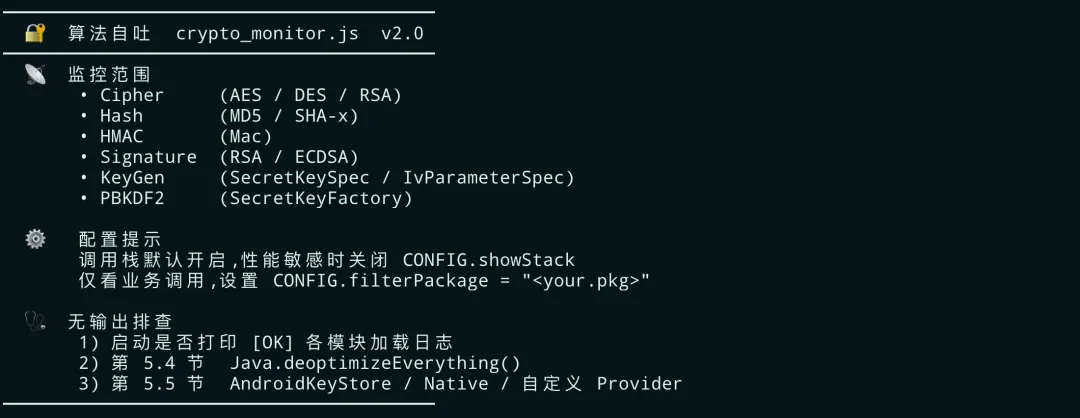 crypto_monitor Banner截图
四、输出格式解读
4.1 Cipher 输出
真机运行时,事件头是带背景色的彩条标签:Cipher 青、Hash 深蓝、HMAC 品红、Signature 金、KeyGen / KeyDerive 绿。下面三张截图都是 QQ 音乐启动后真实抓到的事件,与脚本结构一一对照。
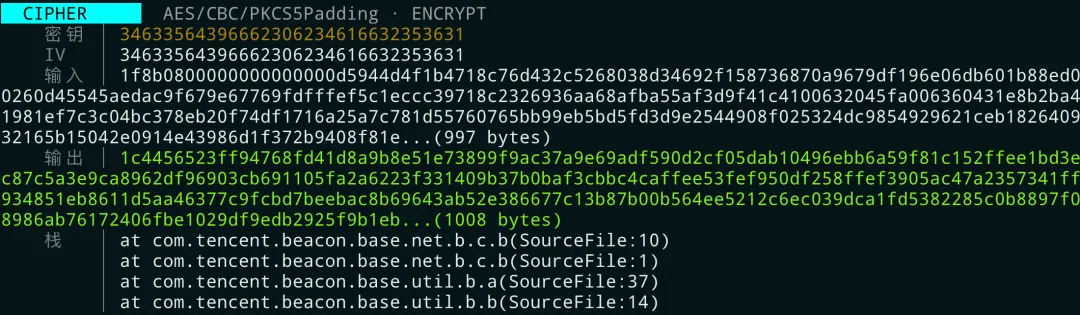 Cipher 事件真机截图
如何解读:
- 算法:
AES/CBC/PKCS5Padding · ENCRYPT —— AES、CBC 模式、PKCS5 填充、加密方向 - 密钥:
34633364643966623062346163335631(32 hex = 16 字节 = AES-128)
- 把这 16 字节当 ASCII 解码 =
"4c3dd9fb0b4a3561" —— 本身就是个 16 字符的 hex 字符串(类似 MD5 截断结果直接 .getBytes() 当 AES key 用)。表面 AES-128,实际熵只有 8 字节
- IV:与密钥完全相同的字节。CBC 模式的 IV 应该每次随机生成,IV ≡ Key 是经典反模式:相同明文永远加密成相同密文,且暴露了 key recovery 攻击面
- 输入:起始字节
1f 8b 是 GZIP 魔数 —— 业务先 gzip 压缩 JSON,再走 AES。末尾 ...(997 bytes) 是 smartFormat 截断标记,告诉你完整长度,屏上只展示前 maxDataLength=256 字节 - 输出:
...(496 bytes) 表明密文总长 496 字节(16 字节倍数,CBC 强制对齐) - 调用栈:
com.tencent.beacon.base.net.b.c.b → util.b.b —— 这是腾讯灯塔 Beacon SDK 的网络上报路径,QQ 音乐用它进行用户行为埋点。
4.2 Hash 多段输入(SHA-256)
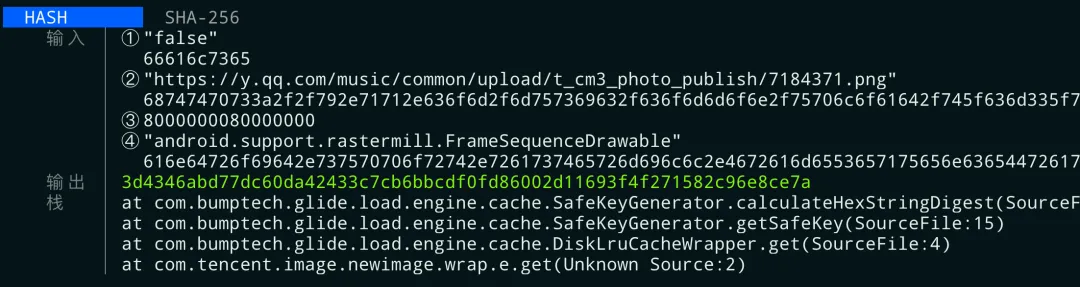 Hash 多段输入真机截图
如何解读:
- 算法:SHA-256
- 输入分 ①~④ 四段 —— 每个环号是脚本帮你区分的"第几次
update()":
- ①
"false" —— 某个布尔标志 - ②
"https://y.qq.com/music/common/upload/t_cm3_photo_publish/7184371.png" —— 图片资源 URL - ③
8000000080000000 —— 8 字节占位(两个 0x80000000,常见的"未指定的宽高") - ④
"android.support.rastermill.FrameSequenceDrawable" —— 解码器类全限定名
- 输出:32 字节(256 位)摘要,用作磁盘缓存项的 key
- 调用栈:
com.bumptech.glide.load.engine.cache.SafeKeyGenerator.calculateHexStringDigest → getSafeKey → DiskLruCacheWrapper.get —— Glide 图片库生成磁盘缓存键的标准路径。
4.3 KeyGen 双事件(SecretKeySpec + IvParameterSpec)
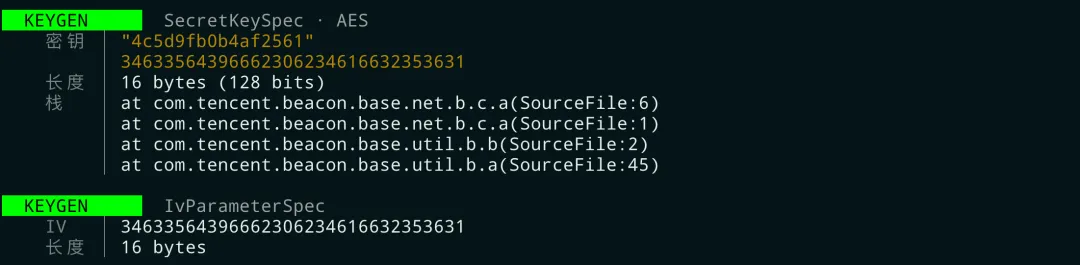 KeyGen 双事件真机截图
这是两条独立事件紧挨着出现,因为业务代码连续构造了 SecretKeySpec 和 IvParameterSpec。
上半:KEYGEN · SecretKeySpec · AES
- 密钥:
"4c5d9fb0b4af2561"(smartFormat 双行:文本 + hex) - 长度:16 bytes(128 bits)→ AES-128
- 栈:
com.tencent.beacon.base.net.b.c.a → util.b.b/a —— 同样是腾讯灯塔 Beacon SDK
下半:KEYGEN · IvParameterSpec
- IV:
34633564396662306234616632353631,ASCII 解码 = 4c5d9fb0b4af2561 - 与上面的密钥字节完全相同
五、性能控制:限速、过滤、按需启用
5.1 限速
某些 App 在启动时会进行大量的哈希操作(类校验、签名验证等),可能在几秒内触发几百次 MessageDigest 调用。CONFIG.rateLimitPerSecond 控制每秒最多输出多少条日志。
触发后行为:令牌耗尽时 canLog() 返回 false,整个事件(含 header / 字段 / 栈)全部丢弃,不会出现半条事件的情况。设为 0 表示完全不限速。
5.2 包名过滤
设置 CONFIG.filterPackage = "com.example.app" 后,调用栈只显示包含该包名的帧。这样可以过滤掉 Android Framework 和第三方库的内部调用,只看 App 业务代码触发的加密操作。
触发后行为:只过调用栈这一字段——事件本身仍然完整打印(header、密钥、IV、输入、输出都在),仅栈帧被剪短。即使过滤后栈为空,事件其它字段也不受影响。
5.3 按需启用模块
如果你只关心对称加密(AES),可以关闭其他模块:
var CONFIG = {
    hookCipher: true,
    hookMessageDigest: false,  // 关闭
    hookMac: false,            // 关闭
    hookSignature: false,      // 关闭
    hookKeyGeneration: true,
    hookPBKDF2: false          // 关闭
};
触发后行为:开关为 false 时,对应模块的 Java.perform 整个块根本不执行——hook 完全不安装到目标进程。和限速(事件丢弃)不一样,关闭模块连开销都没有,可放心用于性能敏感场景。
5.4 与 deoptimizeEverything 配合
如果加载脚本后操作 App 没有任何输出,可能是 JIT 导致 Hook 失效(第 07 篇讲过)。在脚本开头加上:
Java.perform(function() {
    Java.deoptimizeEverything();
});
触发后行为:把 ART 已 JIT 编译的方法全部"反优化"回解释执行,Hook 命中率上升、但启动 1-3 秒会出现明显卡顿。仅在确实抓不到事件时再启用。
5.5 已知失效场景
「算法自吐」不是万能的。以下四种场景下脚本会看不到加密(或看到不完整)——提前知道边界,可以避免怀疑自己抄错代码。
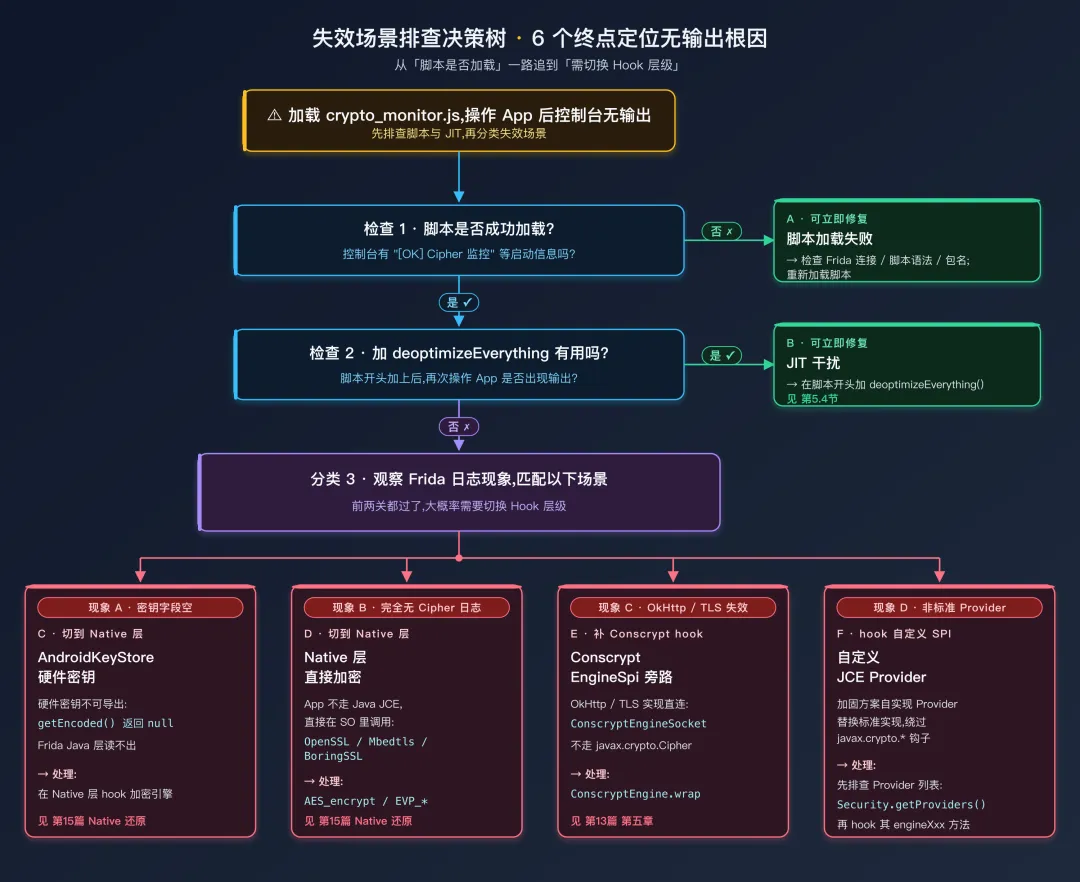 无输出排查决策树
| 场景 | 现象 | 处理 |
|---|
| AndroidKeyStore 硬件密钥 | 能看到 Cipher 调用,但 密钥 字段显示对象引用而非字节 | 硬件密钥不可导出(getEncoded() 返回 null),Frida Java 层读不出。需在 Native 层 Hook 加密引擎(见第15篇 Native 层加密还原) |
| Native 层直接加密 | App 不走 Java JCE,直接在 SO 里调 OpenSSL / Mbedtls / BoringSSL | 本篇脚本全无输出。切到 Native 层 Hook——AES_encrypt、EVP_CipherUpdate、SHA256_Update(见第15篇 Native 层加密还原) |
| Conscrypt EngineSpi 旁路 | 某些 OkHttp/TLS 实现直连 ConscryptEngineSocket,不走 javax.crypto.Cipher | 见第13篇 第五章 Provider 路径;补 hook ConscryptEngine.wrap/unwrap |
| 自定义 JCE Provider | 加固方案自实现 Provider 替换标准实现 | 用 Security.getProviders() 观察是否有非标准 Provider;hook 其 engineXxx 系列方法 |
自检套路——加载脚本后正常操作 App 但完全无 Cipher / Hash 输出,先排除两件事:
- Hook 是否成功:看是否打印
[OK] Cipher 监控 等启动信息 - JIT 是否吃掉了 Hook:试加
Java.deoptimizeEverything()(见 第5.4节)
两件都做了仍无输出,大概率是上表中的某种边界——此时该转 Native 层 Hook(关键词 AES_encrypt / EVP_CipherUpdate / SHA256_Update / MD5_Update),而不是反复改本篇脚本。后续 Native 加密还原专题会展开。
六、与 Objection 的对比
Objection 是 Frida 的一个自动化封装工具,它也有加密监控功能:
# Objection 的加密监控命令
objection -g com.example.app explore
> android hooking watch class javax.crypto.Cipher
> android hooking watch class javax.crypto.Mac
| crypto_monitor.js(本篇) | Objection |
|---|
| Cipher 实例关联 | 有(getInstance/init/doFinal 关联输出) | 无(每个方法独立输出) |
| 智能数据显示 | smartFormat(自动判断文本/二进制) | 原始 toString |
| 密钥提取 | 自动 cast 为 SecretKeySpec 提取字节 | 只显示对象引用 |
| IV 提取 | 自动 cast 为 IvParameterSpec 提取 | 不提取 |
| PBKDF2 监控 | 有 | 无 |
| 调用栈过滤 | 可按包名过滤 | 无过滤 |
| 性能控制 | 限速 + 模块开关 | 无 |
| 定制性 | 完全可定制 | 有限 |
上表基于 Objection v1.11 之前的实测印象;新版本的 watch 语法及输出行为可能变化,使用前请对照 objection GitHub 文档。
选型口诀:Objection 验证调用,crypto_monitor 还原方案。
总结
「算法自吐」是安卓逆向中效率最高的加密分析手段。核心思路是 Hook 标准加密 API 的「咽喉要道」——不管 App 怎么混淆,最终都要调用 Cipher、MessageDigest、Mac 等系统类。
本篇的 crypto_monitor.js 复制即用,关键特性包括:
- Cipher 实例关联:通过 hashCode 将 getInstance / init / doFinal 三步操作关联到同一个上下文,输出完整的「算法 + 密钥 + IV + 输入 + 输出」
- 智能数据显示:
smartFormat 自动判断文本 / 二进制,同时展示可读文本和十六进制 - 密钥自动提取:通过
Java.cast 将 Key 接口转为 SecretKeySpec,提取密钥字节 - 多段输入区分:MessageDigest / Mac 的多次
update() 用 ①②③ 环号标记,避免误读 - 原子事件输出:每个事件用
buf 累积、一次 console.log 吐出,多线程并发也不会字段错位 - 彩色彩条事件头:256 色背景标签,主题再黑也能区分事件类型
- 调用栈追踪:指向 App 业务代码中调用加密的位置
- 性能控制:限速、模块开关、包名过滤
实战工作流:加载脚本 → 操作 App → 读取自吐参数(算法 / 密钥 / IV / 输入 / 输出 / 栈)。从这些参数到 Python 离线复现只差一步——把抓到的字节抄进 pycryptodome,对照真机结果验证即可。
📦 获取本篇脚本
crypto_monitor.js 完整版(700+ 行,6 模块单文件,复制即用)+ 配套 README 使用说明已打包:
- 关注本公众号
- 私信回复关键词「脚本」
回复内含本系列与其它系列(Unidbg / SO 逆向 / ARM 汇编 ……)的脚本汇总,长期维护更新。
 10个月宝宝每天需要喝多少奶粉?

